1. Uvod
The PGST Wireless Home Security System is a comprehensive DIY alarm solution designed to provide peace of mind for your apartment, villa, or any property. This system integrates 4G/WiFi connectivity, a 2MP HD security camera, and various sensors for robust protection. With phone app control and compatibility with Alexa/Google, you can stay connected and monitor your home from anywhere, without subscription fees.
Key features include customizable and expandable protection, a one-click SOS function for emergencies, and easy installation. The system is designed to be user-friendly, allowing both the elderly and children to quickly understand its operation.
2. Sadržaj paketa
Your PGST A107F Security System package includes the following components:
- 1 x PGST A107F Alarm Host Panel with 4.3-inch TFT colorful display screen
- 1 x 2MP HD Security Camera (T53W Camera)
- Multiple Door/Window Sensors (Magnetic Contact Sensors)
- Multiple PIR Motion Detectors
- Remote Controls (Key Fobs)
- RFID Tags
- Power Adapter for Alarm Host
- Mounting Hardware (Screws, Wall Plugs)
- Korisnički priručnik (ovaj dokument)
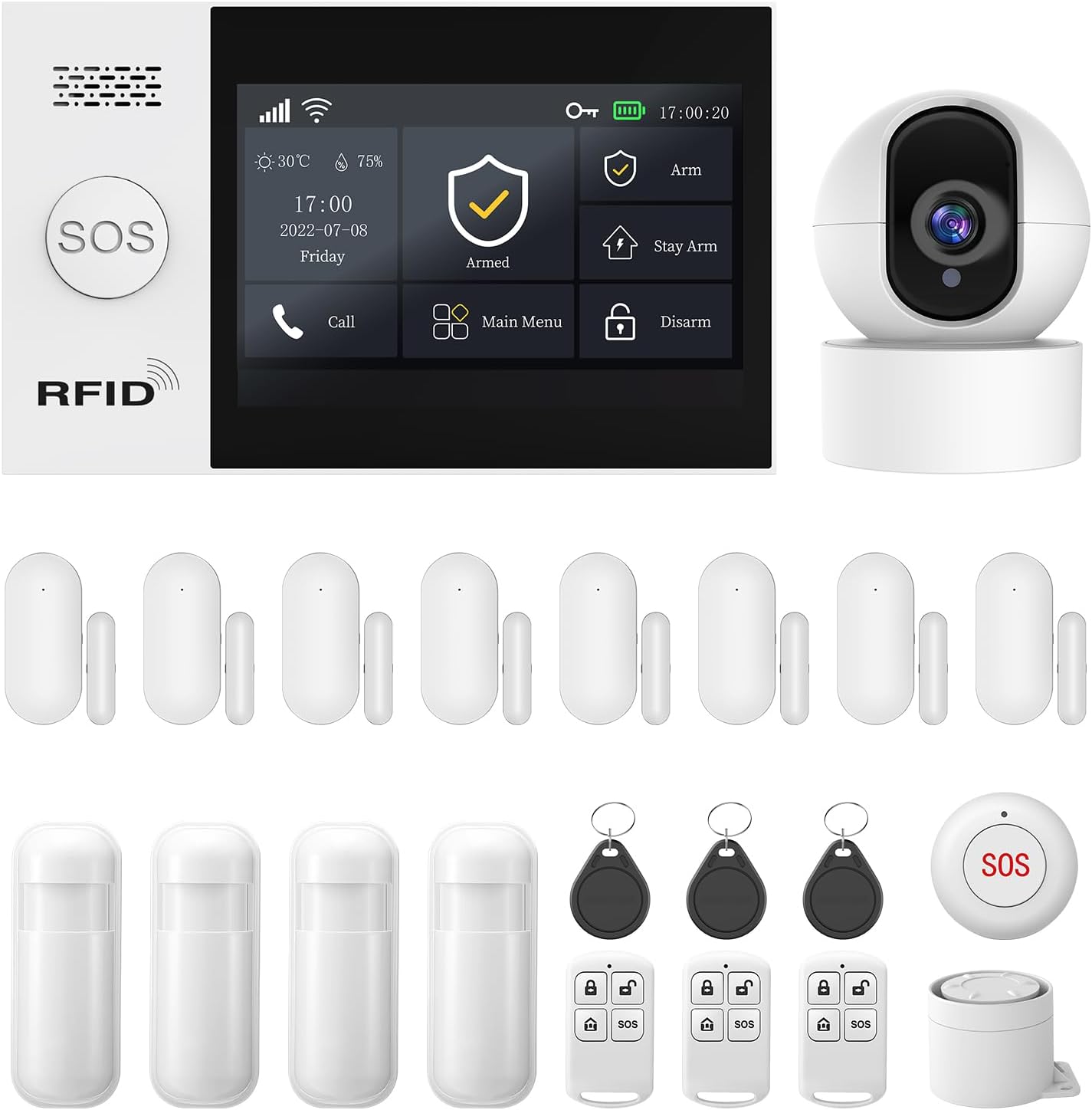
Slika 2.1: Gotovoview of the PGST Wireless Home Security System kit, including the main panel, camera, door/window sensors, motion sensors, key fobs, and SOS button.
3. Postavljanje i instalacija
3.1. Main Alarm Host Panel Installation
The main alarm host panel features a 4.3-inch TFT colorful display screen for easy operation. It can be placed on a flat surface using its stand or mounted on a wall.

Figure 3.1: The 4.3-inch TFT colorful display screen of the alarm host panel, showing its user-friendly interface.

Figure 3.2: The system can link with various smart home products, enhancing overall home intelligence.
For wall mounting, use the provided screws and wall plugs. Ensure the panel is securely attached at a convenient height for access and visibility. The panel also includes an anti-demolition alarm function; if removed from its mounting, it will trigger an alarm and send notifications.

Figure 3.3: The anti-demolition feature ensures the system alerts you if the main panel is tampered with or removed from its installed location.
3.2. Instalacija senzora
Install door/window sensors on frames where the two parts can align when the door/window is closed. Motion sensors should be placed in corners or areas with a clear line of sight to detect movement within their 110° detection range.

Slika 3.4: Pramples of door/window sensors and PIR motion detectors included in the kit.

Figure 3.5: The door magnetic sensor uses advanced magnetic field technology to accurately detect the opening and closing of doors and windows.

Figure 3.6: The PIR Motion Detector is engineered with state-of-the-art infrared technology, precisely detecting intruder movement within its wide-angle detection range.
3.3. Podešavanje kamere
The included T53W Camera provides 2MP HD video. Place it in an area that offers a good view of the space you wish to monitor.

Figure 3.7: The camera provides crystal clear 1080P HD images with a 120° viewing angle, supporting cloud storage.
3.4. App Control and Network Configuration
The system is controlled via the Smart Life or Tuya App. Download the app from your smartphone's app store. Follow the in-app instructions to add your devices.
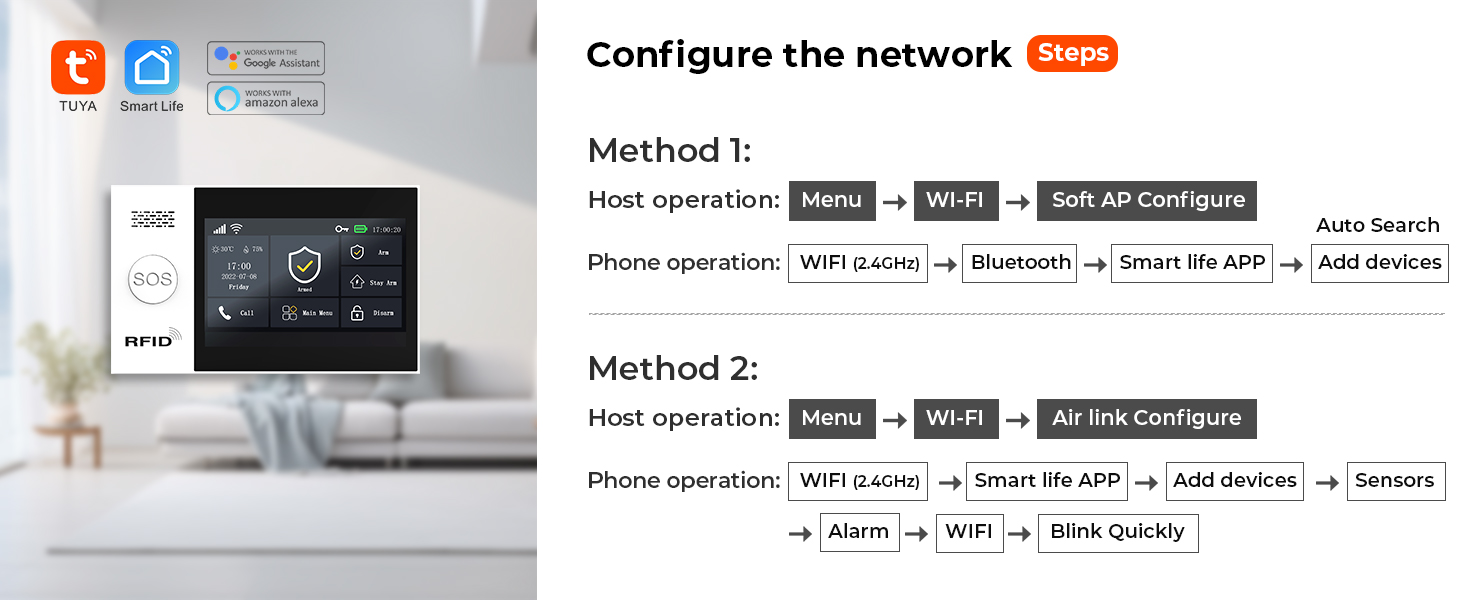
Figure 3.8: Network configuration steps for connecting the alarm host to your Wi-Fi network using either Soft AP Configure or Airlink Configure methods.
Method 1 (Soft AP Configure):
- On the Host: Go to Menu -> Wi-Fi -> Soft AP Configure.
- On your Phone: Enable Wi-Fi (2.4GHz) and Bluetooth. Open Smart Life APP, then Add devices.
- On the Host: Go to Menu -> Wi-Fi -> Airlink Configure.
- On your Phone: Enable Wi-Fi (2.4GHz). Open Smart Life APP, then Add devices -> Sensors -> Alarm -> Wi-Fi -> Blink Quickly.
Ensure your Wi-Fi network is 2.4GHz for successful pairing.
Video 3.1: This video demonstrates the setup process for the PGST107 Home Security Alarm System, including panel operation, sensor integration, and app connectivity.
4. Uputstvo za upotrebu
4.1. Naoružavanje i razoružavanje
The system can be armed or disarmed via the main panel, remote controls, or the Smart Life/Tuya App.
- ruka: Activates all sensors. Any triggered sensor will sound the alarm and send notifications.
- Stay Arm: Aktivira perimetralne senzore (npr. senzore za vrata/prozore) dok istovremeno omogućava slobodno kretanje unutra.
- razoružati: Deaktivira alarmni sistem.
You can also set up automatic arming and disarming schedules through the app to suit your daily routine.

Figure 4.1: Set the arm, disarm, stay arm, and SOS functions on the app. The system will automatically start these functions based on your schedule.
4.2. SOS funkcija
The system includes a one-click SOS function. When activated, the alarm system immediately sends a distress signal to your pre-set contacts (family members, neighbors, or local authorities). This ensures rapid response in emergencies.

Figure 4.2: The system supports 5 preset alarm calls, ensuring no alarm information is missed. If one line is busy, it dials the next reserved number.

Figure 4.3: The SOS button is user-friendly, allowing elderly individuals and children to easily send a reminder if unexpected events occur.
4.3. App Alerts and Voice Intercom
Receive instant push notifications and phone calls directly to your smartphone whenever motion is detected or sensors are triggered. The integrated HD camera allows you to view live situations.

Figure 4.4: When someone attempts to enter your house and a door sensor or PIR detector is activated, you will receive phone messages and calls, in addition to app push alerts.
The system also supports two-way voice intercom through the app, allowing you to communicate through the camera. This feature can be used to deter intruders or communicate with family members.
4.4. Voice Control (Alexa/Google)
The PGST security system is compatible with Amazon Alexa and Google Assistant. You can arm or disarm your system using simple voice commands.

Figure 4.5: The system supports voice control via Alexa and Google Assistant, making it convenient to arm or disarm your home.
5. Održavanje
- Provjera baterije: Regularly check the battery status of all wireless sensors via the app or directly on the devices. Replace batteries as needed to ensure continuous operation.
- čišćenje: Use a soft, dry cloth to clean the main panel, camera, and sensors. Avoid using abrasive cleaners or solvents.
- Ažuriranja firmvera: Periodically check the Smart Life/Tuya App for any available firmware updates for your system components. Updates can improve performance and add new features.
- Položaj senzora: Ensure sensors remain securely attached and their detection paths are clear of obstructions.
6. Otkrivanje problema
| Problem | Mogući uzrok | Rješenje |
|---|---|---|
| System not connecting to Wi-Fi | Netačna lozinka za Wi-Fi; korištena je mreža od 5 GHz; previše udaljeno od rutera. | Ensure correct 2.4GHz Wi-Fi network and password. Move closer to router or use a Wi-Fi extender. Re-attempt network configuration as per Section 3.4. |
| Sensors not triggering alarm | Low battery; improper installation/alignment; sensor out of range. | Check sensor batteries. Re-align magnetic contacts for door/window sensors. Ensure motion sensor has a clear view. Re-pair sensor with the main panel if necessary. |
| Lažni alarmi | Motion sensor triggered by pets or drafts; sensor malfunction. | Adjust motion sensor sensitivity or reposition to avoid false triggers. Check for loose wiring or damage to sensors. |
| Camera not showing live feed | Network connectivity issues; camera power issue; app glitch. | Check camera's power supply and Wi-Fi connection. Restart the camera and the app. Ensure sufficient network bandwidth. |
| SOS button not syncing/working | Pairing issue; low battery. | Ensure the SOS button is properly paired with the main panel. Check and replace its battery. Verify pre-set contacts in the app. |
7. Specifikacije
- Brand: PGST
- Broj modela: PGST A107F
- Stil: 21 PIECE KITS+T53W CAMERA
- Izvor napajanja: Corded Electric
- Tehnologija povezivanja: Wireless (4G/WiFi)
- Kompatibilni uređaji: Smartphone, Tablet (via Smart Life/Tuya App)
- Dimenzije artikla (D x Š x V): 8 x 6 x 4 inča
- Težina artikla: 3.03 funte
- Vrsta instalacije: Screw-In
- Metoda kontrole: App
- Sastav baterije baterije: Alkaline (for sensors/remotes)
- Tehnologija senzora: Motion Sensor, Magnetic Contact Sensor
- Rezolucija kamere: 2MP HD (1080P)
- UPC: 735083581152
8. Garancija i podrška
The PGST A107F Security System comes with a 1-godišnja garancija od datuma kupovine. Ova garancija pokriva proizvodne nedostatke i kvarove pri normalnoj upotrebi.
For any questions, technical assistance, or warranty claims, please feel free to contact PGST customer support. Refer to the contact information provided on the product packaging or the official PGST website.


