1. Uvod
Hvala na kupoviniasing the UPERFECT 15.6-inch 4K Portable Monitor. This device is designed to enhance your productivity and entertainment experience with its stunning 4K UHD resolution, vibrant color reproduction, and versatile connectivity. This manual provides essential information for proper setup, operation, and maintenance to ensure optimal performance and longevity of your monitor.

Figure 1: UPERFECT 15.6-inch 4K Portable Monitor
2. Sadržaj paketa
Molimo Vas da provjerite paket za sljedeće stavke:
- SVRŠENI 15.6-inčni 4K prijenosni monitor
- Magnetic Protective Cover (doubles as a stand)
- USB Type-C to Type-C Cable (x2)
- HDMI to Mini HDMI Cable (x1)
- USB Type-A Power Adapter (PSE certified) (x1)
- Korisnički priručnik (ovaj dokument)
Slika 2: Priložena dodatna oprema
3. Proizvod je gotovview
Familiarize yourself with the monitor's components and ports.
3.1. Komponente monitora
- Displej: 15.6-inch 4K UHD (3840x2160) IPS non-glare screen.
- Magnetni poklopac: Protects the screen and functions as a multi-angle stand.
- Ugrađeni zvučnici: Two 8Ω 1W speakers for audio output.
- Kontrolna dugmad: Power, Menu, Up, Down, Back buttons for OSD navigation.
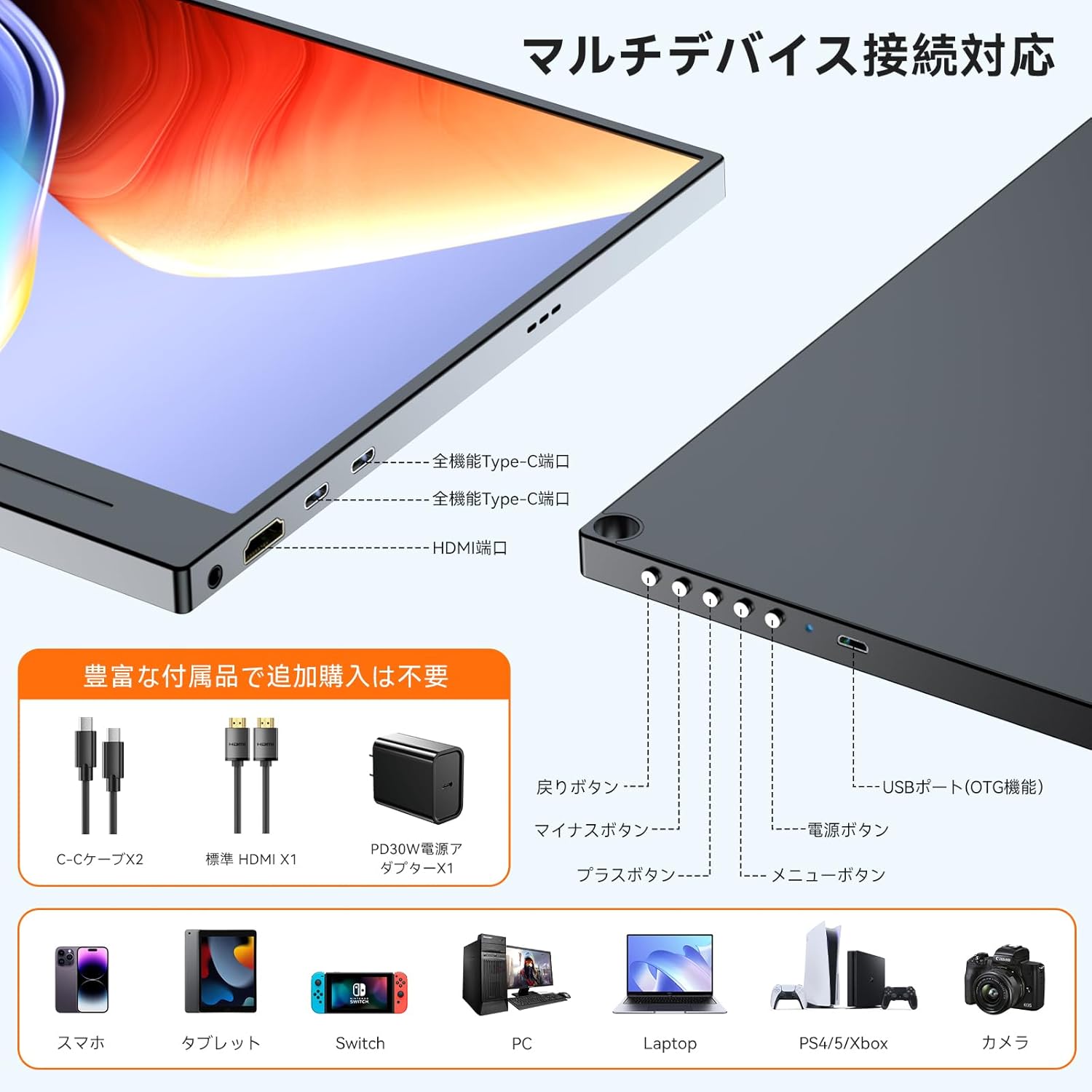
3.2. Portovi i kontrole

Figure 3: Ports and Controls Layout
- Full-function USB-C Ports (x2): For video signal, data transfer, and power delivery.
- Mini HDMI Port (x1): Za ulaz video signala.
- USB-A Port (OTG function) (x1): For connecting peripherals like a keyboard or mouse.
- 3.5 mm audio priključak (x1): Za spajanje slušalica ili eksternih zvučnika.
- Dugme za napajanje: Uključuje/isključuje monitor.
- Dugme menija: Pristupa meniju na ekranu (OSD).
- Navigacijski gumbi (+/-): Used to navigate and adjust settings within the OSD menu.
- Dugme za povratak: Returns to the previous OSD menu level.
4. Podešavanje
Follow these steps to set up your UPERFECT portable monitor.
4.1. Spajanje na izvor napajanja
The monitor can be powered via a USB-C connection from a compatible device or an external power adapter.
- Via USB-C (Single Cable Solution): If your device (e.g., laptop, smartphone) has a full-function USB-C port (supporting DisplayPort Alternate Mode and Power Delivery), connect one end of the provided USB-C to USB-C cable to your device and the other end to one of the monitor's full-function USB-C ports. This single cable can provide both video signal and power. Note: If your device's USB-C port does not support sufficient power delivery, or if it's not Thunderbolt 3/4 compatible, you may need to connect an external power source.
- Via External Power Adapter: Connect the provided USB Type-A power adapter to a power outlet and then to one of the monitor's USB-C ports using a USB-C cable. This ensures stable power delivery, especially when using HDMI for video input or connecting power-intensive devices.
4.2. Povezivanje s uređajima
The monitor supports various devices through USB-C and HDMI connections.
- For Laptops/PCs (USB-C): Connect a USB-C to USB-C cable from your laptop's full-function USB-C port to the monitor. Ensure your laptop's USB-C port supports DisplayPort Alternate Mode.
- For Laptops/PCs (HDMI): Connect the provided HDMI to Mini HDMI cable from your laptop's HDMI port to the monitor's Mini HDMI port. You will also need to connect the monitor to a power source via USB-C.
- Za pametne telefone: Connect a USB-C to USB-C cable from your smartphone's full-function USB-C port to the monitor. Ensure your smartphone supports video output via USB-C (DisplayPort Alternate Mode).
- For Gaming Consoles (Nintendo Switch, PS4/PS5, Xbox): Connect the provided HDMI to Mini HDMI cable from your console's HDMI output to the monitor's Mini HDMI port. The monitor must also be powered via its USB-C port using the external power adapter.
- Za kamere: Connect your camera via HDMI to Mini HDMI. Ensure the monitor is powered externally.

Slika 4: Povezivanje više uređaja
4.3. Using the Magnetic Protective Cover
The included magnetic cover not only protects your monitor but also serves as a versatile stand. Fold the cover into a triangular shape to prop up the monitor at various viewing angles.
5. Uputstvo za upotrebu
Learn how to operate your monitor and adjust its settings.
5.1. Uključivanje/isključivanje
- Uključeno: Pritisnite dugme za napajanje koje se nalazi sa strane monitora.
- Iskljuciti: Pritisnite i držite dugme za napajanje nekoliko sekundi dok se ekran ne isključi.
5.2. On-Screen Display (OSD) meni
OSD meni vam omogućava da prilagodite različite postavke ekrana.
- Pristupni meni: Pritisnite dugme Meni da otvorite OSD meni.
- Navigacija: Use the '+' and '-' buttons to move through menu options.
- Odaberi/Potvrdi: Ponovo pritisnite dugme Meni da biste odabrali opciju ili potvrdili postavku.
- Izlaz: Press the Back button to go back or exit the OSD menu.
5.3. Key Settings and Features
- Svjetlina/kontrast: Adjust these settings for optimal visibility in different lighting conditions. The monitor features 300 nits brightness and a 1300:1 contrast ratio.
- Postavke boja: Fine-tune color temperature, hue, and saturation. The monitor offers 100% sRGB color gamut for accurate color reproduction.
- HDR način rada: Enable High Dynamic Range for enhanced visual depth and contrast in compatible content.
- Smanjenje plave svjetlosti: Activate this feature to reduce eye strain during prolonged use.
- Izvor ulaza: Manually select between USB-C and HDMI input if auto-detection is not desired.
- Omjer širine i visine: Adjust the display aspect ratio (e.g., 16:9).
- FreeSync: For compatible gaming setups, enable FreeSync to reduce screen tearing and stuttering.

Figure 5: 4K Resolution Detail

Figure 6: High Contrast Ratio

Figure 7: 100% sRGB Color Gamut

Figure 8: 3ms Response Time and FreeSync
5.4. Načini prikaza
Depending on your connected device, you can configure the display mode:
- Prošireni način rada: Proširuje vašu radnu površinu preko oba ekrana, pružajući više radnog prostora.
- Duplirani način rada: Zrcali vaš primarni ekran, prikazujući isti sadržaj na oba ekrana.
- Portretni/Pejzažni način rada: The monitor supports both horizontal and vertical orientations. Settings for these modes are typically adjusted on the connected PC or device.

Figure 9: Portrait Mode Usage
6. Održavanje
Pravilna njega će produžiti vijek trajanja vašeg monitora.
- Čišćenje ekrana: Nježno obrišite ekran mekom krpom koja ne ostavlja dlačice. Za tvrdokorne mrlje, lagano obrišiteampOperite krpu vodom ili sredstvom za čišćenje ekrana. Izbjegavajte jake hemikalije ili abrazivne materijale.
- Čišćenje C-aasing: Koristite meku, suhu krpu za čišćenje površine monitoraasing.
- Skladištenje: When not in use, store the monitor in its protective magnetic cover in a cool, dry place away from direct sunlight and extreme temperatures.
- Rukovanje: Izbjegavajte ispuštanje ili izlaganje monitora jakim udarcima.
7. Otkrivanje problema
Ako naiđete na probleme, pogledajte sljedeće uobičajene probleme i rješenja.
| Problem | Mogući uzrok | Rješenje |
|---|---|---|
| Nema prikaza/Nema signala |
|
|
| Screen flickering/Unstable display |
|
|
| Nema zvuka iz zvučnika/slušalica |
|
|
| Cannot connect keyboard/mouse via OTG |
|
|
8. Specifikacije
Detailed technical specifications for the UPERFECT 15.6-inch 4K Portable Monitor.
| Feature | Specifikacija |
|---|---|
| Brand | SUPERFEKTNO |
| Broj modela | 15.6-inch 4K Portable Monitor |
| Veličina ekrana | 15.6 inča |
| Rezolucija | 3840 x 2160 (4K UHD) |
| Tip panela | IPS, Non-glare |
| Aspect Ratio | 16:9 |
| Gamut boja | 100% sRGB |
| Kontrast Ratio | 1300:1 |
| Osvetljenost | 300 nita |
| Vrijeme odgovora | 3ms |
| Refresh Rate | 60Hz |
| Luke | 2x Full-function USB-C, 1x Mini HDMI, 1x USB-A (OTG), 1x 3.5mm Audio Jack |
| VESA Mount | 75mm compatible |
| Dimenzije (Š x V x D) | 355 x 225 x 11 mm |
| Težina | 932 g |
| Potrošnja energije | 12.00 W |
9. Garancija i podrška
UPERFECT je posvećen pružanju visokokvalitetnih proizvoda i izvrsne korisničke usluge.
- Garantni period: Ovaj proizvod dolazi sa a 12-mjesečna garancija od datuma kupovine.
- PSE certifikacija: The included power adapter is PSE certified, ensuring compliance with electrical appliance safety standards.
- Korisnička podrška: UPERFECT offers unlimited customer support. If you have any questions regarding product usage, or encounter any issues such as damage during shipping or defective accessories, please contact our support team. We aim to resolve issues within 12 hours.
- Kontakt informacije: Please refer to the contact details provided on the UPERFECT official website or your purchase platform for support.

Figure 10: UPERFECT Customer Support


