1. Uvod
Thank you for choosing the ORICO 65W GaN Travel Power Strip. This device is designed to provide versatile and efficient power solutions for your electronic devices, especially during travel. It features multiple charging ports and a compact design for convenience. Please read this manual thoroughly before use to ensure proper operation and safety.

Figure 1: The ORICO 65W GaN Travel Power Strip plugged into a wall outlet, showcasing svojim kompaktnim dizajnom i integriranim upravljanjem kablovima.
2. Proizvod je gotovview
2.1 Sadržaj paketa
- ORICO 65W GaN Travel Power Strip (Model AP3-3A2U2C-65-US)
- Uputstvo za upotrebu
- Packing Box

Figure 2: Illustration of the package contents, including the power strip, manual, and packaging.
2.2 Karakteristike
- 7-in-1 Charging Ports: Includes 3 AC outlets, 2 USB-A ports, and 2 USB-C ports.
- 65W GaN Fast Charging: Utilizes GaN technology for efficient and rapid charging of compatible devices, including laptops, tablets, and smartphones.
- Kompaktan i prenosiv dizajn: Features a retractable cord and flat plug for easy storage and travel.
- Odobren za kruzere: Designed without a surge protector, making it suitable for use on cruise ships.
- Efikasno odvođenje toplote: Incorporates Graphene 360° Heat Dissipation, GaN Low-Temperature Fast Charging, and a Thermal Pad for safe operation.

Figure 3: Visual representation of the power strip providing power to 7 devices simultaneously, including AC, USB-A, and USB-C connections.

Slika 4: Interni view highlighting the Graphene 360° Heat Dissipation, GaN Low-Temperature Fast Charging, and Thermal Pad for enhanced safety and efficiency.
3. Podešavanje
3.1 Raspakivanje i pregled
- Pažljivo izvadite produžni kabel iz ambalaže.
- Inspect the device for any signs of damage. Do not use if damaged.
- Provjerite da li je prisutan sav navedeni sadržaj paketa.
3.2 Priključivanje na napajanje
- Unwrap the integrated 4FT extension cord from the power strip. The cord is designed to wrap neatly around the unit for storage.
- Plug the flat-head power plug into a standard 125V AC wall outlet. The flat plug design minimizes obstruction to adjacent outlets.
- The power strip is now ready for use.

Figure 5: The flat plug design allows for easy connection to wall outlets without blocking adjacent receptacles.
4. Uputstvo za upotrebu
4.1 Korištenje AC utičnica
- The power strip features 3 AC outlets (1 three-prong, 2 two-prong).
- Plug your AC-powered devices directly into these outlets.
- Ensure the total power consumption of connected devices does not exceed the maximum rating of the power strip (refer to Specifications).
4.2 Korištenje USB priključaka za punjenje
The power strip includes 2 USB-A ports and 2 USB-C ports for charging various devices.
- USB-C portovi: Support up to 65W GaN fast charging for compatible devices like MacBook Pro/Air, iPad Pro, and modern iPhones.
- USB-A portovi: Provide standard USB charging for smartphones, smartwatches, and other USB-powered accessories.
- For optimal fast charging, use high-quality USB cables compatible with your device's charging standards.
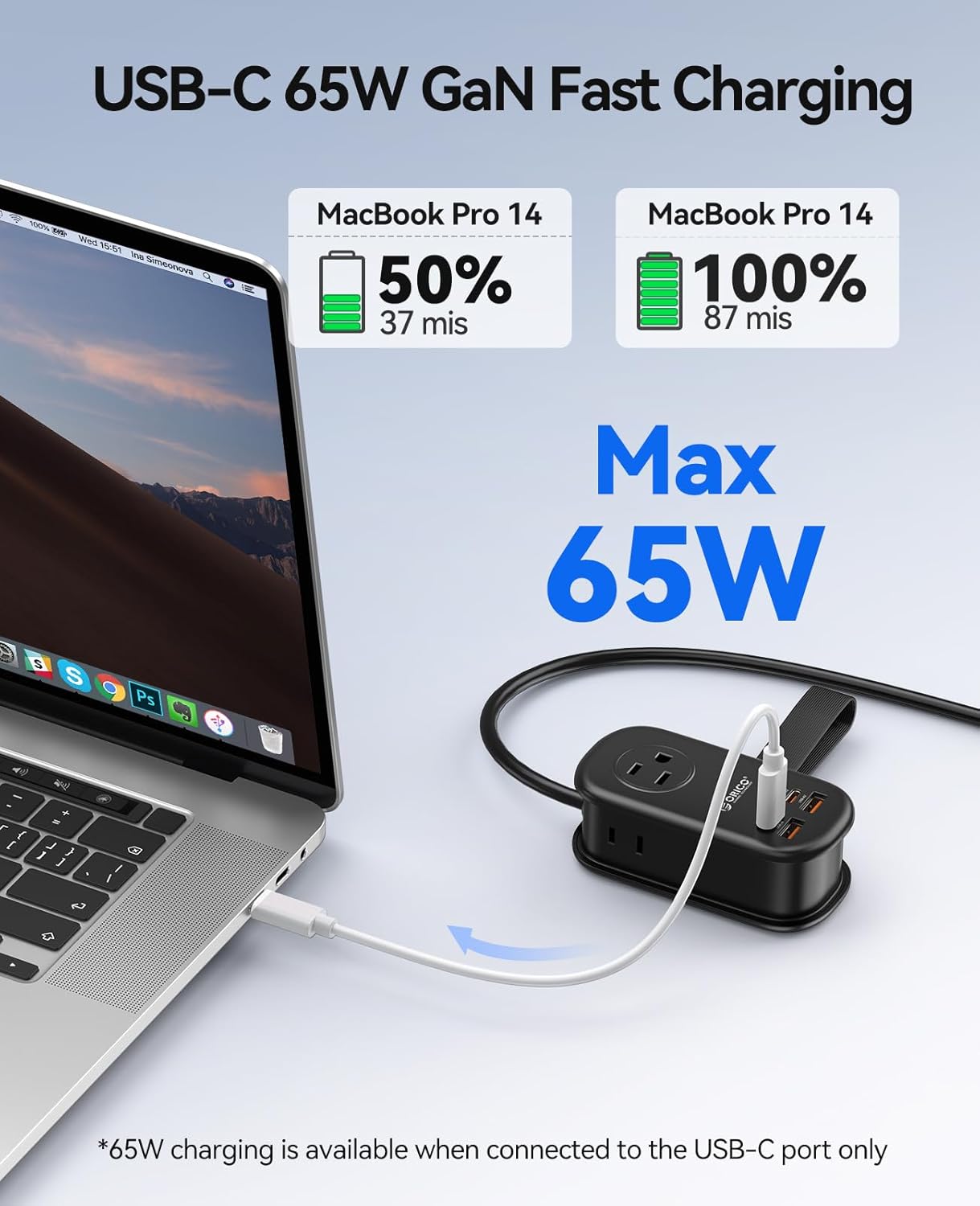
Figure 6: A MacBook Pro charging rapidly via the 65W USB-C port, showing battery percentage and charging time.

Figure 7: Charging power distribution across single, dual, triple, and quad USB port usage scenarios.
4.3 Punjenje više uređaja
The power strip is designed to charge multiple devices simultaneously. The intelligent GaN chip manages power distribution to optimize charging speeds for all connected devices.

Slika 8: Pramples of devices compatible with the USB-C, USB-A, and AC outlets, including MacBooks, iPhones, iPads, smartwatches, and small appliances.
Video 1: Overview of the ORICO PD 65W Travel Power Strip, demonstrating its compact size and multiple charging ports in various usage scenarios.
5. Održavanje
5.1 Čišćenje
- Before cleaning, ensure the power strip is unplugged from the wall outlet and all devices are disconnected.
- Obrišite vanjski dio mekom, suhom krpom. Ne koristite tekuća sredstva za čišćenje ili abrazivne materijale.
5.2 Skladištenje
- When not in use, wrap the extension cord neatly around the power strip and secure it with the integrated strap.
- Uređaj čuvajte na hladnom i suhom mjestu, dalje od direktne sunčeve svjetlosti i ekstremnih temperatura.
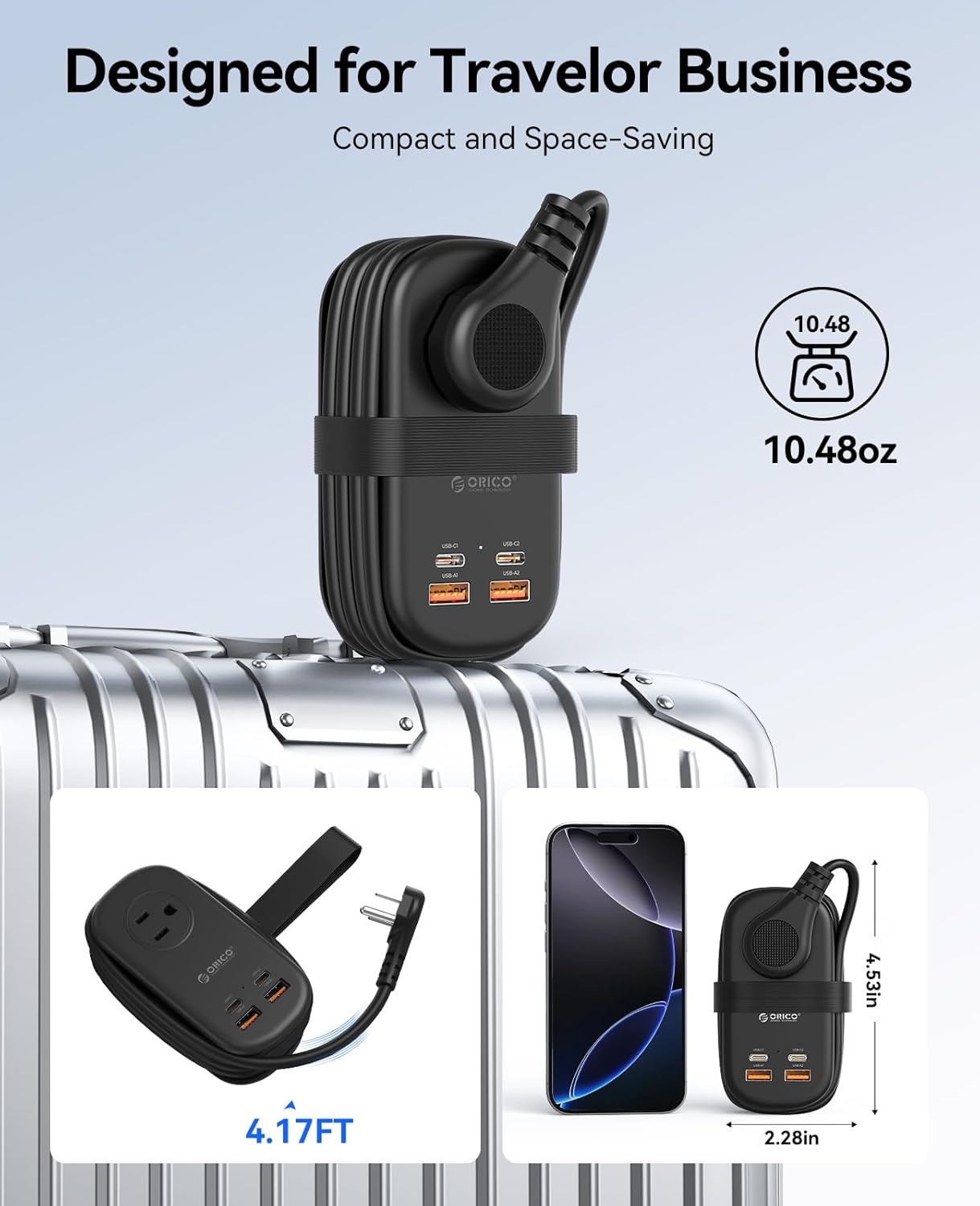
Figure 9: The power strip in its compact, travel-ready state, with the cord neatly wrapped and secured, ideal for luggage.
6. Otkrivanje problema
- Uređaj se ne puni:
- Ensure the power strip is securely plugged into a live wall outlet.
- Verify that the charging cable is properly connected to both the power strip and your device.
- Test with a different cable or device to rule out cable or device issues.
- Check if the device requires more power than the port can supply, especially for high-wattage devices on shared USB ports.
- Sporo punjenje:
- Ensure you are using a fast-charging compatible cable for your device.
- If multiple devices are connected, the total power output is shared, which may reduce individual port speeds.
- Confirm your device supports the fast charging protocols provided by the USB-C ports.
- Power strip feels warm:
- It is normal for the power strip to generate some heat during operation, especially during fast charging or when multiple devices are connected.
- The GaN technology and heat dissipation features are designed to manage this. If it becomes excessively hot or emits smoke/odor, unplug immediately and discontinue use.
7. Specifikacije
| Feature | Detalj |
|---|---|
| Broj modela | AP3-3A2U2C-65-US |
| Brand | ORICO |
| Totalne utičnice | 7 (3 AC, 2 USB-A, 2 USB-C) |
| AC Voltage | 125V |
| USB-C izlaz | Up to 65W (GaN Fast Charging) |
| Posebne karakteristike | Cruise Ship Approved, Lightweight, USB Slots, Flat Plug |
| Dužina kabla | 4FT (approx. 1.22 meters) |
| Dimenzije | 4.53" x 2.28" x 1.65" (približno 11.5 x 5.8 x 4.2 cm) |
| Težina artikla | 11.3 unci (približno 320 grama) |
8. Sigurnosne informacije
- Nemojte rastavljati niti modificirati uređaj.
- Keep away from water, moisture, and high temperatures.
- This device is not a surge protector.
- Do not overload the power strip beyond its rated capacity.
- Čuvati van domašaja djece.
- Use only in dry indoor locations.
9. Garancija i podrška
For warranty information and technical support, please refer to the official ORICO webweb-mjesto ili kontaktirajte prodavača. Sačuvajte račun za kupovinu u slučaju reklamacije.
Video 2: A detailed demonstration of the ORICO AP3 65W Power Strip, highlighting its features and ease of use.
Video 3: A concise video showcasing the 65W GaN Travel Power Strip's design and functionality.


