1. Uvod
The Sonim Zenith H100 is a compact and powerful 4G mobile Wi-Fi hotspot designed to provide reliable internet connectivity on the go. With impressive download and upload speeds, LTE Cat-13 capabilities, Wi-Fi 5 features, and a color screen, the H100 allows you to connect up to 32 devices simultaneously. This manual provides essential information for setting up, operating, maintaining, and troubleshooting your Sonim H100 hotspot.

Figure 1: Sonim Zenith H100 Mobile Wi-Fi Hotspot. The device features a clear display showing connection details and signal strength.
2. Šta se nalazi u kutiji
Prije nego što počnete, molimo vas da se uvjerite da su u vašem paketu sve sljedeće stavke:
- Snimak, H100 4G Mobile Hotspot
- USB-C kabl
- Baterija
- Punjač
- Vodič za brzi početak
3. Device Overview
Familiarize yourself with the physical components of your Sonim H100 hotspot.
3.1 Prednji View

Figure 2: Front of the H100, featuring the display screen.
The front of the device primarily features the color display, which provides real-time information about network status, battery level, and connected devices.
3.2 Strana View and Power Button
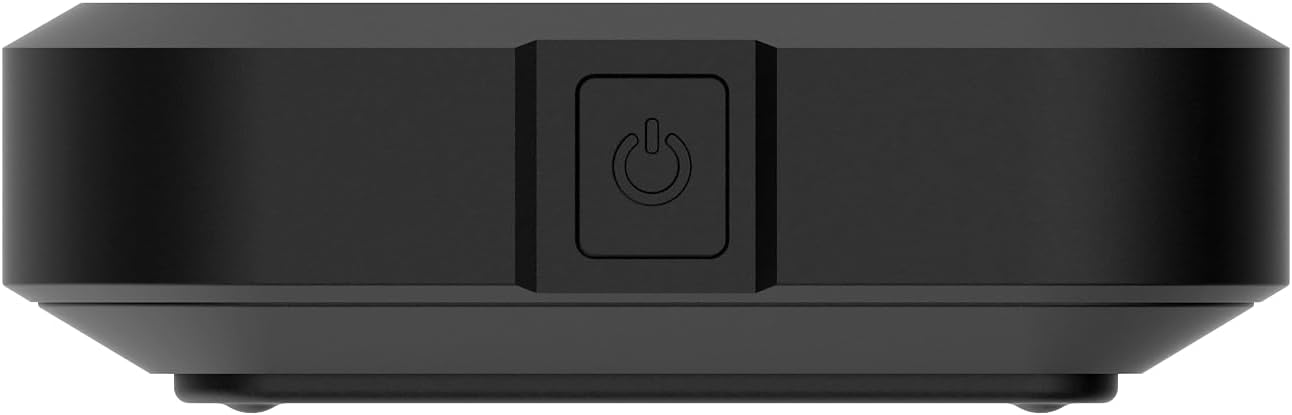
Slika 3: Bočna strana view of the H100, showing the power button.
The power button is located on the side of the device. Press and hold to power on or off. A short press can wake the screen or navigate menus.
3.3 Nazad View

Figure 4: Back of the H100.
The back of the device features a removable cover, under which the battery and SIM card slot are located.
4. Podešavanje
4.1 Punjenje uređaja
Before first use, fully charge your Sonim H100. Connect the provided USB-C cable to the device's USB-C port and the other end to the charger. Plug the charger into a power outlet. The screen will indicate charging status.

Figure 5: USB-C charging port on the Sonim H100.
4.2 Umetanje SIM kartice
- Uvjerite se da je uređaj isključen.
- Skinite stražnji poklopac uređaja.
- Pronađite utor za SIM karticu.
- Carefully insert your activated 4G LTE SIM card into the slot, ensuring correct orientation.
- Vratite zadnji poklopac.
4.3 Uključivanje/isključivanje
- Za uključivanje: Press and hold the power button (refer to Figure 3) until the Sonim logo appears on the screen.
- Za isključivanje: Press and hold the power button until the power-off options appear on the screen, then select "Power Off".
5. Uputstvo za upotrebu
5.1 Connecting Devices to the Hotspot
The Sonim H100 broadcasts a Wi-Fi network that other devices can connect to.
- Ensure the H100 is powered on and has an active cellular connection.
- Na svom uređaju (pametnom telefonu, laptopu, tabletu) otvorite postavke Wi-Fi mreže.
- Look for the Wi-Fi network name (SSID) displayed on the H100's screen.
- Select the H100's network and enter the Wi-Fi password (also displayed on the H100's screen).
- Vaš uređaj bi sada trebao biti povezan s internetom putem hotspota.

Figure 6: H100 screen displaying connection information.
5.2 Managing Connections (Primary and Guest)
The H100 supports both a primary and a guest Wi-Fi network. This allows you to provide internet access to guests without sharing your main network password or access to your primary connected devices.
- Primarna mreža: Your main Wi-Fi network, typically with full access and higher priority.
- Mreža gostiju: A separate Wi-Fi network with its own password, often with limited access or bandwidth, ideal for temporary users.
Navigate the H100's on-screen menu using the navigation button (often the power button or a dedicated navigation button) to view and manage settings for both networks.
5.3 Upotreba ekrana
The color display provides crucial information at a glance. Use the navigation button to cycle through different screens, which may include:
- Network status (4G LTE, signal strength)
- Nivo baterije
- Connected devices (Primary and Guest)
- Wi-Fi SSID and password
- Upotreba podataka
5.4 Mrežne postavke
Advanced network settings can typically be accessed via a web interface. Connect a device to the H100's Wi-Fi, then open a web browser and enter the IP address displayed on the H100's screen (e.g., 192.168.1.1). Log in using the default credentials (usually found in the Quick Start Guide or on a sticker inside the device) to configure settings such as:
- Changing Wi-Fi SSID and password
- Setting up security protocols
- Upravljanje povezanim uređajima
- Ažuriranja firmvera
6. Održavanje
6.1 Njega baterija
- Izbjegavajte izlaganje uređaja ekstremnim temperaturama.
- Do not fully discharge the battery regularly. Charge it before it drops below 20%.
- If storing the device for an extended period, charge the battery to about 50% and power off the device.
6.2 Čišćenje
Use a soft, dry, lint-free cloth to clean the device. Do not use liquid cleaners or aerosols directly on the device. Avoid getting moisture into any openings.
6.3 Ažuriranja softvera
Periodically check for software updates through the device's web interface. Updates can improve performance, add new features, and enhance security. Ensure the device is fully charged before performing any updates.
7. Otkrivanje problema
If you encounter issues with your Sonim H100, refer to the following common problems and solutions:
| Problem | Moguće rješenje |
|---|---|
| Nema internetske veze |
|
| Nije moguće povezivanje na Wi-Fi |
|
| Spora brzina interneta |
|
| Uređaj se ne uključuje |
|
8. Specifikacije
Key technical specifications for the Sonim Zenith H100 Mobile Wi-Fi Hotspot:
| Feature | Detalj |
|---|---|
| Brand | Sonim |
| Naziv modela | H100 |
| Broj modela | 04.F010.373100-000 |
| Tehnologija povezivanja | Wi-Fi, LTE |
| Standard bežične komunikacije | 802.11a/b/g/n/ac (Wi-Fi 5) |
| LTE kategorija | Cat-13 |
| Kapacitet baterije | 3400 mAh |
| Maksimalni broj povezanih uređaja | Do 32 |
| Boja | Crna |
| Težina artikla | 149 grama |
| Dimenzije (D x Š x V) | 15 x 20 x 15 centimetara |
| UPC | 096962278601 |
9. Garancija i podrška
9.1 Garancija proizvođača
The Sonim Zenith H100 comes with a 2-godišnja garancija proizvođača. Please retain your proof of purchase for warranty claims. The warranty covers defects in materials and workmanship under normal use. It does not cover damage caused by misuse, accidents, unauthorized modifications, or natural disasters.
9.2 Korisnička podrška
For technical assistance, warranty claims, or further inquiries, please contact Sonim customer support. Refer to the official Sonim website or the Quick Start Guide for the most up-to-date contact information.
Note: Information regarding spare parts availability and software updates guaranteed until dates is not available at this time.


