Uvod
Thank you for choosing the Nacon PCCH-380 Ergonomic Gaming Chair. This manual provides essential information for the safe and effective use of your new chair. Please read these instructions carefully before assembly and use, and retain them for future reference.
Sigurnosne informacije
UPOZORENJE:
- Do not use the chair for extended periods without taking adequate breaks.
- Always use the height adjustment function safely and follow the manufacturer's instructions to prevent injuries.
- Prije upotrebe provjerite jesu li sve komponente dobro pričvršćene.
- Ne stojte na stolici niti je koristite kao stepenicu.
- Držite djecu i kućne ljubimce dalje od stolice tokom sastavljanja.
Product Overview
The Nacon PCCH-380 is an ergonomic gaming chair designed for comfort and support during long sessions. It features 2D adjustable armrests, a lumbar cushion, and a reclinable backrest.
Ključne karakteristike:
- Ergonomic design for M-L users.
- 2D adjustable armrests.
- Adjustable lumbar cushion.
- Reclinable backrest up to 135°.
- Textile fabric in dark grey.
- 5-star base with smooth-rolling wheels.
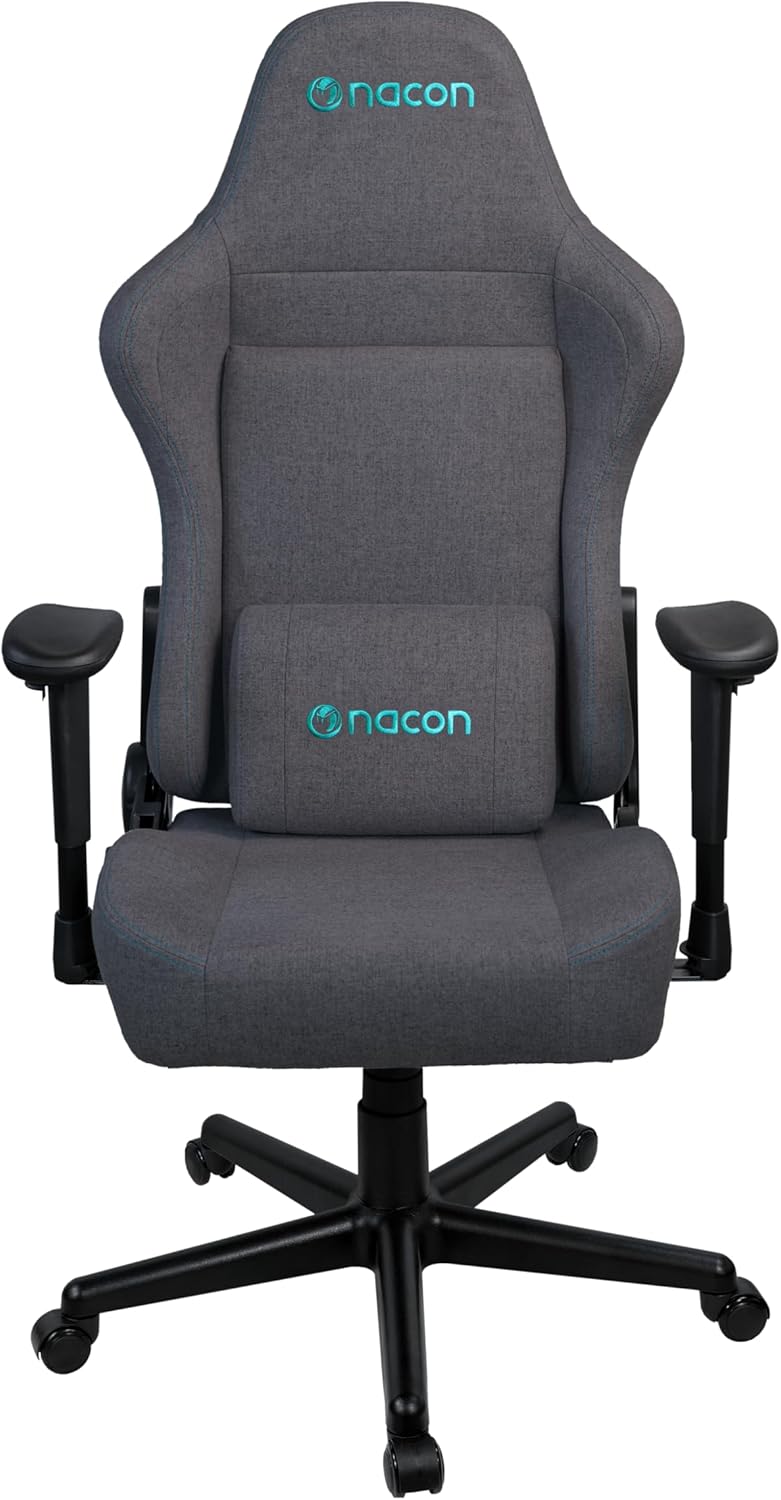
Slika 1: Prednja strana view of the Nacon PCCH-380 Ergonomic Gaming Chair in dark grey.

Slika 2: Natrag view of the Nacon PCCH-380 Ergonomic Gaming Chair, highlighting the backrest design.
Uputstva za sastavljanje
The Nacon PCCH-380 gaming chair requires assembly. Please follow the detailed instructions provided in the separate assembly guide included with your product packaging. Ensure all parts are present before beginning assembly.
Koraci opće skupštine:
- Raspakujte sve komponente i provjerite ih u odnosu na listu dijelova.
- Attach the wheels to the 5-star base.
- Umetnite cilindar za podizanje plina u sredinu baze.
- Attach the seat mechanism to the bottom of the seat.
- Secure the backrest to the seat assembly.
- Install the 2D armrests.
- Place the assembled chair onto the gas lift cylinder.
- Attach the lumbar cushion as desired.

Figure 3: Packaging box for the Nacon PCCH-380 Gaming Chair, indicating assembly is required.
Uputstvo za upotrebu
Your Nacon PCCH-380 gaming chair offers several adjustment options to customize your seating experience for maximum comfort and ergonomic support.
1. Podešavanje visine:
Da biste podesili visinu stolice, pronađite polugu na desnoj strani ispod sjedišta. Dok sjedite, povucite polugu prema gore da biste spustili stolicu. Da biste podigli stolicu, ustanite i povucite polugu prema gore. Otpustite polugu na željenoj visini.
2. Backrest Recline:
The backrest can be reclined up to 135 degrees. Locate the recline lever on the left side of the chair. Pull the lever up and lean back to your desired angle. Release the lever to lock the backrest in position. To return to an upright position, pull the lever and lean forward slightly.

Figure 4: The Nacon PCCH-380 Gaming Chair shown in a reclined position, demonstrating its flexibility.
3. Armrest Adjustment (2D):
The 2D armrests can be adjusted in two dimensions: height and rotation. Use the buttons or levers on the armrests to adjust them to your preferred height and angle for optimal arm and wrist support.
4. Lumbar Cushion:
The included lumbar cushion provides additional support for your lower back. Position it along the backrest to align with the natural curve of your spine for enhanced comfort. The cushion can be removed if not desired.

Slika 5: Krupni plan view of the adjustable lumbar cushion on the Nacon PCCH-380 Gaming Chair.
5. Swivel Function:
The chair features a 360-degree swivel function, allowing for easy movement and access to different areas of your workspace without needing to reposition the entire chair.
Održavanje i njega
Proper maintenance will ensure the longevity and appearance of your Nacon PCCH-380 gaming chair.
čišćenje:
- For general cleaning, wipe the textile fabric with a damp tkanina.
- For stubborn stains, use a mild fabric cleaner and follow the product's instructions. Test on an inconspicuous area first.
- Avoid using harsh chemicals or abrasive cleaners, as these can damage the fabric and components.
- Redovno usisavajte stolicu kako biste uklonili prašinu i ostatke.

Slika 6: Detaljno view of the dark grey textile fabric used on the Nacon PCCH-380 Gaming Chair.
Opšta njega:
- Povremeno provjeravajte sve vijke i šrafove kako biste bili sigurni da su čvrsto zategnuti. Po potrebi ih ponovo zategnite.
- Avoid exposing the chair to direct sunlight for prolonged periods to prevent fading.
- Do not place hot items directly on the chair's surface.
Rješavanje problema
If you encounter any issues with your Nacon PCCH-380 gaming chair, refer to the following common problems and solutions:
1. Chair does not adjust height:
- Ensure the height adjustment lever is fully engaged.
- Check if the gas lift cylinder is properly installed and not damaged.
2. Backrest does not recline or lock:
- Verify that the recline lever is functioning correctly and not obstructed.
- Inspect the recline mechanism for any visible damage or loose connections.
3. Wheels are not rolling smoothly:
- Check for any debris (hair, dust, etc.) caught in the wheels and clean them.
- Provjerite da li su kotači sigurno pričvršćeni za bazu.
Ako ova rješenja ne riješe problem, obratite se korisničkoj podršci.
Specifikacije
| Feature | Detalj |
|---|---|
| Broj modela | PCCH-380 |
| Brand | NACON |
| Boja | Tamno siva |
| Materijal | Textile Fabric |
| Dimenzije proizvoda (D x Š x V) | 58 x 57 x 121-131 cm |
| Težina | 18 kg |
| Maksimalna težina korisnika | 100 kg |
| Preporučena visina korisnika | Do 170 cm |
| Nasloni za ruke | 2D podesivo |
| Ugao nagiba | Do 135° |
| Lumbalna podrška | Adjustable Lumbar Cushion Included |
| Obavezna montaža | Da |
Garancija i podrška
For warranty information and customer support, please refer to the documentation provided with your purchase or contact your retailer. You can also visit the official NACON websajt za dalju pomoć.
NACON is committed to providing high-quality products and support. If you have any questions or require service, please do not hesitate to reach out.


