1. Uvod
Thank you for choosing the Natec Scarab 3 USB 3.1 Gen 1 USB-A + USB-C SD/Micro SD Card Reader. This device is designed to provide fast and reliable data transfer between your memory cards and various devices equipped with USB-A or USB-C ports. Please read this manual carefully before using the product to ensure proper operation and to maximize its lifespan.
2. Proizvod je gotovview
The Natec Scarab 3 is a versatile card reader featuring both USB-A and USB-C connectors, allowing compatibility with a wide range of devices. It supports various SD and Micro SD card formats.
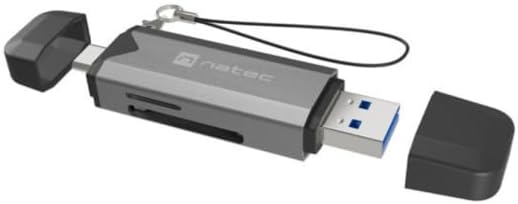
Slika 1: Natec Scarab 3 USB 3.1 Gen 1 USB-A + USB-C SD/Micro SD Card Reader. The image shows the card reader with its USB-A and USB-C connectors, and slots for SD and Micro SD cards. Both protective caps are removed, revealing the connectors.
Ključne karakteristike:
- Dvostruko povezivanje: USB-A and USB-C 3.1 Gen 1 interfaces.
- Brzi prijenos podataka: Up to 5000 Mbit/s (5 Gbps).
- Široka kompatibilnost kartica: Supports MicroSD (TransFlash), MicroSDHC, MicroSDXC, SDHC, and SDXC.
- Kompaktan dizajn: Prenosiv i lak za nošenje.
3. Podešavanje
- Raspakujte uređaj: Carefully remove the Natec Scarab 3 card reader from its packaging.
- Identifikujte konektore: The device has two main connectors: a standard USB-A plug and a reversible USB-C plug, each protected by a cap.
- Poveži se s host uređajem:
- For devices with a USB-A port (e.g., older laptops, desktop PCs), remove the cap from the USB-A end and insert it into an available USB-A port.
- For devices with a USB-C port (e.g., modern laptops, smartphones, tablets), remove the cap from the USB-C end and insert it into an available USB-C port.
- Instalacija drajvera: The Natec Scarab 3 is a plug-and-play device. No additional drivers are typically required for most operating systems (Windows, macOS, Linux, Android). Your system should automatically detect and install the necessary drivers upon first connection.
4. Uputstvo za upotrebu
- Umetnite memorijsku karticu:
- For SD cards (SDHC, SDXC): Locate the SD card slot on the side of the reader. Insert the SD card with the contacts facing down until it clicks into place.
- For Micro SD cards (MicroSD, MicroSDHC, MicroSDXC): Locate the Micro SD card slot, usually adjacent to the SD slot. Insert the Micro SD card with the contacts facing down until it clicks into place.
Napomena: Do not force the card. If it does not insert easily, check the orientation. Only one type of card (SD or Micro SD) can be inserted and read at a time.
- Pristup podacima: Once the card reader is connected to your computer or device and a memory card is inserted, it will appear as a removable drive in your file explorer (e.g., "This PC" on Windows, "Finder" on macOS).
- Prijenos podataka: Sada možete prevući i ispustiti files to and from the memory card, or use copy/paste functions, just like with any other storage device.
- Ejecting Memory Card: Before removing the memory card or disconnecting the card reader, always safely eject the drive from your operating system to prevent data corruption.
- Windows: Right-click on the drive icon in "This PC" and select "Eject".
- macOS: Drag the drive icon to the Trash, or click the Eject button next to the drive in Finder.
- Disconnecting the Reader: After safely ejecting, you can physically remove the memory card and then disconnect the Natec Scarab 3 from your host device. Replace the protective caps on the connectors when not in use.
5. Održavanje
- čišćenje: Za čišćenje vanjske strane čitača kartica koristite meku, suhu krpu koja ne ostavlja dlačice. Nemojte koristiti tekuća sredstva za čišćenje ili aerosole.
- Skladištenje: When not in use, store the card reader with its protective caps on in a cool, dry place, away from direct sunlight and extreme temperatures.
- Izbjegnite fizička oštećenja: Do not drop the device or expose it to excessive force. Avoid inserting foreign objects into the card slots or USB ports.
- Zaštita od vlage: Držite uređaj dalje od vode i drugih tečnosti.
6. Otkrivanje problema
- Problem: The card reader is not detected by the computer.
- Rješenje:
- Ensure the card reader is fully inserted into the USB-A or USB-C port.
- Pokušajte s drugim USB portom na svom računaru.
- Try connecting the card reader to a different computer to rule out a port issue.
- Ponovo pokrenite računar.
- Problem: The memory card is not recognized.
- Rješenje:
- Provjerite je li memorijska kartica u potpunosti i ispravno umetnuta u odgovarajući utor.
- Check if the memory card is damaged or corrupted by trying it in another device.
- Verify that the memory card format is supported by the reader (MicroSD, MicroSDHC, MicroSDXC, SDHC, SDXC).
- Ensure only one card is inserted at a time.
- Problem: Male brzine prijenosa podataka.
- Rješenje:
- Ensure you are using a USB 3.0/3.1 compatible port on your computer for optimal speeds. Connecting to a USB 2.0 port will result in lower speeds.
- Check the speed class of your memory card. Higher class cards offer faster read/write speeds.
- Izbjegavajte prebacivanje mnogo malih files simultaneously; large files transfer more efficiently.
7. Specifikacije
| Brand | Natec |
| Naziv modela | NCZ-2262 |
| Interface Type | USB 3.1 Gen 1 (USB-A, USB-C) |
| Brzina prijenosa podataka | Up to 5000 Mbit/s (5 Gbps) |
| Kompatibilne memorijske kartice | MicroSD (TransFlash), MicroSDHC, MicroSDXC, SDHC, SDXC |
| Dimenzije proizvoda (DxŠxV) | 74 mm x 20 mm x 11 mm (približno 2.91 x 0.79 x 0.43 inča) |
| Težina artikla | Approx. 1.1 pounds (Note: This weight seems unusually high for a card reader, likely a data entry error in source. Actual weight is typically much lower.) |
| Boja | Black, Dark Grey |
| Proizvođač | NATEC |
8. Garancija i podrška
The Natec Scarab 3 USB 3.1 Gen 1 USB-A + USB-C SD/Micro SD Card Reader comes with a 2-year official Natec brand warranty against factory defects, as stated in the product description. Some retailers may offer an extended trogodišnja garancija. Please refer to your purchase documentation for specific warranty terms applicable to your region and retailer.
For technical support or warranty claims, please contact your retailer or visit the official Natec webstranica za informacije o korisničkoj službi.


