1. Uvod
The DOOGEE Blade10 Pro is a rugged smartphone designed for durability and performance. Featuring an ultra-thin body, a large battery, and advanced camera capabilities, it is built to withstand challenging environments while providing a smooth user experience with Android 15.

2. Podešavanje
2.1 Sadržaj paketa
Provjerite da li se u paketu vašeg proizvoda nalaze svi artikli:
- 1 x Blade10 Pro Rugged Smartphone
- 1 x USB kabl tipa C
- 1 x punjač
- 1 x kutija za pakovanje
- 1 x priručnik
- 1 x Garantni list
Video 1: Unboxing the DOOGEE Blade 10 Ultra, showing the phone and accessories.
2.2 Izgled uređaja
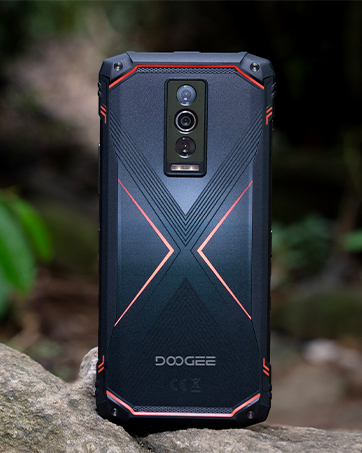
Familiarize yourself with the physical components of your Blade10 Pro smartphone:
- Prednja kamera: Nalazi se u gornjem središnjem dijelu ekrana.
- Prijemnik: Earpiece for calls.
- Dugmad za jačinu zvuka: On the left side for adjusting audio levels.
- Ključ za napajanje: On the right side for turning the device on/off and screen lock.
- Custom Key Function: A programmable button on the left side.
- Utor za SIM/TF karticu: On the left side for inserting SIM and memory cards.
- zadnje kamere: Multiple lenses located on the back.
- Rear Flashes: LED lights for illumination.
- mikrofon: Smješten na dnu.
- Port tipa C: Na dnu za punjenje i prijenos podataka.
- govornik: Smješten na dnu.
2.3 Instalacija SIM kartice i memorije
The Blade10 Pro supports dual Nano SIM cards and a TF (microSD) card for expandable storage up to 2TB. The triple card slot allows for flexible use of network and storage options.
- Pronađite utor za SIM/TF karticu na lijevoj strani uređaja.
- Gently open the protective cover of the slot.
- Insert your Nano SIM cards and/or TF card into the tray according to the diagram.
- Carefully reinsert the tray into the slot and ensure the protective cover is securely closed to maintain water and dust resistance.

Video 2: Demonstration of the DOOGEE Blade 10 series, including the SIM card slot and thin design.
2.4 Početno podešavanje i uključivanje
To power on your device, press and hold the Power Key until the DOOGEE logo appears. Follow the on-screen instructions to complete the initial setup, including language selection, Wi-Fi connection, and Google account setup.

3. Operating Your DOOGEE Blade10 Pro
3.1 Prikaz
The Blade10 Pro features a 6.56-inch HD+ IPS waterdrop screen with a 90Hz refresh rate, providing a smooth and immersive visual experience. With 400 nits of brightness, the display offers clear visibility in various lighting conditions.

3.2 Performanse
Powered by a 12nm UNISOC T7200 Octa-Core processor, the Blade10 Pro delivers a balance of performance and power efficiency. It comes with 30GB (6GB + 24GB extended) RAM and 256GB internal storage, expandable up to 2TB with a TF card, ensuring smooth multitasking and ampprostor za vaše podatke.

3.3 Sistem kamere
Capture life's moments with the 50MP AI main camera and 8MP front camera. The camera system includes various advanced shooting modes such as HDR, Panorama, Pro Mode, and Beauty Mode to enhance your photography.

3.4 Baterija
Equipped with a large 5150mAh battery and 10W charging technology, the Blade10 Pro provides extended usage throughout the day, keeping you connected and entertained.

Video 3: Highlighting the upgraded Si-C battery and reverse charging feature of the Blade 10 Pro Energy.
3.5 Sigurnosne značajke
The device offers multiple security options, including Face ID for quick facial recognition unlock and a side-mounted fingerprint sensor for convenient and secure access.

3.6 Povezivanje
The Blade10 Pro supports NFC for contactless payments and data transfer, dual-band Wi-Fi (2.4G/5G) for fast internet access, and built-in GPS for navigation.
4. Održavanje
4.1 Čišćenje uređaja
To clean your DOOGEE Blade10 Pro, use a soft, lint-free cloth. For stubborn dirt, you may dampen the cloth slightly with water. Avoid using harsh chemicals or abrasive materials, as these can damage the device's finish and protective coatings.
4.2 Robusnost i zaštita
The Blade10 Pro is designed to be highly durable, featuring IP68 and IP69K ratings for water and dust resistance, and MIL-STD-810H compliance for drop protection. This means the device can withstand immersion in water, exposure to dust, and drops from certain heights. Ensure all port covers are securely closed to maintain these protective features.

Video 4: Demonstration of the IP68/IP69K waterproof features, showcasing the phone's resilience to water.
5. Otkrivanje problema
5.1 Problemi s mrežnom vezom
If you experience issues with network connectivity, ensure your SIM card is correctly inserted and activated. Check your device's network settings to confirm that mobile data is enabled and that you are within network coverage. Verify that your local frequency bands are compatible with the device's supported bands: GSM:B2/3/5/8 WCDMA:B1/2/4/5/8 TDD:B34/38/39/40/41 FDD:B1/2/3/4/5/7/8/18/19/20/25/26/28AB/66.
5.2 Uređaj ne reaguje
If your device becomes unresponsive, press and hold the Power Key for approximately 10-15 seconds to force a restart. If the issue persists, ensure the battery is charged. Connect the device to its charger and allow it to charge for at least 30 minutes before attempting to power it on again.
5.3 Problemi s performansama aplikacije
For slow app performance or crashes, try clearing the cache of the problematic app through the device settings (Settings > Apps > [App Name] > Storage > Clear Cache). If the issue continues, consider uninstalling and reinstalling the app. Regularly restarting your device can also help improve overall app performance.
6. Specifikacije
| Feature | Detalj |
|---|---|
| Naziv modela | Blade10 Pro |
| Operativni sistem | Android 15 |
| Brzina procesora | 1.6 GHz (UNISOC T7200) |
| Veličina instalirane RAM memorije | 30 GB (6GB + 24GB extended) |
| Kapacitet memorije | 256 GB (proširivo do 2 TB pomoću TF kartice) |
| Veličina ekrana | 6.56 inča |
| Rezolucija | 720 x 1612 |
| Refresh Rate | 90 Hz |
| Kapacitet baterije | 5150 Milliamp Sati |
| Zadnja kamera | 50MP AI Main Camera |
| Prednja kamera | 8MP |
| Connectivity Technologies | NFC, USB, Wi-Fi, GPS |
| Posebne karakteristike | Built-In GPS, Expandable Memory, Rugged Body (IP68/IP69K/MIL-STD-810H) |
| Težina artikla | 15.8 unce |
| Dimenzije | 7.56 x 4.09 x 2.05 inča |
7. Garancija i podrška
7.1 Informacije o garanciji
Your DOOGEE Blade10 Pro comes with a Warranty Card. Please refer to the card for detailed information regarding warranty coverage, terms, and conditions. Keep your proof of purchase for warranty claims.
7.2 Korisnička podrška
For technical assistance, troubleshooting beyond this manual, or warranty inquiries, please contact DOOGEE customer support through their official website or the contact information provided in your warranty documentation. You can also visit the DOOGEE Store on Amazon za dodatne resurse.


