1. Uvod
This manual provides essential information for setting up, operating, and maintaining your MOREFINE Mini PC M9. Please read these instructions carefully before using the device to ensure optimal performance and safety.
The MOREFINE Mini PC M9 is a compact desktop computer designed for various applications, including office work, business tasks, and home entertainment. It features a 13th Generation Twin Lake N150 processor, 8GB DDR4 RAM, and a 256GB PCIe M.2 SSD, offering efficient performance in a small form factor.
2. Sigurnosne informacije
- Provjerite je li adapter za napajanje kompatibilan s vašim lokalnim napajanjem.
- Ne izlažite uređaj vodi, vlazi ili ekstremnim temperaturama.
- Izbjegavajte postavljanje uređaja na direktnu sunčevu svjetlost ili blizu izvora topline.
- Ne otvarajte casing or attempt to repair the device yourself. Refer to qualified service personnel.
- Otvore za ventilaciju držite slobodnim kako biste spriječili pregrijavanje.
- Koristite samo odobreni pribor i periferne uređaje.
3. Sadržaj paketa
Provjerite da li su sve stavke prisutne u paketu:
- MOREFINE Mini PC M9 Unit
- Adapter za napajanje
- HDMI kabl
- Uputstvo za upotrebu
- VESA nosač (opciono, može varirati ovisno o paketu)
4. Proizvod je gotovview
The MOREFINE Mini PC M9 is designed for efficiency and connectivity. Below are the key features and port layouts.
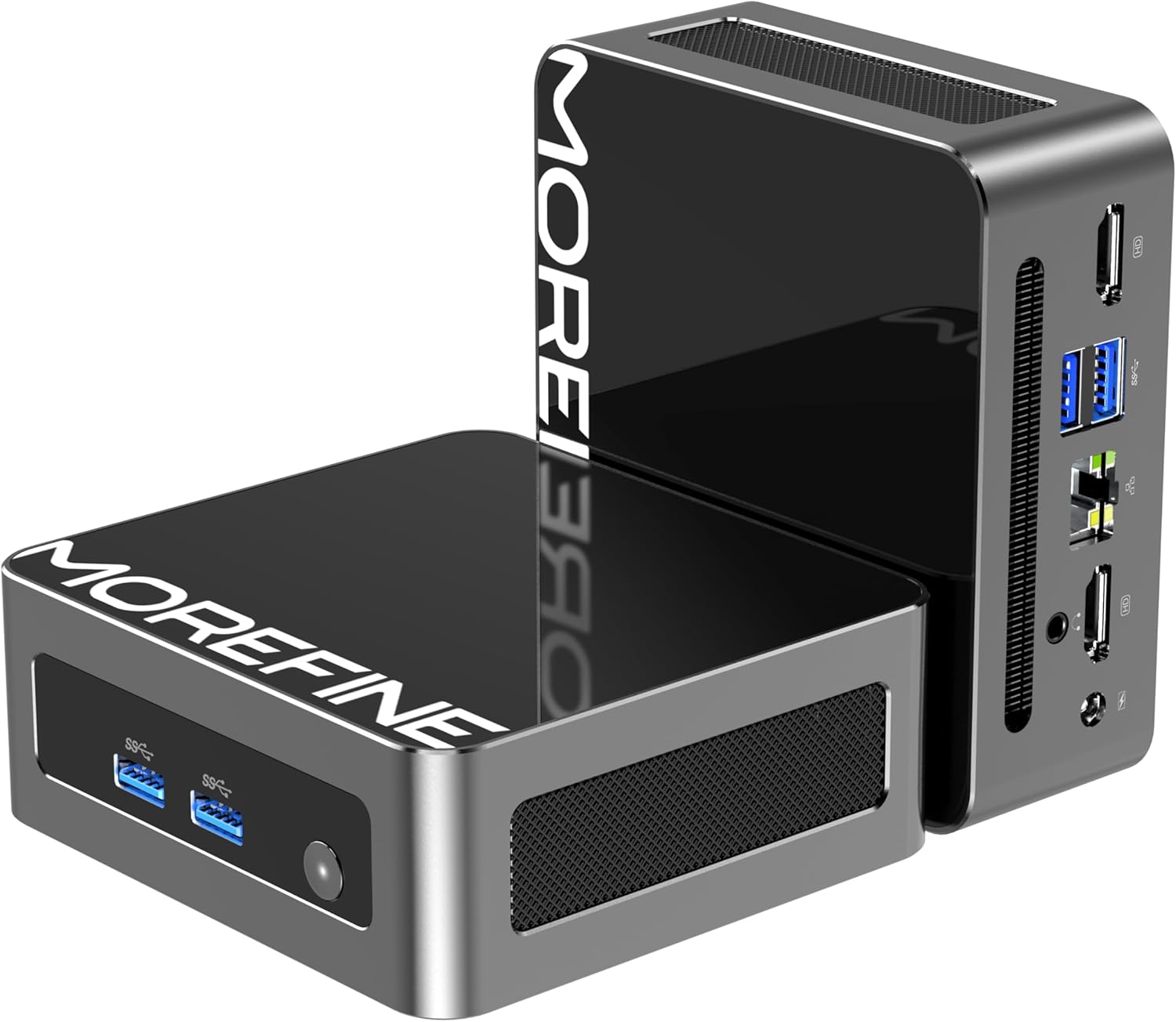
Slika: Prednja i bočna view of the MOREFINE Mini PC M9, showcasing its compact design and accessible ports.

Slika: Prekoview of the Mini PC's features including Twin Lake N150 processor, dual 4K output, space-saving design, quiet fan, DDR4 RAM, WiFi+Bluetooth, and 2.5G LAN.
Izgled porta
- Prednji portovi: Power Button, USB 3.2 x 2
- Stražnji portovi: USB 3.2 x 2, 2.5GbE RJ45 x 1, HDMI 2.0 x 2, 3.5mm Audio Jack x 1, DC Power Input x 1

Image: Close-up of the side ports on the MOREFINE Mini PC M9, showing USB 3.2 ports and the power button.

Slika: Stražnja strana view of the MOREFINE Mini PC M9, detailing the HDMI, USB, RJ45, and power input ports.
5. Podešavanje
Follow these steps to set up your MOREFINE Mini PC M9:
- Povežite periferne uređaje: Connect your monitor(s) to the HDMI ports using HDMI cables. Connect your keyboard and mouse to the USB ports.
- Mrežna veza: For a wired connection, connect an Ethernet cable to the 2.5GbE RJ45 port. For wireless, the device supports WiFi 6 and Bluetooth 5.2, which can be configured after initial boot.
- Priključak za napajanje: Connect the power adapter to the DC power input port on the Mini PC, then plug the adapter into a power outlet.
- Uključeno: Pritisnite dugme za napajanje koje se nalazi na prednjoj strani uređaja. Sistem će se pokrenuti.
- Početno podešavanje: Follow the on-screen instructions to complete the operating system setup (e.g., Windows 11). This typically involves selecting language, region, and creating a user account.

Image: Demonstrates the compact size and multiple placement options for the Mini PC, including laying flat or mounting on the back of a monitor.
6. Operativni
Dual Display Setup
The Mini PC supports dual 4K display output via its two HDMI 2.0 ports. To set up dual monitors:
- Connect both monitors to the HDMI ports on the Mini PC.
- Uključite Mini PC i oba monitora.
- Once the operating system loads, right-click on the desktop and select 'Display settings' (Windows) or similar.
- Configure the display mode (e.g., Extend, Duplicate) and resolution for each monitor as desired.

Image: Illustration of the Mini PC connected to two monitors, demonstrating its dual 4K display capability for enhanced multitasking.
Network and Bluetooth Connectivity
- WiFi 6: Access network settings in your operating system to connect to available wireless networks.
- Bluetooth 5.2: Enable Bluetooth in your operating system settings to pair with compatible devices like keyboards, mice, or headphones.
Auto Power On and Wake On LAN
The Mini PC supports Auto Power On and Wake On LAN features. These settings can typically be configured within the BIOS/UEFI setup. To access BIOS/UEFI, press the 'Del' key repeatedly during startup. You may need to adjust the boot delay in Windows advanced startup options if the default 1-second delay is too short.
7. Održavanje
Čišćenje
- Koristite meku, suhu krpu za čišćenje spoljašnjosti uređaja.
- Za tvrdokornu prljavštinu, lagano dampNapržite krpu vodom. Izbjegavajte jake hemikalije.
- Periodically clean the ventilation openings with a soft brush or compressed air to prevent dust buildup.
Storage and RAM Expansion
The MOREFINE Mini PC M9 supports storage and RAM upgrades:
- RAM: The device has one DDR4 SODIMM slot, supporting up to 32GB DDR4 3200MHz RAM.
- Skladištenje: It features one M.2 2280 NVMe PCIe 3.0 slot and one M.2 2242 SATA3 slot, supporting up to 4TB of storage expansion.
To perform upgrades, it is recommended to consult a qualified technician or refer to detailed online guides specific to the M9 model to avoid damaging internal components.

Slika: Interna view of the Mini PC, highlighting the DDR4 SODIMM slot, M.2 2280 NVMe PCIe, and M.2 2242 SATA slots for memory and storage expansion.
8. Otkrivanje problema
Ako naiđete na probleme sa svojim Mini PC-jem, pogledajte sljedeće uobičajene probleme i rješenja:
- Nema napajanja:
- Provjerite je li adapter za napajanje sigurno priključen i na Mini PC i na ispravnu utičnicu.
- Testirajte utičnicu s drugim uređajem.
- If the power button LED does not illuminate, there might be an issue with the power button or internal power delivery. Contact support if basic checks fail.
- Bez prikaza:
- Verify that the HDMI cable(s) are securely connected to both the Mini PC and the monitor(s).
- Provjerite je li monitor uključen i postavljen na ispravan ulazni izvor (HDMI 1, HDMI 2, itd.).
- Try connecting to a different monitor or using a different HDMI cable.
- No Network Connection (WiFi/Ethernet):
- Za Ethernet, provjerite kabelsku vezu i status rutera.
- For WiFi, ensure WiFi is enabled in the operating system and you are connecting to the correct network with the correct password.
- Ponovo pokrenite ruter/modem i Mini PC.
- Operating System Issues (e.g., updates failing):
- Ensure you have a stable internet connection for updates.
- Check for available disk space.
- Run the operating system's built-in troubleshooters.
- Consider performing a clean installation of the operating system if issues persist and are not resolved by standard troubleshooting.
9. Specifikacije
Detailed technical specifications for the MOREFINE Mini PC M9:
| Feature | Specifikacija |
|---|---|
| Model | M9 |
| Procesor | Intel 13th Gen Twin Lake N150 (4 Cores, 4 Threads, up to 3.6 GHz) |
| Grafika | Intel UHD grafika (integrirana) |
| RAM | 8GB DDR4 3200MHz (proširivo do 32GB) |
| Skladištenje | 256GB PCIe M.2 SSD (Expandable up to 4TB via M.2 2280 NVMe PCIe 3.0 and M.2 2242 SATA3 slots) |
| Operativni sistem | OS (Pre-installed, typically Windows) |
| Video izlaz | 2 x HDMI 2.0 (Supports Dual 4K@60Hz) |
| USB portovi | 4 x USB 3.2 |
| Mreža | 1 x 2.5GbE RJ45, WiFi 6 (802.11ax Dual-band), Bluetooth 5.2 |
| Audio | 1 x 3.5 mm audio priključak |
| Power Input | DC 12V/3A |
| Dimenzije | Približno 4.49 x 4.17 x 1.73 inča |
| Težina | Otprilike 1.43 funti |
10. Garancija i podrška
Informacije o garanciji
Your MOREFINE Mini PC M9 comes with a standard manufacturer's warranty. Please refer to the warranty card included in your package or the product listing for specific terms and duration. Keep your proof of purchase for warranty claims.
Tehnička podrška
For technical assistance, troubleshooting beyond this manual, or warranty inquiries, please contact MOREFINE customer support through the retailer where you purchased the product or visit the official MOREFINE webstranica za kontakt informacije.


