1. Uvod
This manual provides instructions for the proper use and maintenance of your ttec SoundFlow OWS Wireless Bluetooth Earphones, model KM156. Please read this manual thoroughly before using the product to ensure optimal performance and longevity.
The ttec SoundFlow OWS earphones feature an open-ear design for situational awareness, dynamic acoustic system for clear sound, and Bluetooth 5.4 for stable wireless connectivity.
2. Sadržaj paketa
Provjerite da li se u paketu vašeg proizvoda nalaze svi artikli:
- ttec SoundFlow OWS Wireless Bluetooth Earphones (Left and Right)
- Futrola za punjenje
- USB-C kabl za punjenje
- Uputstvo za upotrebu
3. Proizvod je gotovview
Familiarize yourself with the components of your ttec SoundFlow OWS earphones.

Image 3.1: ttec SoundFlow OWS Earphones and Charging Case. The image displays the two black earphones with ear hooks, positioned above their open black charging case.
Komponente slušalica:
- Kuka za uho: Pruža sigurno i udobno prianjanje preko uha.
- Jedinica zvučnika: Pruža audio izlaz.
- mikrofon: Za pozive i glasovne komande.
- Touch Sensor Area: For controlling music, calls, and other functions.
- Kontakti za punjenje: Connects with the charging case for power.

Image 3.2: Close-up of an earbud highlighting the touch sensor area. The image shows a detailed view of the earbud's outer surface, indicating the touch-sensitive zone for controls.
Komponente kućišta za punjenje:
- Utori za slušalice: Securely holds and charges the earphones.
- USB-C priključak za punjenje: Za punjenje kućišta.
- LED indikator: Prikazuje status punjenja i nivo baterije.
4. Podešavanje
4.1 Punjenje slušalica i futrole
Prije prve upotrebe, potpuno napunite slušalice i kućište za punjenje.
- Stavite slušalice u kućište za punjenje. Provjerite da li su kontakti za punjenje poravnati.
- Spojite USB-C kabel za punjenje na priključak za punjenje na kućištu, a drugi kraj na izvor napajanja (npr. USB adapter za zid, USB priključak računara).
- The LED indicator on the case will show the charging status. Once fully charged, the indicator will change or turn off.
A full charge provides up to 6 hours of earphone use, and the charging case provides up to 30 hours of additional battery life. The Charge&Go feature allows 2.5 hours of use from a 15-minute charge.
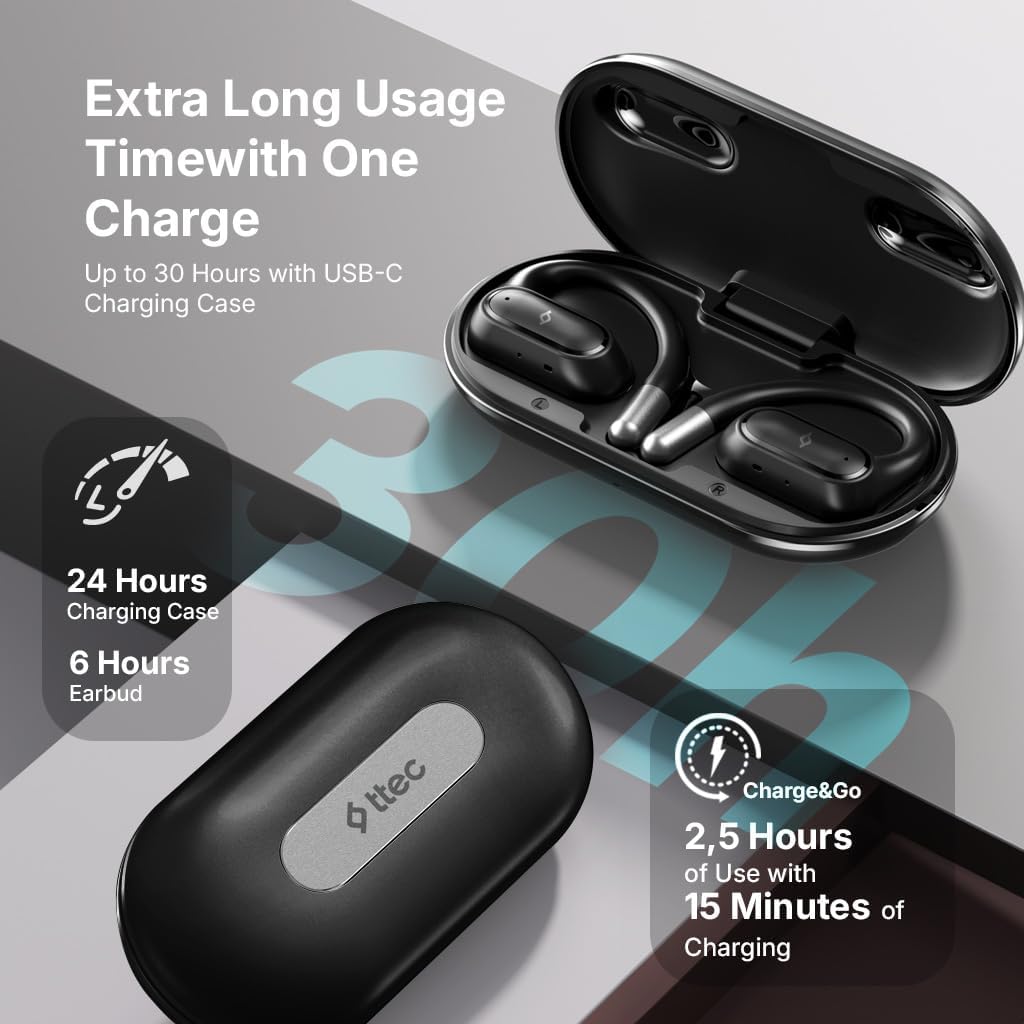
Image 4.1: Charging case displaying battery life. The image illustrates the charging case with text indicating 24 hours from the charging case, 6 hours from earbuds, and 2.5 hours of use from 15 minutes of charging.
4.2 Uparivanje s Bluetooth uređajem
To connect your earphones to a smartphone or other Bluetooth-enabled device:
- Provjerite jesu li slušalice napunjene i stavljene u kutijicu za punjenje.
- Otvorite kućište za punjenje. Slušalice će automatski ući u način rada za uparivanje, a njihovi LED indikatori će treptati.
- Na svom uređaju omogućite Bluetooth i potražite dostupne uređaje.
- Select "ttec SoundFlow" from the list of found devices.
- Once connected, the earphone LED indicators will stop flashing or turn off, and you will hear a confirmation tone.
Slušalice će se automatski ponovo povezati s posljednjim uparenim uređajem kada se izvade iz kutijice, ako je Bluetooth omogućen na uređaju.
5. Uputstvo za upotrebu
5.1 Nošenje slušalica
Gently place the ear hook over your ear and position the speaker unit comfortably in front of your ear canal. The open-ear design allows you to remain aware of your surroundings.

Image 5.1: A person cycling while wearing the ttec SoundFlow OWS earphones. The image highlights the open-ear design, allowing the user to stay connected to their surroundings.

Image 5.2: A woman wearing a ttec SoundFlow earbud, demonstrating the comfortable and secure fit. The image also indicates the lightweight design: 8.2g per earbud and 52g for the charging case.
5.2 Kontrole na dodir
The earphones feature touch sensors for easy control of various functions:
| Akcija | Funkcija |
|---|---|
| Jedan dodir (L/R) | Reprodukcija/Pauziranje muzike, Odgovor na poziv |
| Dvostruki dodir (L) | Previous Track |
| Dvostruki dodir (R) | Next Track |
| Trostruki dodir (L/R) | Aktivirajte glasovnog asistenta |
| Dugi pritisak (L/R) | Reject Call, End Call |
5.3 Režim igre
The earphones feature a low-latency game mode for an enhanced gaming and video experience. This mode reduces audio delay to 50ms.
- To activate Game Mode: Refer to the specific instructions in the quick start guide or product packaging for the exact touch gesture to enable/disable game mode. (Typically a specific tap sequence or long press).
- When Game Mode is active, you may notice a slight change in audio profile, optimized for lower latency.

Image 5.3: ttec SoundFlow earphones and charging case, surrounded by gaming console symbols, highlighting the 50ms low latency feature for an optimized gaming and video experience.
6. Održavanje
6.1 Čišćenje
- Obrišite slušalice i kutijicu za punjenje mekom, suhom krpom koja ne ostavlja dlačice.
- Ne koristite abrazivna sredstva za čišćenje, alkohol ili hemijske rastvarače.
- Provjerite jesu li kontakti za punjenje čisti i suhi kako biste spriječili probleme s punjenjem.
6.2 Otpornost na vodu i znoj
The ttec SoundFlow OWS earphones are IPX6 rated, meaning they are resistant to high-pressure water jets from any direction. This makes them suitable for use during workouts and in light rain.
- Ne uranjajte slušalice u vodu.
- Ensure the earphones are dry before placing them back into the charging case to prevent damage.

Image 6.1: A man running outdoors, illustrating the sweat and water-resistant design of the ttec SoundFlow earphones, which are IPX6 rated.
6.3 Skladištenje
Kada se ne koriste, slušalice čuvajte u njihovoj kutijici za punjenje kako biste ih zaštitili i održali napunjenima. Čuvajte ih na hladnom i suhom mjestu, dalje od ekstremnih temperatura.
7. Otkrivanje problema
Ako imate problema sa slušalicama, pogledajte sljedeća uobičajena rješenja:
| Problem | Rješenje |
|---|---|
| Slušalice se ne uparuju | Ensure earphones are charged. Turn off and on Bluetooth on your device. Forget the device in your Bluetooth settings and re-pair. |
| Samo jedna slušalica radi | Place both earphones back in the case, close the lid, then open again. Ensure both are charged. |
| Nema zvuka | Check device volume. Ensure earphones are connected. Try playing different audio. |
| Problemi s punjenjem | Ensure charging cable is securely connected. Clean charging contacts on earphones and case. Try a different USB-C cable or power source. |
Ako problem i dalje postoji, obratite se korisničkoj podršci.
8. Specifikacije
| Feature | Detalj |
|---|---|
| Naziv modela | SoundFlow |
| Broj modela | KM156 |
| Tehnologija povezivanja | Bežično (Bluetooth 5.4) |
| Form Factor | True Wireless, Open-Ear |
| Težina slušalice | 8.2 grama (svaki) |
| Težina kućišta za punjenje | 52 grama |
| Trajanje baterije slušalica | Do 6 sati (jedno punjenje) |
| Ukupno trajanje baterije (sa kućištem) | Do 30 sati |
| Brzo punjenje | 15 min charge for 2.5 hours use (Charge&Go) |
| Otpornost na vodu | IPX6 Rated (Sweat and Water Resistant) |
| Low Latency | 50 ms (režim igre) |
| Proizvođač | ttec |
9. Garancija i podrška
Your ttec SoundFlow OWS Wireless Bluetooth Earphones are covered by a manufacturer's warranty. For detailed warranty information, please refer to the warranty card included in your product packaging or visit the official ttec website.
For technical support, troubleshooting assistance, or to inquire about replacement parts, please contact ttec customer service through their official channels. Contact information can typically be found on the product packaging or the official ttec website.


