Uvod
The Symcode MJ-Q80 is a versatile multi-function card reader designed for various applications, including point-of-sale systems and membership management. It supports magnetic stripe card reading, IC chip card reading and writing, and NFC contactless card functions. This device offers a convenient plug-and-play experience without the need for additional drivers or power supplies.
1. Podešavanje
1.1 Sadržaj paketa
- Symcode MJ-Q80 Multi-Function Card Reader
- USB kabel
- SDK (komplet za razvoj softvera)
1.2 Povezivanje uređaja
The MJ-Q80 card reader connects to your computer or compatible device via a standard USB interface. No external power supply is required, and the device is designed for plug-and-play operation, eliminating the need for driver installation.
- Connect the USB cable to the MJ-Q80 card reader.
- Uključite drugi kraj USB kabla u dostupan USB port na računaru ili host uređaju.
- The device will perform a self-check upon booting.

Image: The Symcode MJ-Q80 card reader connected to a laptop via USB, illustrating its plug-and-play functionality. The screen displays card data in a text format.
1.3 Kompatibilnost sistema
The Symcode MJ-Q80 is compatible with Windows and Android operating systems.
1.4 Indikatorska svjetla
The device features two LED indicator lights. Both lights illuminate when the device is successfully connected. The green light will flash when a card is being swiped or read.
2. Uputstvo za upotrebu
The MJ-Q80 supports three primary card reading methods: magnetic stripe, IC chip, and NFC contactless.

Image: The Symcode MJ-Q80 card reader demonstrating its 3-in-1 functionality, including magnetic stripe swiping, chip card insertion, and NFC contactless reading.
2.1 Magnetic Card Reading
The device can read all three tracks of magnetic stripe cards. It supports bidirectional swiping, meaning you can swipe the card in either direction through the slot.
- Ensure the magnetic stripe on the card is facing the correct direction (typically towards the device's interior).
- Swipe the card smoothly and consistently through the magnetic card slot.
- The green indicator light will flash during a successful read.
Napomena: This device is a magnetic card reader only and does not support magnetic card encoding (writing).
2.2 IC Chip Card Reading and Writing
The MJ-Q80 is equipped with a slot for reading and writing IC chip cards, including EMV chip cards and SLE4442 chip cards. For advanced functionalities with CPU chip cards, APDU commands are required for deep development.
- Insert the IC chip card into the designated chip card slot with the chip facing downwards.
- Ensure the card is fully inserted until it clicks or is firmly seated.
- The device will automatically attempt to read or write to the chip.
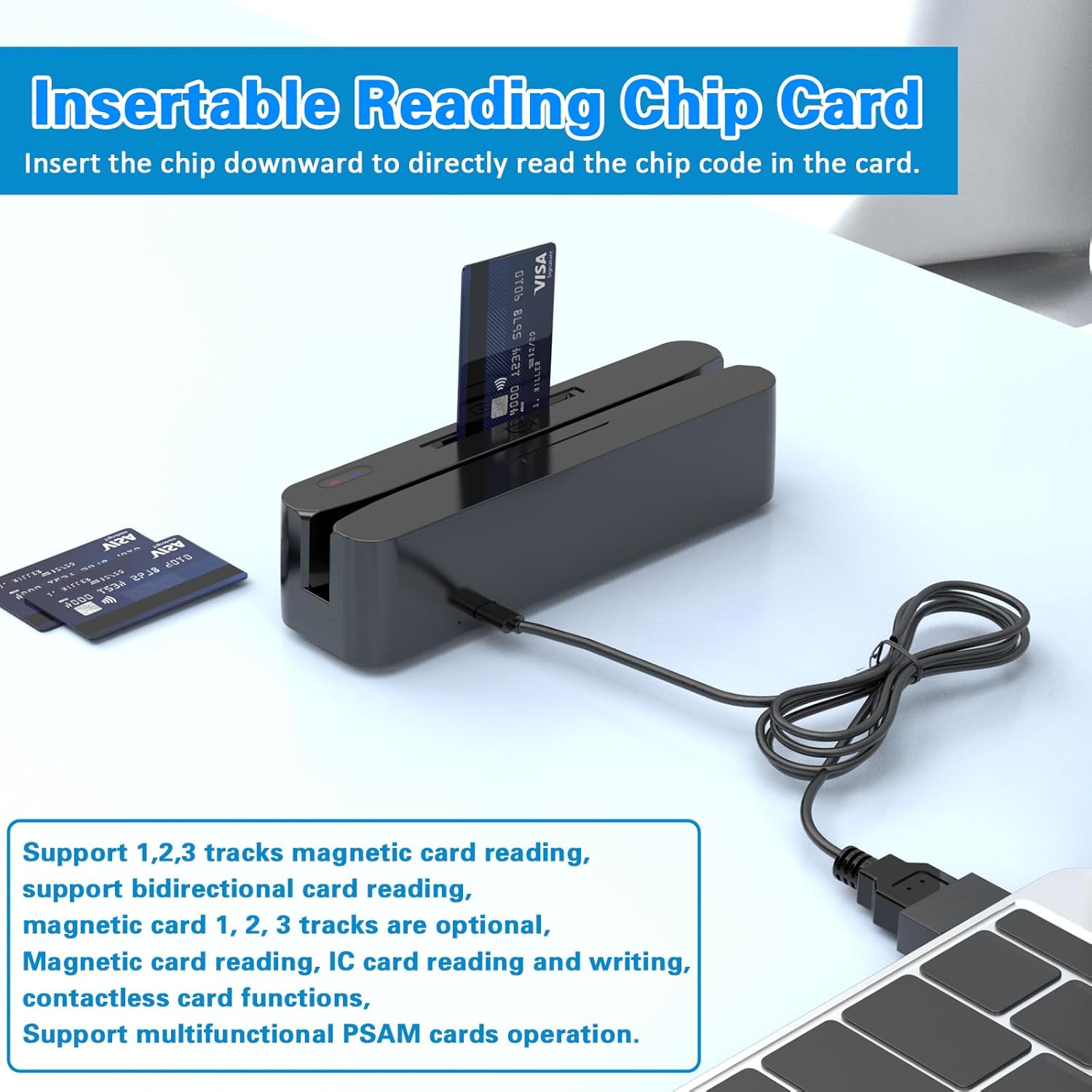
Image: An IC chip card being inserted into the Symcode MJ-Q80 card reader, demonstrating the correct orientation for chip reading.
2.3 NFC Contactless Card Reading
The device includes a built-in NFC reading module for contactless card transactions. The NFC sensing area is located on the left side of the device.
- Locate the NFC sensing area on the left side of the card reader.
- Ensure the NFC sensing mode is enabled via the toggle switch (refer to Section 2.4).
- Hold the contactless card near the NFC sensing area.
- The device will read the card information automatically.

Image: A contactless card being used with the NFC reading module on the side of the Symcode MJ-Q80 card reader, with a laptop in the background.
2.4 NFC Sensing Mode Switch
A toggle switch is present on the device to enable or disable the NFC sensing mode. Ensure this switch is in the "on" position for NFC functionality.

Image: Close-up of the Symcode MJ-Q80 card reader highlighting the NFC reading module and the toggle switch for NFC sensing mode.
2.5 Izlaz podataka
The card reader can output card data to various file formats, including TXT, Word, and Excel, depending on the software used with the device.
3. Održavanje
Proper maintenance ensures the longevity and optimal performance of your Symcode MJ-Q80 card reader.
- čišćenje: Regularly clean the card slots and exterior with a soft, dry cloth. Avoid using abrasive cleaners or solvents.
- Skladištenje: Uređaj čuvajte na hladnom i suhom mjestu, dalje od direktne sunčeve svjetlosti i ekstremnih temperatura.
- Rukovanje: Pažljivo rukujte uređajem kako biste spriječili fizička oštećenja. Izbjegavajte ispuštanje ili izlaganje jakim udarcima.
- Izloženost tečnosti: Keep the device away from liquids to prevent internal damage.
4. Otkrivanje problema
If you encounter issues with your Symcode MJ-Q80 card reader, refer to the following common problems and solutions:
| Problem | Mogući uzrok / rješenje |
|---|---|
| Device not recognized / No indicator lights |
|
| Magnetic card not reading |
|
| IC chip card not reading |
|
| NFC contactless function not working |
|
| Card data not displaying correctly |
|
If the problem persists after attempting these solutions, please contact Symcode customer support for further assistance.
5. Specifikacije
| Feature | Detalj |
|---|---|
| Broj modela | MJ-Q80 |
| Hardversko sučelje | USB |
| Kompatibilni uređaji | Windows, Android, iPad (via USB) |
| Ukupni USB portovi | 1 |
| Number of Card Interfaces | 2 (Magnetic Stripe, IC Chip/NFC) |
| Magnetic Card Support | Tracks 1, 2, 3 (read only), Bidirectional |
| IC Chip Card Support | EMV, SLE4442, CPU chip cards (APDU commands for deep development) |
| Podrška za beskontaktne kartice | NFC (Built-in module) |
| Sigurnosne karakteristike | Built-in data encryption options: triple DES, advanced security features |
| Usklađenost sa standardima | ISO, AAMVA, CADM |
| Dimenzije paketa | 7.56 x 3.62 x 2.36 inča |
| Težina artikla | 7.4 unci (0.21 kilograma) |
6. Garancija i podrška
6.1 Informacije o garanciji
Specific warranty details for the Symcode MJ-Q80 are typically provided at the point of purchase or within the product packaging. Please retain your proof of purchase for warranty claims. For detailed warranty terms and conditions, contact Symcode customer service.
6.2 Korisnička podrška
For technical support, inquiries, or assistance with your Symcode MJ-Q80 card reader, please contact our support team. We are available to provide guidance and resolve any issues you may encounter.
The product includes an SDK (Software Development Kit) with complete dynamic library functions, development examples, key points, and source code examples in various development languages (e.g., C#, C++ for 2003) to assist with integration and custom applications.


