Uvod
This manual provides essential information for setting up, operating, maintaining, and troubleshooting your Vibox II-146 Gaming PC. Please read these instructions carefully before using your new computer to ensure optimal performance and longevity.
The Vibox II-146 is a complete gaming PC bundle designed for an immersive gaming experience at 1080p and 1440p resolutions. It features a powerful multi-core processor and a dedicated graphics card, making it suitable for popular games and demanding applications.
Sadržaj paketa
Before proceeding with the setup, ensure all components listed below are present in your package:
- Vibox II-146 Gaming PC Tower
- Monitor od 23 inča
- Tastatura za igre
- Gaming Mouse
- Slušalice za igre
- LED podloga za miš
- 300 Mbps Wi-Fi Adapter
- Power Cables for PC and Monitor
- Display Cable (HDMI or DisplayPort)
- Korisnički priručnik (ovaj dokument)
Uputstva za postavljanje
1. Raspakivanje i postavljanje
- Pažljivo izvadite sve komponente iz njihove ambalaže.
- Place the PC tower on a stable, flat surface with adequate ventilation. Ensure there is clear space around the air intake and exhaust vents.
- Position the monitor on a stable surface at a comfortable viewvisina.
2. Povezivanje perifernih uređaja
- Povezivanje monitora: Connect one end of the display cable (HDMI or DisplayPort) to the graphics card port on the back of the PC tower and the other end to the corresponding port on the monitor.
- tastatura i miš: Connect the USB cables of the gaming keyboard and mouse to any available USB ports on the back of the PC.
- Slušalice: Plug the headset into the audio jacks (headphone and microphone) on the front or back of the PC.
- Wi-Fi Adapter: Insert the 300 Mbps Wi-Fi adapter into an available USB port.
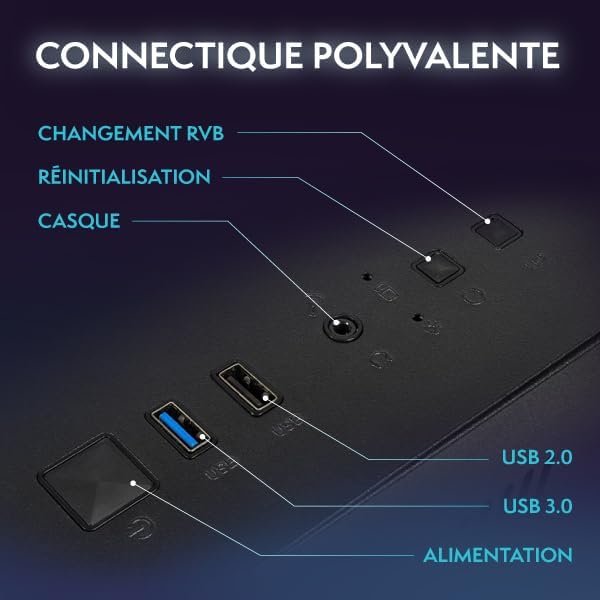
Slika: Stražnja strana view of the Vibox II-146 PC tower, highlighting various connectivity ports including USB, HDMI, and DisplayPort.

Slika: Interna view of the Vibox II-146 PC, showcasing the components and RGB lighting from the fans.
3. Priključak za napajanje
- Connect the PC power cable to the power supply unit on the back of the PC and then to a wall outlet.
- Connect the monitor power cable to the monitor and then to a wall outlet.
4. Initial Boot
- Press the power button on the PC tower.
- Pritisnite dugme za napajanje na monitoru.
- The system will boot into Windows 11 Home. Follow the on-screen instructions for initial setup, including language, region, and network connection.
Uputstvo za upotrebu
Windows 11 Home
Your Vibox II-146 PC comes pre-installed with Windows 11 Home, offering a modern and optimized operating system for gaming and productivity. Key features include:
- Faster loading times with DirectStorage.
- AutoHDR for enhanced graphics in supported games.
- Seamless integration with Xbox Game Pass.
- Optimized CPU performance.

Image: Visual representation of Windows 11 Home features, including faster loading, AutoHDR, Xbox Game Pass integration, and optimized CPU performance.
Performanse u igrama
The AMD Radeon RX 9070 graphics card with 16GB GDDR6 RAM and Intel Core i5-10400F processor provide excellent performance for modern games. Ensure your graphics drivers are up to date for the best gaming experience. You can download the latest drivers from the official AMD website.
Povezivanje
Your PC offers versatile connectivity options:
- USB portovi: Multiple USB 2.0 and USB 3.0 ports for peripherals.
- Izlazi ekrana: HDMI 2.1b and DisplayPort 2.1a for connecting displays.
- Wi-Fi: Integrated Wi-Fi via the included adapter for wireless internet access.
- Audio priključci: Dedicated ports for headphones and microphones.
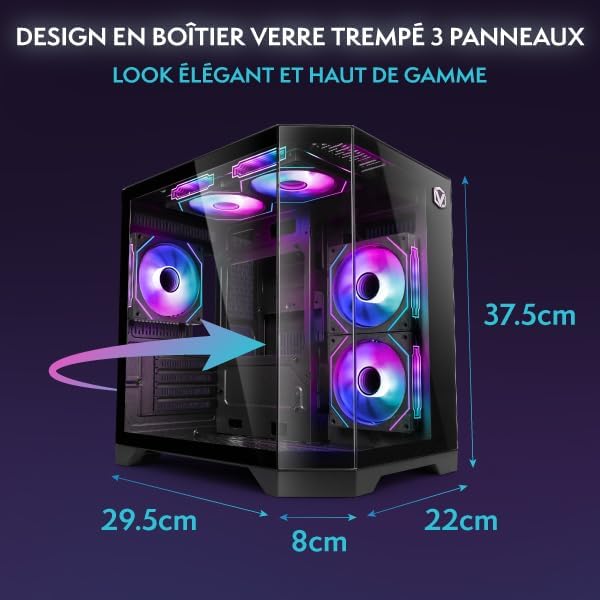
Image: Diagram showing the dimensions of the Vibox II-146 PC tower: 37.5cm height, 29.5cm depth, 22cm width, and 8cm base width.
Održavanje
Opća njega
- Upravljanje prašinom: Regularly clean the exterior of the PC with a soft, dry cloth. Use compressed air to clear dust from vents and internal components (fans, heatsinks) every few months to prevent overheating.
- ventilacija: Ensure the PC is placed in an area with good airflow. Avoid blocking any vents.
- Upravljanje kablovima: Keep cables tidy to improve airflow and prevent accidental disconnections.

Image: Diagram illustrating the optimized reverse airflow design for next-generation cooling within the Vibox II-146 PC case.
Ažuriranja softvera
- Ažuriranja za Windows: Redovno provjeravajte i instalirajte ažuriranja za Windows kako biste osigurali stabilnost i sigurnost sistema.
- Ažuriranja drajvera: Keep your graphics card drivers (AMD Radeon) and other component drivers updated. Visit the manufacturer's websites for the latest versions.

Image: Close-up of Vibox Hex RGB Infinity 120mm fans, showcasing various customizable color and RGB modes.
Rješavanje problema
Ovaj odjeljak se bavi uobičajenim problemima na koje možete naići. Za složenije probleme, obratite se korisničkoj podršci.
| Problem | Mogući uzrok | Rješenje |
|---|---|---|
| Nema struje | Power cable disconnected, power supply switch off, faulty outlet. | Check all power connections. Ensure the power supply switch on the back of the PC is in the 'ON' position. Try a different power outlet. |
| Nema prikaza na monitoru | Monitor not powered, display cable loose or incorrect port, incorrect input source on monitor. | Ensure monitor is powered on. Check display cable connections at both ends. Verify the display cable is connected to the graphics card (not motherboard) and the monitor's input source is correctly selected. |
| Nema internet veze (Wi-Fi) | Wi-Fi adapter not installed, drivers missing, incorrect network settings. | Ensure the Wi-Fi adapter is securely plugged into a USB port. Check Windows Device Manager for driver status. Reconfigure Wi-Fi network settings in Windows. |
| System is slow or freezing | Previše pokrenutih aplikacija, nedovoljno RAM-a, pregrijavanje, zlonamjerni softver. | Close unnecessary applications. Check task manager for resource usage. Ensure proper ventilation and clean dust. Run a full system scan for malware. |
Specifikacije
| Komponenta | Detalj |
|---|---|
| Broj modela | II-146 |
| Procesor | Intel Core i5-10400F (6 Cores, up to 4.3 GHz) |
| Graficka kartica | AMD Radeon RX 9070 (16 GB GDDR6) |
| RAM | 16 GB DDR4 (Dual Channel, 3200 MHz) |
| Skladištenje | 1 TB SSD (Solid State Drive) |
| Operativni sistem | Windows 11 Home |
| Monitor | 23-inch, 1920 x 1080 Resolution |
| Povezivanje | Wi-Fi (300 Mbps adapter included), 3x USB 2.0, 3x USB 3.0, 1x HDMI 2.1b, DisplayPort 2.1a |
| Dimensions (PC Tower) | 35 x 28 x 38 cm (približno 13.8 x 11 x 15 inča) |
| Weight (PC Tower) | 19.17 kg (približno 42.26 lbs) |
Garancija i podrška
Informacije o garanciji
Your Vibox II-146 Gaming PC is covered by a manufacturer's warranty. Please refer to the warranty card included with your product for specific terms and conditions, including warranty duration and coverage details. Keep your proof of purchase for warranty claims.
Korisnička podrška
For technical assistance, troubleshooting beyond this manual, or warranty inquiries, please contact Vibox customer support. You can typically find contact information on the manufacturer's weblokaciji ili na ambalažnim materijalima.
When contacting support, please have your product model number (II-146) and proof of purchase readily available.


