1. Uvod
Welcome to the user manual for your GPD Pocket 4 Mini Laptop. This document provides essential information for setting up, operating, maintaining, and troubleshooting your device. The GPD Pocket 4 is a high-performance, ultra-portable 2-in-1 device designed for both productivity and entertainment, featuring an AMD Ryzen AI 9 HX 370 CPU and an 8.8-inch 2.5K 144Hz touchscreen display.
Please read this manual thoroughly before using your GPD Pocket 4 to ensure proper operation and to maximize its capabilities.
2. Sigurnosne informacije
- Napajanje: Use only the original power adapter provided with the device. Using unauthorized adapters may damage the device and void the warranty.
- Održavanje baterije: Do not attempt to replace the battery yourself. Avoid exposing the device to extreme temperatures (below 0°C or above 35°C) or direct sunlight for prolonged periods.
- Voda i vlaga: Držite uređaj dalje od vode, kiše i prekomjerne vlage. Ne rukujte mokrim rukama.
- ventilacija: Ensure proper ventilation. Do not block the ventilation openings, especially during heavy use, to prevent overheating.
- čišćenje: Isključite napajanje prije čišćenja. Koristite meku, suhu krpu. Izbjegavajte tekuća sredstva za čišćenje ili aerosole.
- Rastavljanje: Do not attempt to disassemble or repair the device yourself. This may cause damage and void the warranty. Contact authorized service personnel for repairs.
3. Sadržaj paketa
Molimo Vas da provjerite sadržaj paketa nakon raspakivanja. Ako bilo koji artikl nedostaje ili je oštećen, odmah se obratite prodavaču.
- GPD Pocket 4 mini laptop
- USB-C Power Adapter (100W PD Fast Charging)
- USB-C na USB-C kabl
- Korisnički priručnik (ovaj dokument)
4. Proizvod je gotovview
The GPD Pocket 4 is a versatile 2-in-1 device, combining a mini laptop with a tablet. It features a high-resolution touchscreen and a physical keyboard.
4.1 Ključne karakteristike
- procesor: AMD Ryzen AI 9 HX 370 CPU (up to 5.1 GHz)
- Grafika: AMD Radeon 890M iGPU (RDNA 3.5 architecture)
- Prikaz: 8.8-inch 2.5K (2560x1600) IPS Touchscreen, 144Hz refresh rate
- Memorija: 32GB LPDDR5X RAM (7500 MT/s)
- Skladištenje: 2TB M.2 NVMe PCIe 4.0 SSD
- Operativni sistem: Windows 11 Home
- Povezivanje: Wi-Fi 6E, Bluetooth 5.3
- baterija: 44.8Wh, up to 9 hours video playback
- luke: HDMI 2.1, 2x USB-C (full-featured), USB-A, RJ45 Network Port, Earphone/Microphone Ports
- Modular IO: Support for 4G, MicroSD, KVM, and RS-232 modules.
4.2 Izgled uređaja

Slika 4.2.1: Bočna i zadnja strana view of the GPD Pocket 4 highlighting ports and features.
- Top/Rear: Charge Indicator, USB4, Memory Card Readers, Reset Button, HDMI 2.1, USB A 3.2 Gen 2, Speaker Port.
- Lijeva strana: Full-Featured USB-C, Air Outlet, RJ45 Network Port, Lanyard Hole, Earphone/Microphone Ports, USB-A, Power Button/Fingerprint.
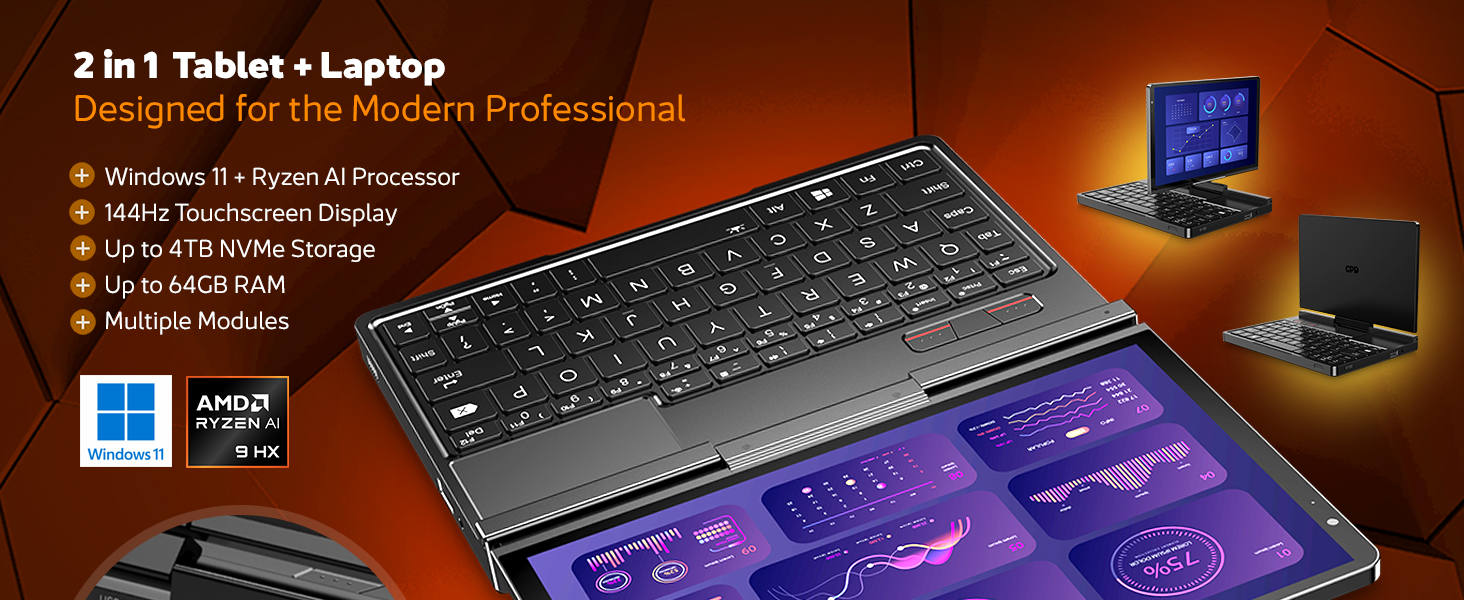
Slika 4.2.2: Gotovoview of the GPD Pocket 4's core specifications and 2-in-1 design.
This image illustrates the device's key technical specifications, including its modular IO, screen, CPU, GPU, RAM, storage, OS, battery, and connectivity, emphasizing its nature as a pocket-sized modular AI PC.

Figure 4.2.3: Modular expansion options for the GPD Pocket 4.
The GPD Pocket 4 supports various modular expansions, including KVM, Memory Card Reader, 4G LTE, and RS-232 modules, enhancing its versatility for different professional needs.
5. Podešavanje
5.1 Početno uključivanje
- Napunite uređaj: Before first use, connect the GPD Pocket 4 to the power adapter using the provided USB-C cable. Plug the adapter into a wall outlet. The charge indicator light will illuminate.
- Uključeno: Press and hold the Power Button (integrated with the fingerprint sensor) for a few seconds until the GPD logo appears on the screen.
- Windows postavka: Slijedite upute na ekranu da biste dovršili proces podešavanja sistema Windows 11 Home. To uključuje odabir regije, jezika, povezivanje na Wi-Fi i kreiranje korisničkog računa.
5.2 Povezivanje perifernih uređaja
- Vanjski zaslon: Connect an external monitor via the HDMI 2.1 port or one of the full-featured USB-C ports.
- USB uređaji: Use the USB-A or USB-C ports for connecting external keyboards, mice, USB drives, or other peripherals.
- mreža: For a wired internet connection, connect an Ethernet cable to the RJ45 network port.
- audio: Connect headphones or external speakers to the 3.5mm earphone/microphone port.
6. Operating the GPD Pocket 4
6.1 Načini rada
- Režim rada laptopa: Use the integrated keyboard and touchpad for traditional laptop functionality. The 8.8-inch display provides a compact yet clear workspace.
- Način rada tableta: Fold the screen back to transform the device into a tablet. The 10-point multi-touch display allows for intuitive navigation and interaction.

Figure 6.1.1: GPD Pocket 4 in tablet mode, showcasing its touch interface.
The device seamlessly transitions between laptop and tablet modes, offering flexibility for various tasks.
6.2 Tastatura i tačped
- The integrated keyboard is designed for comfortable typing in a compact form factor.
- Dodirna tabla podržava višestruke dodirne geste za navigaciju. Za prilagođavanje pogledajte postavke Windowsa.
- The power button doubles as a fingerprint sensor for secure login.

Figure 6.2.1: User interacting with the GPD Pocket 4's keyboard and touchpad.
This image highlights the comfortable keyboard and backlit trackpad, along with the integrated camera and microphone for meetings.
6.3 Upravljanje baterijom
- The GPD Pocket 4 features a 44.8Wh battery.
- For optimal battery life, adjust power settings in Windows.
- The device supports 100W PD fast charging. Use the provided charger for quickest recharge times.

Slika 6.3.1: Interni view showing the 44.8Wh battery and device dimensions.
This image provides a visual representation of the device's internal battery and its compact dimensions, emphasizing its portability and power endurance.
7. Održavanje
7.1 Čišćenje
- Always power off the device and disconnect the charger before cleaning.
- Use a soft, lint-free cloth to wipe the screen and chassis. For stubborn smudges on the screen, lightly dampobrišite krpu vodom ili sredstvom za čišćenje namijenjenim za ekrane (ne prskajte direktno po ekranu).
- Use a soft brush or compressed air to clean dust from the keyboard and ventilation openings.
- Izbjegavajte upotrebu jakih hemikalija, abrazivnih sredstava za čišćenje ili rastvarača.
7.2 Ažuriranja softvera
- Regularly check for Windows updates to ensure your system has the latest security patches and performance improvements. Go to Postavke > Windows Update.
- Periodically check the GPD official website for driver updates, especially for graphics (AMD Radeon 890M) and chipset drivers, to ensure optimal performance.
7.3 Upravljanje skladištem
- Redovno brišite nepotrebne filei aplikacije za oslobađanje prostora za pohranu.
- Consider using cloud storage for large files to reduce local storage consumption.
- The 2TB M.2 NVMe SSD is expandable; consult GPD support for compatible upgrade options if needed.
8. Otkrivanje problema
| Problem | Mogući uzrok | Rješenje |
|---|---|---|
| Uređaj se ne uključuje. | Low battery; Power adapter not connected; Hardware issue. | Ensure the device is fully charged. Verify the power adapter and cable are securely connected. If issues persist, perform a hard reset (press and hold power button for 15 seconds). |
| Ekran je prazan ili treperi. | Display driver issue; Incorrect resolution; Hardware fault. | Restart the device. Update graphics drivers. Check display settings in Windows. |
| Wi-Fi ili Bluetooth ne rade. | Bežični adapter onemogućen; Problem s upravljačkim programom; Smetnje. | Check Wi-Fi/Bluetooth settings in Windows. Restart the device. Update wireless drivers. Ensure no physical obstructions or strong interference sources. |
| Uređaj je spor ili ne reagira. | Previše pokrenutih aplikacija; Malo prostora za pohranu; Pregrijavanje. | Close unnecessary applications. Free up disk space. Ensure ventilation is not blocked. Check Task Manager for resource-intensive processes. |
| Ekran osjetljiv na dodir ne reaguje. | Software glitch; Driver issue; Physical damage. | Restart the device. Check for touchscreen driver updates. If physically damaged, contact support. |
9. Specifikacije
| Feature | Detalj |
|---|---|
| Brand | GPD |
| Naziv modela | Pocket (RM-Pocket-4) |
| Procesor | AMD Ryzen AI 9 HX 370 (5.1 GHz) |
| Grafički koprocesor | Radeon™ 890M |
| RAM | 32 GB LPDDR5X |
| Skladištenje | 2 TB NVMe PCIe Gen4 SSD |
| Veličina ekrana | 8.8 inča |
| Rezolucija ekrana | 2560 x 1600 piksela (2.5K) |
| Refresh Rate | 144Hz |
| Operativni sistem | Windows 11 Home |
| Bežični tip | 802.11ax (Wi-Fi 6E), Bluetooth 5.3 |
| Prosječno trajanje baterije | 9 sati (reprodukcija videa) |
| Težina artikla | 1.6 funti (725 grama) |
| Dimenzije proizvoda | 8.11 x 5.67 x 0.87 inča |
| Boja | Crna |
10. Garancija i podrška
GPD products typically come with a limited manufacturer's warranty. Please refer to the warranty card included in your package or visit the official GPD webweb stranicu za detaljne uslove garancije specifične za vašu regiju.
For technical support, troubleshooting assistance beyond this manual, or warranty claims, please contact GPD customer support through their official website or the retailer from whom you purchased the device.
GPD Official Webstranica: www.gpd.hk
Please have your product model number (RM-Pocket-4) and purchase information ready when contacting support.


