1. Važne informacije o sigurnosti
Molimo vas da pažljivo pročitate sva uputstva prije sastavljanja i upotrebe. Sačuvajte ovaj priručnik za buduću upotrebu.
- Ograničenje težine: Do not exceed the desktop weight limit of 100.53 pounds (45.6 kg). Overloading can cause instability and damage.
- Montaža: Ensure all components are securely assembled before use. Loose parts can lead to injury or product failure.
- električna sigurnost: Keep power outlets and LED lights away from water and other potential hazards. Do not use in wet environments.
- Kabl za napajanje: Ensure the 6.56ft power cord is not pinched or damaged during assembly or use.
- ventilacija: Do not block ventilation openings on electrical components.
- djeca: Držite male dijelove i materijale za pakovanje dalje od djece tokom sastavljanja.
- Alati: Use appropriate tools as recommended in the assembly instructions.
2. Proizvod je gotovview
The DWVO L Shaped Desk is designed for home office and gaming environments, offering a spacious work area combined with integrated storage and modern features. This desk includes a convenient charging station, smart LED lighting, and amprješenja za skladištenje.
Ključne karakteristike:
- Praktična stanica za punjenje: Features 2 USB ports and 4 power outlets with a 6.56ft power cord for charging various devices.
- Pametne LED svjetlosne trake: RGB LED lighting controllable via a phone app or switch, offering customizable colors, music sync, and timer functions.
- L-Shaped Design with Storage: Combines a computer desk with file cabinets, including 1 file drawer (for letter, A4, legal size files), 2 utility drawers, and 4 open storage shelves.
- Integrated Printer Stand: A dedicated space for printers, scanners, or other office machines.
- Čvrsta konstrukcija: Made from high-grade P2 MDF board with a scratch-resistant finish and a heavy-duty metal frame (1.57" x 0.78") for stability and durability.
- Monitor Elevation Stand: Designed to promote a correct and comfortable sitting posture.
3. Sadržaj paketa
Prije početka montaže, molimo Vas da provjerite da li su svi dolje navedeni dijelovi prisutni i da li su neoštećeni. Ako bilo koji dio nedostaje ili je oštećen, obratite se korisničkoj podršci.
- 1 x L-oblikovani radni sto (komponente)
- 1 x Packet of Fittings (screws, dowels, connectors, etc.)
- 1 x Uputstvo za upotrebu (ovaj dokument)
- Assembly Tools (e.g., screwdriver)
Note: The L shaped computer desk comes in 2 packages, which might not arrive at the same time.
4. Upute za postavljanje i montažu
Za ovaj proizvod je potrebna montaža. Preporučuje se da dvije osobe assemble the desk to ensure safety and ease of construction. A screwdriver is recommended for assembly, and basic tools are included in the fittings packet.
Koraci opće skupštine:
- Raspakujte i identifikujte dijelove: Carefully unpack all components and lay them out on a clean, soft surface to prevent scratches. Identify each part using the labels and the included parts list.
- Sastavite osnovne strukture: Begin by assembling the main frame and the side storage units (shelves and drawer cabinets) according to the detailed diagrams in the included manual.
- Ugradnja ladica: Assemble the three drawers (two utility, one file drawer) and install the drawer glides into the cabinet. Ensure smooth operation.
- Attach Desktop and Monitor Stand: Secure the desktop panels and the elevated monitor stand to the assembled base structures.
- Install Power Outlets and LED Lights: Mount the power strip with USB ports and AC outlets in the designated area. Attach the LED light strips to the underside of the monitor stand or other specified locations.
- Završne provjere: Ensure all screws are tightened, and the desk is stable. Place the desk in its desired location, ensuring adequate space for movement and cable management.

Figure 4.1: Desk Dimensions and Component Layout

Figure 4.2: Drawer Assembly and Storage Options
Video 4.1: Montaža završenaview for the DWVO L Shaped Desk. This video demonstrates key steps in putting together the desk components, including the frame, storage units, and desktop.
5. Uputstvo za upotrebu
5.1. Utičnice i USB portovi
The desk is equipped with a built-in power strip for convenient device charging and power supply.
- veza: Plug the desk's 6.56ft power cord into a standard wall outlet.
- AC utičnice: Use the 4 AC outlets (120V/12A) to power your computer, monitor, printer, or other office equipment.
- USB portovi: Use the 2 USB ports (5V/2A) to charge smartphones, tablets, or other USB-powered devices.
- sigurnost: Do not overload the power strip. Ensure devices are compatible with the provided voltage i struja.

Figure 5.1: Integrated Power Outlets and USB Ports
5.2. LED svetla
The desk features RGB LED light strips to enhance your workspace ambiance.
- Kontrola: The LED lights can be controlled via a dedicated light strip switch or a smartphone application. Refer to the separate LED light manual (if provided) for app download and pairing instructions.
- Prilagodba: Use the app to customize colors, adjust brightness, and select from various lighting modes.
- Sinhronizacija muzike: Neki načini rada omogućavaju sinhronizaciju svjetala s muzikom, stvarajući dinamično vizualno iskustvo.
- Funkcija tajmera: Podesite tajmere da se svjetla automatski pale ili gase.
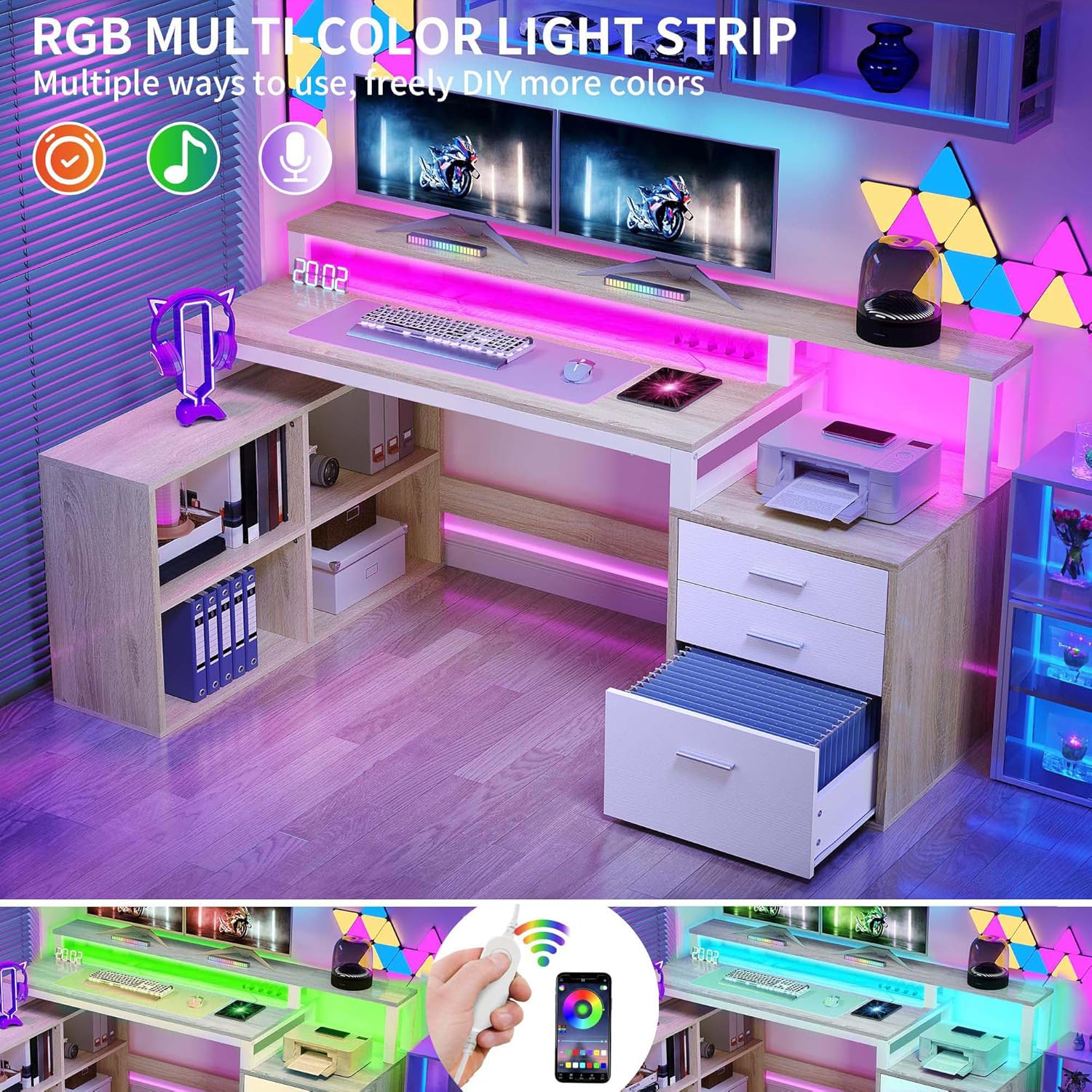
Figure 5.2: RGB LED Light Features
6. Održavanje
Proper maintenance will ensure the longevity and appearance of your DWVO L Shaped Desk.
- čišćenje: Obrišite površine stola oglasomamp krpom. Izbjegavajte upotrebu jakih hemikalija, abrazivnih sredstava za čišćenje ili prekomjerne vlage, jer mogu oštetiti završnu obradu.
- Prosipanje: Odmah očistite prolivenu tekućinu kako biste spriječili mrlje ili oštećenje obrađenog drveta.
- Električne komponente: Ensure power outlets and LED lights are kept dry and free from dust. Do not attempt to clean electrical components with liquids while plugged in.
- hardver: Povremeno provjeravajte sve vijke i pričvršćivače kako biste bili sigurni da su čvrsto zategnuti. Po potrebi ih ponovo zategnite kako biste održali stabilnost.
- Klizne ladice: If drawers become stiff, a small amount of silicone lubricant can be applied to the glides.
7. Otkrivanje problema
If you encounter issues with your desk, refer to the following common troubleshooting tips:
| Problem | Mogući uzrok | Rješenje |
|---|---|---|
| Radni sto je klimav ili nestabilan. | Labavi pričvršćivači; neravan pod. | Check and tighten all screws and bolts. Ensure the desk is on a level surface; use shims if needed. |
| LED svjetla se ne pale. | Power cord not plugged in; loose connection; faulty light strip. | Ensure the desk's main power cord is securely plugged into a working outlet. Check the connection of the LED strip to its power source. If issues persist, contact support. |
| Utičnice/USB portovi ne rade. | Desk's power cord unplugged; circuit breaker tripped; faulty power strip. | Verify the desk's power cord is plugged in. Check your home's circuit breaker. Test with another device. If still not working, contact support. |
| Fioke se teško otvaraju/zatvaraju. | Misaligned glides; obstruction; worn glides. | Ensure drawers are correctly seated on glides. Check for any obstructions. Apply silicone lubricant to glides if needed. |
If these solutions do not resolve the issue, please contact DWVO customer support for further assistance.
8. Specifikacije
| Brand | DWVO |
| Broj modela | MADWVfnadw |
| Dimenzije proizvoda (D x Š x V) | 35.4" x 65.4" x 36" (90 cm x 166 cm x 91.4 cm) |
| Težina artikla | 92.6 funti (42 kg) |
| Desktop Weight Limit | 100.53 funti (45.6 kg) |
| Materijal | Engineered Wood (P2 MDF), Metal Frame |
| Boja | Oak & White |
| Utičnice | 4 AC utičnice (120V/12A) |
| USB portovi | 2 USB porta (5V/2A) |
| Dužina kabla za napajanje | 6.56 stopa (2 metara) |
| Broj ladica | 3 (1 file drawer, 2 utility drawers) |
| Broj polica | 4 open storage shelves |
| Obavezna montaža | Da (Preporučuje se 2 osobe) |
9. Garancija i podrška
9.1. Informacije o garanciji
This DWVO L Shaped Desk comes with a Ograničena garancija. Please note that the monitor stand component is excluded from this limited warranty. For specific details regarding warranty coverage, duration, and terms, please refer to the warranty card included with your purchase or contact DWVO customer support.
9.2. Korisnička podrška
If you have any questions, require assistance with assembly, or need to report missing/damaged parts, please contact DWVO customer support. Have your model number (MADWVfnadw) and purchase information ready when contacting support.
For the most up-to-date contact information, please visit the official DWVO webweb-mjesto ili pogledajte dokumentaciju o kupovini.


