Masajoy bežične slušalice - uputstvo za upotrebu
Model: Spark 06
Uvod
The Masajoy Wireless Headset with Mic for Work (Model: Spark 06) is designed to provide clear and reliable audio communication for various professional and personal uses. Featuring multiple connection modes, AI noise cancellation, and a comfortable design, this headset is ideal for business video conferencing, online courses, and call center environments.

Figure 1: Masajoy Wireless Headset and included accessories.
Šta je u kutiji
Molimo Vas da provjerite da li su sve komponente prisutne u paketu:
- Wireless Headset with Mic for Work
- USB A / C Dongle
- USB C to 3.5MM Cable
- Kabel za punjenje tipa C
- Uputstvo za upotrebu
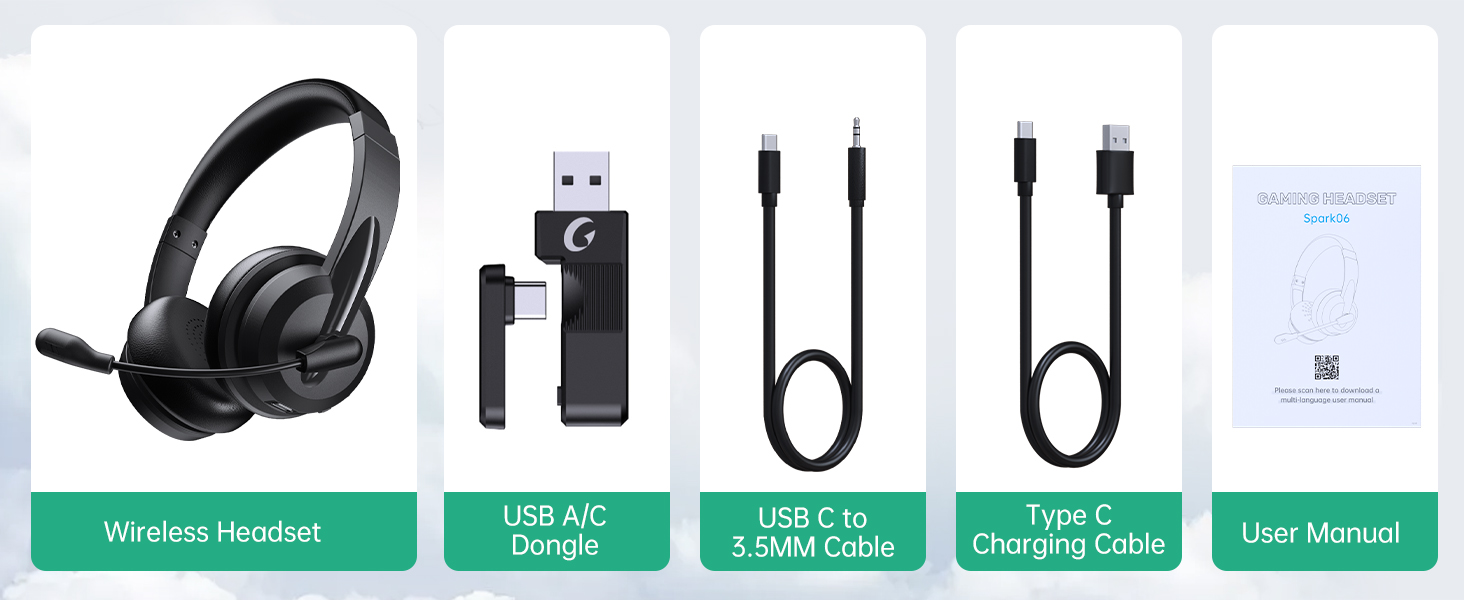
Slika 2: Sadržaj paketa.
Setup
Punjenje slušalica
Before first use, fully charge the headset. Connect the Type C Charging Cable to the headset's charging port and the other end to a USB power source (e.g., computer USB port, wall adapter). The charging indicator light will show the charging status.
- Vrijeme punog punjenja: Približno 2.5 sata
- Vrijeme razgovora: Do 30 sata
- Vrijeme reprodukcije muzike: do 25 sati

Figure 3: Long Battery Life for Extended Use.
Načini povezivanja
The Masajoy headset supports three connection modes:
-
Bluetooth V5.3 Connection:
For wireless connection to Bluetooth-enabled devices (e.g., smartphones, laptops). Ensure the headset is in pairing mode (refer to operating instructions for details). Traži "Spark 06" in your device's Bluetooth settings and connect.
-
2.4G Wireless (USB A/C Dongle):
For wireless connection to computers without Bluetooth or for a dedicated connection. Plug the USB A or USB C dongle into an available USB port on your computer. The headset will automatically connect to the dongle.
-
Wired 3.5mm Audio Cable:
For a wired connection to devices with a 3.5mm audio jack. Connect one end of the USB C to 3.5MM Cable to the headset's USB-C port and the other end to your device's 3.5mm audio jack. This mode is useful when battery is low or for devices that do not support wireless connections.

Figure 4: Dual Connection Options (Bluetooth & 2.4G Wireless).
NOTE: This headset does not support dual device connection simultaneously.
Uputstvo za upotrebu
Uključivanje/isključivanje
- To Power On: Press and hold the Power button until you hear a voice prompt.
- To Power Off: Press and hold the Power button until you hear a voice prompt.
Kontrola jačine zvuka
Use the volume control buttons located on the headset to adjust the listening volume.
Mikrofon s AI poništavanjem buke
The headset features advanced AI noise cancellation to reduce background noise during calls. This feature enhances clarity for the listener.
NOTE: This AI Noise Cancelling feature is only available when connected via Bluetooth.

Figure 5: AI Noise Cancelling in action.
Funkcija isključivanja mikrofona
To mute the microphone, simply rotate the microphone boom to the upright position. A voice prompt will confirm "MIC mute". To unmute, rotate the microphone boom back down.

Figure 6: Microphone Mute Control by Rotation.
Udobnost i dizajn
The headset is designed for all-day wear with protein memory foam ear cups that are soft and breathable, preventing overheating. The adjustable and expandable headband ensures a comfortable fit for most head shapes.

Figure 7: Comfortable and Breathable Design.
Specifikacije
| Feature | Detalj |
|---|---|
| Naziv modela | Spark 06 |
| Tehnologija povezivanja | Wireless (Bluetooth V5.3, 2.4G), Wired (3.5mm) |
| Kontrola buke | AI Noise Cancellation (Bluetooth mode only), Passive Noise Cancellation |
| Trajanje baterije (vrijeme razgovora) | Do 30 sati |
| Trajanje baterije (reprodukcija muzike) | Do 25 sati |
| Vrijeme punjenja | Pribl. 2.5 sati |
| bežični domet | Up to 36 feet (11 meters) for Bluetooth |
| Veličina audio drajvera | 40 milimetara |
| Osetljivost mikrofona | 43 dB |
| Priključak za slušalice | USB-C (for charging/wired audio) |
| Kompatibilni uređaji | PC, Mac, Laptop, Chromebook, tablet, smartphones, MP3 players, PS5, PS4, Xbox one, gaming systems with an aux port |
| Materijal | Faux Leather, Polycarbonate (PC), Metal, Acrylonitrile Butadiene Styrene (ABS) |
| Težina artikla | 10.2 unce |
| Boja | Crna |
Održavanje
- čišćenje: Za čišćenje slušalica koristite meku, suhu krpu. Nemojte koristiti abrazivna sredstva za čišćenje ili rastvarače.
- Skladištenje: Slušalice čuvajte na hladnom i suhom mjestu, dalje od direktne sunčeve svjetlosti i ekstremnih temperatura.
- Održavanje baterije: Da biste produžili vijek trajanja baterije, izbjegavajte često potpuno pražnjenje slušalica. Redovno ih punite, čak i ako ih ne koristite duži period.
- Rukovanje: Avoid dropping the headset or subjecting it to strong impacts. Do not twist or bend the microphone boom excessively beyond its intended rotation.
Rješavanje problema
| Problem | Mogući uzrok | Rješenje |
|---|---|---|
| Slušalice se ne uključuju. | Niska baterija. | Charge the headset fully using the provided Type C charging cable. |
| Nije moguće povezivanje putem Bluetootha. | Headset not in pairing mode; device Bluetooth off; out of range. | Ensure headset is in pairing mode. Turn Bluetooth on your device. Move headset closer to the device (within 36 feet). |
| Nema zvuka iz slušalica. | Jačina zvuka je preniska; na uređaju je odabran pogrešan audio izlaz; slušalice nisu povezane. | Increase headset volume. Check device's audio output settings. Re-establish connection. |
| Mikrofon ne radi. | Microphone muted; incorrect input device selected; AI Noise Cancellation issue. | Ensure microphone boom is not in the upright (muted) position. Check device's microphone input settings. Note that AI Noise Cancellation is only active in Bluetooth mode. |
| Loš kvalitet zvuka / statički šum. | Smetnje; izvan dometa; slaba baterija. | Move away from other wireless devices. Move closer to the connected device. Charge the headset. |
Garancija i podrška
Masajoy products are designed for reliability and performance. For warranty information and technical support, please refer to the official Masajoy website or contact customer service using the details provided in the original product packaging or purchase receipt.
Također možete posjetiti Masajoy Store on Amazon za više informacija o proizvodu i resurse podrške.


