1. Uvod
This manual provides detailed instructions for the installation, operation, and maintenance of your Hodozzy Android Car Stereo, model 2G+64G, specifically designed for Volvo XC60 vehicles manufactured between 2008 and 2013. This head unit features an Android 13 system, 9-inch touchscreen, wireless CarPlay, Android Auto, Mirror Link, GPS navigation, Bluetooth, Wi-Fi, FM/RDS radio, and supports steering wheel controls and a rear view kamera.
2. Sigurnosne informacije
- Prije instalacije i rada pažljivo pročitajte sva uputstva.
- Installation should be performed by a qualified professional to prevent damage to the vehicle or the unit.
- Ne rukujte uređajem na način koji vas odvlači od vožnje. Uvijek dajte prioritet sigurnosti u saobraćaju.
- Izbjegavajte izlaganje uređaja ekstremnim temperaturama, direktnoj sunčevoj svjetlosti tokom dužeg perioda ili prekomjernoj vlazi.
- Provjerite jesu li sve žice ispravno spojene kako biste spriječili kratki spoj ili električne opasnosti.
3. Sadržaj paketa
Provjerite da li su sve komponente prisutne u paketu:
- Hodozzy Android Car Stereo Head Unit (9-inch screen)
- Power Cable
- CANBUS dekoder
- USB kablovi (2x)
- Microphone/Camera Cable
- GPS antena
- RCA kablovi
- Reverse Line Cable
- Korisnički priručnik (ovaj dokument)
- Alat za instalaciju
- Accessories (mounting brackets, screws)
- Backup Camera

Slika: Prekoview of the Hodozzy Android Car Stereo unit, its dimensions, and the included accessories in the packing list.
4. Postavljanje i instalacija
4.1 Compatibility Check:
This product is designed for Volvo XC60 models from 2008 to 2013. It is crucial to verify your car's central control panel configuration. This unit primarily supports vehicles with a left-hand drive configuration (Option A). If your vehicle has a right-hand drive configuration (Option B), please contact customer support for suitable recommendations before proceeding with installation.

Image: Visual guide illustrating the difference between left-hand drive (Option A, compatible) and right-hand drive (Option B, incompatible) central control panels for Volvo XC60.
4.2 Ožičenje:
Refer to the wiring diagrams provided. Ensure all cables are securely connected to their corresponding ports. Incorrect wiring can lead to malfunction or damage.
- Kabl za napajanje: Connect to the vehicle's power harness. The CANBUS decoder ensures proper communication with the vehicle's systems.
- USB kablovi: Connect for external USB devices or charging.
- GPS antena: Mount in a location with a clear view neba za optimalan prijem signala.
- rezervna kamera: Connect the camera's video output to the unit's camera input. Ensure the reverse trigger wire is connected to the vehicle's reverse light signal for automatic activation.
- RCA kablovi: Za eksterni audio/video ulaz/izlaz.

Image: Detailed diagrams showing the connection points on the back of the head unit and descriptions of various cables and their functions.
4.3 Montaža:
Carefully integrate the head unit into your Volvo XC60's dashboard. Use the provided installation tools and accessories to secure the unit. Ensure no wires are pinched or damaged during the mounting process.
5. Uputstvo za upotrebu
5.1 Početno uključivanje:
Nakon instalacije, uključite paljenje vozila. Uređaj bi se trebao automatski uključiti. Slijedite upute na ekranu za početno podešavanje, kao što su odabir jezika i vremenske zone.
5.2 Android 13 System:
The unit runs on Android 13 with 2GB RAM and 64GB ROM. This allows for smooth app usage, multitasking, and ample storage. Connect to a 5G/2.4GHz Wi-Fi hotspot to download applications from the pre-installed app store.
5.3 Bežični CarPlay i Android Auto:
Connect your smartphone wirelessly via Bluetooth and Wi-Fi to access CarPlay (for iOS) or Android Auto (for Android devices). This allows for safe access to navigation, music, messages, and other phone features directly on the car stereo display.

Image: Screenshots demonstrating the user interface for Wireless CarPlay, Android Auto, and Mirror Link functionalities on the car stereo display, with corresponding phone screens.
5.4 Zrcalna veza:
The Mirror Link function allows you to display your phone's screen directly onto the car stereo. This is compatible with both iOS and Android devices, enabling you to view videos or other content from your phone on the larger screen.
5.5 GPS navigacija:
The integrated GPS system provides accurate route guidance with real-time traffic updates. Ensure the GPS antenna is properly installed for optimal signal reception.

Image: Display showing offline and online GPS navigation maps, along with an icon indicating Wi-Fi hotspot connectivity.
5.6 Bluetooth povezivost:
Pair your phone via Bluetooth for wireless music streaming and hands-free calling. Access your phone's contacts and call history directly from the unit.
5.7 FM/RDS Radio:
Tune into FM radio stations with clear reception. The RDS (Radio Data System) feature provides additional information such as station name and traffic updates.
5.8 EQ postavke:
Customize your audio experience with a variety of EQ sound scenes and frequency division adjustments. This allows for a personalized and immersive sound output.

Image: Screenshots of the Bluetooth calling interface, FM/RDS radio tuner, and graphic equalizer (EQ) settings on the car stereo.
5.9 Dual USB Ports:
Utilize the two USB ports for simultaneous charging of devices and playback of music or video files USB memorije.
5.10 Customizable UI Themes:
Choose from 26 different UI desktop themes to personalize the display and user interface according to your preferences.
Image: A collage of various desktop themes available for the 9-inch HD touchscreen, showcasing different layouts and color schemes.
5.11 Steering Wheel Control (SWC):
The unit supports your vehicle's existing steering wheel controls, allowing for hands-free operation of audio and navigation functions without distraction.
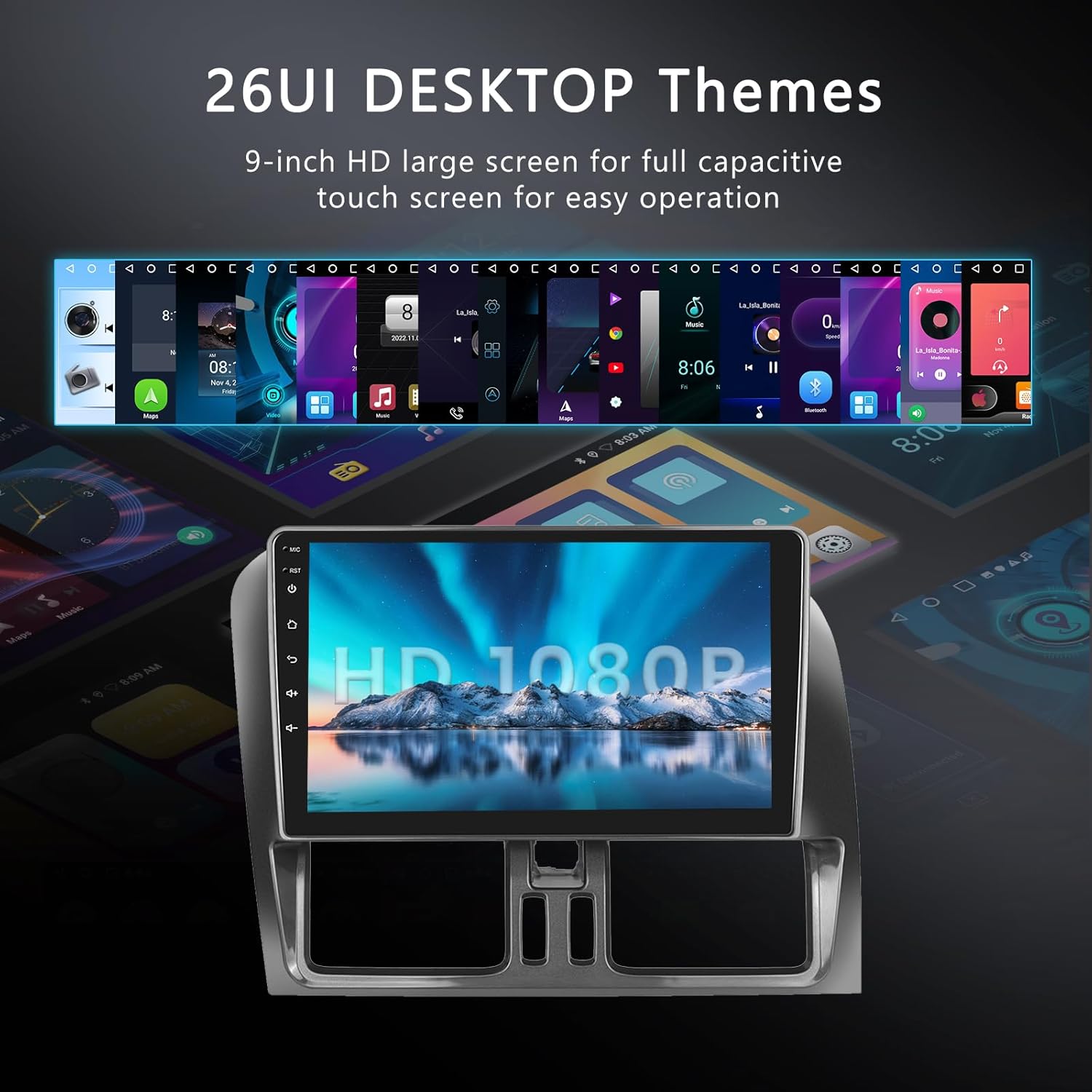
Image: Illustration of steering wheel controls interacting with the car stereo, and a diagram showing the AHD waterproof backup camera with its features (HD image, night vision, 150° wide angle).
5.12 HD zadnji View rezervna kamera:
The included AHD waterproof backup camera enhances parking safety by providing a clear, wide-angle rear view on the display when the vehicle is in reverse. It features HD image quality and night vision capabilities.
Video: A demonstration of the Hodozzy Android Car Stereo's features and user interface in operation. This video provides a visual overview o mogućnostima sistema.
6. Održavanje
- čišćenje: Use a soft, dry cloth to clean the screen and unit. For stubborn marks, slightly dampNapržite krpu vodom. Izbjegavajte jake hemikalije ili abrazivne materijale.
- Ažuriranja softvera: Periodically check for software updates to ensure optimal performance and access to new features. Follow the on-screen instructions for any available updates.
- Uslovi okoline: Ne izlažite uređaj ekstremnim temperaturama ili visokoj vlažnosti.
7. Otkrivanje problema
Ako naiđete na probleme, pogledajte sljedeće uobičajene probleme i rješenja:
| Problem | Mogući uzrok | Rješenje |
|---|---|---|
| Jedinica se ne uključuje. | Neispravno ožičenje napajanja; Pregoreli osigurač; Problem s akumulatorom vozila. | Check power cable connections. Inspect vehicle fuses. Verify vehicle battery health. |
| Nema zvuka ili isprekidan zvuk. | Speaker wiring issues; Volume too low; Mute activated; Incorrect audio settings. | Verify all speaker wires are correctly connected. Adjust volume. Check mute status. Review audio output settings. |
| Kamera za vožnju unazad se ne prikazuje. | Camera not connected; Reverse trigger wire not connected or faulty; Camera power issue. | Ensure camera video and power cables are securely connected. Verify the reverse trigger wire is correctly connected to the vehicle's reverse light signal. |
| GPS signal je slab ili netačan. | GPS antena nepravilno postavljena ili neispravna. | Premjestite GPS antenu na poziciju sa čistim view neba. Provjerite vezu antene. |
| Problemi s uparivanjem putem Bluetootha. | Bluetooth not enabled; Device not in pairing mode; Interference. | Ensure Bluetooth is enabled on both the unit and your device. Put device in pairing mode. Try pairing in a different location. |
| CarPlay/Android Auto se ne povezuje. | Wi-Fi/Bluetooth issues; Phone software outdated; App permissions. | Check Wi-Fi and Bluetooth connections. Ensure phone software is up to date. Verify app permissions on your phone. |
Ako problem i dalje postoji nakon isprobavanja ovih rješenja, obratite se korisničkoj podršci.
8. Specifikacije
| Feature | Detalj |
|---|---|
| Naziv modela | 2G+64G |
| Operativni sistem | Android 13 |
| Veličina ekrana | 9 inča |
| Memorija (RAM) | 2GB |
| Pohrana (ROM) | 64GB |
| Povezivanje | Bluetooth, Wi-Fi (5G/2.4GHz hotspot) |
| Posebne karakteristike | Android Auto, Apple CarPlay, Mirror Link, GPS, FM/RDS Radio, EQ, Steering Wheel Control, Backup Camera Support |
| Vrsta karte | širom svijeta |
| Vrsta montaže | Montaža na instrument tabli |
| Vrsta usluge vozila | Car (Volvo XC60 2008-2013) |
| Težina artikla | 3.43 funte |
| Dimenzije paketa | 13.5 x 8.94 x 3.78 inča |
9. Informacije o garanciji
This product comes with a limited warranty of 2 years from the date of purchase. This warranty covers manufacturing defects and malfunctions under normal use. It does not cover damage caused by improper installation, misuse, accidents, unauthorized repairs, or normal wear and tear. Please retain your proof of purchase for warranty claims.
10. Podrška i kontakt
For technical assistance, troubleshooting, or warranty inquiries, please contact Hodozzy customer support:
- Email: hodozzyofficial@163.com
Please provide your product model number (2G+64G) and a detailed description of your issue when contacting support.


