1. Uvod
This manual provides essential information for the safe and efficient use of your AT&T Cingular Flex 2 Smart Flip Phone (Model 6723D). Please read these instructions carefully before operating your device to ensure optimal performance and longevity.
The Cingular Flex 2 is a compact flip phone designed for reliable communication. It features a vibrant display, a built-in camera for capturing moments, and 4GB of internal storage for essential files and applications. The device operates on KaiOS, offering a streamlined user experience.
2. Šta se nalazi u kutiji
Provjerite da li se u paketu vašeg proizvoda nalaze svi artikli:
- AT&T Cingular Flex 2 Smart Flip Phone
- Adapter za napajanje
- Litijum-jonska baterija (unapred instalirana ili zasebna)
3. Device Overview
Familiarize yourself with the physical components of your AT&T Cingular Flex 2 phone.
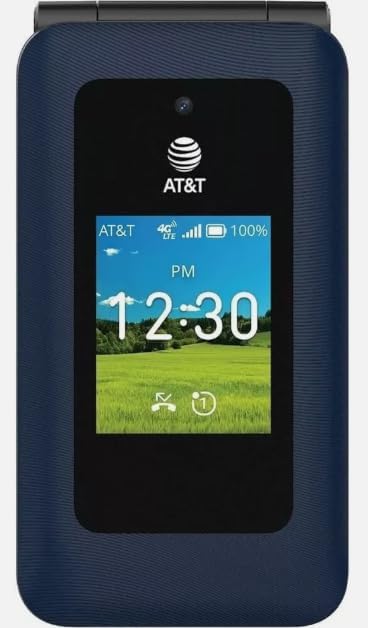
Slika 3.1: Front view of the AT&T Cingular Flex 2 Smart Flip Phone, showing the main display with time, network signal, and battery indicator.

Slika 3.2: Pozadi view of the AT&T Cingular Flex 2 Smart Flip Phone, highlighting the textured back cover and the speaker grille at the top.
Ključne komponente:
- Vanjski zaslon: Shows notifications, time, and caller ID when closed.
- Glavni ekran: Internal screen for navigation and content.
- Tastatura: Numeric and navigation buttons for input.
- kamera: Located on the device for capturing photos and videos.
- Dugmad za jačinu zvuka: Podesite nivoe zvuka.
- Power/End Call Button: Turns the device on/off and ends calls.
- Port za punjenje: Za povezivanje strujnog adaptera.
4. Podešavanje
4.1. Umetanje SIM kartice i baterije
- Uvjerite se da je telefon isključen.
- Pažljivo uklonite zadnji poklopac telefona.
- If the battery is installed, remove it by gently lifting it from the notch.
- Locate the SIM card slot, typically beneath the battery compartment. Insert your SIM card with the gold contacts facing down and the notched corner aligned correctly.
- Insert the battery, ensuring the contacts align with those in the phone.
- Vratite zadnji poklopac dok ne klikne sigurno na svoje mjesto.
4.2. Punjenje uređaja
- Spojite adapter za napajanje na priključak za punjenje na vašem telefonu.
- Uključite adapter za napajanje u standardnu električnu utičnicu.
- Prije prve upotrebe, ostavite telefon da se potpuno napuni. Indikator baterije na ekranu će prikazivati status punjenja.
4.3. Uključivanje / isključivanje napajanja
- Za uključivanje: Pritisnite i držite dugme za napajanje/prekid poziva dok se ekran ne osvijetli.
- Za isključivanje: Pritisnite i držite dugme za uključivanje/isključivanje/prekid poziva, a zatim odaberite "Isključivanje" iz opcija na ekranu.
5. Upravljanje telefonom
5.1. Osnovna navigacija
The Cingular Flex 2 uses a physical keypad for navigation. Use the directional pad (D-pad) to move between menu items and the center button to select. The left and right soft keys perform actions indicated on the screen above them.
5.2. Upućivanje i primanje poziva
- Za upućivanje poziva: Enter the phone number using the keypad and press the Call button (usually the green button).
- Da odgovorite na poziv: Kada telefon zazvoni, pritisnite dugme za poziv.
- Za završetak poziva: Press the Power/End Call button (usually the red button).
5.3. Slanje i primanje poruka
Iz glavnog menija idite na aplikaciju 'Poruke'.
- To Send a New Message: Select 'New Message', enter the recipient's number or select from contacts, then type your message using the keypad.
- Note on Multimedia Messaging: Sending photos via text message may not be consistently supported. Receiving multimedia messages can also be intermittent.
- Voice to Text: This device does not support voice-to-text input for messaging.
5.4. Upotreba kamere
The phone includes a built-in camera. You can access it via the main menu or by pressing the dedicated camera shortcut button on the side of the device.
- Slikati: Open the camera app, frame your shot, and press the center button or camera button to capture.
- Snimanje video zapisa: Switch to video mode within the camera app and press the record button.
5.5. Internet i aplikacije
The Cingular Flex 2 runs on KaiOS. Access the KaiOS store for additional applications. Pre-installed apps include YouTube and a feature-reduced version of Google Maps. Be aware that some utility apps downloaded from the store may display advertisements.
6. Održavanje
6.1. Održavanje baterije
- Izbjegavajte izlaganje baterije ekstremnim temperaturama.
- Charge the battery using only the provided power adapter.
- Unplug the charger once the battery is fully charged to conserve energy.
6.2. Čišćenje uređaja
Za čišćenje ekrana i kućišta telefona koristite meku, suhu krpu koja ne ostavlja dlačice. Izbjegavajte upotrebu jakih hemikalija ili abrazivnih materijala.
6.3. Ažuriranja softvera
Periodically check for software updates in the phone's settings menu to ensure your device has the latest features and security enhancements.
7. Otkrivanje problema
If you encounter issues with your Cingular Flex 2, refer to the following common problems and solutions:
| Problem | Moguće rješenje |
|---|---|
| Slow interface or app loading | Close unused applications. Restart the phone. Consider uninstalling less frequently used apps to free up resources. |
| Operating System crashes | Restart the device. Ensure the software is up to date. If persistent, a factory reset may be necessary (back up data first). |
| Wi-Fi or network connectivity issues | Toggle Wi-Fi/Mobile Data off and on. Restart the phone. Check router or network settings. Ensure notifications for network disconnections are managed in settings to avoid excessive alerts. |
| Keyboard input errors (e.g., double key strokes) | Ensure you are pressing keys firmly and deliberately. If the issue persists, contact customer support. |
| Cannot send photos via text message | This is a known limitation for some devices. Try alternative methods for sharing images if available, or reduce image size if an option. |
| Loše trajanje baterije | Reduce screen brightness. Close background apps. Limit use of power-intensive features like GPS. Ensure the battery is fully charged. |
7.1. Factory Reset
Vraćanje na fabričke postavke će izbrisati sve podatke sa vašeg telefona i vratiti ga na originalne fabričke postavke. Ovo može riješiti uporne probleme sa softverom. Back up all important data before performing a factory reset. Consult your phone's settings menu for the 'Reset' or 'Erase all data' option.
8. Specifikacije
Detailed technical specifications for the AT&T Cingular Flex 2 Smart Flip Phone (Model 6723D):
| Feature | Specifikacija |
|---|---|
| Naziv modela | Cingular Flex 2 |
| Broj modela stavke | 6723D |
| Brand | AT&T |
| Operativni sistem | KaiOS |
| Kapacitet memorije | 4 GB |
| Veličina instalirane RAM memorije | 512 MB |
| CPU model | Mediatek Dimensity 1100 |
| Rezolucija | 720 x 1520 |
| Tehnologija povezivanja | 4G LTE |
| Cellular Technology | 4G |
| Wireless Carrier | Otključano |
| GPS | Istina |
| Form Factor | Flip |
| Boja | Classic Navy |
| Kapacitet baterije | 1400 Milliamp Sati |
| Ocjena snage baterije | 2800 Amp Sati |
| Težina artikla | 7.4 unci (0.21 kilograma) |
| Dimenzije paketa | 4.69 x 2.91 x 2.13 inča |
| Proizvođač | AT&T |
| Datum prve dostupnosti | 11. februara 2025 |
9. Garancija i podrška
For warranty information, please refer to the documentation provided with your purchase or visit the official AT&T support website. If you require technical assistance or have questions not covered in this manual, please contact AT&T customer support.
Dodatne resurse za podršku i kontakt informacije možete pronaći na AT&T prodavnica na Amazonu.


