1. Proizvod je gotovview
This manual provides instructions for the Fanttik F2 Master Mini Cordless Rotary Tool Kit and the Fanttik D2 PLUS Laser Level. These tools are designed for precision tasks and accurate leveling applications.

Image 1.1: The Fanttik F2 Master Mini Cordless Rotary Tool (left) and D2 PLUS Laser Level (right).
1.1 F2 Master Mini Cordless Rotary Tool
The F2 Master is a compact, cordless rotary tool featuring a brushless hollow cup motor for reduced noise and enhanced performance. It offers 5 adjustable speed settings for various precision tasks such as grinding, polishing, drilling, and engraving. The tool includes a Revostor Hub for organized accessory storage and a durable aluminum case with a pop-up mechanism for easy access.
1.2 D2 PLUS Laser Level
The D2 PLUS is a high-precision laser level utilizing advanced high-brightness green laser technology. It provides a projection range of up to 100 ft with an accuracy of 3/32 inches at 30 ft. It features independent or combined vertical and horizontal line projection, a wide-angle expansion for vertical lines, and a pulse mode for extended working range with an optional receiver.
2. Sigurnosne informacije
Uvijek se pridržavajte sljedećih sigurnosnih mjera opreza kako biste spriječili ozljede i oštećenje proizvoda.
- Prije upotrebe pročitajte sva uputstva.
- Wear appropriate personal protective equipment, such as safety glasses, when operating the rotary tool.
- Održavajte radni prostor čistim i dobro osvijetljenim.
- Nemojte koristiti električne alate u eksplozivnoj atmosferi, kao što je prisustvo zapaljivih tečnosti, gasova ili prašine.
- Držite djecu i osobe u blizini dok koristite električni alat.
- Alat čuvajte van domašaja djece.
2.1 Laser Safety
The D2 PLUS Laser Level is a Class II laser product. Observe the following precautions:
- OPREZ: Ne gledajte direktno u laserski snop.
- Ne usmjeravajte laserski snop namjerno prema ljudima ili životinjama.
- Avoid exposing the eyes to direct or reflected laser beams.
- Ne modificirajte laserski uređaj.
- Koristite samo onako kako je opisano u ovom priručniku.
3. Sadržaj paketa
Provjerite da li se u vašem paketu nalaze sve dolje navedene stavke:

Image 3.1: Contents of the D2 PLUS Laser Level package.
- D2 PLUS laserski nivo
- USB-C kabl
- Magnetski nosač
- Target Plate
- Torba sa vrpcom
- Uputstvo za upotrebu
- F2 Master Mini Cordless Rotary Tool
- F2 Master Revostor Hub with 35 accessories (3/32" / 2.3mm)
- F2-M2 Magnetic Wrench
4. F2 Master Rotary Tool - Setup & Operation
4.1 Komponente iznadview
- Rotary Tool Body: Main unit with motor and battery.
- stezaljka: Holds the accessory bits.
- Indikatorska svjetla brzine: Display current speed setting.
- Dugme za napajanje/brzinu: Controls power and speed.
- Revostor Hub: Magnetic stand for organizing accessories.
- Aluminum Case: Protective case with pop-up mechanism.
4.2 Punjenje rotacionog alata
The F2 Master is battery-powered. Ensure it is fully charged before first use.
- Connect the USB-C charging cable to the charging port on the rotary tool.
- Drugi kraj kabla priključite na odgovarajući USB adapter za napajanje (nije uključen).
- The indicator lights will show charging status. Once fully charged, disconnect the cable.
4.3 Pričvršćivanje dodatne opreme
The Revostor Hub provides organized storage and easy access to various accessories.

Image 4.1: The Revostor Hub for organized accessory storage.
- Ensure the rotary tool is turned off.
- Odvrnite maticu stezne glave.
- Insert the desired accessory bit (3/32" / 2.3mm shank) into the collet.
- Tighten the collet nut securely using the F2-M2 Magnetic Wrench to hold the bit in place. Do not overtighten.
4.4 Uključivanje/isključivanje i podešavanje brzine
The F2 Master features a brushless motor for efficient and quiet operation.

Image 4.2: The F2 Master operates quietly at 32 dB when idle.
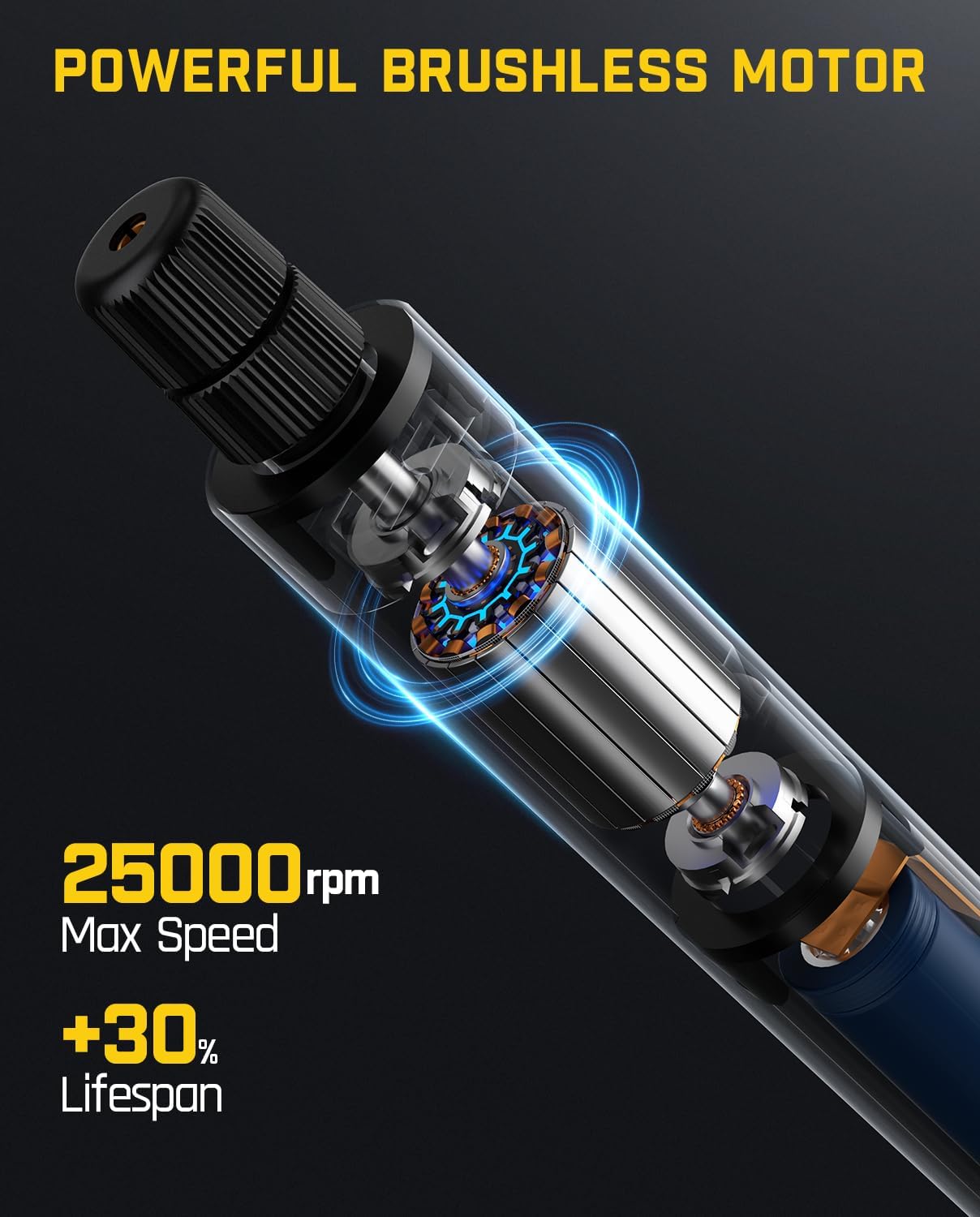
Image 4.3: The F2 Master's powerful brushless motor provides up to 25,000 RPM.
- Za uključivanje: Press and hold the Power/Speed button until the indicator lights illuminate. The tool will start at the lowest speed setting.
- Za podešavanje brzine: Briefly press the Power/Speed button to cycle through the 5 available speed settings. The indicator lights will show the selected speed.
- Za isključivanje: Press and hold the Power/Speed button until the indicator lights turn off.
5. D2 PLUS Laser Level - Setup & Operation
5.1 Komponente iznadview
- Laserski emiteri: Project horizontal and vertical green laser lines.
- Kontrolna tabla: Buttons for power, mode selection, and pulse mode.
- Brava klatna: Secures the pendulum for manual mode or transport.
- Indikator baterije: Prikazuje preostalo trajanje baterije.
- USB-C priključak za punjenje: Za punjenje interne baterije.
5.2 Charging the Laser Level
The D2 PLUS has a 2600 mAh rechargeable battery, providing 7-14 hours of continuous use.

Image 5.1: The D2 PLUS Laser Level features a USB-C charging port.
- Connect the provided USB-C charging cable to the charging port on the side of the laser level.
- Drugi kraj kabla priključite na odgovarajući USB adapter za napajanje (nije uključen).
- The battery indicator lights will show charging status. Disconnect once fully charged.
5.3 Uključivanje/isključivanje i odabir načina rada
The D2 PLUS uses an OSRAM green laser, which is four times brighter than traditional red lasers.

Image 5.2: The D2 PLUS utilizes a bright OSRAM green laser.

Image 5.3: The D2 PLUS offers three distinct line modes.

Image 5.4: Manual Mode (left) and Self-Leveling Mode (right) applications.
- Način samoniveliranja: Unlock the pendulum by sliding the pendulum lock switch to the 'unlocked' position. Press the power button to turn on the laser. The laser will self-level within 4 degrees. If the tilt exceeds 4 degrees, the laser will flash rapidly to indicate it is out of level. Press the power button to cycle through horizontal line, vertical line, or both.
- Ručni način rada: Lock the pendulum by sliding the pendulum lock switch to the 'locked' position. Press and hold the power button for 3 seconds to turn on the laser. The laser lines can now be projected at any angle without self-leveling. Press the power button to cycle through horizontal line, vertical line, or both.
- Pulsni način rada: In self-leveling mode, briefly press the pulse mode button (often indicated by a 'P' or wave icon) to activate pulse mode. This mode extends the working range up to 200 ft when used with a compatible laser receiver (not included), especially useful in bright environments.

Image 5.5: Pulse Mode extends the working range of the D2 PLUS Laser Level.
5.4 Montiranje laserskog nivelira
The D2 PLUS can be mounted using its integrated magnetic bracket or a tripod.

Image 5.6: The D2 PLUS offers high precision, up to ±3/32 in at 30 ft.
- Magnetni nosač: Attach the magnetic bracket to metallic surfaces for stable positioning.
- Montaža stativa: The laser level has a standard tripod thread (1/4"-20) on its base for mounting to a tripod (not included).
6. Održavanje
Proper maintenance ensures the longevity and optimal performance of your tools.

Image 6.1: The D2 PLUS Laser Level is designed for durability against dust, water, and minor impacts.
- čišćenje: Koristite meku, damp cloth to clean the tool surfaces. Do not use abrasive cleaners or solvents. For the laser level, gently wipe the laser windows with a clean, lint-free cloth.
- Skladištenje: Store both tools in their original packaging or a protective case in a dry, cool place, away from direct sunlight and extreme temperatures. Ensure the pendulum lock on the laser level is engaged during storage and transport.
- Održavanje baterije: For optimal battery life, charge the tools regularly, even if not in frequent use. Avoid fully discharging the batteries for extended periods.
- inspekcija: Periodically inspect the tools for any signs of damage, loose parts, or wear. Do not operate damaged tools.
7. Otkrivanje problema
Pogledajte donju tabelu za uobičajene probleme i njihova rješenja.
| Problem | Mogući uzrok | Rješenje |
|---|---|---|
| F2 Master does not turn on. | Niska baterija. | Charge the rotary tool using the USB-C cable. |
| F2 Master accessory bit is loose. | Collet nut not tightened sufficiently. | Ensure the collet nut is securely tightened with the magnetic wrench. |
| D2 PLUS laser lines are flashing rapidly. | Laser level is out of its self-leveling range (>4 degrees). | Place the laser level on a flatter surface or adjust its position until the flashing stops. |
| D2 PLUS laser lines are dim or not visible outdoors. | Jarko ambijentalno svjetlo. | Activate Pulse Mode and use a compatible laser receiver (not included). |
| D2 PLUS laser lines are not self-leveling. | Pendulum lock is engaged (Manual Mode). | Slide the pendulum lock switch to the 'unlocked' position for Self-Leveling Mode. |
If you encounter issues not covered here, please contact Fanttik customer support.
8. Specifikacije
8.1 Fanttik F2 Master Mini bežični rotacijski alat
| Feature | Specifikacija |
|---|---|
| Tip motora | Brushless Hollow Cup Motor |
| Maksimalna brzina rotacije | 25,000 RPM |
| Postavke brzine | 5 podesivih postavki |
| Noise Level (Idle) | 32 dB |
| Težina | 0.22 lb |
| Accessory Shank Size | 3/32" / 2.3mm |
| Izvor napajanja | Battery Powered |
| Posebne karakteristike | Portable, Cordless, Revostor Hub, Aluminum Case |
8.2 Fanttik D2 PLUS Laser Level
| Feature | Specifikacija |
|---|---|
| Laser Type | Green Laser (OSRAM) |
| Klasifikacija lasera | Class II, <1 mW |
| Raspon projekcije | Do 100 stopa |
| Preciznost | ±3/32 inča na 30 stopa |
| Opseg samoniveliranja | ±4 stepeni |
| Ugao vertikalne linije | 130° |
| Kapacitet baterije | 2600 mAh |
| Vrijeme neprekidne upotrebe | 7-14 sata |
| Port za punjenje | USB-C |
| Trajnost | Dust Resistance, Water Resistance, Resistant to fall from 1m |
9. Garancija i podrška
Fanttik products are manufactured to high-quality standards. For warranty information or technical support, please refer to the warranty card included in your package or visit the official Fanttik webstranica. Molimo vas da prilikom kontaktiranja podrške pripremite broj modela i datum kupovine.
For further assistance, you may contact Fanttik customer service through their official channels.


