1. Uvod
Thank you for choosing the Angrox Voice Remote Control. This remote is specifically designed as a replacement for Philips Google Smart TVs, offering enhanced functionality including voice control and dedicated shortcut buttons for popular streaming services. Please read this manual carefully to ensure proper setup and operation.

Slika: Prednja i bočna view of the Angrox Voice Remote Control, showcasing njegovim ergonomskim dizajnom i rasporedom tipki.
2. Podešavanje
2.1 Instalacija baterije
The remote requires two (2) AAA batteries (not included). Ensure correct polarity when inserting the batteries.
- Uklonite poklopac baterije na stražnjoj strani daljinskog upravljača povlačenjem prema dolje.
- Insert two AAA batteries, matching the positive (+) and negative (-) terminals as indicated inside the battery compartment.
- Vratite poklopac baterije tako što ćete ga gurnuti nazad na mjesto dok ne klikne sigurno.

Image: A three-step diagram illustrating how to remove the battery cover, insert two AAA batteries, and replace the cover.
2.2 Uparivanje s vašim TV-om
Before using the remote, it must be paired with your Philips Google Smart TV. This remote supports both infrared and Bluetooth technology for optimal performance.
- Ensure your Philips Google Smart TV is powered on.
- Hold down the "VOL-" button and the "Mic" (Google Assistant) button simultaneously for 5 seconds.
- The remote will initiate the pairing process. All pairing transactions occur in the background, and no further setup is typically required once the pairing is successful.

Image: A hand holding the remote, with an arrow pointing from the 'VOL-' and 'Mic' buttons to a TV screen, illustrating the pairing process.

Image: A visual guide showing the remote and a TV screen with on-screen instructions for pairing, emphasizing holding the VOL- and Mic buttons.
2.3 Kompatibilni modeli televizora
This voice replacement remote is compatible with the following Philips Google Smart TV series:
- 7000 serija: 75PUL7552/F7, 65PUL7552/F7, 55PUL7552/F7, 50PUL7552/F7, 43PUL7652/F7
- 7600 serija: 65PUL7672/F7, 55PUL7672/F7, 50PUL7672/F7, 43PUL7672/F7

Image: The remote control centered between two Philips Google Smart TVs, with lists of compatible 7000 and 7600 series models.
3. Uputstvo za upotrebu
3.1 Funkcije dugmadi iznadview
Familiarize yourself with the various buttons and their functions on your Angrox remote control:
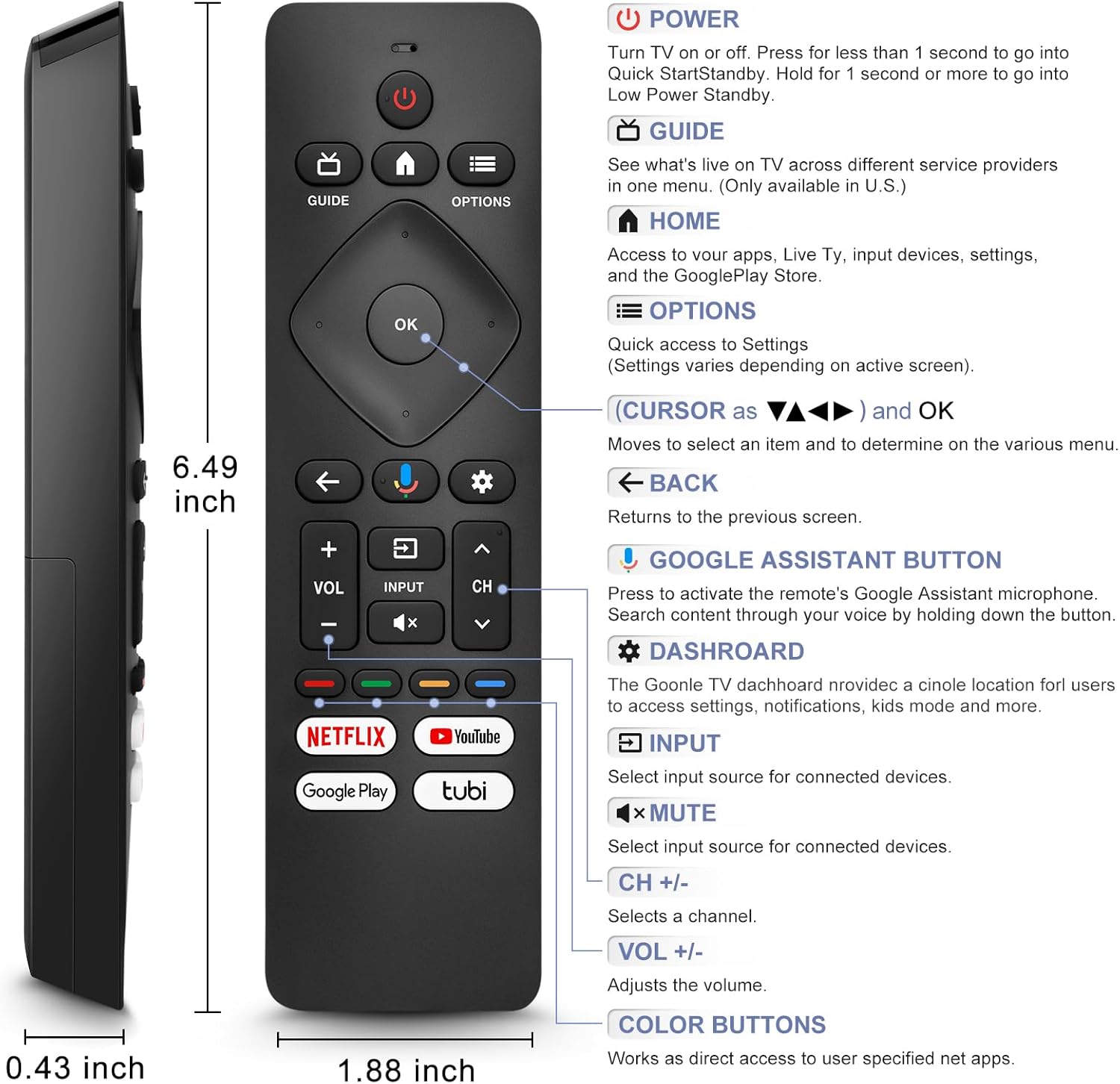
Image: A detailed diagram of the remote control with labels and descriptions for each button, including Power, Guide, Home, Options, Cursor/OK, Back, Google Assistant, Dashboard, Input, Mute, Volume, Channel, and Color Buttons.
- Snaga: Press to turn TV on or off. Hold for 1 second for Quick Start Standby, or longer for Low Power Standby.
- vodič: Access live TV service providers (availability may vary by region).
- Početna: Access apps, Live TV, input devices, settings, and the Google Play Store.
- Opcije: Quick access to settings (settings vary based on active screen).
- Cursor (Up/Down/Left/Right) & OK: Navigacija kroz menije i potvrđivanje odabira.
- nazad: Vratite se na prethodni ekran.
- Dugme Google asistenta: Press and hold to activate the remote's microphone for voice search.
- Kontrolna tabla: Access the Google TV dashboard for settings, notifications, and kids mode.
- Unos: Odaberite izvor ulaza za povezane uređaje.
- Isključi zvuk: Mute or unmute the TV audio.
- VOL +/-: Podesite nivo jačine zvuka.
- CH +/-: Select the next or previous channel.
- Dugmad u boji: Provide direct access to user-specified net apps.
3.2 Voice Search Function
The integrated voice function allows for easier and more intuitive interaction with your smart TV. Simply press and hold the Google Assistant button and speak your command or query.
- Pritisnite i držite Dugme Google Assistant (microphone icon).
- Govorite jasno u mikrofon daljinskog upravljača.
- Otpustite dugme kada završite sa govorom.
Examples of voice commands include: "What's the weather today?", "Turn down the volume", "Open YouTube", or searching for specific content.
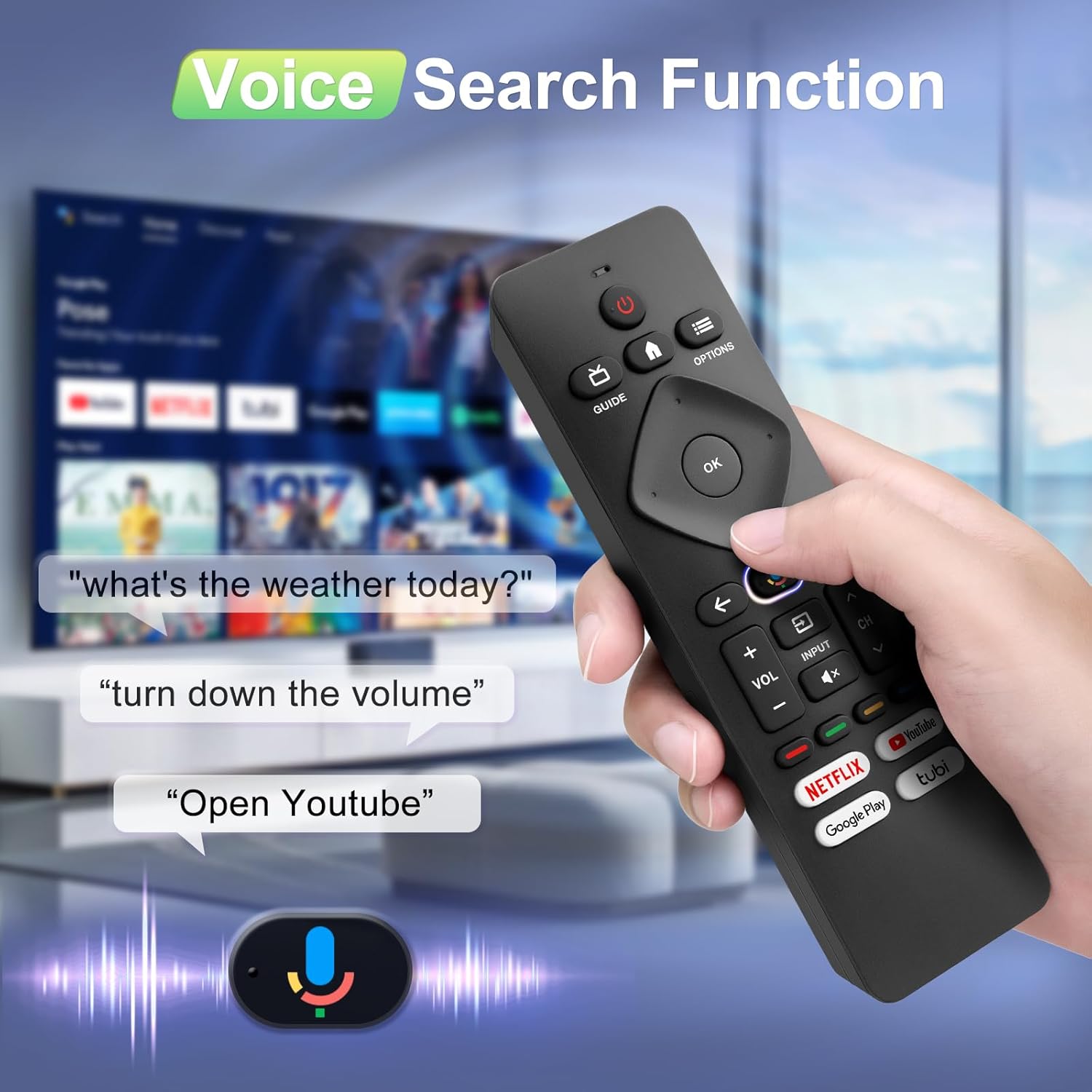
Image: A hand holding the remote, with speech bubbles showing example voice commands like "what's the weather today?" and "Open Youtube", demonstrating the voice search capability.
3.3 Dugmad prečica
The remote features four dedicated shortcut buttons for quick access to popular streaming channels:
- Netflix
- YouTube
- Google Play
- Tubi
Pressing these buttons will directly launch the respective application on your TV, provided they are installed and configured.

Image: The remote control highlighting the four dedicated shortcut buttons for Netflix, YouTube, Google Play, and Tubi, with their respective logos.
4. Održavanje
Da biste osigurali dugotrajnost i optimalne performanse vašeg daljinskog upravljača, slijedite ove smjernice za održavanje:
- čišćenje: Obrišite daljinski upravljač mekom, suhom krpom. Ne koristite tekuća sredstva za čišćenje ili abrazivne materijale.
- Zamjena baterije: Zamijenite baterije kada daljinski upravljač postane spor ili prestane raditi. Uvijek zamijenite obje baterije istovremeno novima.
- Skladištenje: Daljinski upravljač čuvajte na hladnom i suhom mjestu, dalje od direktne sunčeve svjetlosti i ekstremnih temperatura.
- Izbjegavajte kapi: Zaštitite daljinski upravljač od fizičkih udara, jer padovi mogu oštetiti unutrašnje komponente.
5. Otkrivanje problema
Ako imate problema s daljinskim upravljačem, pogledajte sljedeća uobičajena rješenja:
- Daljinski ne reaguje:
- Provjerite jesu li baterije pravilno umetnute s ispravnim polaritetom.
- Zamijenite stare baterije novim AAA baterijama.
- Provjerite da nema prepreka između daljinskog upravljača i IR prijemnika televizora.
- Glasovna funkcija ne radi:
- Ensure the remote is properly paired with your TV via Bluetooth. Refer to Section 2.2.
- Make sure you are pressing and holding the Google Assistant button while speaking.
- Provjerite postavke televizora kako biste bili sigurni da je glasovno upravljanje omogućeno.
- Dugmad ne reagiraju ili su ljepljiva:
- Clean the remote surface, especially around the buttons, to remove any dirt or debris.
- If buttons remain unresponsive after cleaning and battery replacement, the remote may require replacement.
- Short Remote Distance:
- The remote supports infrared and Bluetooth. Ensure no physical obstructions are blocking the signal.
- The remote is designed for optimal performance within 10 meters (approximately 33 feet) and is available up to 12 meters (approximately 39 feet).
6. Specifikacije
| Brand | Angrox |
| Broj modela | URMT26CND002 |
| Kompatibilni uređaji | Philips Google Smart TVs (7000 & 7600 Series) |
| Tehnologija povezivanja | Infrared, Bluetooth |
| Posebne karakteristike | Ergonomic, Voice Search, Shortcut Buttons |
| Izvor napajanja | 2 x AAA baterije (nisu uključene) |
| Težina artikla | 2.39 unci (približno 67.7 grama) |
| Dimenzije paketa | 6.73 x 1.93 x 1.02 inča |
| Izdržljivost dugmadi | Tested for 5,000-8,000 clicks per button |
7. Garancija i podrška
Angrox is committed to providing excellent after-sale service. We focus on the compatibility and quality of our replacement remotes. If you have any questions or concerns regarding your order or the product, please do not hesitate to contact us directly. Our professional after-sale service team is available to assist you.
For support, please refer to the contact information provided with your purchase or visit the Angrox store on Amazon.
