1. Proizvod je gotovview
The Nokia G310 5G Smartphone (Model TA-1573) offers lightning-fast 5G connectivity and modern mobile technology. It features a vibrant display for various tasks, a powerful processor for smooth performance, and an advanced camera system for detailed photos. Designed for daily use, it provides a comfortable grip and durable build quality. Enjoy extensive network compatibility, ample storage, a long-lasting battery with quick charging, and a user-friendly interface with regular software updates.
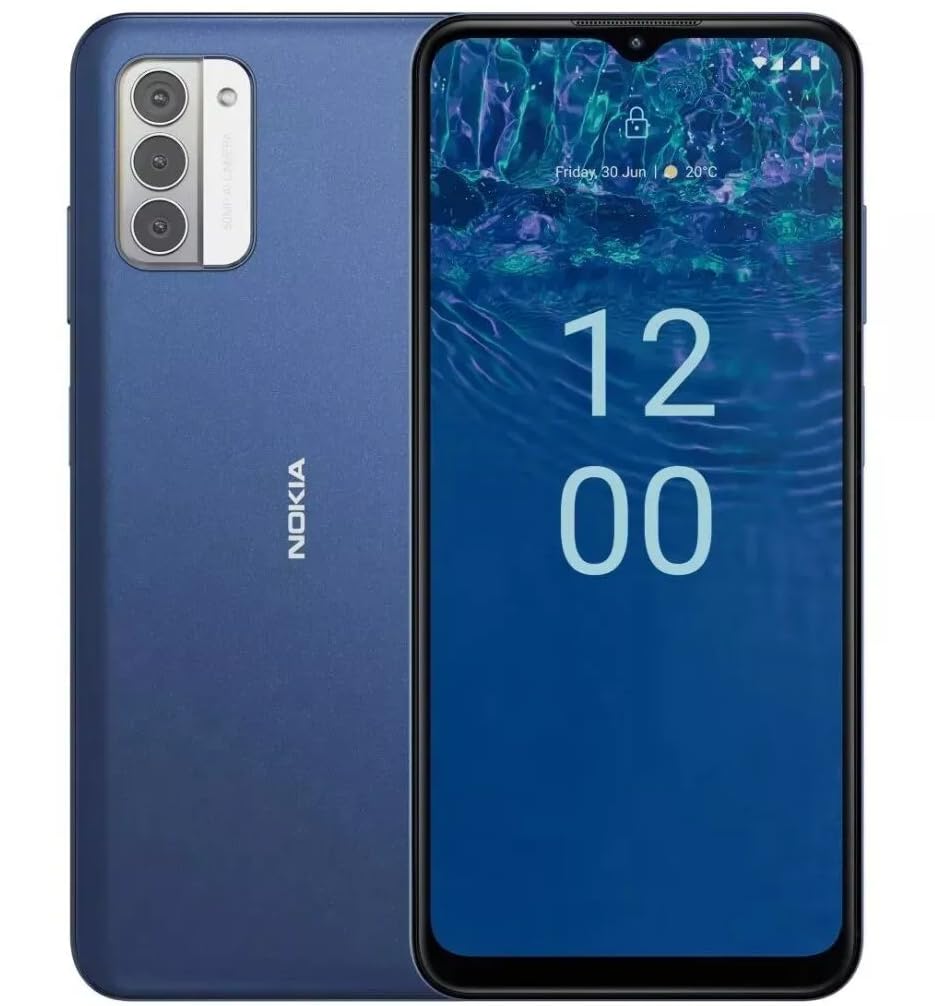
Slika: Stražnja strana view of the Nokia G310 5G Smartphone, showcasing the triple camera module and Nokia branding.
Ključne karakteristike
- 5G povezivanje: Experience ultra-fast mobile data speeds and low latency.
- Živopisni ekran: Large touchscreen display delivers vibrant colors and sharp visuals.
- Efikasne performanse: Processor handles everyday tasks smoothly, from browsing to gaming.
- Izdržljiv dizajn: Sleek and modern smartphone design with durable construction.
2. Getting Started
Šta je u kutiji
- Nokia G310 5G pametni telefon
- Punjač
SIM and MicroSD Card Installation
Locate the SIM/MicroSD card tray on the side of your device. Use the provided SIM ejector tool to open the tray. Insert your Nano-SIM card(s) and/or MicroSD card into the designated slots. Ensure the cards are correctly oriented. Gently push the tray back into the device until it clicks into place.
Uključivanje/isključivanje
To power on your Nokia G310, press and hold the Power/Fingerprint Sensor button located on the right side of the device until the Nokia logo appears. To power off, press and hold the Power/Fingerprint Sensor button, then select 'Power off' from the options that appear on the screen.
3. Izgled uređaja
Physical Buttons and Ports
- Dugmad za jačinu zvuka: Located on the right side, above the Power/Fingerprint Sensor button, for adjusting media and call volume.
- Power/Fingerprint Sensor Button: Located on the right side, used for powering the device on/off, locking/unlocking the screen, and fingerprint authentication.
- USB-C priključak: Nalazi se na dnu, koristi se za punjenje i prijenos podataka.
- 3.5 mm audio priključak: Nalazi se na dnu, za spajanje žičanih slušalica.
- govornik: Nalazi se na dnu za audio izlaz.
- mikrofon: Integrisan za pozive i glasovne komande.
Modul kamere
The rear of the device features a multi-lens camera module, including a main camera, along with a flash for low-light photography. The front-facing camera is discreetly placed within a notch at the top of the display.
4. Uputstvo za upotrebu
Osnovna navigacija
The Nokia G310 operates on the Android operating system, offering an intuitive touchscreen interface. Swipe up from the bottom of the screen to access the app drawer, swipe down from the top for notifications and quick settings, and use gestures or navigation buttons (configurable in settings) to move between apps and screens.
Povezivanje
- 5G mobilni podaci: The device supports 5G connectivity for ultra-fast mobile data speeds. Ensure your SIM card and plan support 5G.
- Wi-Fi: Connect to wireless networks for internet access. Go to Settings > Network & internet > Wi-Fi to manage connections.
- Bluetooth: Pair with other Bluetooth-enabled devices like headphones or speakers. Go to Settings > Connected devices > Bluetooth.
- GPS: Utilize built-in GPS for location services and navigation.
5. Upotreba kamere
The Nokia G310 features an advanced camera system designed to capture memorable moments. Access the camera app from your home screen or app drawer.
Snimanje fotografija
Open the Camera app, frame your shot, and tap the shutter button on the screen to take a picture. The advanced AI camera assists in optimizing settings for various scenes.
Snimanje video zapisa
In the Camera app, switch to video mode, then tap the record button to start and stop recording. The phone supports various video resolutions.
Režimi kamere
Explore different camera modes available in the camera app, such as Portrait, Panorama, and Night mode, to enhance your photography experience.
6. Upravljanje baterijom
Punjenje vašeg uređaja
The Nokia G310 is equipped with a 5000 Milliamp Hours (5000.0 Battery Power Rating) battery. Connect the provided USB-C charger to the port at the bottom of the device. The phone supports quick charging for reduced downtime.
Optimiziranje vijeka trajanja baterije
- Podesite svjetlinu ekrana na ugodan nivo.
- Omogućite način rada za uštedu baterije kada je baterija slaba.
- Zatvorite nekorištene aplikacije koje rade u pozadini.
- Isključite Wi-Fi, Bluetooth ili GPS kada ih ne koristite.
7. Tehničke specifikacije
| Broj modela | TA-1573 |
| Operativni sistem | Android |
| CPU model | MediaTek Helio P60T |
| Cellular Technology | 5G |
| Wireless Carrier | Otključano |
| Kapacitet memorije | 4 GB |
| Rezolucija | 1080 x 2340 |
| Unos ljudskog interfejsa | Touchscreen |
| Kapacitet baterije | 5000 Milliamp Sati |
| Audio Jack | 3.5 mm |
| Boja | Plava |
| Proizvođač | Nokia |
| Datum prve dostupnosti | 31. januara 2025 |
8. Otkrivanje problema
If you encounter issues with your Nokia G310, try the following common troubleshooting steps:
- Uređaj ne reaguje: Pritisnite i držite dugme za napajanje oko 10-15 sekundi da biste prisilno ponovo pokrenuli računar.
- Problemi s povezivanjem: Toggle Wi-Fi or Bluetooth off and on. Restart your device. Check network settings.
- Aplikacija ne radi: Obrišite keš memoriju i podatke aplikacije u Postavkama > Aplikacije. Ako problem i dalje postoji, deinstalirajte i ponovo instalirajte aplikaciju.
- Baterija se brzo prazni: Review battery usage in Settings > Battery to identify power-hungry apps. Adjust screen brightness and enable Battery Saver.
- Memorija je puna: Izbrišite nepotrebno files, photos, or apps. Transfer media to a computer or cloud storage. Consider using a MicroSD card for additional storage.
9. Održavanje i njega
- čišćenje: Use a soft, lint-free cloth to clean your device. Avoid harsh chemicals or abrasive materials.
- Ažuriranja softvera: Regularly check for and install software updates to ensure your device runs optimally and has the latest security features. Go to Settings > System > System update.
- Upravljanje skladištem: Periodično review your device's storage to free up space and maintain performance.
- Uslovi okoline: Avoid exposing your device to extreme temperatures, direct sunlight, or excessive moisture.
10. Garancija i podrška
For warranty information, please refer to the warranty card included in your product packaging or visit the official Nokia support website. For further assistance, contact Nokia customer support.


