1. Uvod
This manual provides comprehensive instructions for the setup, operation, and maintenance of your SPYPOINT Flex-Dark Cellular Trail Camera. Please read this guide thoroughly to ensure proper use and optimal performance of your device. The SPYPOINT Flex-Dark is designed for outdoor use, capturing high-resolution photos and videos of wildlife with cellular transmission capabilities.
2. Proizvod je gotovview i ključne karakteristike
The SPYPOINT Flex-Dark Cellular Trail Camera offers advanced features for reliable outdoor monitoring:
- Noćni vid bez sjaja: Equipped with no-glow LEDs, the camera operates discreetly in total darkness, emitting no visible light. Users can remotely switch between no-glow and low-glow settings via the SPYPOINT app for adaptable control.
- Slika visoke rezolucije: Captures crystal-clear 40MP photos and 1080p videos with sound. Captured media is transmitted directly to your cell phone via the free SPYPOINT app.
- Advanced Camera Settings: Fine-tune camera performance with features such as Multi-shot, Time-Lapse+, customizable scheduling, and in-app maps.
- Mobilna povezanost: Features cross-carrier cellular coverage, automatically connecting to the best available signal for reliable photo and video transmission without requiring Wi-Fi.
- Durable and Weather-Resistant Design: Built for rugged outdoor environments, the camera features a reinforced ghost grey casing for superior concealment and durability. The semi-flexible antenna with secure brass fittings resists damage, and an upgraded latch ensures easy opening, even in cold weather.
- Included Photo Transmission Plan: A free plan providing 100 photos per month is included. Optional upgrade plans are available for more photos.
3. Šta se nalazi u kutiji
Upon unboxing your SPYPOINT Flex-Dark Cellular Trail Camera, verify that all components are present:
- SPYPOINT FLEX-DARK Camera
- Instalacioni remen

SPYPOINT Flex-Dark Cellular Trail Camera with packaging and strap.
4. Vodič za postavljanje
4.1. Fizička postavka
- Umetnite baterije: The camera requires batteries (not included). Ensure correct polarity when inserting. For optimal performance, consider using SPYPOINT LIT-22 rechargeable lithium batteries.
- Umetnite MicroSD karticu: Open the camera latch and insert a compatible MicroSD card (up to 32GB, not included) into the designated slot.
- Screw in Antenna: Attach the provided antenna to the camera's antenna port by screwing it in clockwise until secure.
- Montaža: Use the included installation strap to securely mount the camera to a tree or other stable surface. Ensure the camera is positioned to capture the desired area.

Diagram illustrating how to screw in the antenna, insert the MicroSD card, and turn on the camera.
4.2. App Setup and Activation
- Download the SPYPOINT App: Download and install the free SPYPOINT app on your smartphone from your device's app store.
- Kreirajte račun: If you are a new user, create a SPYPOINT account and log in.
- Dodajte svoju kameru: In the app, navigate to the 'Cameras' section and tap the '+' icon to add a new camera. Follow the on-screen prompts to scan the QR code located inside your camera's battery compartment.

SPYPOINT app interface showing the 'add camera' plus button.

SPYPOINT app showing the device identification screen with QR code scanning instructions.
- Formatirajte MicroSD karticu: With the camera powered on, press the 'FORMAT' button to format the MicroSD card. This prepares the card for use and ensures compatibility.
- Izvršite test: Press the 'TEST' button on the camera. This initiates a test sequence to verify camera functionality and cellular connection.
- Check App Status: Return to the SPYPOINT app. Your camera's status should update, indicating successful activation and connection.
Diagram illustrating how to format the MicroSD card and push the test button on the camera.
SPYPOINT app screenshots showing camera status before and after reporting.
5. Uputstvo za upotrebu
5.1. Uključivanje / isključivanje napajanja
To power on the camera, slide the ON/OFF switch to the 'ON' position. To power off, slide the switch to the 'OFF' position.
5.2. Camera Modes and Settings
All camera settings, including photo resolution (40MP), video resolution (1080p), multi-shot, time-lapse, and scheduling, are managed remotely through the SPYPOINT app. Access the camera settings within the app to customize its operation.

Smartphone displaying a 40MP photo captured by the SPYPOINT Flex-Dark camera.

Smartphone displaying a 1080p video with sound captured by the SPYPOINT Flex-Dark camera.
5.3. Night Vision Control
The Flex-Dark camera features no-glow LEDs for night vision. You can adjust the night vision settings (no-glow or low-glow) remotely via the SPYPOINT app to suit your specific monitoring needs and avoid disturbing wildlife.

Close-up of the SPYPOINT Flex-Dark camera, illustrating its no-glow LED feature.
5.4. Cellular Transmission
The camera automatically connects to the best available cellular network to transmit captured photos and videos to your SPYPOINT app. Ensure the camera is placed in an area with adequate cellular signal for reliable transmission.

SPYPOINT Flex-Dark camera demonstrating cross-carrier cellular coverage.
6. Održavanje
6.1. Upravljanje baterijom
Regularly check the battery level via the SPYPOINT app. Replace or recharge batteries as needed to ensure continuous operation. If using rechargeable LIT-22 batteries, follow the manufacturer's charging instructions.
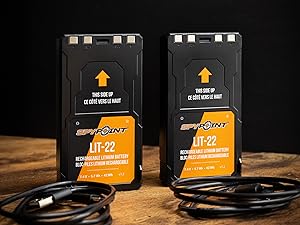
SPYPOINT LIT-22 rechargeable lithium batteries.
6.2. Upravljanje MicroSD karticama
Periodically format your MicroSD card using the camera's format function or through the app to maintain optimal performance and prevent data corruption. Ensure the card has sufficient space for new captures.

SPYPOINT 32GB Micro SD card.
6.3. Čišćenje
Pažljivo očistite objektiv i kućište kamere mekom krpomamp cloth. Avoid using abrasive cleaners or solvents that could damage the camera's finish or optical components.
7. Otkrivanje problema
- No Photos/Videos Transmitted:
- Provjerite nivoe baterije.
- Verify cellular signal strength in the camera's location via the app.
- Ensure your photo transmission plan is active and has available photos.
- Confirm the MicroSD card is properly inserted and formatted.
- Loš kvalitet slike:
- Očistite sočivo kamere.
- Check camera settings in the app to ensure desired resolution is selected.
- Ensure the camera is stable and not subject to excessive movement.
- Kamera se ne uključuje:
- Uvjerite se da su baterije ispravno umetnute i potpuno napunjene.
- Provjerite je li prekidač za UKLJUČENO/ISKLJUČENO u položaju 'UKLJUČENO'.
For further assistance, refer to the SPYPOINT app's help section or visit the official SPYPOINT support website.
8. Specifikacije
| Feature | Specifikacija |
|---|---|
| Naziv modela | FLEX-DARK US |
| Photo Resolution | 40MP |
| Video Rezolucija | 1080p with Sound |
| Night Vision | No-Glow LEDs |
| Domet detekcije | 100ft |
| Povezivanje | Cellular (Cross-Carrier) |
| Izvor napajanja | Battery Powered (Batteries Required) |
| Memorija | Micro SD (Required, Not Included) |
| Nivo vodootpornosti | Otporan na vodu |
| Dimenzije (D x Š x V) | 10 x 2 x 2.7 inča |
| Težina artikla | 15.8 unce |
| UPC | 887157000028 |
9. Garancija i podrška
9.1. Informacije o garanciji
The SPYPOINT Flex-Dark Cellular Trail Camera comes with a 2-godišnja garancijaMolimo sačuvajte dokaz o kupovini za potrebe reklamacije.
9.2. Korisnička podrška
For technical support, troubleshooting assistance, or warranty inquiries, please contact SPYPOINT customer service through the SPYPOINT app or visit the official SPYPOINT website for detailed support resources and contact information.


