Uvod
This manual provides comprehensive instructions for the Gravity C28 Rugged Smartwatch. Please read this manual carefully before using the device to ensure proper operation and maintenance. Keep this manual for future reference.
The Gravity C28 is designed for durability and advanced functionality, featuring a 2.02-inch TFT high-resolution display, AI-generated watch faces, and over 100 sports modes. It includes health monitoring features such as heart rate and sleep tracking, Bluetooth calling, and smart notifications. The smartwatch is built to withstand various environments with its 1 ATM waterproof, shockproof, and dustproof design.
Šta je u kutiji
- Gravity C28 pametni sat
- Kabel za punjenje
- Korisnički priručnik (ovaj dokument)
The product package includes the Gravity C28 Smartwatch and its essential accessories for charging and initial setup.
Product Overview

Slika 1: Front view pametnog sata Gravity C28, prikazanogasing its rugged design and digital display with time, date, and health metrics.
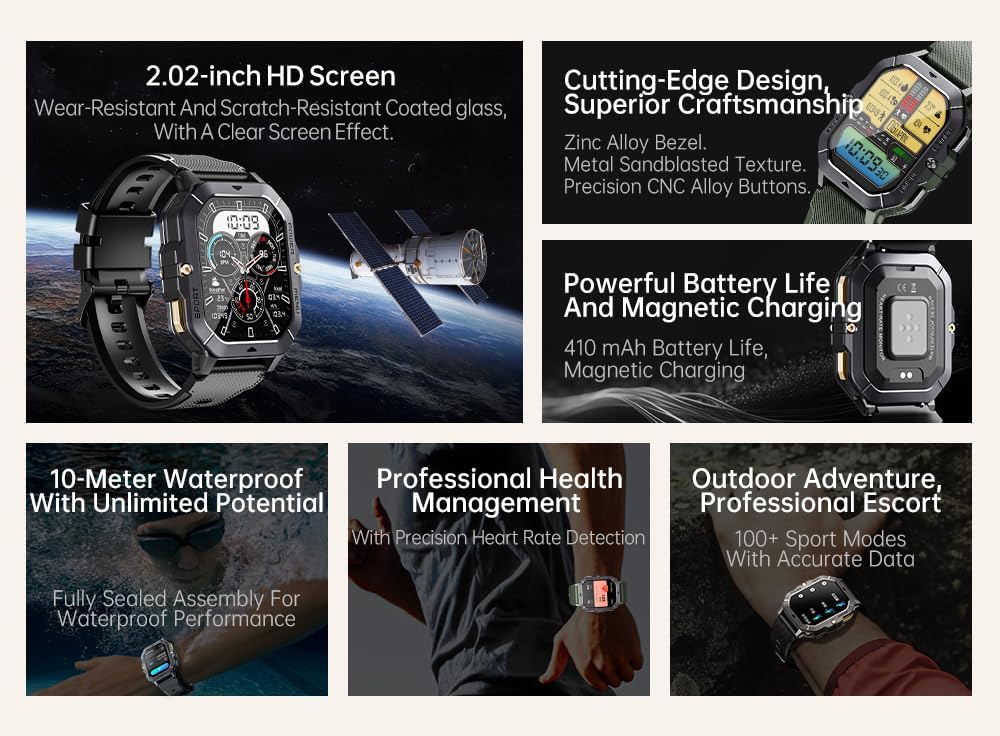
Slika 2: Gotovoview of key features including 2.02-inch HD screen, cutting-edge design, powerful battery, 10-meter waterproof rating, professional health management, and 100+ sport modes.
Setup
1. Punjenje uređaja
Prije prve upotrebe, potpuno napunite svoj Gravity C28 pametni sat. Spojite magnetni kabel za punjenje na utičnice za punjenje na stražnjoj strani sata i uključite USB kraj u adapter za napajanje (nije uključen) ili USB priključak računara.

Slika 3: Close-up of the Gravity C28 Smartwatch's rear, showing the magnetic charging contacts and heart rate sensor. The watch easily attaches to the charging dock via strong magnetic force for secure and convenient charging.

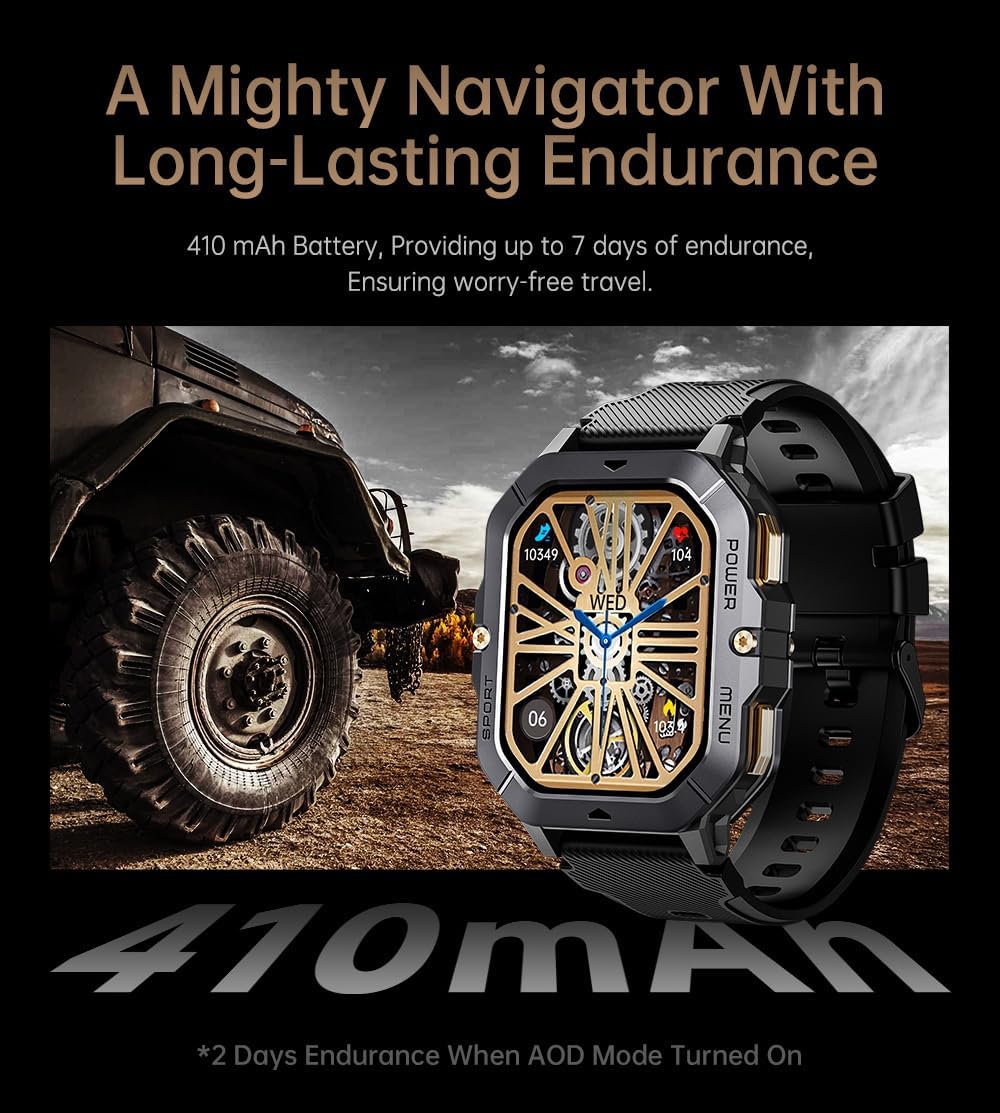
Slika 4: The Gravity C28 Smartwatch highlighting its 410mAh battery, providing long-lasting endurance for worry-free travel.
- Provjerite jesu li kontakti za punjenje na satu i kabelu čisti i suhi.
- Potpuno punjenje obično traje otprilike 2 sata.
- The watch has a 410mAh battery, providing up to 25 days of standby time.
2. Downloading the Da Fit App
The Gravity C28 Smartwatch requires the "Da Fit" application for full functionality and synchronization with your smartphone.
- Scan the QR code provided in the quick start guide or search for "Da Fit" in your smartphone's app store (Google Play Store for Android, Apple App Store for iOS).
- Preuzmite i instalirajte aplikaciju.
3. Uparivanje sa vašim pametnim telefonom
- Provjerite je li Bluetooth omogućen na vašem pametnom telefonu.
- Otvorite aplikaciju "Da Fit".
- Follow the on-screen instructions to add your device. The app will search for available smartwatches. Select "Gravity C28" from the list.
- Potvrdite zahtjev za uparivanje i na telefonu i na pametnom satu.
Note: For optimal performance, ensure the Da Fit app has necessary permissions enabled (e.g., location, notifications, background refresh).
Uputstvo za upotrebu
Osnovna navigacija
- Dugme za napajanje: Press and hold to power on/off. Short press to return to the watch face or wake the screen.
- Dugme menija: Short press to access the main menu.
- Sport dugme: Short press to quickly access sports modes.
- Geste na ekranu osjetljivom na dodir:
- Prevucite prema gore: View obavještenja.
- Swipe down: Access quick settings.
- Swipe left/right: Navigate through widgets (e.g., activity, heart rate, weather).
- Tap: Select an item or open an application.

Slika 5: Illustration of various menu display modes available on the Gravity C28 Smartwatch, including Grid View, Surface, Parallel, and Helm, allowing for flexible switching.
Monitoring zdravlja
The Gravity C28 provides comprehensive health tracking features:
- Praćenje srčanog ritma: Real-time heart rate tracking throughout the day. Access the heart rate widget or app on the watch for detailed data.
- Praćenje spavanja: Automatski prati vaše obrasce spavanja, uključujući duboki san, lagani san i vrijeme buđenja. View sleep data in the Da Fit app.
- Kiseonik u krvi (SpO2): Izmjerite nivo zasićenosti krvi kisikom.
- krvni pritisak: Provides an estimate of blood pressure. For medical accuracy, consult a healthcare professional.
- Praćenje stresa: Tracks stress levels based on heart rate variability.
- Praćenje aktivnosti: Bilježi korake, udaljenost i potrošene kalorije.

Slika 6: Display of various health tracking metrics available on the Gravity C28, including heart rate, SpO2, blood pressure, stress levels, sleep patterns, and cycle tracking.
Sportski modovi
With over 100 sports modes, the Gravity C28 can accurately track various physical activities. To start a workout:
- Press the Sport button or navigate to the Sports app from the main menu.
- Odaberite željenu aktivnost (npr. trčanje, vožnja bicikla, plivanje).
- Tap to start the activity. The watch will display real-time metrics such as duration, heart rate, and calories.
- To end the activity, swipe right or press the power button and select "End".
Slika 7: The Gravity C28 Smartwatch being used during snorkeling, illustrating its 1 ATM waterproof capability suitable for various water activities like daily cleaning, sweating, and rain exposure.
Bluetooth pozivi i obavještenja
The smartwatch supports Bluetooth calling and smart notifications:
- Bluetooth pozivanje: Once paired, you can answer incoming calls directly from your wrist. The watch has a built-in microphone and speaker.
- Pametna obavještenja: Receive alerts for calls, messages, and social media apps (e.g., WhatsApp, Facebook) directly on your watch. Configure notification settings within the Da Fit app.

Slika 8: Two Gravity C28 smartwatches demonstrating the Bluetooth call and message alert functionality, showing an incoming call screen.
Prilagodba
- Lica za gledanje: Change watch faces directly on the device or through the Da Fit app. The app offers a wide selection and supports AI-generated watch faces for personalization.
- Stil menija: The watch supports various menu display modes (e.g., Grid View, List View) which can be changed in settings.

Slika 9: Explanation of the DA GPT and AI Watch Face features, showing how users can interact with DA GPT for new ideas and conveniently change watch faces, including generating images from text prompts.
Održavanje i njega
- čišćenje: Redovno čistite pametni sat i remen mekom krpomamp tkanina. Izbjegavajte korištenje jakih kemikalija ili abrazivnih materijala.
- Otpornost na vodu: The Gravity C28 is 1 ATM waterproof. It is suitable for daily use, hand washing, rain, and shallow water activities like swimming. Do not use it for diving or high-pressure water activities. Avoid hot water or steam.
- temperatura: The watch is designed to withstand temperatures from -24°C to 60°C. Avoid exposing it to extreme temperatures outside this range.
- Punjenje: Always ensure the charging contacts are dry before charging to prevent corrosion.
- Skladištenje: When not in use for extended periods, store the watch in a cool, dry place. Charge it periodically to maintain battery health.
Rješavanje problema
| Problem | Mogući uzrok | Rješenje |
|---|---|---|
| Sat se ne uključuje | Slaba baterija; Uređaj se zamrznuo | Punite sat najmanje 30 minuta. Ako i dalje ne reaguje, pritisnite i držite dugme za napajanje 10-15 sekundi da biste ga prisilno ponovo pokrenuli. |
| Nije moguće uparivanje s telefonom | Bluetooth off; App not running; Watch not discoverable; Interference | Ensure Bluetooth is on. Restart both watch and phone. Make sure the Da Fit app is open. Forget previous pairings on phone. Try pairing in a different location. |
| Netačni zdravstveni podaci | Improper fit; Sensor obstruction; Movement during measurement | Pobrinite se da vam sat čvrsto, ali udobno prianja uz zglob. Očistite senzor na poleđini sata. Ostanite mirni tokom mjerenja. |
| Obavještenja nisu primljena | App permissions; Notification settings; Bluetooth disconnected | Check Da Fit app permissions for notifications. Verify notification settings within the app. Ensure Bluetooth connection is stable. |
| Kratko trajanje baterije | Frequent use of features; High screen brightness; AOD mode enabled | Reduce screen brightness. Limit continuous heart rate monitoring. Disable Always-On Display (AOD) if not needed. Close unused apps on the watch. |
Specifikacije
| Feature | Detalj |
|---|---|
| Broj modela | W4-C28 |
| Display | 2.02-inčni TFT, rezolucija 320x390 |
| Kapacitet baterije | 410 mAh |
| Trajanje baterije (stanje pripravnosti) | Do 25 dana |
| Otpornost na vodu | 1 ATM (Waterproof, Shockproof, Dustproof) |
| Radna temperatura | -24°C do 60°C |
| Povezivanje | Bluetooth |
| Kompatibilnost | Android OS, iOS (via Da Fit app) |
| Monitoring zdravlja | Heart Rate, Sleep, SpO2, Blood Pressure, Stress, Activity |
| Sportski modovi | 100+ |
| Težina artikla | 1 funte |
| Dimenzije paketa | 9 x 4 x 1 inča |
Garancija i podrška
Gravity provides a standard manufacturer's warranty for the C28 Smartwatch against defects in materials and workmanship under normal use. Please refer to the warranty card included with your product or visit the official Gravity webstranicu za detaljne uslove i odredbe garancije.
For technical support, troubleshooting assistance, or warranty claims, please contact Gravity customer service through their official webweb-mjesto ili kontakt informacije navedene u pakovanju vašeg proizvoda.
Online resursi:
- Official Gravity Webstranica: www.gravity.com
- Da Fit App Support: Refer to the help section within the Da Fit application.


