1. Uvod
Thank you for choosing the Shokz Opencomm2 2025 Wireless Earphones. These open-ear bone conduction headphones are designed for clear communication and comfortable listening, particularly in professional and active environments. This manual provides essential information for the proper use, setup, and maintenance of your device.

Image: The Shokz Opencomm2 2025 Wireless Earphones, showcasing their flexible, open-ear design and integrated microphone boom.
2. Proizvod je gotovview
2.1 Šta se nalazi u kutiji
- Shokz Opencomm2 2025 Wireless Earphones
- USB-C kabl za punjenje
- Torbica za nošenje
- Korisnički vodič (ovaj dokument)
- Legal Statement & Warranty Card

Image: Contents of the Shokz Opencomm2 2025 package, including the earphones, charging cable, carrying case, and documentation.
2.2 Komponente slušalica
Familiarize yourself with the key components of your Opencomm2 earphones:
- Pretvarači koštane provodljivosti: These rest on your cheekbones, delivering audio without blocking your ear canals.
- Držač mikrofona: Adjustable boom for clear voice pickup.
- Višenamjensko dugme: For power, pairing, play/pause, and call management.
- Dugmad za jačinu zvuka: For adjusting volume and track control.
- USB-C priključak za punjenje: Za punjenje uređaja.

Slika: Krupni plan view of the Shokz Opencomm2 earphone's right side, highlighting the multi-function button, volume controls, and the USB-C charging port.
3. Podešavanje
3.1 Punjenje slušalica
- Connect the USB-C charging cable to the charging port on the earphones.
- Drugi kraj kabla priključite na USB adapter za napajanje (nije uključen) ili na USB port računara.
- LED indikator će prikazivati status punjenja. Potpuno punjenje traje otprilike 1.5 sat.
3.2 Uparivanje s uređajem
- Provjerite da li su slušalice isključene.
- Press and hold the multi-function button for 5-7 seconds until the LED indicator flashes red and blue alternately, indicating pairing mode.
- Na svom uređaju (npr. pametnom telefonu, računaru) omogućite Bluetooth i potražite dostupne uređaje.
- Select "Opencomm2" from the list of found devices.
- Once connected, the LED indicator will flash blue once every few seconds, and you will hear a voice prompt "Connected".
4. Uputstvo za upotrebu
4.1 Nošenje slušalica
Place the flexible band behind your head, with the bone conduction transducers resting comfortably on your cheekbones, just in front of your ears. Adjust the microphone boom so it is positioned near your mouth for optimal voice clarity.
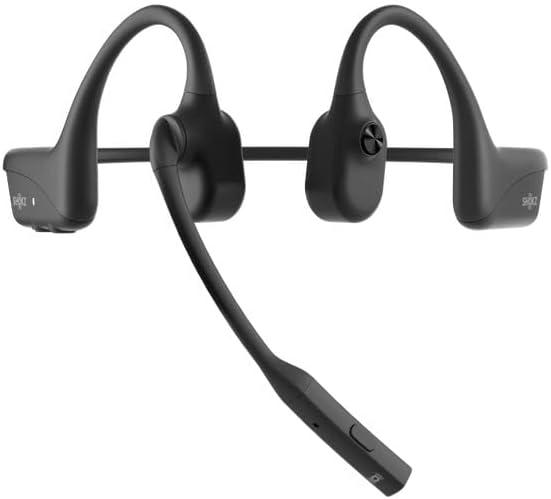
Image: The Shokz Opencomm2 2025 earphones positioned on a head, demonstrating the correct placement of the bone conduction transducers and microphone boom.
4.2 Osnovne kontrole
- Uključivanje/isključivanje: Pritisnite i držite višenamjensko dugme 2 sekundi.
- Pusti/pauza: Jednom pritisnite višenamensko dugme.
- Pojačavanje/stišavanje glasnoće: Press the respective volume buttons.
- Sljedeća pjesma: Pritisnite i držite dugme za povećanje jačine zvuka 2 sekunde.
- Prethodni zapis: Pritisnite i držite dugme za jačinu zvuka - 2 sekunde.
- Odgovori/Završi poziv: Jednom pritisnite višenamensko dugme.
- odbiti poziv: Pritisnite i držite višenamjensko dugme 2 sekundi.
- Isključivanje mikrofona: During a call, press the multi-function button twice.
5. Održavanje
5.1 Čišćenje
Obrišite slušalice mekom krpomamp krpom. Ne koristite jake hemikalije ili abrazivna sredstva za čišćenje. Prije punjenja provjerite je li priključak za punjenje suh.
5.2 Skladištenje
Store the earphones in their carrying case when not in use to protect them from dust and damage. Avoid storing in extreme temperatures.
5.3 Otpornost na vodu
The Opencomm2 earphones are water resistant, meaning they can withstand sweat and light splashes. They are not designed for submersion in water. Do not charge if wet.
6. Otkrivanje problema
- Nema napajanja: Ensure the earphones are fully charged. Connect to a power source and check the LED indicator.
- Ne može se upariti: Ensure the earphones are in pairing mode (red and blue flashing LED). Turn off and on your device's Bluetooth, then try pairing again. Move closer to your device.
- Nema zvuka: Provjerite nivoe jačine zvuka i na slušalicama i na povezanom uređaju. Uvjerite se da su slušalice pravilno povezane putem Bluetootha.
- Loš kvalitet poziva: Ensure the microphone boom is positioned correctly near your mouth. Check for environmental noise interference.
- Intermitentna veza: Move closer to your connected device. Avoid obstacles between the earphones and the device.
7. Specifikacije
| Feature | Specifikacija |
|---|---|
| Naziv modela | Opencomm2 |
| Povezivanje | Bežično (Bluetooth 5.0) |
| Bluetooth domet | Do 10 metara (33 stope) |
| Vrsta audio drajvera | Pogonski mehanizam za koštanu provodljivost |
| Frekvencijski odziv | 20 Hz - 20 kHz (Resonant Mode) |
| Osjetljivost | 96 dB |
| Impedansa | 32 Ohm |
| Vrijeme punjenja | Približno 1.5 sata |
| Težina artikla | 35 grama (1.23 unci) |
| Nivo vodootpornosti | Otporan na vodu |
| Mikrofon | Boom mikrofon |
| Port za punjenje | USB-C |
8. Garancija i podrška
Your Shokz Opencomm2 2025 Wireless Earphones come with a limited warranty. Please refer to the included Warranty Card for detailed terms and conditions. For technical support, product registration, or further assistance, please visit the official SHOKZ webstranice ili kontaktirajte njihov odjel za korisničku podršku.
Online podrška: Posjetite SHOKZ trgovinu na Amazonu


