Uvod
The Gravity C29 Rugged Smart Watch is designed for durability and performance in challenging environments. This manual provides comprehensive instructions for setting up, operating, and maintaining your smartwatch, ensuring you get the most out of its advanced features, including health tracking, sports modes, and smart connectivity.
Šta je u kutiji
- Gravity C29 Smart Watch
- Kabel za punjenje
- Korisnički priručnik (ovaj dokument)
Product Overview
The Gravity C29 features a robust design with a 1.52-inch HD TFT display, built to withstand shock, dust, and water. It includes physical buttons for power and sport modes, alongside a responsive touchscreen for navigation.

Slika: Front view of the Gravity C29 Rugged Smart Watch, showcasing its robust design, circular display, and side buttons.

Image: The Gravity C29 Smart Watch display, highlighting its 1.52-inch HD screen with clear visibility even in bright conditions.
Setup
1. Punjenje pametnog sata
Before first use, fully charge your Gravity C29 Smart Watch. Connect the magnetic charging cable to the charging points on the back of the watch and plug the USB end into a power adapter (not included) or a computer's USB port. A full charge typically takes approximately 2 hours.
2. Downloading the Da Fit App
To unlock all features and synchronize data, download the "Da Fit" app from your smartphone's app store (App Store for iOS, Google Play Store for Android). The watch is compatible with Android 9.0+ and iOS 9.0+.
3. Uparivanje sa vašim pametnim telefonom
- Provjerite je li Bluetooth omogućen na vašem pametnom telefonu.
- Otvorite aplikaciju Da Fit i slijedite upute na ekranu da biste kreirali račun ili se prijavili.
- In the app, navigate to the "Device" section and tap "Add Device" or "Bind Device".
- Select "C29" from the list of available devices.
- Potvrdite zahtjev za uparivanje i na satu i na pametnom telefonu.
Once paired, the watch will automatically synchronize time and data with your phone.
Uputstvo za upotrebu
Osnovna navigacija
- Touchscreen: Prevucite lijevo/desno, gore/dolje za navigaciju kroz menije i obavještenja. Dodirnite za odabir.
- Dugme za napajanje (gore desno): Pritisnite da biste probudili/uspavali ekran, dugo pritisnite da biste uključili/isključili uređaj.
- Sport Mode Button (Bottom Right): Pritisnite za brzi pristup sportskim režimima.
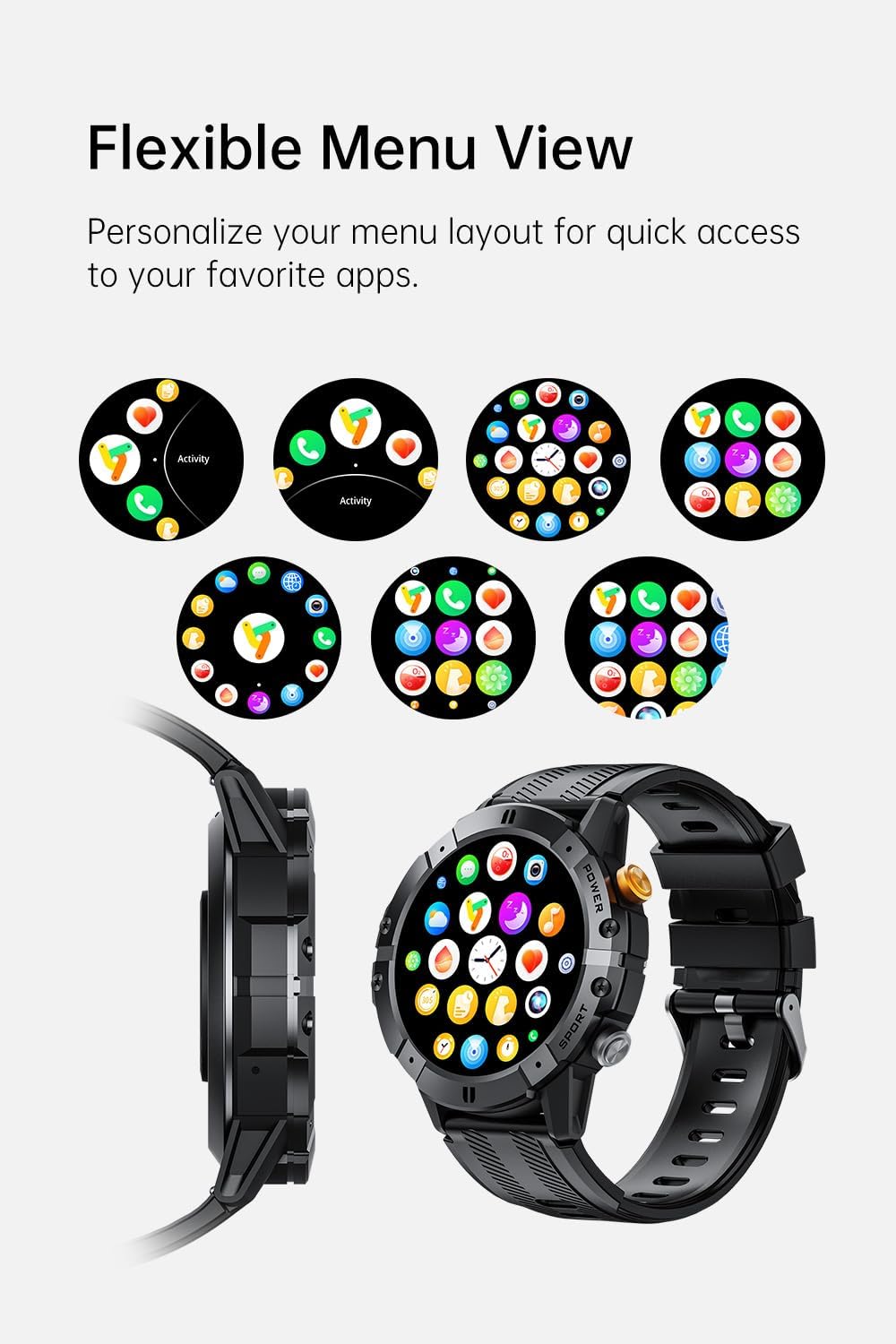
Image: Various menu layouts and app icons displayed on the Gravity C29 Smart Watch screen, demonstrating the flexible menu view.
Bluetooth Calling & Smart Notifications
Once paired, the C29 allows you to make and receive calls directly from your wrist. You will also receive real-time notifications for calls, messages, and app alerts.

Image: A hand wearing the Gravity C29 Smart Watch, showing an incoming call notification and message alerts on the watch screen.
AI glasovni asistent
Activate the AI Voice Assistant on your watch to perform tasks hands-free, such as setting alarms, checking weather, or controlling music, using simple voice commands.

Image: The Gravity C29 Smart Watch displaying the AI Voice Assistant interface, with examples of voice commands like "Turn on the alarm" and "Call my mom."
Praćenje zdravlja
The C29 monitors your heart rate 24/7 and provides detailed sleep analysis. Access these metrics through the watch interface or the Da Fit app for comprehensive health insights.

Image: The Gravity C29 Smart Watch displaying a heart rate graph, illustrating its precision sensors for accurate health monitoring.
Sportski modovi
With over 100 sports modes, the C29 accurately tracks various activities like running, cycling, hiking, and swimming. Select your desired sport mode before starting an activity for precise data collection.

Image: Icons representing various sports activities such as swimming, cycling, running, and hiking, indicating the Gravity C29 Smart Watch's support for over 120 sports modes.
Ostale pametne karakteristike
The Gravity C29 offers additional functionalities including weather updates, music control, and camera remote control. Access these features through the watch's menu.

Image: The Gravity C29 Smart Watch displaying a weather forecast, surrounded by icons representing other convenient functions like music control, camera remote, and settings.
Održavanje
Čišćenje
Redovno brišite sat i remen mekom,amp krpom. Izbjegavajte upotrebu jakih hemikalija ili abrazivnih materijala. Prije punjenja provjerite jesu li kontakti za punjenje čisti i suhi.
Otpornost na vodu
The Gravity C29 is 1 ATM waterproof, meaning it can withstand splashes, rain, and brief immersion. It is suitable for everyday wear and light water activities. Do not use it for diving, hot showers, or prolonged submersion.

Image: The Gravity C29 Smart Watch being splashed with water, illustrating its 1 ATM waterproof rating suitable for handling splashes and rain.
Battery Care
To prolong battery life, avoid extreme temperatures. Charge the watch fully before long periods of inactivity. The 410mAh battery provides up to 7-10 days of active use and up to 25 days on standby.
Rješavanje problema
- Sat se ne uključuje: Provjerite je li sat potpuno napunjen. Spojite ga na punjač i pričekajte nekoliko minuta prije nego što ga pokušate uključiti.
- Nije moguće upariti s telefonom:
- Provjerite je li Bluetooth omogućen na vašem telefonu i je li sat u dometu.
- Ponovo pokrenite i sat i telefon.
- Check if the Da Fit app is updated to the latest version.
- If previously paired, try unpairing from your phone's Bluetooth settings and re-pairing through the app.
- Netačni zdravstveni podaci: Pazite da sat čvrsto prianja uz zglob, ne previše stegnut ili previše labav. Očistite senzor na stražnjoj strani sata.
- Obavještenja se ne prikazuju: Check notification permissions for the Da Fit app in your phone's settings. Ensure the app is running in the background.
Specifikacije
| Feature | Detalj |
|---|---|
| Brand | Gravitacija |
| Model | C29 |
| Veličina ekrana | 1.52 inča |
| Display Type | HD TFT |
| Rezolucija | 360x360 |
| Kapacitet baterije | 410 mAh |
| Trajanje baterije (aktivno) | 7-10 dana |
| Trajanje baterije (stanje pripravnosti) | Do 25 dana |
| Otpornost na vodu | 1 ATM (Shockproof, Dustproof) |
| Povezivanje | Bluetooth 5.2 |
| Kompatibilnost | Android 9.0+ / iOS 9.0+ |
| Sportski modovi | 100+ |
| Radna temperatura | -24°C do 60°C |
| Težina artikla | 4.6 unce |
Garancija i podrška
For product support, troubleshooting assistance, or warranty inquiries, please refer to the contact information provided with your purchase or visit the official Gravity webSačuvajte dokaz o kupovini za slučaj reklamacije.
Protection plans are available for extended coverage. Please check your purchase details for more information on available protection plans.


