1. Uvod
Thank you for choosing the HOU iPad Keyboard Case. This manual provides detailed instructions for setting up, operating, and maintaining your new keyboard case. Designed for enhanced productivity and protection, this accessory transforms your iPad into a versatile workstation.
2. Kompatibilnost
This keyboard case is designed to be compatible with specific iPad models. Please verify your iPad's model number to ensure proper fit and functionality.
Kako provjeriti model vašeg iPada:
- Idi na Postavke na vašem iPadu.
- Dodirnite Generale, onda O.
- Locirajte Broj modela. It typically starts with 'A' followed by four digits (e.g., A2602).
- Alternatively, the model number is printed in tiny text on the back case of your iPad.
Kompatibilni modeli iPada:
- iPad 9th Generation 10.2 inch 2021 (Model Numbers: A2602/A2603/A2604/A2605)
- iPad 8th Generation 10.2 inch 2020 (Model Numbers: A2270/A2428/A2429/A2430)
- iPad 7th Generation 10.2 inch 2019 (Model Numbers: A2200/A2197/A2198)
- iPad Air 3 (10.5 inch)
- iPad Pro 10.5 inch 2017

3. Ključne karakteristike
The HOU iPad Keyboard Case offers a range of features designed to enhance your iPad experience:
- Silent & Responsive Typing: Equipped with premium silicone-coated scissor switches for quiet, comfortable, and efficient typing.
- Dizajn s magnetskim odvojivim elementom: The keyboard can be easily detached from the case, allowing for flexible use in tablet mode or laptop mode.
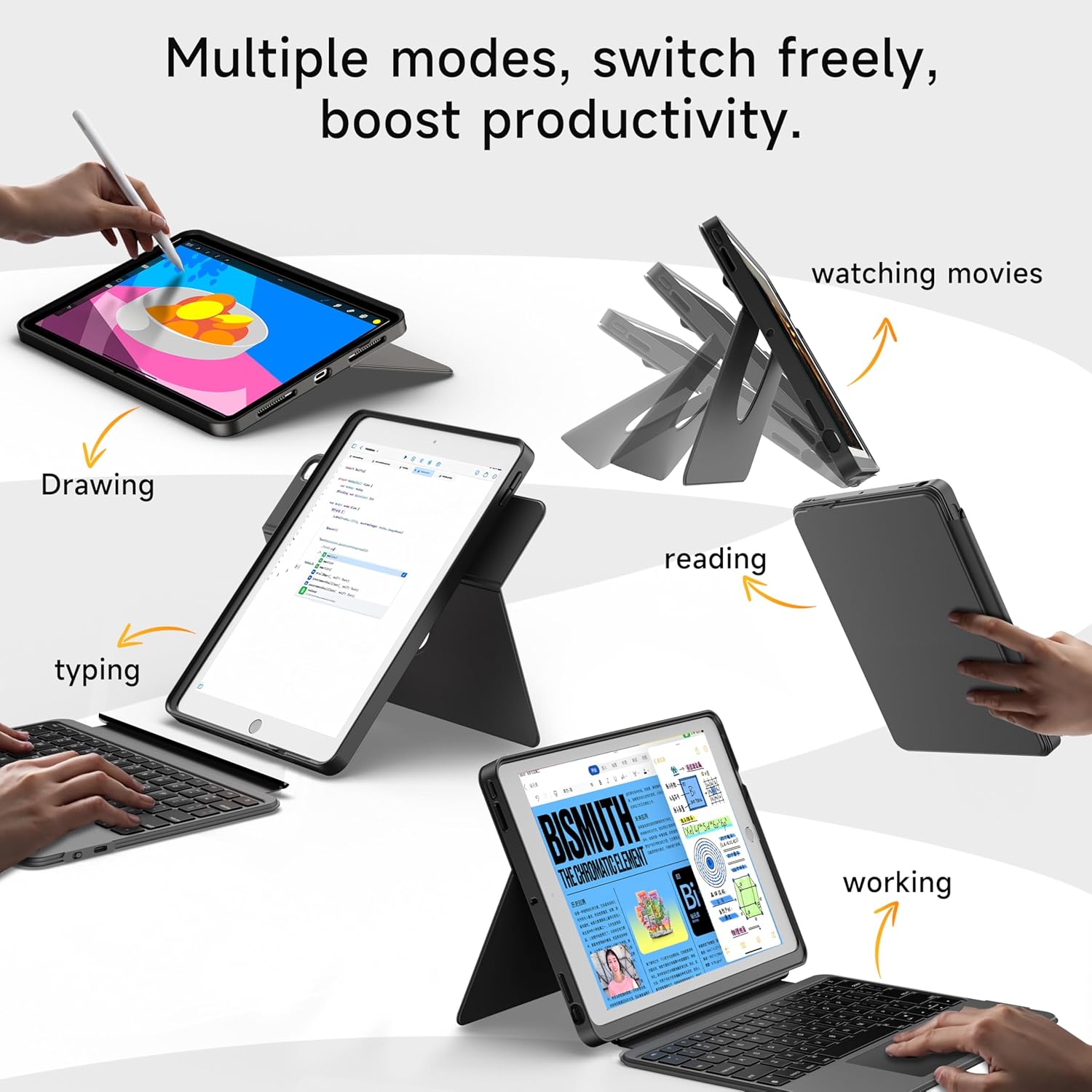
- 360° Rotating Stand with Adjustable Angles: Provides versatile viewing angles, supporting both portrait and landscape orientations for various activities like reading, watching, or presenting.
- Tastatura sa 7 boja pozadinskog osvjetljenja: Features adjustable 7-color backlighting for typing in low-light conditions, with customizable brightness levels.
- Military-Grade Protection: The shockproof silicone case offers 360° protection against drops and spills.
- Secure Apple Pencil Storage: Includes an elastic strap to securely hold your Apple Pencil.
- Integrisana dodirna tabla: A large multi-touch touchpad supports iOS gestures for precise navigation.
- Dug vijek trajanja baterije: The keyboard features a 500mAh battery, providing up to 50 hours of use with backlighting off, or 4-6 hours with backlighting on.

4. Upute za postavljanje
4.1. Punjenje tastature
Before first use, ensure the keyboard is fully charged.
- Pronađite USB-C priključak za punjenje sa strane tastature.
- Connect the provided USB-C cable to the keyboard and a compatible power adapter (not included).
- The LED indicator will turn red during charging and turn off when fully charged. A 2-hour charge provides weeks of use.

4.2. Bluetooth uparivanje
Slijedite ove korake da biste povezali tastaturu sa iPadom putem Bluetootha:
- Ensure the keyboard is charged and turn it on using the power switch.
- Na vašem iPadu idite na Postavke > Bluetooth.
- Pritisnite i držite FN + CONTROL + R keys on the keyboard for 3 seconds to enter pairing mode. The Bluetooth indicator light on the keyboard will flash.
- On your iPad, select "HOU Keyboard" from the list of available devices.
- Once paired, the Bluetooth indicator light on the keyboard will turn off.
5. Uputstvo za upotrebu
5.1. Korištenje tastature
The keyboard provides a full QWERTY layout with dedicated iOS command keys for efficient workflow.
- Prečice: Access one-tap shortcuts for screen brightness, media playback, volume control, Lock, Home, and Emoji functions.
- kucanje: Enjoy a comfortable and quiet typing experience for documents, emails, and more.

5.2. Podešavanje pozadinskog osvjetljenja
Tastatura ima pozadinsko osvjetljenje u 7 boja sa podesivim intenzitetom.
- Promjena boje: Pritisnite FN + Light Bulb icon to cycle through the 7 available colors.
- Podesite svjetlinu: Pritisnite FN + strelica gore or FN + strelica nadole to increase or decrease backlight brightness.
5.3. Korištenje dodirne table
The large multi-touch touchpad supports various iOS gestures for intuitive navigation:
- Dodir jednim prstom: Kliknite/Odaberite.
- Two Fingers Swipe: Pomicanje gore/dolje/lijevo/desno.
- Three Fingers Swipe Up: Idite na početni ekran.
- Three Fingers Swipe Down: View Kontrolni centar.
- Pinch In/Out: Uvećanje/umanjivanje.
5.4. Utilizing the 360° Rotating Stand
Integrisani stalak omogućava fleksibilnost viewing opcije:
- Pejzažni način rada: Ideal for watching videos, presentations, or typing.
- Portretni način: Perfect for reading documents, browsing social media, or video calls.
- Podesiv nagib: Tilt the screen from 90° (typing) to 170° (movie nights) for optimal comfort.


6. Održavanje
To ensure the longevity and optimal performance of your HOU iPad Keyboard Case, follow these maintenance guidelines:
- čišćenje: Koristite meku, damp krpu za brisanje vanjske strane kućišta i tastature. Izbjegavajte jake hemikalije ili abrazivne materijale.
- Skladištenje: When not in use, keep the keyboard case closed to protect the screen and keyboard. Store in a cool, dry place away from extreme temperatures.
- Izbjegavajte tečnosti: While the case offers some protection, avoid direct exposure to liquids to prevent damage to the electronic components.
7. Otkrivanje problema
If you encounter any issues with your HOU iPad Keyboard Case, refer to the following common solutions:
- Tastatura se ne povezuje putem Bluetootha:
- Provjerite je li tastatura potpuno napunjena i uključena.
- Turn off and on your iPad's Bluetooth, then try pairing again.
- Make sure your iPad's operating system is iOS 15.3 or later.
- Tastatura ne reaguje:
- Check the keyboard's battery level. Recharge if necessary.
- Ponovo povežite Bluetooth vezu.
- Pozadinsko osvetljenje ne radi:
- Uvjerite se da je tastatura uključena.
- Pritisnite FN + Light Bulb icon to activate or change backlight settings.
- Touchpad Lag or Unresponsiveness:
- Provjerite da baterija tastature nije kritično niska.
- Restart the Bluetooth connection on your iPad.
8. Specifikacije proizvoda
| Feature | Detalj |
|---|---|
| Brand | HOU |
| Broj modela | B0DTKBTV4H |
| Kompatibilni uređaji | iPad 9th/8th/7th Gen 10.2", iPad Air 3, iPad Pro 10.5" 2017 |
| Tehnologija povezivanja | Bluetooth |
| Opis tastature | Ergonomic, Ultra-Silent Keys, X-shaped high-rebound keys |
| Posebne karakteristike | Backlit (7-Color), Detachable Case, Hotkeys and Media Keys, Portable, Trackpad, 360° Rotating Stand, Apple Pencil Holder |
| Kapacitet baterije | 500mAh (Lithium) |
| Trajanje baterije | Up to 50 hours (backlight off), 4-6 hours (backlight on) |
| Port za punjenje | USB-C |
| Materijal | Silicone (Shockproof, Military-Grade Protection) |
| Težina artikla | 1.34 funti (približno 608 g) |
| Uključene komponente | Keyboard, Case, USB-C Charging Cable |
9. Garancija i korisnička podrška
Your HOU iPad Keyboard Case is backed by a comprehensive warranty and dedicated customer support.
- Dvogodišnja garancija zamjene: Enjoy peace of mind with a 1-year replacement warranty covering manufacturing defects.
- Pravila povrata novca u roku od 30 dana: If you are not completely satisfied with your purchase, you may return it within 30 days for a full refund.
- 24/7 korisnička podrška: For any questions, concerns, or assistance, please contact our customer support team available 24 hours a day, 7 days a week.


