Product Overview
The Edifier ES20 is a compact and powerful portable Bluetooth speaker designed for both indoor and outdoor use. It features IP67 waterproof and dustproof capabilities, ensuring durability in various environments. With Bluetooth V5.4 connectivity, it offers stable wireless audio and supports stereo pairing for an enhanced sound experience. The speaker also includes a built-in microphone for hands-free calls and customizable ambient lighting.
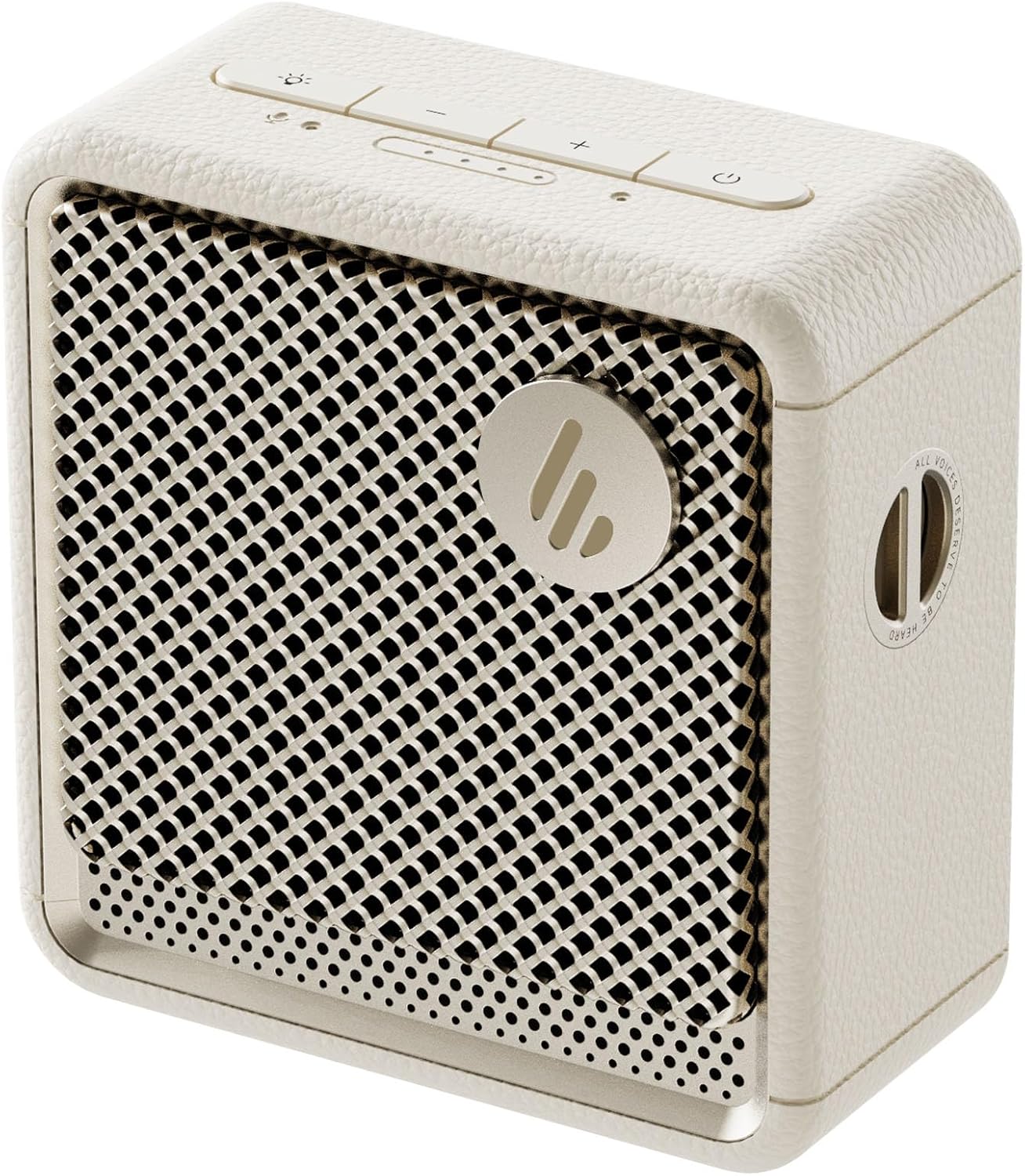
Slika: Front view of the Edifier ES20 Portable Bluetooth Speaker in Ivory, showcasing svojim kompaktnim dizajnom i rešetkom zvučnika.

Image: The Edifier ES20 speaker placed on a desk, demonstrating its suitability for home or office environments.
Ključne karakteristike uključuju:
- Vrhunski kvalitet zvuka: 6W (RMS) output with a 1.7'' full-range driver and 2'' passive bass radiators for rich, punchy sound.
- Bluetooth V5.4 & Stereo Pairing: Seamless wireless connectivity and the ability to pair two speakers for stereo sound.
- IP67 vodootporan i otporan na prašinu: Designed to withstand splashes, rain, and dust, making it ideal for outdoor use.
- Long Lasting Playtime: Do 15 sati reprodukcije sa jednim punjenjem.
- Ambijentalna rasvjeta: Features a customizable ambient light system for enhanced atmosphere.
- Ugrađeni mikrofon: High-sensitivity microphone for clear hands-free communication.
- Jednostavan za kontrolu: Intuitive top-mounted buttons and control via the EDIFIER ConneX app.
Vodič za postavljanje
Šta je u kutiji
Prije nego što počnete, molimo vas da se uvjerite da su sve komponente prisutne u pakovanju:
- Edifier ES20 Portable Bluetooth Speaker
- Strap
- Vodič za brzi početak
- USB-C na USB-C kabl
- Važna sigurnosna uputstva

Image: A visual representation of the Edifier ES20 speaker and its included accessories, such as the strap, charging cable, and documentation.
Punjenje zvučnika
The ES20 speaker comes with a built-in rechargeable battery. Before first use, it is recommended to fully charge the speaker.
- Connect the provided USB-C to USB-C cable to the charging port on the speaker.
- Drugi kraj kabla priključite na kompatibilni USB adapter za napajanje (nije uključen) ili USB port računara.
- The battery indicator lights on the top panel will illuminate to show charging progress. All lights will be solid when fully charged.
Početno Bluetooth uparivanje
Follow these steps to connect your ES20 speaker to a Bluetooth device for the first time:
- Ensure the speaker is charged and powered on. The Bluetooth indicator light will flash, indicating it's in pairing mode.
- Na svom uređaju (pametnom telefonu, tabletu, laptopu) omogućite Bluetooth i potražite dostupne uređaje.
- Select "EDIFIER ES20" from the list of found devices.
- Once connected, the Bluetooth indicator light on the speaker will remain solid.
For advanced features and easier control, download the EDIFIER ConneX app from your device's app store.

Image: Screenshots illustrating the EDIFIER ConneX mobile application, which provides additional control and customization options for the speaker.
Uputstvo za upotrebu
Funkcije dugmadi
The ES20 speaker features intuitive top-mounted buttons for easy control:

Image: A detailed diagram outlining the functions of each button on the top panel of the ES20 speaker, including power, volume, playback, and lighting controls.
| Dugme/indikator | Funkcija |
|---|---|
| Dugme za napajanje | Press and hold for 1.5s to power on/off. Short press to play/pause. |
| Jačina zvuka (+) | Kratko pritisnite da povećate jačinu zvuka. |
| Smanjivanje glasnoće (-) | Kratko pritisnite da biste smanjili jačinu zvuka. |
| Dugme za način rada/svjetlo | Short press to cycle through sound effects. Press and hold for 1.5s to cycle through ambient light modes. |
| Bluetooth dugme | Short press to disconnect current Bluetooth device. Press and hold for 1.5s to enter Bluetooth pairing mode. Double press to enable/disable stereo pairing. |
| Indikator napajanja baterije | Indicates current battery level. |
| Indikator načina rada | Blue for Bluetooth mode, White for Bluetooth stereo pairing mode. |
Bluetooth stereo uparivanje
You can pair two ES20 speakers together for a true wireless stereo experience. This requires two ES20 units.
- Ensure both ES20 speakers are powered on and not connected to any other Bluetooth devices.
- On one speaker (this will be the primary speaker), double-press the Bluetooth button. The Bluetooth indicator will flash rapidly.
- The primary speaker will automatically search for and connect to the second ES20 speaker.
- Once connected, the Bluetooth indicator on both speakers will remain solid, and you will hear an audible confirmation.
- Now, connect your device to the primary ES20 speaker via Bluetooth as you normally would.

Image: Two ES20 speakers, one black and one ivory, positioned to illustrate Bluetooth stereo pairing, with a smartphone displaying music playback.
Bluetooth Multi-Point Connectivity
The ES20 supports connecting to two Bluetooth devices simultaneously, allowing for seamless switching between audio sources.
- Connect the first device to the ES20 speaker via Bluetooth.
- Once connected, put the speaker back into pairing mode (press and hold the Bluetooth button for 1.5s).
- Connect the second device to the ES20 speaker.
- The speaker will now be connected to both devices. To switch audio playback, simply pause playback on the active device and start playback on the other.

Image: A visual representation of the ES20 speaker connected to multiple smartphones, highlighting its Bluetooth multi-point connectivity feature.
Sistem ambijentalnog osvetljenja
The ES20 features an ambient light system with multiple modes to enhance your listening experience or provide utility.
- Disanje: Light gently fades in and out.
- duga: Cycles through a spectrum of colors.
- statično: A single, constant color.
- Glittering and Colorful: Dynamic, multi-color effects.
- Svjetlo za hitne slučajeve: Flashing red light for signaling.
To change the ambient light mode, press and hold the Mode/Light button for 1.5 seconds.

Image: The ES20 speaker showcasing its ambient light system, with icons representing different light effects like breathing, rainbow, static, glittering, and emergency light.
Višestruki zvučni efekti
Optimize your audio experience by selecting from four preset sound modes:
- muzika: Profesionalni uravnoteženi zvukfile za opšte slušanje muzike.
- igra: Enhanced audio cues for gaming.
- film: Optimized for dialogue and cinematic soundscapes.
- Vanjski: Pojačana jačina zvuka i bas za okruženja na otvorenom.
To cycle through sound effects, short press the Mode/Light button.

Image: The ES20 speaker set in a natural environment, surrounded by icons representing its various sound effect modes: Music, Game, Movie, and Outdoor.
Built-in MEMS Microphone
The ES20 includes a high-sensitivity MEMS microphone with intelligent noise cancellation, allowing for clear hands-free calls when connected to your smartphone.

Image: The ES20 speaker positioned next to a smartphone showing an active call screen, illustrating the use of its built-in MEMS microphone for hands-free communication.
Održavanje
Čišćenje
- Use a soft, dry cloth to clean the surface of the speaker.
- Ne koristite abrazivna sredstva za čišćenje, voskove ili rastvarače jer mogu oštetiti završnu obradu.
- For the speaker grille, use a soft brush to gently remove dust or debris.
Waterproof and Dustproof Care (IP67)
While the ES20 is IP67 rated for water and dust resistance, proper care is essential to maintain its integrity:
- Prije izlaganja zvučnika vodi ili prašini, provjerite je li poklopac priključka za punjenje sigurno zatvoren.
- Do not intentionally submerge the speaker beyond 1 meter (3 feet) or for longer than 30 minutes.
- After exposure to water, especially saltwater or chlorinated water, rinse the speaker with fresh water and allow it to air dry completely before charging or using.
- Izbjegavajte izlaganje zvučnika ekstremnim temperaturama ili direktnoj sunčevoj svjetlosti na duže periode.

Image: The black version of the ES20 speaker partially submerged in water, illustrating its IP67 waterproof and dustproof protection rating.
Battery Care
- Da biste produžili vijek trajanja baterije, izbjegavajte često potpuno pražnjenje zvučnika.
- Charge the speaker regularly, even if not in use, to prevent deep discharge.
- Čuvajte zvučnik na hladnom i suhom mjestu kada ga ne koristite duži period.

Image: A circular graphic depicting the 15-hour playtime of the ES20 speaker, with the speaker itself at the center.
Rješavanje problema
| Problem | Mogući uzrok | Rješenje |
|---|---|---|
| Zvučnik se ne uključuje. | Slaba baterija; Dugme za napajanje nije pravilno pritisnuto. | Charge the speaker fully. Press and hold the power button for 1.5 seconds. |
| Nije moguće upariti s Bluetooth uređajem. | Speaker not in pairing mode; Device Bluetooth off; Speaker too far from device; Interference. | Ensure speaker is in pairing mode (flashing Bluetooth light). Turn device Bluetooth off/on. Move speaker closer to device. Avoid strong Wi-Fi signals or other Bluetooth devices. |
| Nema zvuka ili je jačina zvuka niska. | Volume too low on speaker or device; Paused playback; Incorrect audio output selected on device. | Increase volume on both speaker and device. Ensure music is playing. Check device's audio output settings. |
| Izobličenje zvuka. | Volume too high; Weak Bluetooth signal. | Lower the volume. Move speaker closer to the Bluetooth device. |
| Stereo uparivanje nije uspjelo. | Only one speaker in pairing mode; Speakers too far apart. | Ensure both speakers are powered on and not connected to other devices before initiating stereo pairing. Keep speakers within close proximity during pairing. |
If the issue persists, try resetting the speaker by holding the power button for 10 seconds, or consult the EDIFIER ConneX app for further assistance.
Specifikacije
Detailed technical specifications for the Edifier ES20 Portable Bluetooth Speaker:

Image: A comprehensive table listing the technical specifications of the ES20 speaker, including output power, frequency response, dimensions, and weight.
| Feature | Detalj |
|---|---|
| Naziv modela | ES20 |
| Vrsta zvučnika | Prenosivi zvučnik |
| Ukupna izlazna snaga | 6W (RMS) |
| Jedinice vozača | Full-range: φ43mm, Passive bass radiator: φ55mm |
| Frekvencijski odziv | 93Hz – 19KHz |
| Odnos signala i šuma | ≥85dB (A) |
| Bluetooth verzija | V5.4 |
| Kodeci | SBC |
| Connectivity Protocol | Bluetooth, EDIFIER ConneX App |
| Trajanje baterije | 15 sata |
| IP Rating | IP67 (Vodootporan i otporan na prašinu) |
| Dimenzije proizvoda (Š × V × D) | 90.4mm × 93.7mm × 49.7mm (3.55"D x 3.68"W x 1.95"H) |
| Neto težina | 326g (1.01 kilograma) |
| Kontrolni metod | Dodirnite |

Image: The ES20 speaker with its dimensions (width, height, depth) clearly marked, providing a visual reference for its compact size.
Garancija i podrška
The Edifier ES20 Portable Bluetooth Speaker comes with a limited warranty. Please refer to the "Warranty Card" included in your product packaging for detailed terms and conditions.
For technical support, troubleshooting assistance beyond this manual, or warranty claims, please visit the official Edifier website or contact their customer service. The EDIFIER ConneX app may also provide direct support options or frequently asked questions.
Više informacija i resursa za podršku možete pronaći na Edifier trgovina na Amazonu.