Uvod
Thank you for choosing the SONICAKE Sprint QAM-15 Electric Guitar Amplifier. This portable 15-watt combo amplifier is designed for practice, travel, and small gigs, offering versatile tone control and essential connectivity. This manual provides detailed instructions to help you get the most out of your amplifier.
Ključne karakteristike:
- Portable & Lightweight Design (approx. 7.45 lbs, 11.5"x11.5"x4.5")
- Dual-Channel Versatility (Clean and Overdrive)
- Enhanced Connectivity (3.5mm Headphone Output, 3.5mm AUX Input)
- Professional Sound Control (3-Band EQ: Treble, Mid, Bass, Gain, Volume)
- Closed-Back Design for High-Quality Audio Output
Sigurnosna uputstva
Please read and understand these safety instructions before operating your ampspašivač. Sačuvajte ovaj priručnik za buduću upotrebu.
- Izvor napajanja: Povežite ampIsključivo za napajanje na navedeni izvor napajanjatage kao što je naznačeno na uređaju.
- ventilacija: Do not block any ventilation openings. Ensure adequate airflow around the ampusisivač za sprečavanje pregrijavanja.
- Voda i vlaga: Nemojte izlagati amplifier to rain, moisture, or any liquids. Do not place objects filled with liquids on the amplifier.
- Izvori toplote: Zadrži ampDržite aparat dalje od izvora toplote kao što su radijatori, grijalice, peći ili drugi uređaji (uključujući ampLifiers) koji proizvode toplotu.
- čišćenje: Čistite samo suhom krpom. Izbjegavajte upotrebu tečnih ili aerosolnih sredstava za čišćenje.
- servisiranje: Ne pokušavajte sami servisirati ovaj proizvod. Sve servise prepustite kvalificiranom servisnom osoblju.
- Kablovi: Zaštitite kabl za napajanje od gaženja ili priklještenja, posebno na utikačima, utičnicama i na mjestu gdje izlaze iz uređaja.
Product Overview

Front view of the SONICAKE Sprint QAM-15 Electric Guitar Ampspasilac, izložbaasing svojim kompaktnim dizajnom i kontrolnom pločom.
Karakteristike kontrolne table:

Detaljno view of the amplifier's control panel, highlighting each knob and input for user reference.
- ULAZ: 1/4" (6.35mm) jack for connecting your electric guitar.
- DOBITAK: Kontroliše količinu pre-amplification or distortion. Higher settings increase saturation.
- OD (Overdrive) Button: Toggles between the clean channel and the overdrive channel. Press in for overdrive, out for clean.
- VOL (volumen): Podešava ukupnu izlaznu jačinu zvuka amplifier.
- TRE (Visoki tonovi): Adjusts the high-frequency response of the amplifier.
- MID (Srednji): Adjusts the mid-range frequency response of the amplifier.
- BASS: Podešava niskofrekventni odziv amplifier.
- AUX (pomoćni) ulaz: 3.5mm jack for connecting external audio devices (e.g., MP3 player, phone) to play along with backing tracks.
- PHONES (Headphone Output): 3.5mm jack for connecting headphones for silent practice. Mutes the main speaker when in use.
- Prekidač: Okreće ampuključite ili isključite punjač.
- POWER Indicator LED: Svetli kada je ampLifier je uključen.
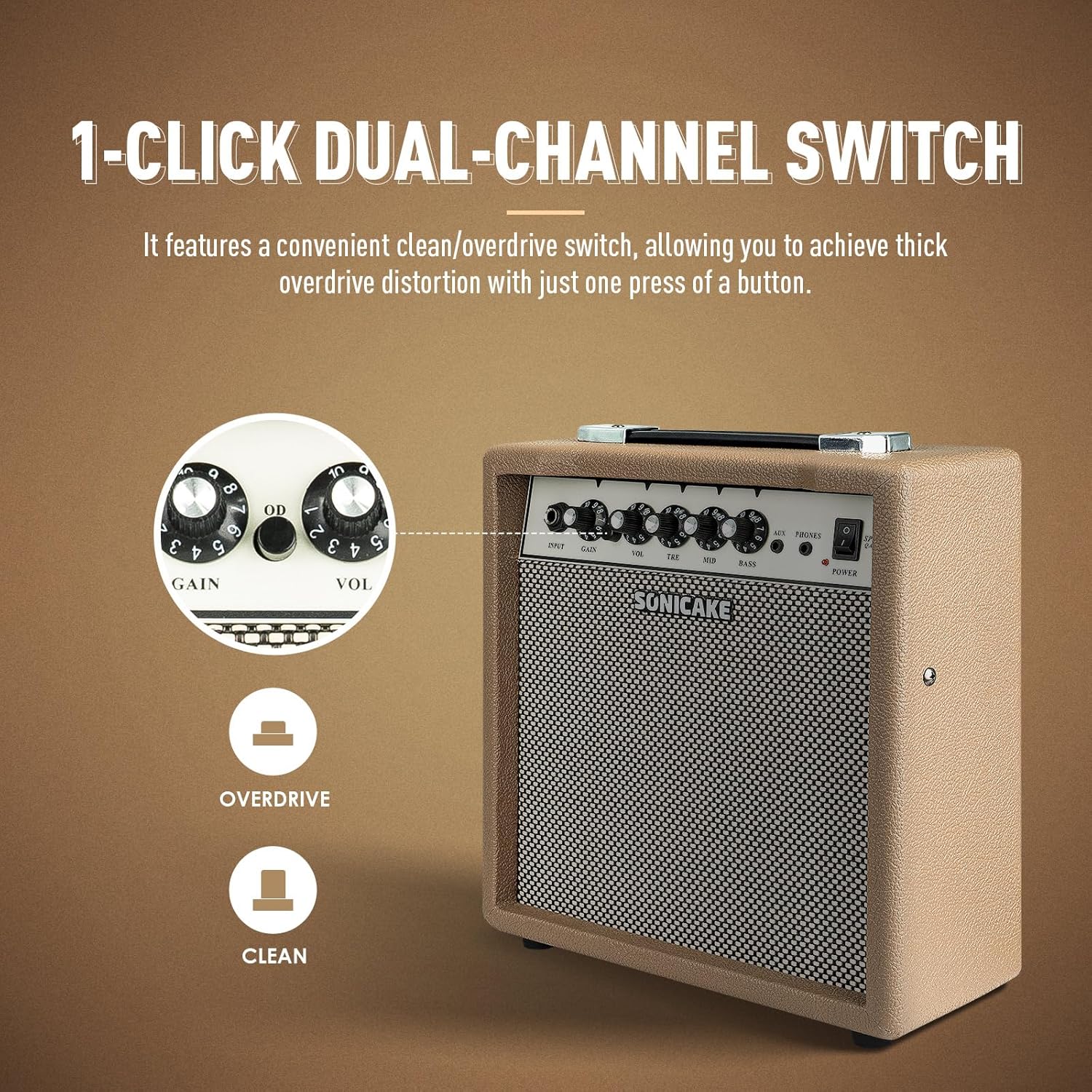
The OD button allows for instant switching between clean and overdrive tones.

The amplifier features dedicated AUX In and Headphone Out jacks for versatile practice options.
Setup
- Raspakivanje: Pažljivo uklonite ampIzvadite uređaj iz ambalaže. Pregledajte da li ima znakova oštećenja.
- plasman: Postavite amplifier on a stable, flat surface. Ensure there is adequate space around the unit for ventilation.
- Priključak za napajanje: Povežite priloženi kabl za napajanje na amplifier's power input jack and then to a suitable electrical outlet. Ensure the power switch on the amplifier is in the 'OFF' position before connecting to power.
- Priključak za gitaru: Connect your electric guitar to the 'INPUT' jack on the amplifier's front panel using a standard 1/4" (6.35mm) instrument cable.
- Početne postavke: Before powering on, set the 'VOL' knob to its minimum position (fully counter-clockwise) and the 'GAIN' knob to a low setting. Set the 'TRE', 'MID', and 'BASS' knobs to their center (12 o'clock) positions.
Uputstvo za upotrebu
Osnovna operacija:
- Uključeno: Flip the 'POWER' switch to the 'ON' position. The power indicator LED will illuminate.
- Podešavanje glasnoće: Slowly turn the 'VOL' knob clockwise to increase the overall output volume to your desired level.
- Iskljuciti: When finished, turn the 'VOL' knob to its minimum position, then flip the 'POWER' switch to the 'OFF' position.
Odabir kanala:
The Sprint QAM-15 features two distinct channels: Clean and Overdrive.
- Očisti kanal: With the 'OD' button in the 'OUT' position, the amplifier operates in the clean channel, providing a clear, uncolored tone.
- Kanal za overdrive: Press the 'OD' button 'IN' to engage the overdrive channel. This adds distortion and sustain to your guitar tone. The 'GAIN' knob becomes more active in this mode.
Tone Control (3-Band EQ):
Use the 'TRE', 'MID', and 'BASS' knobs to shape your amplifier's tone:
- TRE (Visoki tonovi): Adjusts the brightness and clarity of your sound. Turn clockwise for more sparkle, counter-clockwise for a warmer tone.
- MID (Srednji): Controls the presence and punch of your sound. Adjust to cut through a mix or to create a scooped sound.
- BASS: Adjusts the low-end fullness and depth of your sound. Turn clockwise for a thicker, heavier tone, counter-clockwise for a tighter sound.
Kontrola pojačanja:
The 'GAIN' knob controls the amount of signal sent to the amplifier's pre-amp stage. Higher gain settings result in more distortion and sustain, particularly noticeable in the overdrive channel. Experiment with the 'GAIN' and 'VOL' knobs to find your desired balance of distortion and overall loudness.
Povezivanje:
- AUX ulaz: Connect an external audio device (e.g., smartphone, tablet, MP3 player) to the 'AUX' input using a 3.5mm stereo cable. This allows you to play along with backing tracks or your favorite music through the amplifier's speaker. The volume of the AUX input is controlled by your external device.
- Izlaz za slušalice: Connect a pair of headphones to the 'PHONES' output using a 3.5mm stereo plug. This will mute the amplifier's main speaker, allowing for silent practice. The headphone volume is controlled by the amplifier's 'VOL' knob.
Održavanje
- čišćenje: Redovno obrišite amplifier's exterior with a soft, dry, lint-free cloth. Do not use abrasive cleaners, solvents, or waxes.
- Skladištenje: Kada se ne koristi duži period, uskladištite ampČuvajte na hladnom i suhom mjestu, dalje od direktne sunčeve svjetlosti i ekstremnih temperatura.
- Rukovanje: Always carry the amplifier using its handle. Avoid dropping or subjecting the unit to strong impacts.
- ventilacija: Osigurajte ampVentilacijski otvori spajvača ostaju čisti od prašine i ostataka.
Rješavanje problema
If you encounter issues with your SONICAKE Sprint QAM-15 ampspasilac, pogledajte sljedeće uobičajene probleme i rješenja:
| Problem | Mogući uzrok | Rješenje |
|---|---|---|
| Nema zvuka iz amplifier. |
|
|
| Zvuk je izobličen ili prepun šumova. |
|
|
| AUX ulaz ne radi. |
|
|
If the problem persists after trying these solutions, please contact SONICAKE customer support or a qualified technician.
Specifikacije

Dimensions of the SONICAKE Sprint QAM-15 amplifier.
- Model: QAM-15
- Output Wattage: 15 Watts
- Težina artikla: Otprilike 7.94 funti (3.6 kg)
- Dimenzije proizvoda: 4.53 x 11.42 x 11.42 inča (11.5 x 29 x 29 cm)
- Kompatibilni uređaji: Električna gitara
- Vrsta materijala: Plastika
- Boja: Bež
Garancija i podrška
For detailed warranty information, please refer to the warranty card included with your product or visit the official SONICAKE webSačuvajte dokaz o kupovini za slučaj reklamacije.
For technical support, product registration, or further inquiries, please visit the official SONICAKE webweb-mjestu ili kontaktirajte njihovu službu za korisnike putem kontaktnih informacija navedenih na njihovoj website.


