Uvod
Thank you for choosing the AIKELA Bluetooth Speaker with Video Scrolling Remote and Phone Stand. This multi-functional device is designed to enhance your media experience by providing amplified sound, a stable viewing platform, and convenient remote control. Whether you're watching videos, listening to podcasts, or making hands-free calls, this product offers a seamless and enjoyable experience.

The AIKELA Bluetooth Speaker with Phone Stand and its accompanying remote control.
Sadržaj paketa
Molimo Vas da provjerite paket za sljedeće stavke:
- Bluetooth Speaker with Phone Stand x 1
- Daljinski upravljač x 1
- Tip C kabla x 1
- Korisnički priručnik x 1

Vizualni prikaz svih artikala uključenih u paket proizvoda.
Karakteristike proizvoda
- Small But Powerful Sound: The upgraded wireless Bluetooth speaker delivers clear, loud sound for music, movies, videos, and podcasts. It includes a built-in microphone for crisp hands-free calls, which can also assist individuals with hearing loss.
- Video Scrolling Remote: A dedicated Bluetooth remote allows for easy scrolling, pausing, playing videos, and adjusting phone volume. This feature is ideal for platforms like YouTube, TikTok, or Netflix, freeing your hands during various activities.
- Podesivi stalak za telefon: The stand features a weighted base with non-slip silicone to securely hold your phone. Its adjustable angle ensures optimal viewing, whether on a desk, kitchen counter, or bedside table.
- Portable & Long-Lasting: With a foldable, lightweight design, the speaker is easy to transport. Its rechargeable battery provides up to 10 hours of use on a single 1.5-hour charge, making it suitable for home, office, or travel.

The product combines a Bluetooth speaker, phone stand, built-in microphone, and remote control.

Uživajte amplified sound for media and clear hands-free calls.

The phone stand is adjustable and foldable for convenience.

The speaker offers up to 10 hours of battery life on a 1.5-hour charge.
Vodič za postavljanje
1. Punjenje uređaja
Before first use, fully charge the AIKELA Bluetooth Speaker using the provided Type-C cable. Connect the cable to the speaker's charging port and a compatible USB power source.
2. Uključivanje / isključivanje napajanja
Locate the ON/OFF button on the speaker. Press and hold to power on or off the device.
3. Bluetooth uparivanje (zvučnik)
- Ensure the speaker is powered on and in pairing mode (indicated by a blinking blue LED light).
- On your smartphone or tablet, go to Bluetooth settings.
- Traži available devices and select "YX01" (or similar name) to connect.
- Once connected, the LED light will become solid blue.
4. Bluetooth Pairing (Remote Control)
- Slide the ON/OFF button on the back of the remote control to the ON position.
- On your smartphone or tablet, go to Bluetooth settings.
- Traži available devices and select "YK01 (Remote Control)" to connect.
- Once connected, the remote is ready for use.
5. iOS Specific Setup for Remote Control
For iOS devices, you must enable AssistiveTouch for the remote control to function correctly with video scrolling and other gestures. Follow these steps:
- Idi na Postavke.
- Odaberite Pristupačnost.
- Dodirnite Dodirnite.
- Uključi AssistiveTouch.
- Osigurati Izvršite pokrete dodirom je uključen.
- Podesite Osetljivost praćenja to 20%-30% for optimal performance.

Step-by-step guide for enabling AssistiveTouch on iOS devices to use the remote control.
6. Adjusting the Phone Stand
The phone stand is designed to be adjustable for various viewing angles. Gently adjust the hinges to achieve your desired height and tilt. Ensure your device is securely placed on the stand's non-slip surface. The stand is compatible with most 4"-13" smartphones, tablets, and e-readers.
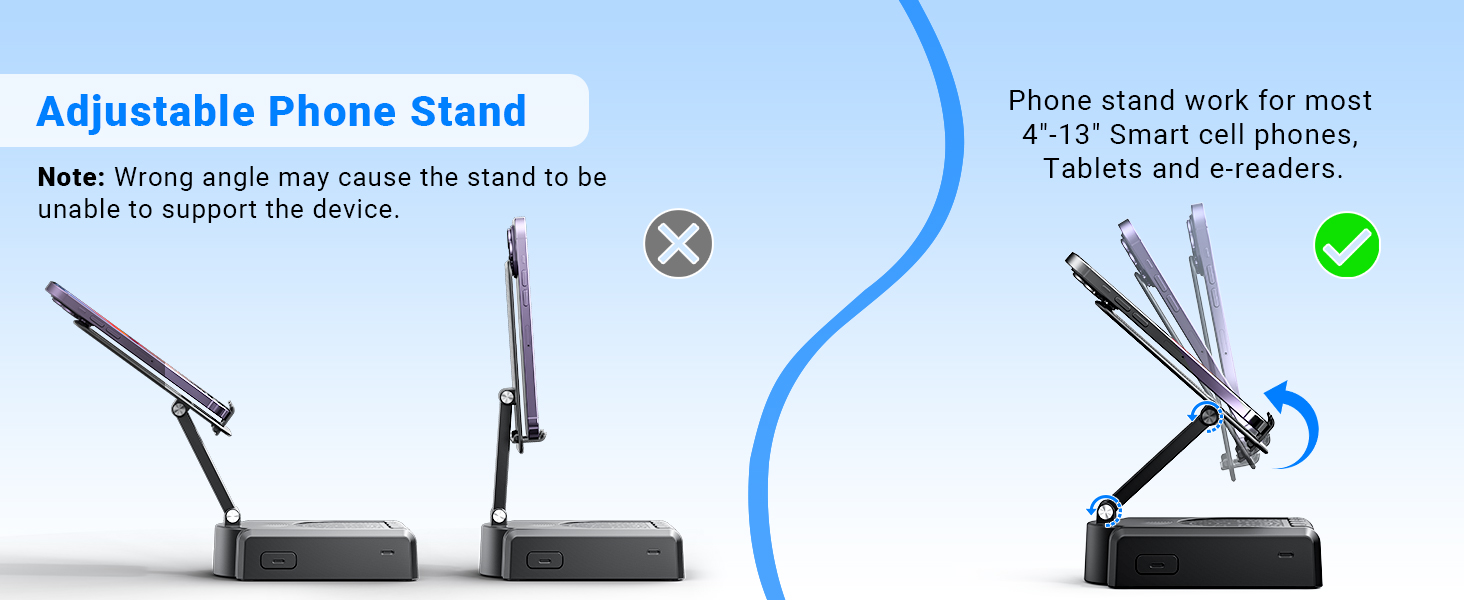
Demonstration of the adjustable angles of the phone stand.
Uputstva za rad
Kontrole zvučnika
The speaker features intuitive buttons for basic functions:
- UKLJUČENO/ISKLJUČENO: Uključite ili isključite uređaj.
- Pause/Play/Answer/Hang Up: Control media playback and phone calls.
- Prethodni/Volume-: Skip to the previous track or decrease volume.
- Sljedeće/Volume+: Skip to the next track or increase volume.
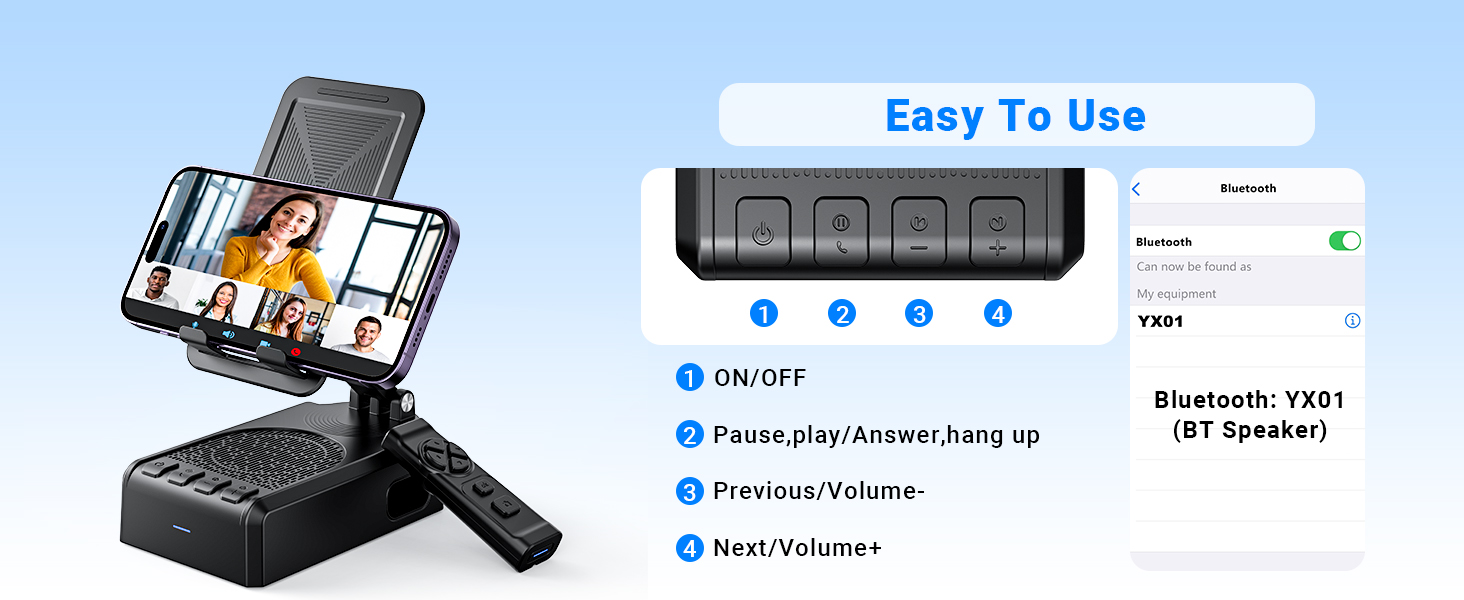
Gotovoview o kontrolnim dugmadima zvučnika i njihovim funkcijama.
Funkcije daljinskog upravljača
The Bluetooth remote control provides convenient hands-free operation for various applications:
- Single click (Up/Down arrows): Scroll up/down in apps like TikTok or YouTube.
- Single click (Left/Right arrows): Swipe left/right (e.g., for next/previous video).
- Long press (Left/Right arrows): Adjust volume (Volume- / Volume+).
- OK button (center): Pusti/pauziraj medije.
- Double click (OK button): Single 'like' in social media apps.
- Long press 3s (OK button): Continuous likes (in TikTok live state).
- Dugme kamere: Exit continuous likes (in TikTok live state).
Note: The remote control is not compatible with music software or Kindle devices.
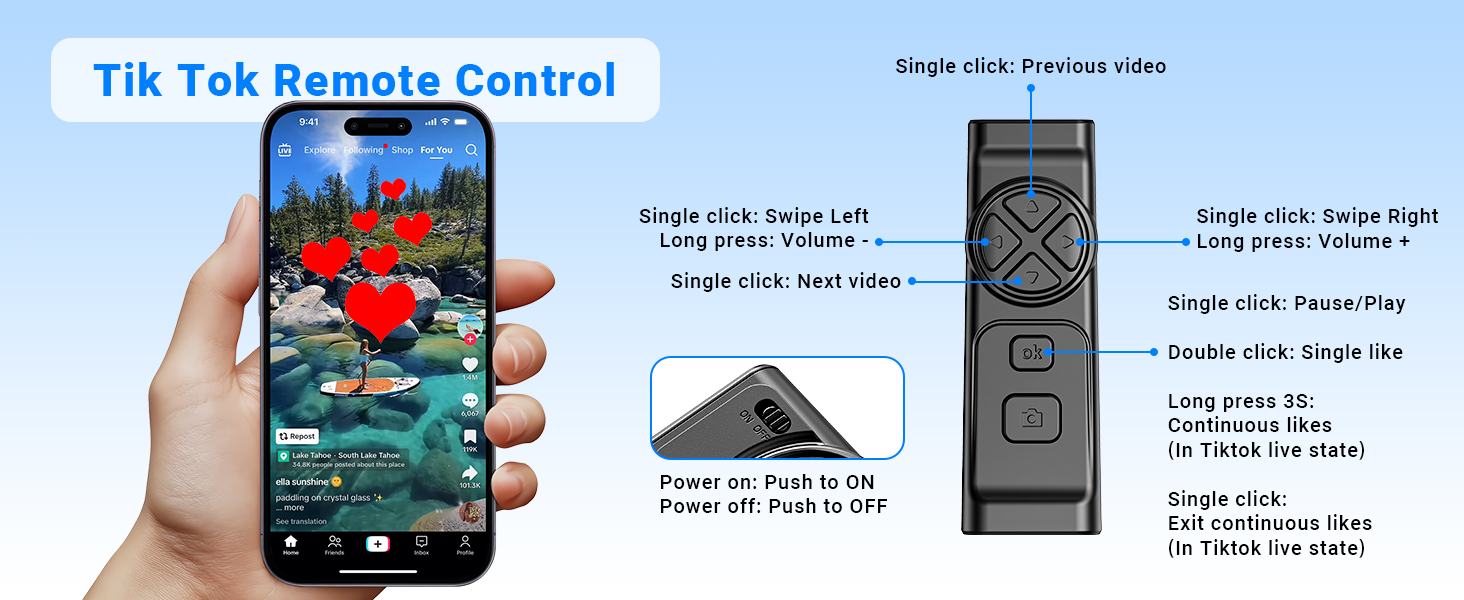
Detailed functions of the remote control for video scrolling and interaction.
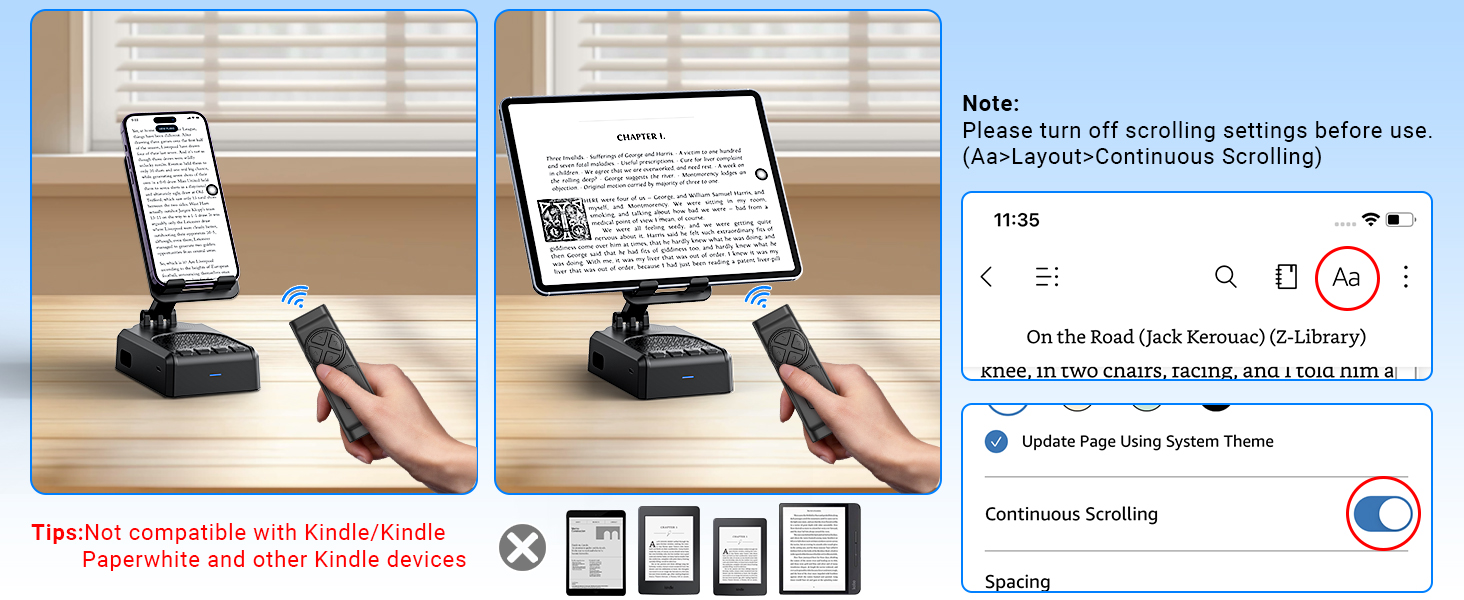
Important note regarding the remote control's compatibility with certain applications and devices.
Njega i održavanje
- Uređaj držite suhim. Ne izlažite ga vlazi ili ekstremnim temperaturama.
- Uređaj čistite mekom, suhom krpom. Izbjegavajte upotrebu jakih hemikalija ili abrazivnih sredstava za čišćenje.
- Čuvajte uređaj na hladnom i suvom mestu kada se ne koristi.
- Izbjegavajte ispuštanje ili izlaganje uređaja jakim udarima.
Rješavanje problema
Remote Control Issues (iOS)
problem: The remote control cannot scroll through videos on an iOS device.
Rješenje: Ensure AssistiveTouch is properly configured. Go to Postavke > Pristupačnost > Dodir > AssistiveTouch. Turn on AssistiveTouch, then turn on Izvršite pokrete dodirom, and adjust the Osetljivost praćenja to 20%-30%.
problem: Remote control still not working after enabling AssistiveTouch.
Rješenje:
- Verify the remote control is powered on (slide the button on the back to ON).
- Confirm the remote is paired with your phone via Bluetooth. Check your phone's Bluetooth settings.
- If issues persist, try disabling and re-enabling the AssistiveTouch function.
Visual guide for troubleshooting remote control issues on iOS devices.
Low Volume on Android Devices
problem: The speaker volume is too low on an Android device.
Rješenje: After connecting the speaker via Bluetooth, go to your phone's Bluetooth settings, find the connected speaker (e.g., YX01), tap the gear icon or settings icon next to it, and ensure 'Sync volume with phone' or 'Media volume sync' is enabled.

Instructions for adjusting volume sync settings on Android devices.
Tehničke specifikacije
| Feature | Specifikacija |
|---|---|
| Naziv modela | YX01, YK01 |
| Vrsta zvučnika | Prenosivi zvučnik |
| Posebne karakteristike | Bass Boost, Built-In Microphone, Lightweight, Portable, Stereo Pairing |
| Kompatibilni uređaji | Android phone, Samsung, Tablet, iPad, iPhone |
| Unit Count | 1.0 Count |
| Konfiguracija kanala surround zvuka | 1.0 |
| Boja | Crna |
| Trajanje baterije | 10 sata |
| Dimenzije proizvoda | 5.7"D x 2.08"Š x 3.34"H |
| Težina artikla | 0.36 kilograma (12.6 unci) |
| Je vodootporan | False |
| Vrijeme punjenja | 1.5 sata |
| Vrsta garancije | Ograničeno |
| Maksimalni domet (Bluetooth) | 393 Inches (10 Meters) |
| Broj stavki | 1 |
| Kontrolni metod | Daljinski, dodir |
| Bežična komunikacijska tehnologija | Bluetooth |
| Izvor napajanja | Battery Powered |
| Broj baterija | Potrebne su 2 A baterije (uključene) |
| Vrsta audio drajvera | Dynamic Driver |
| Broj mikrofona | 1 |
| Connectivity Protocol | Bluetooth |
| Stil | Moderna |
| Proizvođač | AIKELA |
| Maksimalna izlazna snaga zvučnika | 1 Watts |
| Način audio izlaza | Stereo |
| Vrsta montaže | Tabletop Mount |
Garancija i podrška
AIKELA provides 12 months of support for your Speaker Stand. If you encounter any problems or have questions, please contact customer service. For quick assistance, use the 'Find Order - Contact Seller' option on your purchase platform.


