1. Uvod
This manual provides detailed instructions for the setup, operation, maintenance, and troubleshooting of your Keychron Q6 HE QMK Wireless Custom Mechanical Keyboard. Please read this guide thoroughly to ensure optimal performance and longevity of your device.
The Keychron Q6 HE is a full-size layout wireless QMK custom keyboard featuring Hall Effect Gateron 2.0 magnetic switches, offering advanced customization and a premium typing experience.
2. Sadržaj paketa
Provjerite da li se sve stavke nalaze u vašem paketu:
- Keychron Q6 HE Keyboard
- Keyboard PCB
- Slučaj
- Aluminijumska ploča
- Keycaps (Mac & Windows compatible)
- USB-C na USB-C kabl
- USB-A na USB-C adapter
- Switch Puller
- Izvlakač ključeva
- Uputstvo za upotrebu

Image: Keychron Q6 HE keyboard with included accessories, showcasing the full package contents.
3. Podešavanje
3.1 Početno povezivanje
The Keychron Q6 HE supports three connection modes: 2.4 GHz Wireless, Bluetooth 5.1, and Wired (USB-C).
3.1.1 Žičano povezivanje
- Spojite priloženi USB-C kabel na USB-C priključak tastature.
- Drugi kraj kabla priključite na USB port računara.
- Ensure the mode switch on the back of the keyboard is set to 'Cable' mode.
- Vaš operativni sistem će automatski prepoznati tastaturu.
3.1.2 Bežična veza od 2.4 GHz
- Locate the 2.4 GHz receiver (dongle) included with your keyboard.
- Plug the 2.4 GHz receiver into an available USB port on your computer.
- Set the mode switch on the back of the keyboard to '2.4G' mode.
- The keyboard should automatically connect to the receiver. If not, press and hold the 'Fn' + '4' keys for 4 seconds to initiate pairing.
3.1.3 Bluetooth veza
- Set the mode switch on the back of the keyboard to 'Bluetooth' mode.
- To enter pairing mode, press and hold 'Fn' + '1' (for device 1), 'Fn' + '2' (for device 2), or 'Fn' + '3' (for device 3) for 4 seconds until the indicator light flashes rapidly.
- On your computer, smartphone, or tablet, enable Bluetooth and search for 'Keychron Q6 HE'.
- Odaberite tastaturu za uparivanje. Indikatorska lampica će prestati treptati nakon povezivanja.
- You can switch between paired Bluetooth devices by pressing 'Fn' + '1', 'Fn' + '2', or 'Fn' + '3' briefly.
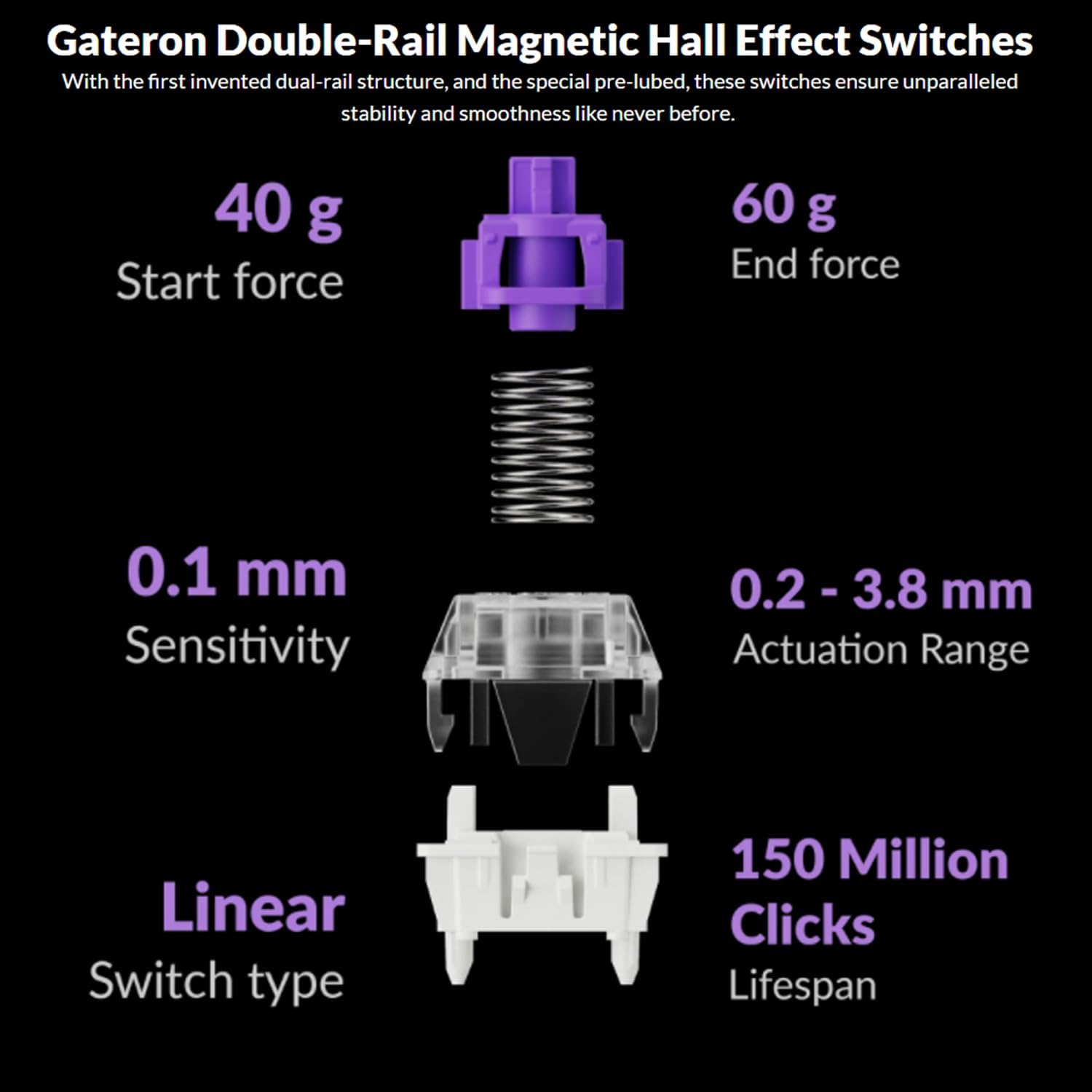
Image: The Keychron Q6 HE keyboard connected to a computer and a tablet, demonstrating its multi-device connectivity.
3.2 Promjena operativnog sistema
The keyboard has a switch to toggle between Mac and Windows layouts. Ensure this switch, located on the back of the keyboard, is set to your current operating system for correct key mapping.
3.3 Punjenje baterije
The keyboard is equipped with a 4000 mAh Lithium Ion battery. Connect the USB-C cable to the keyboard and a power source (computer USB port or USB wall adapter) to charge. The charging indicator light will show the charging status.
4. Uputstvo za upotrebu
4.1 Osnovne funkcije tipki
The Q6 HE features a standard 100% layout. All keys function as labeled. Use the 'Fn' key in combination with other keys for secondary functions (e.g., media controls, backlight adjustments).
4.2 Programabilni gumb
The rotary knob on the top right of the keyboard is programmable. By default, it controls volume (rotate) and media play/pause (press). Its functions can be customized using the Keychron Launcher web app.
4.3 Gateron Magnetic Hall Effect Switches
The Q6 HE utilizes Gateron Double-Rail Magnetic Hall Effect Switches, which allow for dynamic customization of key behavior.

Image: Diagram illustrating the adjustable actuation points of the magnetic switches, ranging from 0.5mm to 3.5mm.
4.3.1 Adjustable Actuation Points
The actuation point (the distance a key needs to travel to register a press) can be adjusted from 0.1 mm to 3.8 mm using the Keychron Launcher web app. This allows for personalized typing and gaming sensitivity.
4.3.2 Brzo okidanje
Rapid Trigger functionality allows a key to reactivate instantly upon reset, without needing to return to its original position. This feature is highly beneficial for competitive gaming and can be configured via the Keychron Launcher.

Image: Detailed breakdown of Gateron Double-Rail Magnetic Hall Effect Switches, showing components and specifications like start force, end force, sensitivity, actuation range, switch type, and lifespan.
4.4 RGB pozadinsko osvjetljenje
The keyboard features south-facing RGB LED lights. You can cycle through various lighting effects and adjust brightness using 'Fn' key combinations or through the Keychron Launcher web app.
4.5 Keychron Launcher Web App
The Keychron Launcher is a web-based application for advanced customization. It allows you to:
- Remap tipke
- Adjust actuation points for magnetic switches
- Create personalized macro commands
- Set shortcuts and key combinations
- Customize RGB lighting effects

Slika: Snimak ekrana Keychron Launchera web app interface, showing options for key remapping, actuation point adjustment, and macro creation.
5. Održavanje
5.1 Čišćenje tastature
Za čišćenje tastature:
- Isključite tastaturu iz svih izvora napajanja i uređaja.
- Koristite meku krpu koja ne ostavlja dlačiceampvodom ili blagim sredstvom za čišćenje obrišite kapice tipki i kućište.
- Za dublje čišćenje, koristite priloženi alat za izvlačenje kapica tipki da biste uklonili kapice tipki i očistite donju stranu komprimiranim zrakom ili malom četkom.
- Izbjegavajte prskanje tekućina direktno na tastaturu.
5.2 Prekidači koji se mogu mijenjati tokom rada
The Q6 HE features hot-swappable magnetic switches, allowing you to replace individual switches without soldering.

Slika: Krupni plan view of the Keychron Q6 HE keyboard with several keycaps and switches removed, highlighting the hot-swappable magnetic switch design.
5.2.1 Zamjena prekidača
- Use the switch puller to carefully remove the desired switch. Grip the switch firmly and pull straight up.
- Poravnajte pinove novog prekidača s rupama na PCB ploči.
- Gently press the new switch into place until it clicks. Ensure it is seated correctly and not bent.
5.3 Njega baterija
Da produžite vijek trajanja baterije:
- Izbjegavajte često potpuno pražnjenje baterije.
- Tastaturu čuvajte na hladnom i suhom mjestu kada je ne koristite duži period.
- Ne izlažite tastaturu ekstremnim temperaturama.
6. Otkrivanje problema
6.1 Tastatura ne reaguje
- Ožičeni način: Provjerite je li USB-C kabel sigurno povezan i s tastaturom i s računarom. Pokušajte s drugim USB priključkom ili kabelom.
- 2.4 GHz način rada: Verify the 2.4 GHz receiver is plugged in and the keyboard is set to '2.4G' mode. Re-pair by holding 'Fn' + '4' for 4 seconds.
- Bluetooth način rada: Check if Bluetooth is enabled on your device and the keyboard is paired. Re-pair if necessary by holding 'Fn' + '1/2/3' for 4 seconds.
- baterija: Ensure the keyboard battery is charged. Connect it to a power source.
6.2 Tipke se ne registruju ili se tipkaju dva puta
- Tačka aktiviranja: Adjust the actuation point for the affected keys using the Keychron Launcher. A higher actuation point (e.g., 2.0mm or 3.0mm) can help prevent accidental presses or double typing.
- Problem s prekidačem: If a specific key consistently malfunctions, the magnetic switch might be faulty. Consider replacing the hot-swappable switch.
- Firmware: Ensure your keyboard firmware is up to date via the Keychron Launcher.
6.3 Problemi sa RGB pozadinskim osvjetljenjem
- Svjetlina: Adjust backlight brightness using 'Fn' key combinations.
- Efekti: Cycle through different RGB effects using 'Fn' key combinations.
- softver: Use the Keychron Launcher to customize and troubleshoot RGB settings.
7. Specifikacije
| Broj modela | Q6H-P1 |
| Brand | Keychron |
| Tehnologija povezivanja | 2.4 GHz bežično, Bluetooth 5.1, USB-C žičano |
| Opis tastature | Full-size, Ergonomic |
| Posebne karakteristike | Hall Effect Magnetic Switches, Programmable Knob, Large Battery Capacity, Hot-Swappable |
| Kompatibilni uređaji | PC, Mac, Smartphone, Tablet, Gaming Console |
| Pozadinsko osvetljenje tastature | RGB (južno orijentisan) |
| Materijal | 6063 Aluminum (Case) |
| Baterija | 4000 mAh litijum-jonska (uključena) |
| Težina artikla | 6.49 funte (otprilike 2.94 kg) |
| Dimenzije paketa | 19 x 8.5 x 3 inča |

Image: An exploded diagram showing the internal layers and components of the Keychron Q6 HE keyboard, including keycaps, knob, magnetic switches, top case, sound absorbing foam, gaskets, plate, PCB, latex bottom pad, bottom case PET film, bottom case acoustic foam, battery, and silicone gaskets.
8. Informacije o garanciji
Keychron products typically come with a limited manufacturer's warranty. For specific warranty terms, conditions, and duration, please refer to the official Keychron webweb-mjesto ili garantni list koji ste dobili uz proizvod. Sačuvajte dokaz o kupovini za slučaj reklamacije.
9. Podrška
For further assistance, technical support, or to download the latest firmware and software, please visit the official Keychron webstranica:
You can also visit the Keychron store on Amazon for product information and customer service:


