1. Uvod
This manual provides detailed instructions for the setup, operation, maintenance, and troubleshooting of your Transformers TF-Crystal 85 Keys Mechanical Keyboard. Please read this manual thoroughly before using the product to ensure proper functionality and longevity.
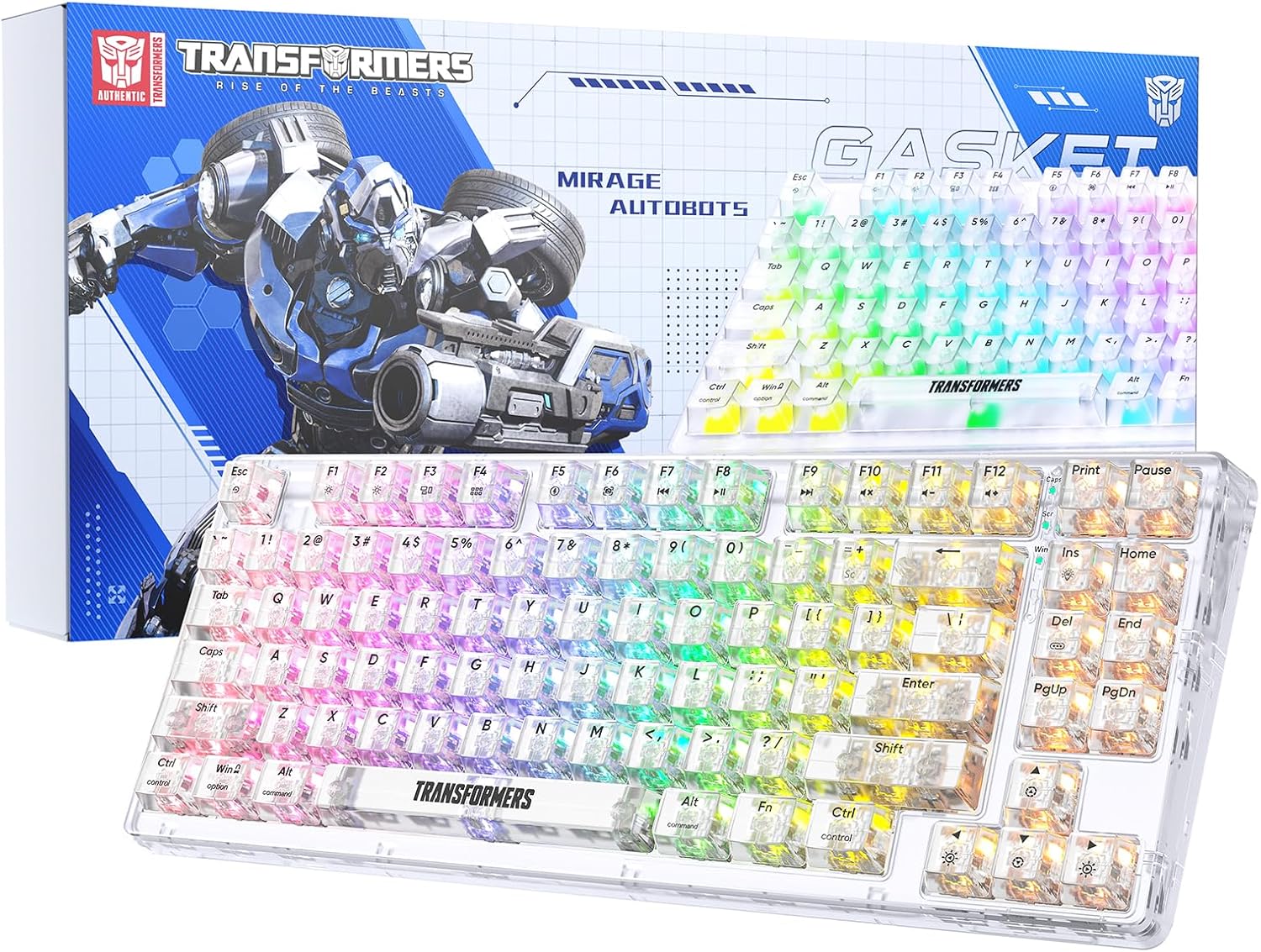
Image 1.1: Transformers TF-Crystal 85 Keys Mechanical Keyboard with its packaging, showcasing the transparent design and RGB lighting.
2. Proizvod je gotovview
2.1 Ključne karakteristike
- Raspored sa 85 tipki: Compact 75% design retaining essential functions, arrow, and navigation keys.
- Trostruka povezanost: Podržava Bluetooth 5.0, bežičnu vezu od 2.4GHz i žičanu USB-C vezu.
- PCB sa mogućnošću vruće zamjene: Compatible with most 3-pin and 5-pin mechanical switches, allowing for easy customization and replacement.
- Linear Switches: Pre-lubricated switches with a 50 million keystroke lifespan for durability and smooth operation.
- Struktura zaptivke: Incorporates high-quality gasket materials and a silicone pad to absorb vibrations and reduce typing noise.
- Prilagodljivo RGB pozadinsko osvjetljenje: Features 20 built-in backlight modes, 16.8 million color options, and dynamic music rhythm effects.
- Programmable Driver: Enables macro customization, key function remapping, and advanced lighting control.
- Dug vijek trajanja baterije: Equipped with a 4000mAh battery, providing up to 240 hours of continuous use in 2.4GHz mode without backlighting.
- Široka kompatibilnost: Supports Mac, Windows, iOS, Android, PC, Laptop, Smartphone, Tablet, Switch, Xbox, and PlayStation.
- Transparentni dizajn: Features transparent keycaps and base for enhanced aesthetic appeal.
3. Podešavanje
3.1 Punjenje tastature
Before initial use, fully charge the keyboard. Connect the provided USB-C cable to the keyboard's USB-C port and the other end to a powered USB port (e.g., computer, wall adapter). The charging indicator will show the charging status.
3.2 Povezivanje putem bežičnog načina rada od 2.4 GHz
- Pronađite USB prijemnik od 2.4 GHz, koji se obično nalazi u odjeljku na tastaturi.
- Uključite USB prijemnik u slobodan USB port na vašem računaru.
- Toggle the mode switch on the keyboard to the 2.4G pozicija.
- The keyboard will automatically connect to your device.
3.3 Connecting via Bluetooth 5.0 Mode
- Toggle the mode switch on the keyboard to the BT pozicija.
- Pritisnite i držite fn+1 (ili fn+2, fn+3) 3-5 sekundi dok indikatorska lampica ne počne brzo treptati, što ukazuje na režim uparivanja.
- Na svom uređaju (računaru, tabletu, pametnom telefonu) omogućite Bluetooth i potražite nove uređaje.
- Select "TF-Crystal 85" from the list of available devices to pair.
- Once paired, the indicator light will stop flashing and remain solid. You can pair up to three Bluetooth devices using fn+1, fn+2, i fn+3.
3.4 Povezivanje putem USB-C žičanog načina rada
- Spojite priloženi USB-C kabel na USB-C priključak tastature.
- Drugi kraj USB-C kabla priključite na dostupan USB port na računaru.
- The keyboard will automatically switch to wired mode and function without battery power.

Image 3.1: Diagram illustrating the three connection modes: Bluetooth 5.0, 2.4GHz wireless, and USB-C wired, compatible with various devices.
4. Uputstvo za upotrebu
4.1 Prebacivanje između načina rada
Use the physical switch located on the keyboard to select between BT (Bluetooth), 2.4G (2.4GHz wireless), and USB-C (wired) modes.
4.2 RGB kontrola pozadinskog osvjetljenja
The keyboard features customizable RGB backlighting. Use the following key combinations to adjust:
- Fn + Ins: Cycle through 20 different backlight effects.
- Fn + Del: Switch backlight colors within certain modes.
- Fn + ↑ / ↓: Podesite svjetlinu pozadinskog osvjetljenja (5 nivoa).
- Fn + ← / →: Adjust backlight effect speed (5 levels).
- Fn + Esc (hold for 3s): Reset backlight settings to default.

Image 4.1: Visual guide for controlling RGB backlight effects, brightness, and speed using Fn key combinations.
4.3 Programmable Driver Usage
The keyboard includes a programmable driver for advanced customization. This driver allows you to:
- Uređivanje makroa: Record and edit complex key sequences.
- Key Redefinition: Customize the function of individual keys.
- RGB Effect Customization: Fine-tune lighting modes, colors, and speeds, including music rhythm lighting effects.
Refer to the software's dedicated user interface for detailed instructions on using these features.

Image 4.2: Screenshot of the programmable driver interface, showing options for macro editing, RGB effects, and key redefinition.
4.4 Prekidači za vruću zamjenu
The TF-Crystal 85 keyboard features a hot-swappable PCB, allowing you to change mechanical switches without soldering. This supports most 3-pin and 5-pin mechanical switches.
- Isključite tastaturu ili je odspojite s uređaja.
- Koristite priloženi alat za izvlačenje kapica tipki da pažljivo uklonite željenu kapicu tipki.
- Use the provided switch puller to gently grip the switch from its top and bottom clips, then pull it straight up to remove it.
- Poravnajte pinove novog prekidača s otvorima na PCB-u. Provjerite jesu li pinovi ravni.
- Gently press the new switch into place until it clicks securely. Do not force it.
- Zamijenite poklopac tipke.

Image 4.3: Illustration of the hot-swappable feature, showing how to remove and insert 3-pin/5-pin switches and the linear switch specifications.
5. Održavanje
5.1 Čišćenje tastature
- Prije čišćenja isključite tastaturu iz svih izvora napajanja.
- Koristite meku krpu koja ne ostavlja dlačiceampvodom ili blagim sredstvom za čišćenje obrišite tipke i kućište.
- Za prašinu i nečistoće između tipki koristite komprimirani zrak ili malu četku.
- Avoid using harsh chemicals or abrasive materials that could damage the keyboard's surface.
5.2 Njega baterija
- Izbjegavajte često potpuno pražnjenje baterije.
- Tastaturu čuvajte na hladnom i suhom mjestu kada je ne koristite duži period.
- If the keyboard will not be used for a long time, charge it to about 50% before storage.
6. Otkrivanje problema
| Problem | Mogući uzrok | Rješenje |
|---|---|---|
| Tastatura ne reaguje u bežičnom režimu. | Low battery, incorrect mode selected, receiver not connected, Bluetooth not paired. | Charge the keyboard. Ensure the mode switch is set correctly (2.4G or BT). Re-insert the 2.4G receiver. Re-pair Bluetooth. |
| Tipke se ne registruju ili se tipkaju dvaput. | Faulty switch, debris under keycap, software issue. | Clean under the keycap. Try hot-swapping the switch with a known working one. Restart your computer. |
| RGB backlight not working or incorrect. | Backlight turned off, incorrect settings, software conflict. | Podesite svjetlinu pomoću Fn + ↑. Ciklusni načini rada sa Fn + Ins. Reset backlight with Fn + Esc (hold 3s). Check programmable driver settings. |
| Tastatura se ne puni. | Faulty USB-C cable, power source issue, keyboard port damage. | Try a different USB-C cable. Use a different USB port or power adapter. Ensure the cable is fully inserted. |
7. Specifikacije
| Feature | Detalj |
|---|---|
| Broj modela | TF-Crystal 85 |
| Key Layout | 85 tipki (75% kompaktnosti) |
| Povezivanje | Bluetooth 5.0, 2.4GHz bežični, USB-C žični |
| Tip prekidača | Pre-lubricated Linear Mechanical Switches |
| Prebacite životni vek | 50 miliona pritisaka na tastere |
| Mogućnost zamjene vrućim putem | Da (kompatibilno sa 3/5 pinova) |
| Pozadinsko osvetljenje | RGB (20 modova, 16.8 miliona boja) |
| Kapacitet baterije | 4000mAh |
| Battery Life (2.4G, no light) | Do 240 sati |
| Battery Life (Backlit ON) | Približno 22 sata |
| Dimenzije (D x Š x V) | 34.7 cm x 14 cm x 4.5 cm |
| Kompatibilnost | Mac, Windows, iOS, Android, PC, Laptop, Smartphone, Tablet, Switch, Xbox, PlayStation |

Image 7.1: Visual representation of the keyboard's battery life: 240 hours with backlight off, 22 hours with backlight on, powered by a 4000mAh battery.
8. Garancija i podrška
Transformers is committed to providing exceptional customer service. If you encounter any problems with your TF-Crystal 85 Keys Mechanical Keyboard, our after-sales support team is available to assist you. This includes technical support, exchanges, or installation guidance.
Please contact our customer service for assistance. We guarantee a hassle-free service experience.


