1. Uvod
This manual provides essential information for the safe and efficient use of your SBS Powerbank 10K Slim. Please read these instructions carefully before using the device and retain them for future reference.
The SBS Powerbank 10K Slim is a portable charging device designed to provide power to various electronic devices, including smartphones, tablets, and other USB-powered gadgets. It features a 10,000 mAh capacity, intelligent charging technology, and multiple output ports for versatile use.
2. Sadržaj paketa
Provjerite da li su sve stavke prisutne u paketu:
- SBS Powerbank 10K Slim
- USB-A na USB-C kabel
- Uputstvo za upotrebu
3. Značajke proizvoda
- Kapacitet 10,000 mAh: Capable of recharging a smartphone up to 4 times or a tablet up to 2 times.
- Intelligent Charge (IC) 10 Watts: Automatically detects the maximum power your device can accept and adjusts output accordingly, providing protection against overheating and short circuits.
- Tanak i kompaktan dizajn: Portable and lightweight for easy transport in a pocket or bag.
- USB-C ulaz/izlaz: The USB-C port functions for both charging the power bank and charging external devices.
- LED indikatori statusa: Easily monitor the remaining charge level of the power bank.
- Više izlaznih portova: Includes 1x USB-C port and 2x USB-A ports for charging various devices simultaneously.
4. Podešavanje
4.1 Početno punjenje Powerbank-a
Before first use, fully charge the power bank. Connect the supplied USB-A to USB-C cable to the power bank's USB-C port and the USB-A end to a compatible USB wall charger (not included) or a computer's USB port. The LED indicators will illuminate to show the charging progress.

Image: The power bank being charged using the included USB-C to USB-A cable connected to a laptop.
4.2 Identifikacija portova
The power bank features various ports for charging and discharging:
- USB 1 (USB-A 1A Standard): Output for standard charging (5W).
- USB-C (Type-C Fast Charge): Input/Output for fast charging (10W).
- USB 2 (USB-A 2.1A Intelligent Charge): Output for intelligent fast charging (10W).

Slika: Detaljna view of the power bank's charging ports, indicating their types and power outputs.
5. Uputstvo za upotrebu
5.1 Punjenje eksternih uređaja
To charge your device, connect it to one of the power bank's output ports (USB 1, USB 2, or USB-C) using an appropriate charging cable. The power bank will automatically begin charging. You can charge up to three devices simultaneously.

Image: The power bank actively charging a smartphone and a pair of wireless earbuds.
5.2 Provjera statusa baterije
Press the power button once to activate the LED indicators. The blue LEDs will show the remaining charge level of the power bank. Each LED typically represents approximately 25% of the battery capacity.

Image: The power bank's side with the power button and LED indicators displaying the charge level.
5.3 Intelligent Charge (IC) Function
The Intelligent Charge feature on the USB 2 (USB-A 2.1A) and USB-C ports automatically identifies the connected device and delivers the optimal charging current up to 10W. This ensures efficient and safe charging for a wide range of devices.

Image: The power bank charging a smartphone, highlighting its 10,000 mAh capacity and recharge capability.
6. Održavanje
6.1 Opšta njega
- Držite power bank suhim i dalje od vlage.
- Izbjegavajte ekstremne temperature (vruće ili hladno).
- Uređaj čistite mekom, suhom krpom. Ne koristite jake hemikalije ili abrazivne materijale.
- Ne ispuštajte, ne rastavljajte niti pokušavajte sami popraviti power bank.
6.2 Skladištenje
When storing the power bank for extended periods, ensure it is charged to approximately 50-75% capacity. Recharge it every 3-6 months to maintain battery health.
6.3 Sigurnosne mjere
- This power bank includes built-in protections against short circuits, overcharging, and over-discharging.
- Do not expose the power bank to fire or direct sunlight.
- Čuvati van domašaja djece.
7. Otkrivanje problema
7.1 Power Bank se ne puni
- Provjerite je li kabel za punjenje sigurno spojen i na power bank i na izvor napajanja.
- Try a different USB wall adapter or USB port.
- Provjerite je li izvor napajanja aktivan.
7.2 Uređaj se ne puni preko power bank-a
- Check if the power bank has sufficient charge (press the button to check LEDs).
- Ensure the charging cable connecting your device to the power bank is functional and correctly inserted.
- Pokušajte s drugim izlaznim priključkom na power banku.
- Some devices may require a specific charging cable or adapter.
7.3 Sporo punjenje
- Ensure you are using the appropriate port for faster charging (USB-C or USB 2).
- The charging speed can be affected by the cable quality, the device being charged, and the power bank's remaining charge level.
8. Specifikacije
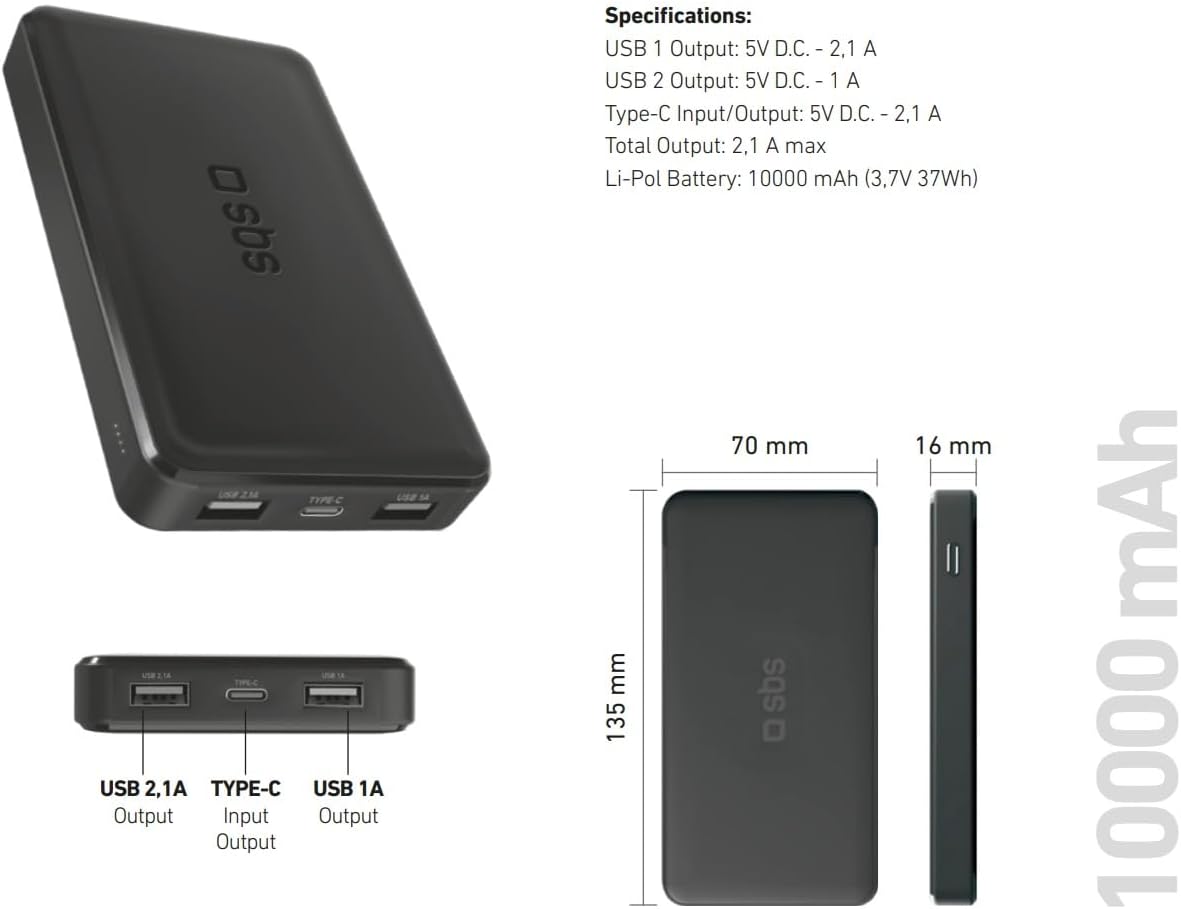
Image: Technical specifications and physical dimensions of the power bank.
| Feature | Detalj |
|---|---|
| Naziv modela | TTBB10000TCK |
| Kapacitet baterije | 10,000 mAh (3.7 V 37 Wh) |
| Vrsta baterije | Litijum-polimer |
| USB 1 izlaz | 5V D.C. - 1A (5W) |
| USB 2 izlaz | 5V D.C. - 2.1A (10W Intelligent Charge) |
| USB-C ulaz/izlaz | 5V D.C. - 2.1A (10W Fast Charge) |
| Total Output | 2.1A maks |
| Boja | Crna |
| Dimenzije | 135 mm x 70 mm x 16 mm |
| Težina | 230 grama |
| Posebne karakteristike | Fast Charge, Lightweight, Short-circuit Protection, Over-discharge Protection, Slim Design |
| Kompatibilni uređaji | Smartphone, Tablet, Smartwatch, Speaker, Laptop (charging only) |
9. Garancija i podrška
9.1 Garancija proizvođača
This SBS Powerbank 10K Slim comes with a 2-godišnja garancija proizvođačaMolimo sačuvajte dokaz o kupovini za reklamacije u okviru garancije. Garancija pokriva nedostatke u materijalu i izradi pri normalnoj upotrebi.
9.2 Korisnička podrška
For further assistance, technical support, or warranty inquiries, please visit the official SBS website or contact their customer service department. You can find more information and products from SBS by visiting their official store: SBS Brand Store.