1. Uvod
Thank you for choosing the MOREFINE M9 Mini PC. This compact desktop computer is designed for efficiency and versatility, featuring an Intel N150 processor, ample memory and storage, and comprehensive connectivity options. This manual provides essential information for setting up, operating, maintaining, and troubleshooting your device to ensure optimal performance.
2. Sadržaj paketa
Please check the box for the following items. If any item is missing or damaged, please contact your retailer or MOREFINE support.
- MOREFINE M9 Mini PC
- Adapter za napajanje
- HDMI kabl
- VESA nosač (opciono, može varirati ovisno o paketu)
- Korisnički priručnik (ovaj dokument)
3. Proizvod je gotovview
The MOREFINE M9 Mini PC offers a compact design with robust features for various computing needs.
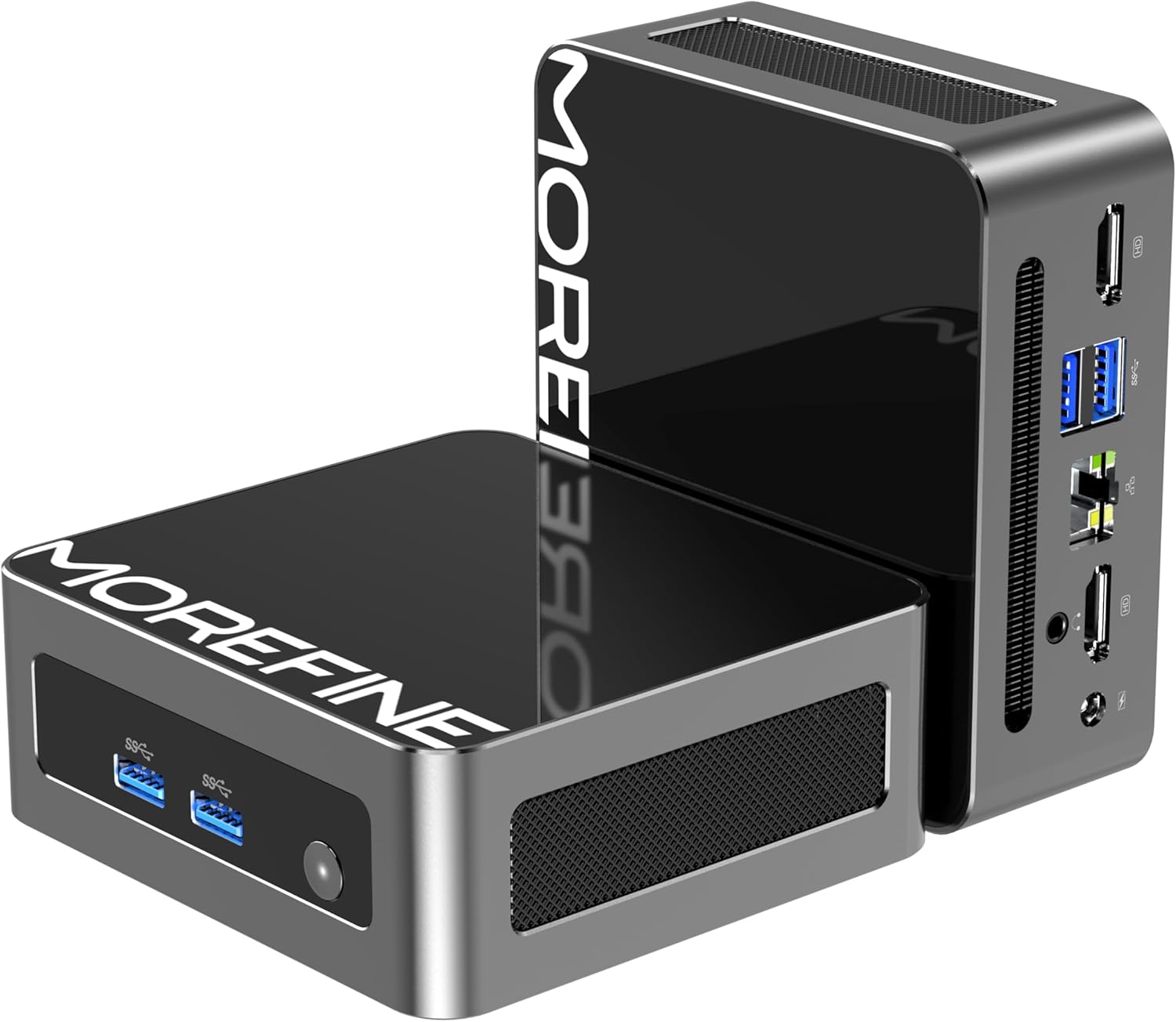
Image: The MOREFINE M9 Mini PC, showcasing its compact form factor and various ports on the front and rear panels.
Ključne karakteristike:
- procesor: Intel Twin Lake N150 (4 Cores, up to 3.6GHz)
- Memorija: 16 GB DDR4 3200 MHz RAM memorije (proširivo do 32 GB)
- Skladištenje: 512GB M.2 PCIe 3.0 NVMe SSD (expandable with an additional M.2 SATA slot)
- Grafika: Intel UHD Graphics with dual HDMI 2.1 4K@60Hz output
- Povezivanje: WiFi 6 (802.11ax), Bluetooth 5.2, 2.5G RJ45 Ethernet
- luke: 4x USB 3.2, 2x HDMI 2.1, 1x 2.5G RJ45, 1x 3.5mm Audio Jack, DC Power Input
- hlađenje: High-performance silent fan (below 35dB)

Image: Diagram highlighting key features including the Twin Lake N150 processor, dual 4K output, space-saving design, ultra-quiet fan, DDR4 RAM, and WiFi+Bluetooth connectivity.
Izgled porta:
Familiarize yourself with the available ports for connecting peripherals.

Image: The MOREFINE M9 Mini PC showing its various ports, including USB 3.2, HDMI, 2.5G Ethernet, and audio jack.
4. Upute za postavljanje
Follow these steps for the initial setup of your MOREFINE M9 Mini PC.
- Povežite periferne uređaje: Connect your monitor(s) to the HDMI ports. Connect your keyboard and mouse to the USB 3.2 ports.
- Mrežna veza: For a wired connection, connect an Ethernet cable to the 2.5G RJ45 port. For wireless, the device supports WiFi 6.
- Priključak za napajanje: Connect the power adapter to the DC power input port on the mini PC, then plug the adapter into a power outlet.
- Uključeno: Press the power button located on the front of the mini PC. The power indicator light will illuminate.
- Početna instalacija Windowsa: Follow the on-screen instructions to complete the Windows operating system setup. This typically involves selecting language, region, and creating a user account.
Opcije plasmana:
The compact design allows for flexible placement, including laying flat on a desk or mounting behind a monitor using a VESA mount (if included).
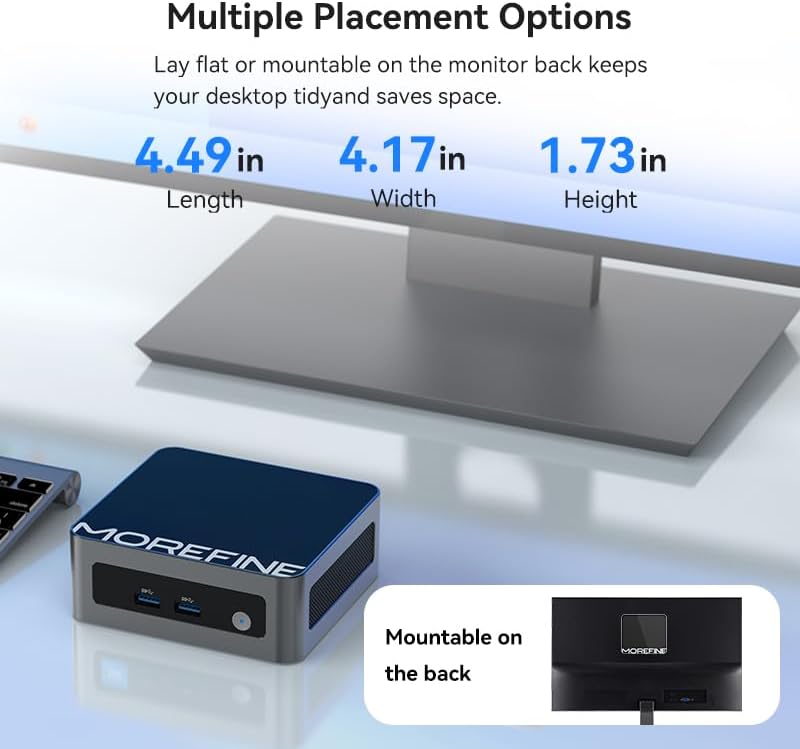
Image: The MOREFINE M9 Mini PC shown in various placement configurations, including on a desk and mounted behind a monitor, illustrating its space-saving design.
5. Uputstvo za upotrebu
Osnovna operacija:
- Uključivanje/isključivanje: Press the power button to turn the device on. To turn off, use the Windows shutdown option or press and hold the power button for 5 seconds.
- Ponovno pokretanje: Use the Windows restart option.
- Režim spavanja: Use the Windows sleep option or briefly press the power button.
Podešavanje dvostrukog ekrana:
The MOREFINE M9 supports dual 4K display output via its two HDMI 2.1 ports, enhancing multitasking capabilities.
- Connect two monitors to the HDMI ports on the mini PC.
- Nakon što se Windows pokrene, kliknite desnim tasterom miša na radnu površinu i odaberite "Postavke ekrana".
- Configure your display preferences (e.g., extend, duplicate) as needed.

Image: The MOREFINE M9 Mini PC connected to two monitors, demonstrating its dual 4K display capability for enhanced productivity.
Proširenje pohrane:
The mini PC features two M.2 slots for storage expansion, supporting up to 4TB.
- One M.2 2280 slot for NVMe PCIe 3.0 SSDs.
- One M.2 2242 slot for SATA 3 SSDs.
To install or upgrade storage, consult a qualified technician or refer to detailed instructions available on the MOREFINE support website. Ensure the device is powered off and disconnected from power before opening the chassis.

Slika: Interna view of the MOREFINE M9 Mini PC, highlighting the DDR4 RAM slots and the M.2 2280 NVMe and M.2 2242 SATA SSD expansion slots.
6. Održavanje
Proper maintenance ensures the longevity and optimal performance of your mini PC.
- čišćenje: Regularly clean the exterior with a soft, dry cloth. Use compressed air to gently clear dust from ventilation grilles. Ensure the device is powered off before cleaning.
- Ažuriranja softvera: Keep your operating system and drivers updated. Windows Update will handle most OS updates. For specific driver updates, check the MOREFINE support website.
- Uslovi okoline: Operate the mini PC in a well-ventilated area, away from direct sunlight, excessive heat, humidity, and dust. Avoid blocking the ventilation openings.
- Upravljanje napajanjem: Use the provided power adapter. Avoid frequent power interruptions.
7. Otkrivanje problema
Ako naiđete na probleme, pogledajte sljedeće uobičajene korake za rješavanje problema.
- Nema napajanja:
- Provjerite je li adapter za napajanje sigurno priključen i na mini računar i na ispravnu utičnicu.
- Testirajte utičnicu s drugim uređajem.
- Bez prikaza:
- Verify that the HDMI cable is securely connected to both the mini PC and the monitor.
- Provjerite je li monitor uključen i postavljen na ispravan ulazni izvor (HDMI 1, HDMI 2, itd.).
- Ako je moguće, pokušajte s drugim HDMI kabelom ili monitorom.
- Nema internetske veze:
- Za žičane veze, provjerite status Ethernet kabela i rutera.
- For wireless connections, ensure Wi-Fi is enabled in Windows settings and you are connected to the correct network with the correct password.
- Ponovo pokrenite ruter/modem.
- Accessing BIOS/UEFI Setup:
- To enter BIOS setup during boot, repeatedly press the Del key immediately after powering on the device.
- Alternatively, from Windows, navigate to Settings > System > Recovery > Advanced Startup and choose to restart into UEFI Firmware Settings.
8. Specifikacije
Detailed technical specifications for the MOREFINE M9 Mini PC.
| Feature | Specifikacija |
|---|---|
| Brand | VIŠE |
| Broj modela | M9-N150 |
| Procesor | Intel Twin Lake N150 (4 Cores, 3.6 GHz Max Frequency) |
| RAM | 16 GB DDR4 3200 MHz SODIMM (Expandable to 32GB) |
| Skladištenje | 512 GB M.2 PCIe 3.0 NVMe SSD (Supports additional M.2 SATA SSD up to 4TB) |
| Grafički koprocesor | Intel UHD grafika |
| Maksimalna rezolucija ekrana | 3840x2160 piksela (4K) |
| Operativni sistem | Windows 10 Pro |
| Bežično povezivanje | WiFi 6 (802.11ax), Bluetooth 5.2 |
| Ethernet | 2.5G RJ45 |
| USB portovi | 4x USB 3.2 |
| Video izlaz | 2x HDMI 2.1 |
| Audio izlaz | 1x 3.5 mm audio priključak |
| Težina artikla | 1.43 funte |
| Dimenzije paketa | 5.71 x 5.63 x 4.13 inča |
9. Garancija i podrška
MOREFINE products are designed for reliability and performance. For warranty information, please refer to the documentation included with your purchase or visit the official MOREFINE website. Typically, a standard manufacturer's warranty covers defects in materials and workmanship.
For technical support, troubleshooting assistance, or warranty claims, please contact MOREFINE customer service through their official website or the contact information provided with your product. Please have your model number (M9-N150) and purchase details ready when contacting support.
Politika povrata: This product typically includes a 30-day return policy from the date of purchase, subject to the retailer's terms and conditions.
10. Dodatni resursi
For the latest drivers, firmware updates, and frequently asked questions, please visit the official MOREFINE support page:


