Uvod
Thank you for choosing the RAINPOINT Sprinkler Timer. This programmable hose controller is designed to simplify your garden watering, offering automatic, manual, and rain delay functions. Featuring a 100% metal water pipe construction, it ensures durability and efficient water flow for your lawn and garden irrigation needs.
Zvanična video prezentacija proizvodaasing the RAINPOINT Sprinkler Timer's features and benefits, including its metal construction and various watering modes.
Ključne karakteristike
- 100% Metal Water Pipes: Upgraded internal water pipes made entirely of metal, designed to withstand water pressure up to 140 PSI and offer a longer service life compared to plastic alternatives.
- Full-Flow Design: Utilizes a full-bore metal ball valve and larger water pipe diameter to provide a higher water flow (up to 10 Gal/min at 100 PSI) and minimize pressure loss.
- Automatic Watering Mode: Allows setting flexible watering frequencies (1-12 hours or 1-7 days) and durations (1 minute to 3 hours 59 minutes) for automated irrigation.
- Rain Delay & Manual Mode: Features a rain delay function (24H, 48H, or 72H) to pause scheduled watering during rainfall, and a manual mode for temporary watering needs (1 minute to 8 hours) without affecting the main schedule.
- Leak-Proof Brass Water Inlet & Outlet: Equipped with pure brass ¾" standard threaded connections for quick and secure attachment to garden hoses. Anti-twist lock thread design withstands 2000N tensile force, ensuring IP65 waterproof performance for outdoor use.
- 2.5" LCD ekran: Large, easy-to-read display for clear programming and status monitoring.
- Zaštita male snage: Automatically turns off the valve to prevent continuous watering when battery is low.
Sadržaj paketa
Molimo Vas da se uvjerite da su svi artikli prisutni prilikom raspakivanja:
- 1 x RAINPOINT Sprinkler Timer (Model: RP-MIN)
- 1 x Uputstvo za upotrebu
- (Batteries not included - Requires 2 AA batteries)
Vodič za postavljanje
1. Instalacija baterije
The timer requires 2 AA alkaline batteries (not included). Ensure correct polarity when inserting.
- Pronađite odjeljak za baterije na stražnjoj strani tajmera.
- Otvorite poklopac baterije.
- Insert 2 new AA alkaline batteries, observing the +/- markings.
- Close the battery cover securely to ensure the IP65 waterproof seal is maintained.

Image showing the timer's features including IP65 waterproof rating and low power protection, which relates to battery life.
2. Povezivanje tajmera
Connect the timer to your outdoor faucet and garden hose.
- Provjerite je li slavina zatvorena.
- Thread the brass inlet of the timer onto your outdoor faucet. Hand-tighten firmly. The ¾" standard GHT fitting ensures compatibility with most garden hoses.
- Thread your garden hose onto the brass outlet of the timer. Hand-tighten firmly.
- Slowly turn on your outdoor faucet. The timer is designed to withstand up to 140 PSI.

The main product image showing the timer connected to a hose and faucet, illustrating proper setup.

Detaljno view of the durable brass inlet and outlet connections, highlighting the quality of the fittings.
3. Podešavanje sata
Before programming, set the current time.
- Turn the dial to "SET CLOCK".
- Use the "+" and "-" buttons to adjust the hour. Press "OK" to confirm.
- Use the "+" and "-" buttons to adjust the minute. Press "OK" to confirm.
- Turn the dial to "ON" to save the settings and return to normal operation.
Uputstvo za upotrebu
Automatski način zalijevanja
Program your timer for automatic, scheduled watering.
- Turn the dial to "START TIME". Use "+" and "-" to set the desired start time for watering. Press "OK".
- Turn the dial to "HOW LONG". Use "+" and "-" to set the watering duration (1 minute to 3 hours 59 minutes). Press "OK".
- Turn the dial to "HOW OFTEN". Use "+" and "-" to set the watering frequency (every 1-12 hours or every 1-7 days). Press "OK".
- Turn the dial to "ON" to activate the programmed schedule.
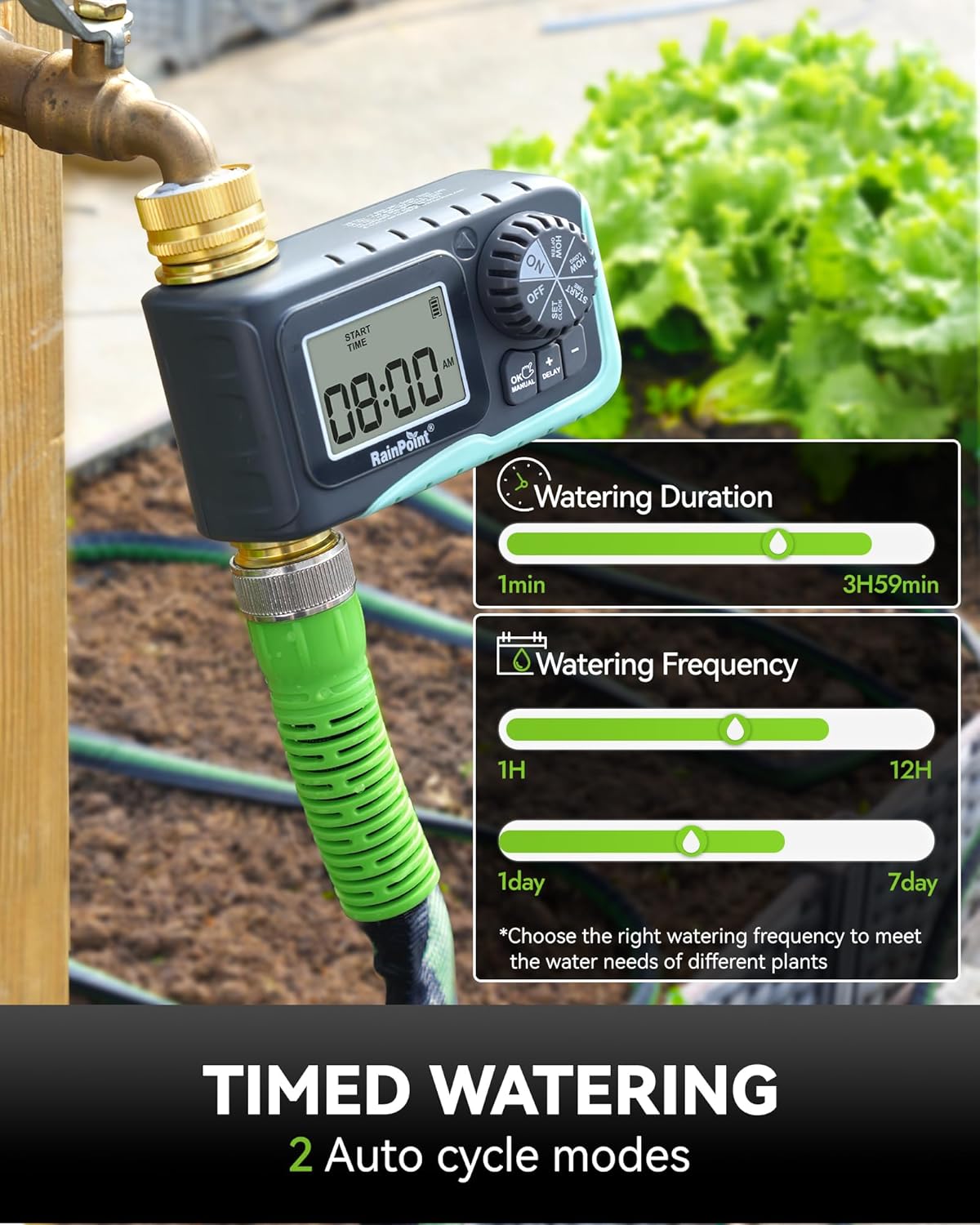
The timer's display showing options for setting watering duration and frequency for automatic cycles.
Režim odlaganja kiše
Temporarily pause your watering schedule due to rain.
- With the dial set to "ON", press the "DELAY" button.
- Each press of the "DELAY" button will cycle through delay options: 24H, 48H, 72H.
- The timer will pause for the selected duration and automatically resume the programmed schedule afterward.

Visual representation of the rain delay function, allowing users to prevent overwatering during rainy periods.
Ručni način zalijevanja
Initiate immediate watering without affecting your programmed schedule.
- With the dial set to "ON", press the "MANUAL" button.
- Use the "+" and "-" buttons to set the desired manual watering duration (1 minute to 8 hours).
- Press "OK" to start manual watering.
- To stop manual watering early, press "MANUAL" again or turn the dial to "OFF" and then back to "ON".

An image demonstrating the manual watering feature, showing a user watering plants directly.
Turning Off the Timer
To stop all watering functions, turn the dial to "OFF". The display will show "OFF".
Održavanje
- Zamjena baterije: Replace batteries when the low power indicator appears on the display to ensure continuous operation and prevent unexpected watering.
- čišćenje: Periodically clean the filter washer located at the inlet to prevent debris from entering the timer and affecting water flow.
- Zimljenje: Before the first frost, disconnect the timer from the faucet and hose. Drain any remaining water from the timer and store it indoors in a dry, protected area to prevent freezing damage.
- Prevencija curenja: Ensure all connections are hand-tightened securely. The anti-leak seal ring and robust brass fittings are designed to prevent leaks, but proper installation is crucial.

An illustration highlighting the durable 100% metal water pipe construction, emphasizing its resistance to high pressure and long lifespan.
Rješavanje problema
| Problem | Mogući uzrok | Rješenje |
|---|---|---|
| Timer not turning on/display blank. | Prazne ili nepravilno instalirane baterije. | Replace with 2 new AA alkaline batteries, ensuring correct polarity. |
| Nema protoka vode. | Faucet is off; low water pressure; clogged filter; timer is off or not programmed. | Ensure faucet is fully open. Check water pressure. Clean the filter washer at the inlet. Set the dial to "ON" and verify programming. |
| Curenje vode iz priključaka. | Loose connection; missing or damaged washer. | Hand-tighten all connections firmly. Check that the rubber washer is properly seated in the inlet. Replace if damaged. |
| Timer not following schedule. | Incorrect programming; rain delay active; low battery. | Review and re-program the schedule. Check if rain delay is active. Replace batteries. |
Specifikacije
| Atribut | Detalj |
|---|---|
| Brand | RAINPOINT |
| Model | RP-MIN (1 Outlet) |
| Materijal | Mesing, metal |
| Dimenzije proizvoda | 4.5"D x 2.6"Š x 4.5"H |
| Otpornost na pritisak vode | Do 140 PSI |
| Tensile Force Resistance | 2000N (Anti-twist lock thread) |
| Brzina protoka vode | Up to 10 Gal/min at 100 PSI |
| Učestalost zalijevanja | 1-12 hours or 1-7 days |
| Trajanje navodnjavanja | 1 minute - 3 hours 59 minutes (Automatic); 1 minute - 8 hours (Manual) |
| Waterproof Rating | IP65 |
| Display | 2.5" LCD ekran |
| Izvor napajanja | 2 x AA baterije (nisu uključene) |
| Težina artikla | 12.6 unce |
| Zemlja porijekla | Kina |
Garancija i podrška
For warranty information, technical support, or any inquiries regarding your RAINPOINT Sprinkler Timer, please refer to the official RAINPOINT webweb-stranicu ili direktno kontaktirajte njihovu korisničku službu. Kontaktni podaci se obično nalaze na pakovanju proizvoda ili na službenim online kanalima proizvođača.
Također možete posjetiti RAINPOINT Store on Amazon za dodatne informacije o proizvodu i resurse podrške.


