ICUIXIAN Video Wall Controller
Model: U1x4P - User Manual
Advanced 4K@60Hz HDMI Video Wall and Matrix Switcher
1. Uvod
The ICUIXIAN U1x4P Video Wall Controller is a versatile device designed for professional display applications. It functions as both a video wall processor and an HDMI matrix switcher, supporting 4K@60Hz input resolutions and offering various display configurations including 4x1, 3x1, 2x1, 1x2, 1x3, 1x4, and 2x2 video walls. Key features include 90, 180, and 270-degree image rotation, edge blending, and multiple control options for seamless operation.
2. Proizvod je gotovview
The U1x4P integrates advanced video processing capabilities to create dynamic and flexible display solutions. It features multiple HDMI inputs and outputs, along with an RS-232 port for external control, and an audio output for synchronized sound.

Figure 2.1: ICUIXIAN U1x4P Video Wall Controller, remote control, and a conceptual curved video wall display.

Figure 2.2: Feature overview of the 4K Video Wall Controller, highlighting its dual functionality as a video wall processor and seamless matrix switcher.
3. Podešavanje
Follow these steps to set up your ICUIXIAN Video Wall Controller.
- Povežite ulazne izvore: Connect your HDMI or DisplayPort source devices (e.g., PC, TV box, game console) to the HDMI-1, HDMI-2, HDMI-3, HDMI-4, or DP input ports on the controller.
- Connect Display Outputs: Connect your display monitors (TVs, projectors, billboards) to the HDMI-1, HDMI-2, HDMI-3, HDMI-4 output ports. Ensure correct cabling for your desired video wall configuration.
- Povežite audio izlaz (opciono): If external audio is required, connect speakers or an audio system to the A-OUT 3.5mm stereo jack.
- Connect RS-232 (Optional): For advanced control via a computer or control system, connect an RS-232 cable to the RS-232 port.
- Priključak za napajanje: Connect the provided 12V DC power adapter to the DC 12V input port on the controller and then plug it into a power outlet. The LED indicator will illuminate.

Figure 3.1: Connection diagram illustrating input and output device connectivity.
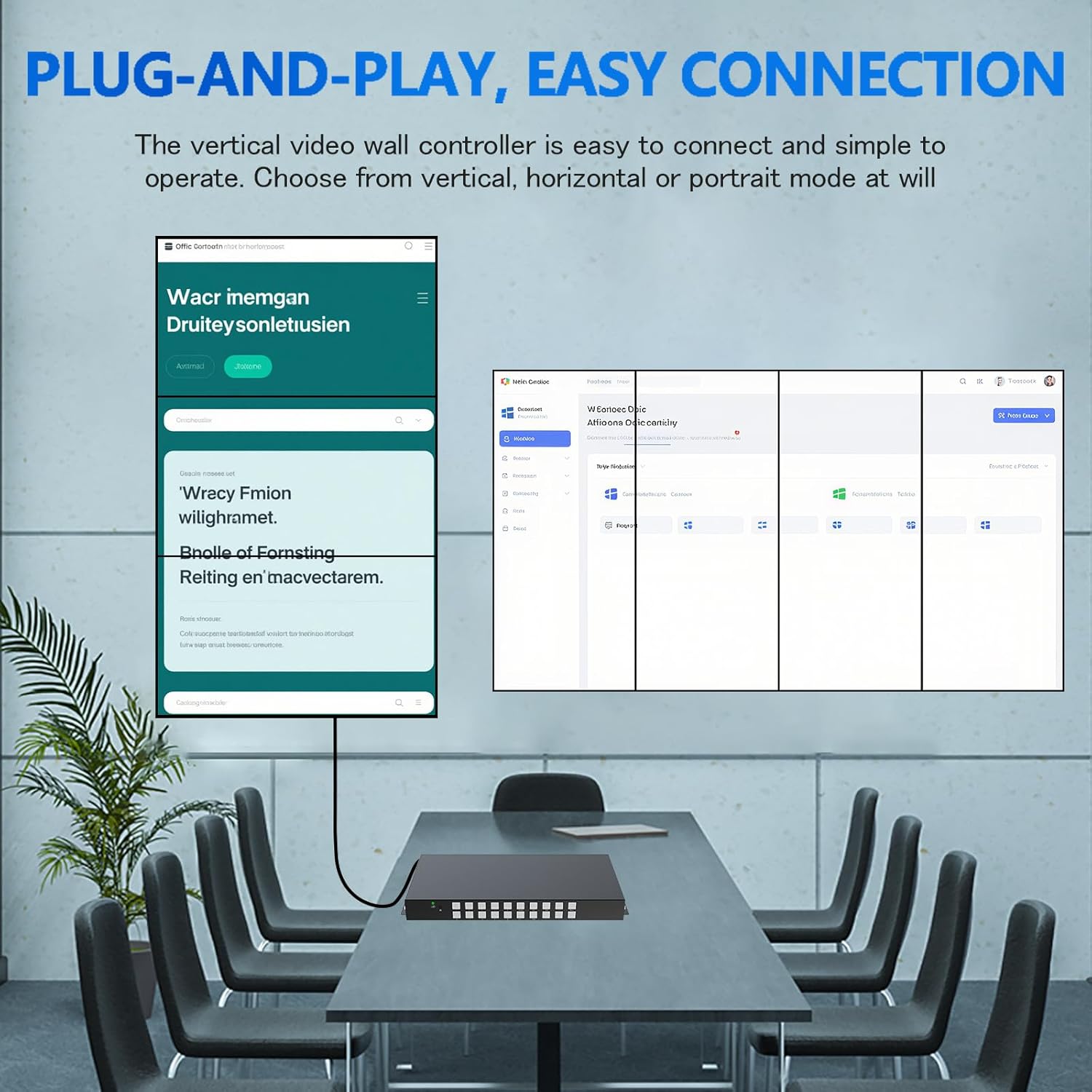
Slika 3.2: Prample of a plug-and-play connection setup for the video wall controller.
4. Načini rada i karakteristike
The U1x4P supports two primary operating modes: Video Wall Mode and HDMI Matrix Mode.
4.1. Video Wall Mode
In Video Wall Mode, a single input source is displayed across multiple screens, forming a larger composite image. The controller supports various configurations and advanced display features.
- Podržane konfiguracije: 4x1, 3x1, 2x1, 1x2, 1x3, 1x4, and 2x2.
- Rotacija slike: Supports 90, 180, and 270-degree rotation for individual display units, enabling vertical or horizontal splicing.
- Edge Blending/Fusion: Adjusts the seam area between stitched images to minimize gaps and create a more seamless visual experience.
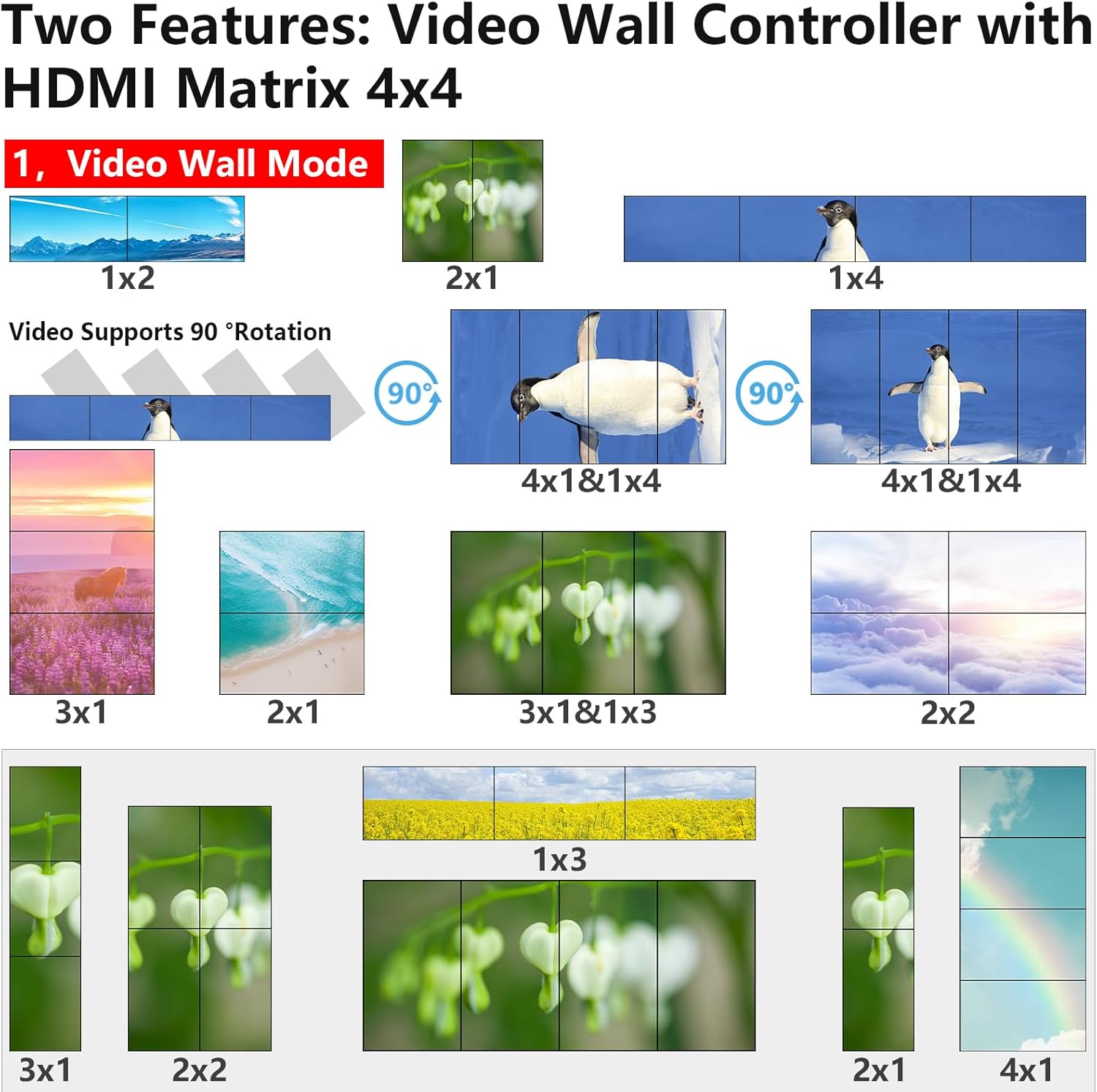
Figure 4.1: Various video wall configurations and 90-degree rotation capabilities.
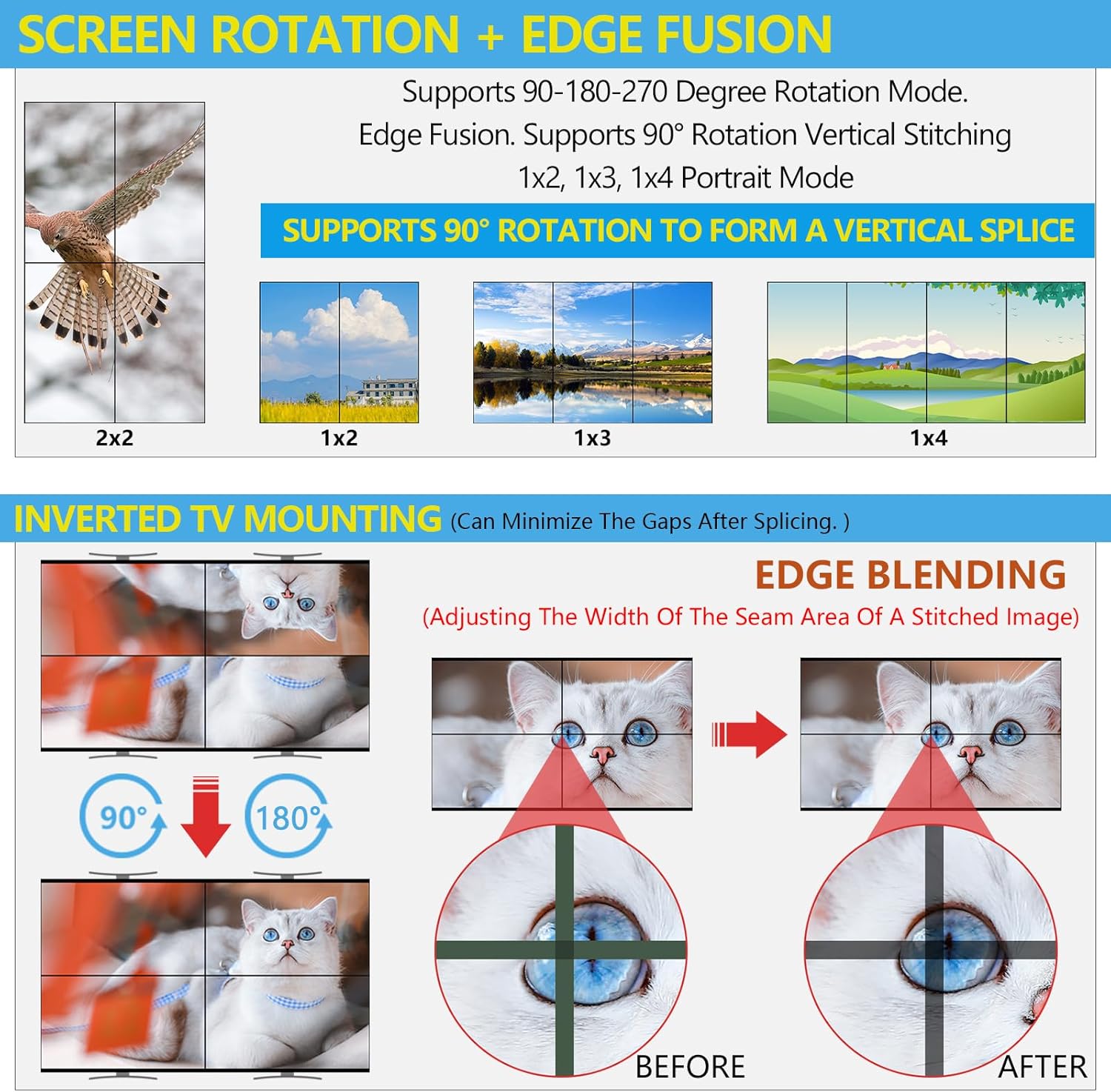
Figure 4.2: Screen rotation and edge fusion functionality for enhanced video wall display.

Slika 4.3: Detaljan primjeramples of individual and whole-screen rotation for seamless video walls.
4.2. HDMI Matrix Mode
In HDMI Matrix Mode, the controller allows any of the four input signals to be routed to any of the four output displays independently. It also supports multi-view split-screen display.
- Besprekorno prebacivanje: Transition between input sources without black screens or delays.
- više-view Prikaz: Each output can display a split screen of up to four input sources simultaneously.

Figure 4.4: Switching between Video Wall Mode and HDMI Matrix Mode.

Slika 4.5: Multi-view and matrix mode functionalities.
5. Metode kontrole
The U1x4P offers three methods for control:
- Infracrveni daljinski upravljač: Use the included IR remote for convenient control of input switching, mode selection, and other functions from a distance.
- Gumbi na prednjoj ploči: The device features buttons on its front panel for direct control, allowing for quick adjustments.
- RS-232 Software Control: For integration into professional control systems or for advanced configuration, the RS-232 port allows control via dedicated software.

Figure 5.1: Available control methods and audio output port.
6. Specifikacije
| Feature | Opis |
|---|---|
| Broj modela | U1x4P |
| Rezolucija ulaza | Up to 3840x2160@60Hz (4K@60Hz) |
| Izlazna rezolucija | 1920x1200@60Hz, 1920x1080@60Hz (Freely Switchable) |
| HDMI verzija | HDMI 2.0 |
| Bandwidth | 18 Gbps |
| Inputs | 4 x HDMI, 1 x DisplayPort |
| Izlazi | 4 x HDMI, 1 x 3.5mm Audio Out |
| Kontrolne metode | IR Remote, Front Panel Buttons, RS-232 |
| Podrška za rotaciju | 90°, 180°, 270° for individual units |
| Dimenzije | 6 x 12.5 x 3 inča |
| Težina artikla | 5 funte |
| Boja | Crna |

Figure 6.1: Input and output resolution capabilities.

Figure 6.2: Point-to-point resolution clarity comparison.
7. Održavanje
To ensure the longevity and optimal performance of your ICUIXIAN Video Wall Controller, follow these maintenance guidelines:
- čišćenje: Za čišćenje vanjštine uređaja koristite meku, suhu krpu. Izbjegavajte abrazivna sredstva za čišćenje ili rastvarače.
- ventilacija: Osigurajte da je uređaj postavljen u dobro prozračenom prostoru kako biste spriječili pregrijavanje. Ne blokirajte ventilacijske otvore.
- Snaga: Isključite napajanje tokom oluja sa grmljavinom ili kada se uređaj ne koristi duži period.
- Okruženje: Držite uređaj dalje od vlage, ekstremnih temperatura i direktne sunčeve svjetlosti.
8. Otkrivanje problema
If you encounter issues with your video wall controller, refer to the following common troubleshooting steps:
- Nema signala/prikaza:
- Verify all HDMI/DP cables are securely connected to both source and display devices.
- Provjerite da li je ulazni izvor uključen i da li daje signal.
- Check that the correct input is selected on the controller.
- Confirm display monitors are powered on and set to the correct input.
- Iskrivljena slika:
- Check cable quality; use high-speed HDMI 2.0 cables for 4K signals.
- Ensure input and output resolutions are compatible with your displays.
- Adjust edge blending settings if the distortion is at screen seams.
- Daljinski upravljač ne radi:
- Provjerite nivoe baterije i zamijenite ih ako je potrebno.
- Ensure there are no obstructions between the remote and the IR receiver on the controller.
- Nema zvuka:
- Verify external audio system is connected correctly and powered on.
- Provjerite audio postavke na izvornom uređaju.
If problems persist, contact ICUIXIAN technical support for further assistance.
9. Garancija i podrška
ICUIXIAN is committed to providing quality products and customer satisfaction. For each shipment, products undergo careful testing to ensure functionality. In the event of a product issue, ICUIXIAN offers professional technical staff to provide one-on-one communication and prompt assistance.
For detailed warranty information or technical support, please refer to the official ICUIXIAN webweb-mjesto ili direktno kontaktirajte njihovu korisničku službu. Za prošireno pokriće mogu biti dostupni i planovi zaštite.
