1. Uvod
This manual provides essential instructions for the setup, operation, and maintenance of your TMY Projector. Please read this manual thoroughly before using the product to ensure proper functionality and to maximize your viewing iskustvo. Sačuvajte ovaj priručnik za buduću upotrebu.
2. Proizvod je gotovview
2.1 Sadržaj paketa
Provjerite da li su sve stavke prisutne u paketu:
- TMY Projector Unit
- Daljinski upravljač
- HDMI kabl
- Kabl za napajanje
- Garantni list
2.2 Ključne karakteristike
- Netflix Officially Licensed: Access streaming services directly without external devices.
- Rezolucija 1080P: Pruža jasne i detaljne slike.
- Electric Focus & Auto Keystone: Automatic image adjustment for optimal clarity and shape.
- Okretni stalak od 270°: Flexible projection angles, including ceiling projection.
- Upgraded WiFi 6 Connectivity: Ensures stable and fast wireless streaming.
- Dual-Mode Bluetooth 5.2: Connects to external speakers or functions as a standalone Bluetooth speaker.
- Više opcija povezivanja: HDMI, USB, Phone/PC mirroring.
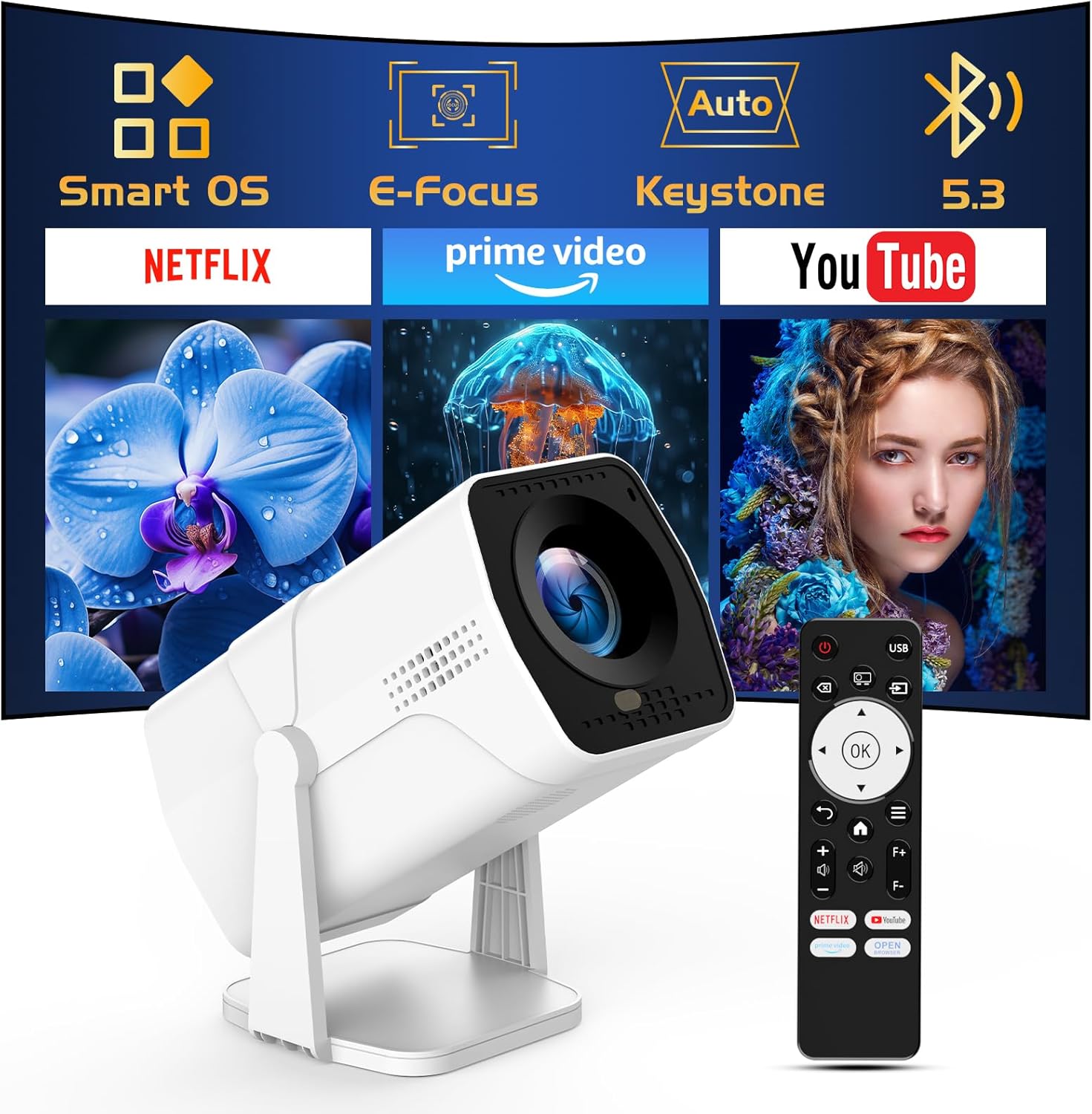
Image: The TMY Projector unit, its remote control, and a projected screen displaying logos for Smart OS, E-Focus, Auto Keystone, Bluetooth 5.3, Netflix, Prime Video, and YouTube.
3. Podešavanje
3.1 Postavljanje
Position the projector on a stable, flat surface. The 270° rotatable stand allows for versatile placement, including projecting onto walls or ceilings. Ensure adequate ventilation around the projector.

Image: A TMY Projector positioned on a bedside table, projecting an image onto the ceiling, demonstrating its 270° rotatable stand for multi-angle viewing.
3.2 Priključak za napajanje
- Spojite kabel za napajanje na ulazni priključak za napajanje projektora.
- Drugi kraj kabla za napajanje priključite na standardnu električnu utičnicu.
3.3 Početno uključivanje i podešavanje fokusa
- Pritisnite dugme za napajanje na projektoru ili daljinski upravljač da uključite uređaj.
- Karakteristike projektora Električni fokus i Auto Keystone correction. The image will automatically adjust for clarity and a rectangular shape within approximately 2 seconds.
- If further adjustment is needed, use the remote control to fine-tune the focus.

Image: A TMY Projector projecting a vibrant image onto a screen, with an overlay illustrating the 'FOCUS' function and icons for Auto Keystone and 50%-100% Zoom.
3.4 Network Connection (WiFi)
The projector supports WiFi 6 for a fast and stable internet connection.
- Navigate to the 'Settings' menu using the remote control.
- Odaberite 'Mreža' ili 'WiFi postavke'.
- Choose your desired WiFi network from the list and enter the password.
- Potvrdite vezu.

Image: A TMY Projector wirelessly connected to a tablet, smartphone, and laptop, illustrating its WiFi 6 connectivity for faster streaming with no lagging.
3.5 Bluetooth veza
The projector features Dual-Mode Bluetooth 5.2 for audio connectivity.
- Projector Mode (Output): To connect to external Bluetooth speakers or soundbars: Navigate to 'Bluetooth Settings', enable Bluetooth, and pair with your audio device.
- Speaker Mode (Input): To use the projector's built-in speakers as a standalone Bluetooth speaker: Select 'Speaker Mode' in the Bluetooth settings. Your phone or other device can then connect to the projector to play audio.

Image: A TMY Projector illustrating its two-way Bluetooth 5.2 functionality, showing connections to a soundbar (Projector Mode) and a smartphone (Speaker Mode).
4. Operacija
4.1 Navigating the Smart OS
The projector runs on a smart TV operating system. Use the provided remote control to navigate menus, select applications, and control playback.

Image: The TMY Projector unit with a projected screen showing a grid of built-in smart OS applications, including Netflix, YouTube, Prime Video, TikTok, and others.
4.2 Accessing Built-in Apps
The projector comes with pre-installed and officially licensed applications such as Netflix, Prime Video, and YouTube. Access these directly from the home screen or through the 'App Store' for additional content.

Image: A TMY Projector projecting a screen filled with content from officially licensed apps like Netflix, Prime Video, and YouTube, with the remote control in the foreground.
4.3 Povezivanje vanjskih uređaja
The projector offers multiple ports for connecting external devices:
- HDMI: Connect TV sticks, TV boxes, PCs/Laptops, or gaming consoles (e.g., PS).
- USB: Reprodukujte medije files directly from USB drives or connect other USB accessories.
- Phone/PC Mirroring: Wirelessly mirror content from your smartphone or PC (refer to the on-screen instructions for specific mirroring protocols).
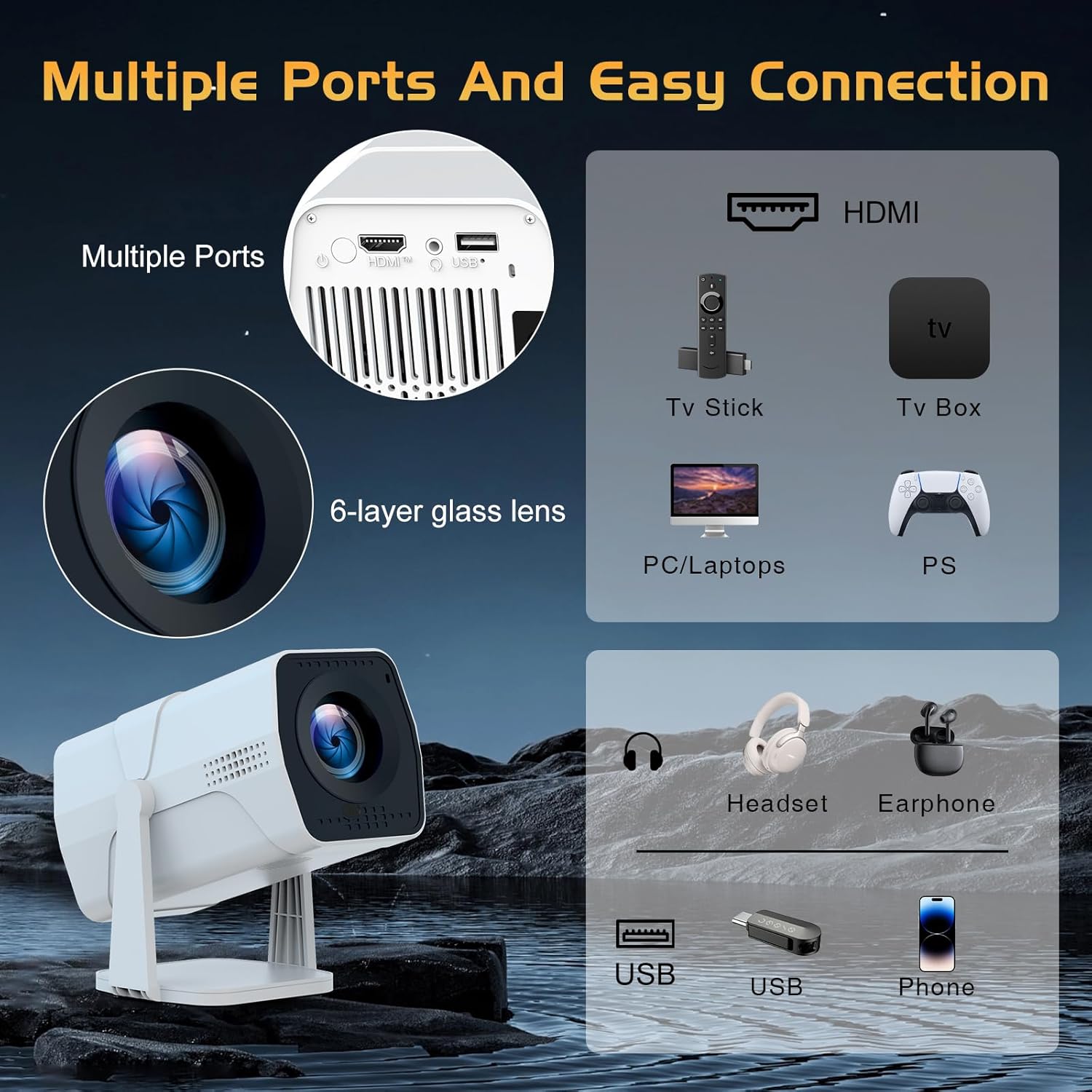
Image: A detailed diagram showing the multiple ports on the TMY Projector (HDMI, USB) and various connection possibilities, including TV sticks, PCs, gaming consoles, headsets, and phones.
4.4 Screen Zoom Function
The projector includes a 50%-100% zoom function, allowing you to adjust the screen size without moving the projector. This feature can be accessed via the remote control or settings menu.
5. Održavanje
To ensure the longevity and optimal performance of your TMY Projector, follow these maintenance guidelines:
- Čišćenje sočiva: Koristite meku krpu koja ne ostavlja dlačice, posebno dizajniranu za optička sočiva. Izbjegavajte abrazivne materijale ili jake hemikalije.
- Čišćenje eksterijera: Obrišite vanjski dio projektora mekom, suhom krpom. Ne koristite tekuća sredstva za čišćenje direktno na uređaju.
- ventilacija: Uvjerite se da otvori za ventilaciju nisu blokirani kako biste spriječili pregrijavanje.
- Skladištenje: When not in use for extended periods, store the projector in a cool, dry place, away from direct sunlight and dust.
6. Otkrivanje problema
If you encounter issues with your TMY Projector, refer to the following common problems and solutions:
- Nema napajanja:
- Ensure the power cord is securely connected to both the projector and a working electrical outlet.
- Provjerite je li utičnica funkcionalna.
- No Image / Blurry Image:
- Verify the projector is powered on and the lens cap is removed.
- Allow the automatic focus and keystone correction to complete. If still blurry, manually adjust focus using the remote.
- Ensure the projection surface is suitable and the projector is within the recommended distance.
- If using an external source (HDMI), ensure the correct input source is selected.
- Nema zvuka:
- Check the volume level on the projector and any connected external audio devices.
- If using Bluetooth speakers, ensure they are properly paired and connected.
- If using internal speakers, ensure external Bluetooth output is not selected.
- Daljinski upravljač ne reaguje:
- Ensure the batteries are correctly inserted and not depleted.
- Usmjerite daljinski upravljač direktno prema IR prijemniku projektora.
- Problemi s WiFi vezom:
- Ensure your WiFi network is active and within range.
- Dvaput provjerite WiFi lozinku.
- Restart the projector and your WiFi router.
- If the connection times out, try moving the projector closer to the router or reducing interference.
7. Specifikacije
| Feature | Specifikacija |
|---|---|
| Brand | TMY |
| Model | B0DRFF5KMF |
| Težina artikla | 2.79 funte |
| Dimenzije proizvoda | 5.35 x 4.84 x 7.09 inča |
| Boja | Bijelo |
| Posebne karakteristike | Speakers, Electric Focus, Auto Keystone, 270° Rotatable Stand |
| Tehnologija povezivanja | HDMI, USB, WiFi 6, Bluetooth 5.2 |
| Rezolucija ekrana | 1920 x 1080 (1080P Full HD) |
| Preporučena upotreba | Indoor |

Image: A visual comparison showing the TMY Projector's 1080P Full HD image quality, emphasizing that it is recommended for use in dark environments for optimal viewing, contrasted with daytime or light-on conditions.
8. Garancija i podrška
TMY is committed to providing excellent customer service and product support.
- garancija: Ovaj proizvod dolazi sa 3 godine garancije.
- Politika povrata: Enjoy a 30-day return period.
- tehnička podrška: Dostupni su doživotni postprodajni servis i tehnička podrška.
- Vrijeme odgovora: Expect a quick reply within 24 hours for support inquiries.
Za dodatnu pomoć, molimo Vas da posjetite službenu stranicu TMY Store on Amazon or contact customer support through the provided channels in your warranty card.


