1. Uvod
This manual provides essential information for the safe and efficient operation of your Bietrun 2000W Pure Sine Wave Inverter. Please read it thoroughly before installation and use, and retain it for future reference.
Sadržaj paketa
Provjerite da li su sve stavke prisutne u paketu:
- 1 x Bietrun 2000W Pure Sine Wave Inverter
- 2 x 10AWG 3-foot Battery Cables (Red and Black)
- 1 x Ground Cable
- 1 x daljinski upravljač
- 4 x osigurači
- 1 x Small Wrench
- Montažni vijci

Image 1.1: The Bietrun 2000W Pure Sine Wave Inverter with its remote control, battery cables, ground cable, fuses, and wrench.
2. Sigurnosna uputstva
Observe the following safety precautions to prevent injury and damage to the inverter or connected devices:
- Ne otvarajte inverter casing. Unutra nema dijelova koje korisnik može sam servisirati.
- Osigurajte odgovarajuću ventilaciju oko invertera. Ne blokirajte otvore za hlađenje.
- Keep the inverter away from water, moisture, flammable materials, and direct sunlight.
- Inverter priključite samo na izvor napajanja od 12 V DC. Povezivanje s drugim izvorima napajanja...tagmogu uzrokovati štetu.
- Ensure correct polarity when connecting battery cables (Red to Positive, Black to Negative). Reverse polarity will cause damage.
- Always connect the ground cable to a proper earth ground.
- Do not exceed the inverter's rated continuous power output (2000W) or peak surge power (4000W).
- Prije bilo kakvog održavanja ili čišćenja isključite inverter iz baterije.
Integrisane zaštitne funkcije
The inverter includes multiple protection mechanisms:
- Zaštita od preopterećenja
- Low Voltage Zaštita
- GFCI zaštita
- Overvoltage Zaštita
- Zaštita od previsoke temperature
- Zaštita od kratkog spoja
- Zaštita od obrnutog povezivanja
- Zaštita od prekomjerne struje

Image 2.1: Visual representation of the inverter's comprehensive safety protection system.
3. Značajke proizvoda
The Bietrun 2000W Pure Sine Wave Inverter is designed for reliable power conversion with advanced features:
- Izlaz čistog sinusnog vala: Provides high-quality AC power (THD < 3%) suitable for sensitive electronics, ensuring stable operation and minimizing damage risk.
- Visoka efikasnost: Conversion efficiency exceeding 90% reduces energy loss.
- Kontinuirana snaga: Delivers 2000W continuous power with a 4000W peak surge capacity.
- Svestran izlaz: Features 4 AC outlets, 1 AC wiring terminal, 2 USB ports (5V/2.1A), and 1 Type-C port (5V/2.1A).
- HD LED Display: Provides real-time status updates including input/output voltage, charging status, battery status, current power, and fault codes.
- daljinski upravljač: Allows for convenient power management from a distance.
- tihi rad: High-efficiency cooling system with a low-noise fan maintains optimal operating temperature.
- Kompaktan i izdržljiv dizajn: Encased in rugged Aluminum Alloy, with dimensions of 19 x 10 x 7 inches and a weight of 12.5 lbs.

Image 3.1: Key features of the Bietrun 2000W Pure Sine Wave Inverter.
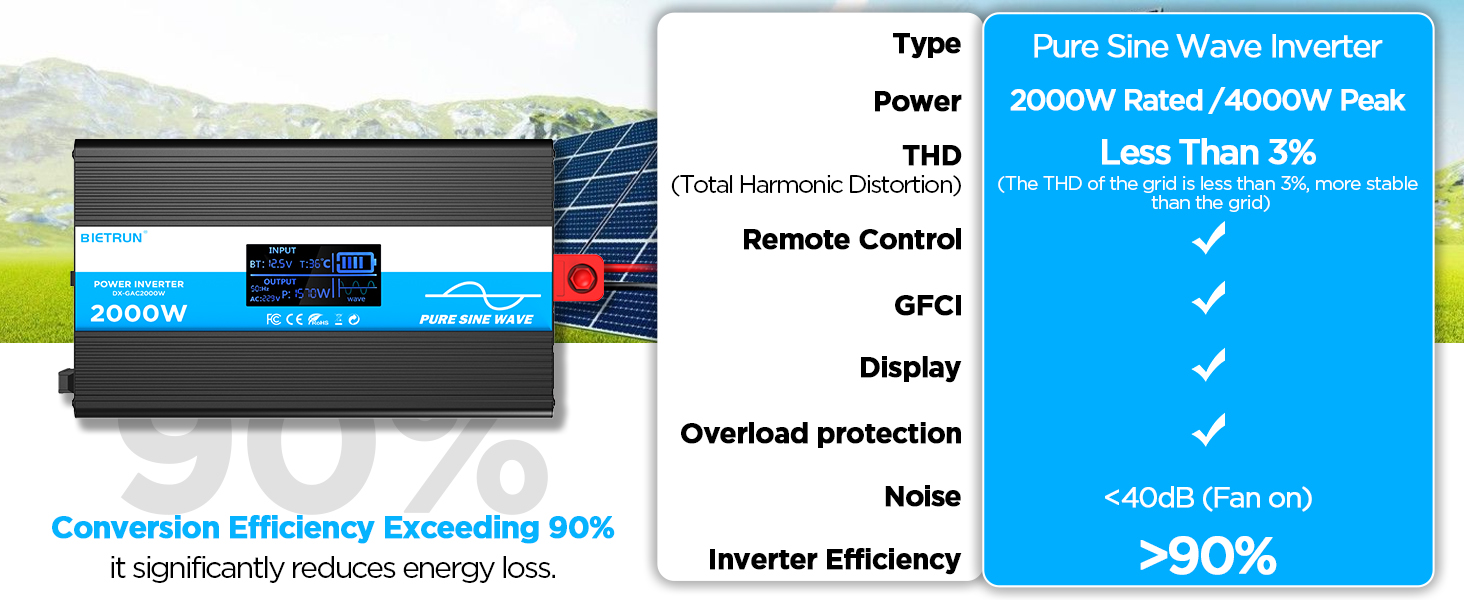
Image 3.2: Illustrates the stable, grid-like output of a pure sine wave inverter compared to unstable power from other types.
4. Postavljanje i instalacija
Lokacija i montaža
Choose a dry, well-ventilated location away from direct sunlight, heat sources, and flammable materials. The inverter can be wall-mounted using the provided screws.
Kompatibilnost baterija
The inverter is compatible with various 12V battery types, including LiFePO4, LI, SLD, GEL, FLD, and AGM batteries.

Image 4.1: The inverter supports multiple 12V battery chemistries.
Koraci povezivanja
- Pripremite kablove: Use the provided 10AWG 3-foot cables. Ensure all connections are secure.
- Spojite kabel za uzemljenje: Attach the green/yellow ground cable to the inverter's ground terminal and to a reliable earth ground point.
- Spojite kablove baterije:
- Povežite crvena battery cable to the inverter's pozitivno (+) terminal.
- Povežite crna battery cable to the inverter's negativno (-) terminal.
- Povežite drugi kraj crvena cable to the battery's pozitivno (+) terminal.
- Povežite drugi kraj crna cable to the battery's negativno (-) terminal.
Važno: Ensure correct polarity. A spark may occur during the final connection, which is normal due to capacitor charging.
- Sigurne veze: Double-check all connections for tightness to prevent loose contacts and overheating.
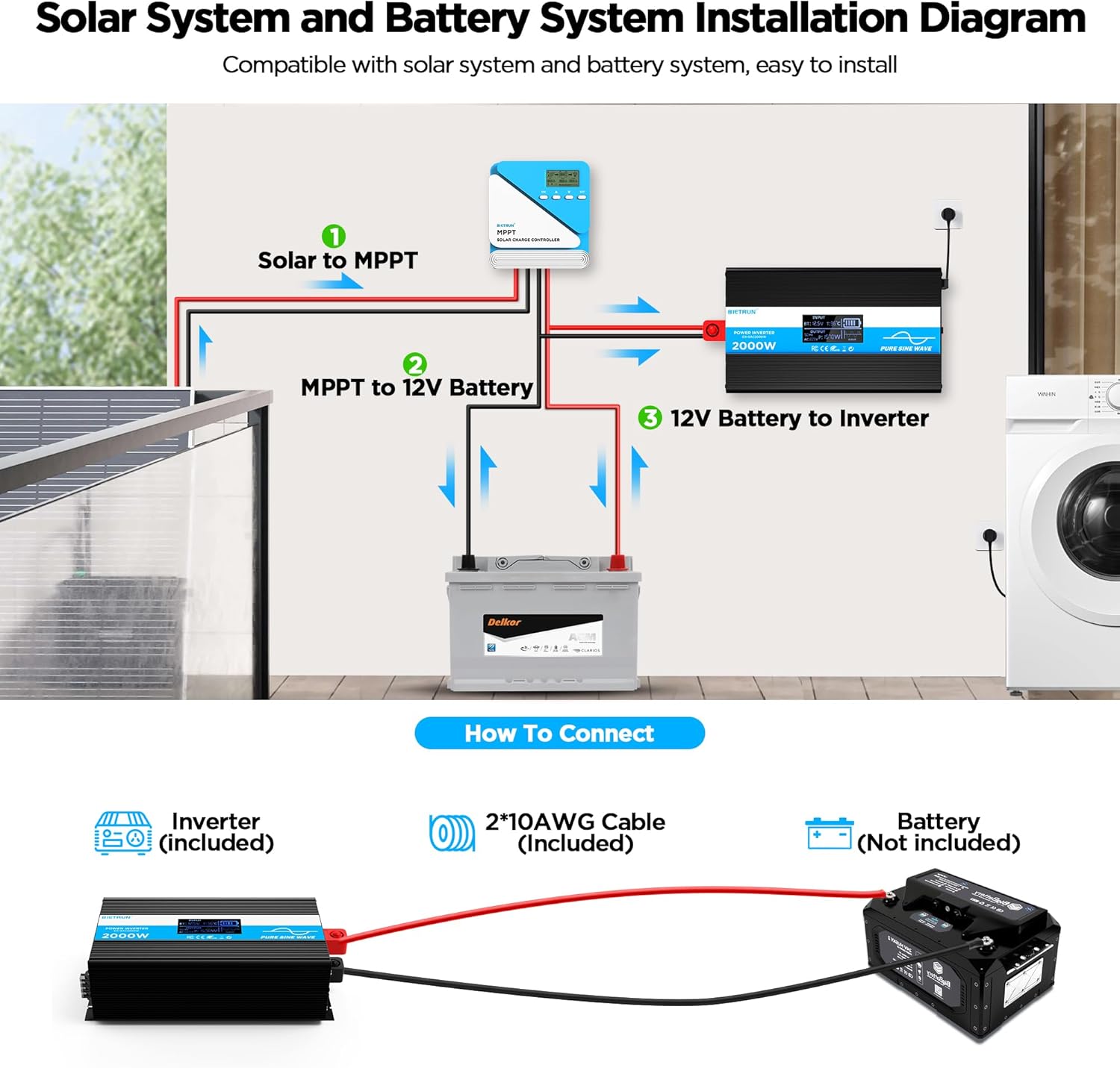
Image 4.2: Basic wiring diagram for connecting the inverter to a 12V battery.
Inverter Interface Overview

Image 4.3: Front panel layout with output interfaces and controls.

Image 4.4: Rear panel layout with battery input terminals and cooling fans.
5. Operacija
Uključivanje/isključivanje
- Ručni rad: Flip the ON/OFF switch on the inverter to the 'ON' position to power on. Flip to 'OFF' to power off.
- Rad daljinskog upravljača: Ensure the inverter's 'REMOTE' switch is in the 'ON' position. Use the ON/OFF buttons on the remote control to operate the inverter.
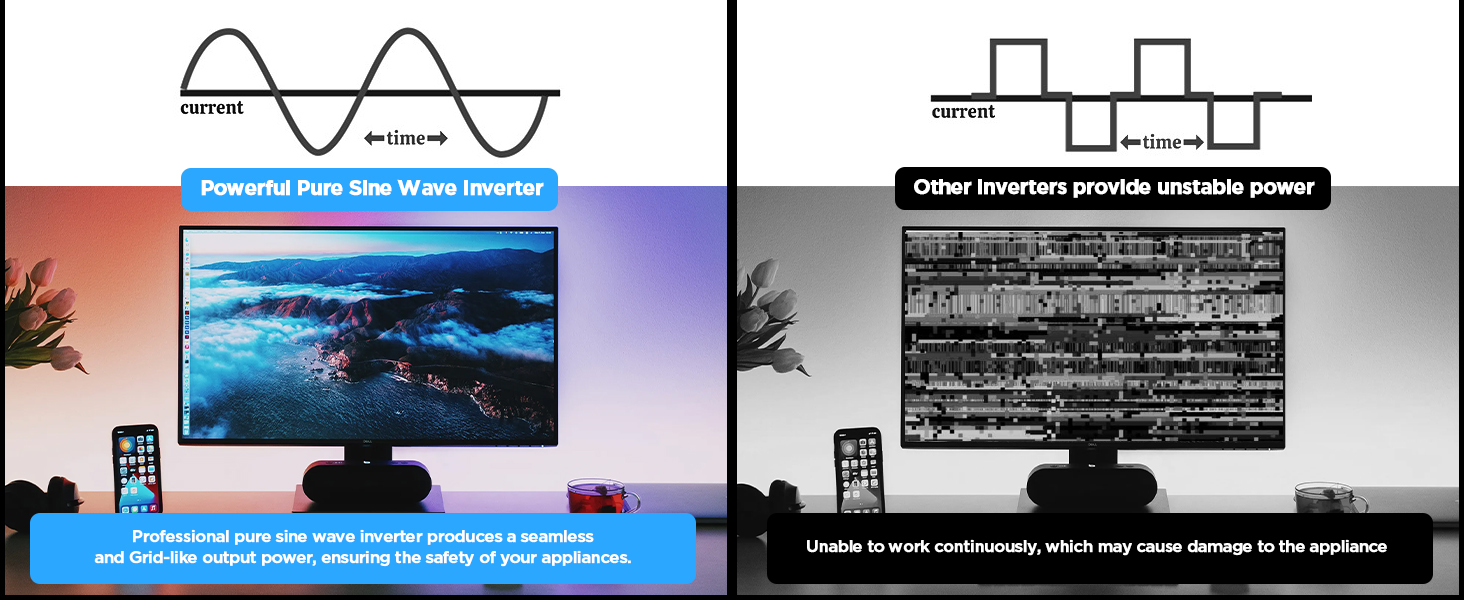
Image 5.1: The remote control allows for convenient operation.
Povezivanje uređaja
Once the inverter is powered on, plug your AC devices into the AC outlets or connect to the AC wiring terminal. USB devices can be connected to the USB or Type-C ports.
Ensure the total power consumption of all connected devices does not exceed 2000W continuously.
6. HD Display Information
The integrated HD display provides real-time operational data and fault indications:
- Unos: Prikazuje vol. Baterijetage (BT) and internal temperature (T).
- Izlaz: Shows output frequency (Hz), AC voltage (AC), and current power consumption (P).
- Status baterije: Visual indicator of battery charge level.
- Valni oblik: Indicates pure sine wave output.
- Kodovi grešaka: Numeric codes appear for specific issues, aiding in troubleshooting.

Image 6.1: The HD display provides comprehensive status updates and fault codes.
Opisi kodova greške
- 2: Low Voltage Upozorenje
- 3: Overvoltage Zaštita
- 4: Low Voltage Zaštita
- 5: Upozorenje o preopterećenju
- 6: Zaštita od preopterećenja
- 7: Zaštita od previsoke temperature
- 8: Zaštita od kratkog spoja na izlazu
7. Otkrivanje problema
If the inverter is not functioning correctly, refer to the display for fault codes and consult the table below:
| Problem | Mogući uzrok | Rješenje |
|---|---|---|
| Inverter se ne uključuje | Labavi kontakti baterije, nizak napon baterijetage, faulty fuse. | Check battery cable connections. Recharge or replace battery. Check and replace fuses if blown. |
| No AC output (Fault Code 8) | Kratki spoj na izlazu. | Disconnect all AC loads. Check for short circuits in connected devices or wiring. Reconnect one by one. |
| Overload warning/protection (Fault Code 5/6) | Priključeno opterećenje premašuje kapacitet invertera. | Reduce the total power of connected devices. Disconnect high-power appliances. |
| Low voltage warning/protection (Fault Code 2/4) | Battery voltage je prenisko. | Recharge the battery. Check battery health. |
| Overvoltage protection (Fault Code 3) | Ulazni voltage je previsok. | Provjerite zapreminu baterijetage is within the 12V range. Disconnect from charging source if overcharging. |
| Overtemperature protection (Fault Code 7) | Inverter is overheating. | Ensure adequate ventilation. Reduce load. Allow inverter to cool down. Clean fan vents if obstructed. |
If the fault persists after attempting the solutions, contact customer support.
8. Specifikacije
| Feature | Specifikacija |
|---|---|
| Broj modela | DX-GAC2000W |
| Kontinuirana snaga | 2000W |
| Peak Surge Power | 4000W |
| Ulazni voltage | DC 12V |
| Output Voltage | AC 110V-120V |
| Izlazni talasni oblik | Čisti sinusni val |
| Totalna harmonijska distorzija (THD) | < 3% |
| Efikasnost konverzije | > 90% |
| AC utičnice | 4 |
| USB portovi | 2 (5V/2.1A) |
| Type-C port | 1 (5V/2.1A) |
| Dimenzije (D x Š x V) | 19 x 10 x 7 inča |
| Težina artikla | 11.13 funte |
| Sistem za hlađenje | Dvostruki ventilatori za hlađenje |
9. Održavanje
Redovno održavanje osigurava optimalne performanse i dugotrajnost vašeg invertera:
- čišćenje: Periodically clean the exterior of the inverter with a dry, soft cloth. Ensure cooling vents are free from dust and debris. Do not use liquid cleaners.
- Provjera veze: Regularly inspect battery cable connections for tightness and corrosion. Clean any corrosion with a wire brush and baking soda solution.
- ventilacija: Ensure the inverter always has adequate airflow. Do not operate in enclosed spaces without ventilation.
- Zamjena osigurača: If a fuse blows, replace it only with a fuse of the same type and rating as specified in the package contents.
10. Garancija i podrška
For warranty information or technical support, please refer to the contact details provided with your purchase or visit the official Bietrun webSačuvajte račun kao dokaz o kupovini.


