1. Uvod
The LILYGO T5-4.7-S3 is a versatile development board featuring a 4.7-inch E-Paper display and an ESP32-S3-WROOM-1 microcontroller. This board is designed for various applications requiring low-power display capabilities and robust wireless connectivity. This manual provides essential information for setting up, operating, and maintaining your device.
2. Sigurnosne informacije
- Handle the board with care to avoid damage to electronic components.
- Avoid exposure to extreme temperatures, moisture, or static electricity.
- Osigurajte ispravno napajanje voltage (typically 5V via USB-C) to prevent damage.
- Do not attempt to disassemble or modify the board beyond its intended use.
- Čuvati van domašaja djece.
3. Sadržaj paketa
Provjerite da li se sve stavke nalaze u vašem paketu:
- LILYGO T5-4.7-S3 Development Board with 4.7-inch E-Paper Display
- Jumper Wires
- Header Pins
- Battery Connector Cable

Figure 3.1: Contents of the LILYGO T5-4.7-S3 package.
4. Proizvod je gotovview
The LILYGO T5-4.7-S3 integrates an ESP32-S3-WROOM-1-N16R8 MCU with a 4.7-inch E-Paper display. Key features include:
- MCU: ESP32-S3-WROOM-1-N16R8
- ekran: 4.7-inch E-Paper, 540 x 960 resolution, 16 gray levels, with touchscreen functionality.
- Bežična povezanost: Wi-Fi and Bluetooth V5.0.
- Memorija: 16MB Flash, 8MB PSRAM.
- Real-Time Clock (RTC): Supports PCF8563 RTC.
- Upravljanje baterijom: Includes battery capacity detection.
- Interfejsi: USB-C port for power and data, SD card slot, and various GPIO pins compatible with Raspberry Pi bus interface.

Slika 4.1: Vrh view of the LILYGO T5-4.7-S3 board.

Slika 4.2: Prednja strana view of the LILYGO T5-4.7-S3 with e-paper display.
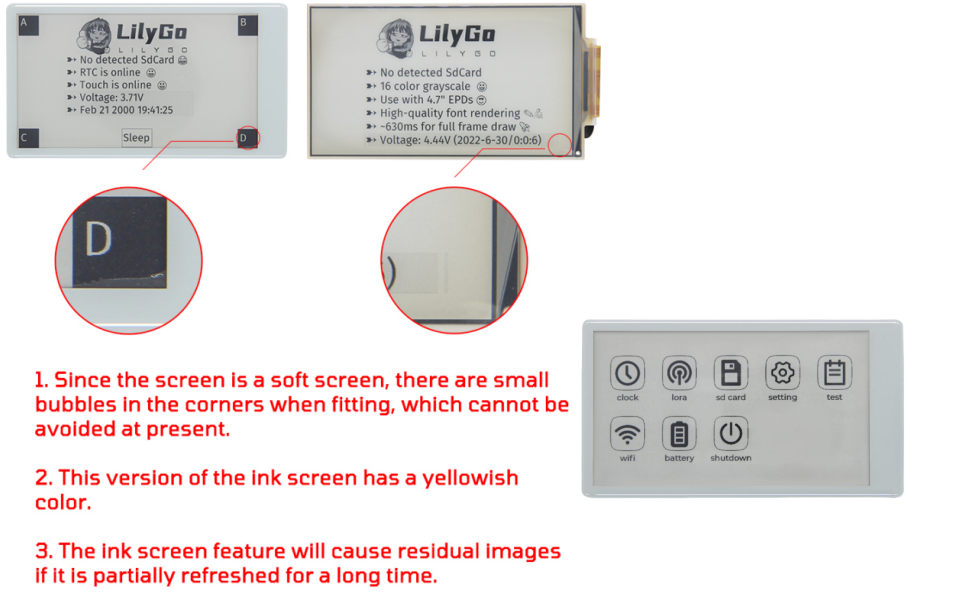
Figure 4.3: LILYGO T5-4.7-S3 E-Paper Board Pinout and Features.
4.1 E-Paper Display Characteristics
The 4.7-inch E-Paper display has specific characteristics:
- Due to the flexible nature of the screen, small bubbles may be present in the corners during fitting. This is a normal manufacturing characteristic.
- This version of the E-Paper screen may exhibit a slight yellowish tint.
- Partial refresh of the screen for extended periods can result in residual images (ghosting).

Figure 4.4: E-Paper Screen Notes.
5. Podešavanje
To begin using your LILYGO T5-4.7-S3 board, follow these setup steps:
- Priključite napajanje: Connect the board to a computer using a USB-C cable. The board will power on.
- Initial Firmware Check: The board typically comes with factory test firmware. If the screen displays content, the hardware is likely functioning correctly.
- Instalirajte drajvere: Ensure your computer has the necessary USB-to-serial drivers for ESP32-S3 devices. These are usually automatically installed or can be found on the Espressif website.
- Pripremite razvojno okruženje: Install your preferred programming environment (Arduino IDE, VS Code with PlatformIO, or MicroPython). Refer to the official LILYGO GitHub repository for detailed setup instructions and examples: github.com/Xinyuan-LilyGO/LilyGo-EPD47/tree/esp32s3.
5.1 Ažuriranje firmvera
To upload new firmware or examples, you will need to put the board into DFU (Device Firmware Upgrade) mode:
- Connect the board to your computer via the USB-C cable.
- Pritisnite i držite BOOT dugme.
- Dok još držite BOOT button, briefly press the RST dugme.
- Otpustite RST dugme.
- Otpustite BOOT dugme.
- The board is now in DFU mode and ready for firmware upload via your chosen development environment.
Video 5.1: Demonstration of the firmware flashing process for a LILYGO T-Display-S3 board. The process is similar for the T5-4.7-S3.
6. Uputstvo za upotrebu
Once firmware is loaded, the operation of the LILYGO T5-4.7-S3 will depend on the specific application programmed onto it. Generally, interaction will be via the 4.7-inch touchscreen.
- Touchscreen: Navigate menus and interact with applications by tapping or swiping on the capacitive touchscreen.
- Dugmad: The board may include physical buttons (e.g., RST, BOOT) that can be programmed for specific functions within your application.
- SD kartica: Insert a microSD card into the slot for data storage or loading assets for your applications, such as maps or images.
- USB-C: Use the USB-C port for power, data transfer, and debugging.
6.1 dokample Application: Mesh Networking
The ESP32-S3's wireless capabilities can be utilized for mesh networking, allowing devices to communicate without traditional internet infrastructure. This is particularly useful in off-grid or emergency situations.
Video 6.1: Demonstration of mesh networking capabilities using a LILYGO T-Lora Pager, showcasing potential applications for ESP32-S3 based devices like the T5-4.7-S3.
7. Programsko okruženje
The LILYGO T5-4.7-S3 board supports several popular programming environments:
- Arduino IDE: A user-friendly environment for beginners and experienced developers.
- VS Code (PlatformIO): A powerful and flexible environment for professional development.
- MicroPython: Allows programming the ESP32-S3 using Python.
- ESP-IDF: Espressif's official IoT Development Framework for advanced users.
For detailed guides, code examples, and libraries, visit the official LILYGO GitHub repository: github.com/Xinyuan-LilyGO/LilyGo-EPD47/tree/esp32s3.
8. Održavanje
- čišćenje: Use a soft, dry cloth to clean the board and screen. Avoid abrasive materials or harsh chemicals.
- Skladištenje: Store the board in a cool, dry place, away from direct sunlight and extreme temperatures. The provided protective case (
 ) is recommended for storage.
 - Ažuriranja firmvera: Regularly check the LILYGO GitHub repository for firmware updates and improvements.
9. Otkrivanje problema
If you encounter issues with your LILYGO T5-4.7-S3 board, consider the following:
- No Display After Flashing: If the screen remains blank after uploading new firmware, ensure the firmware is compatible with the T5-4.7-S3 model. Try re-flashing the factory test firmware from the GitHub repository to verify basic hardware functionality.
- USB Port Not Recognized: Verify that the USB-C cable is functioning and properly connected. Ensure the correct drivers are installed on your computer. If using Arduino IDE, check that the correct board and COM port are selected.
- Aplikacija ne radi: Double-check your code for errors. Consult the examples and documentation on the LILYGO GitHub page.
- Screen Issues (Bubbles, Tint, Ghosting): Refer to the E-Paper Display Characteristics section (4.1) for expected behavior. These are often inherent to the e-paper technology.
For further assistance, refer to the FAQ section on the LILYGO GitHub page or contact LILYGO product support.
10. Specifikacije
| Feature | Specifikacija |
|---|---|
| MCU | ESP32-S3-WROOM-1-N16R8 |
| Tip ekrana | 4.7 Inches E-Paper, Capacitive Touchscreen |
| Rezolucija ekrana | 540 x 960 |
| Sivi nivoi | 16 |
| RAM | 8 MB (PSRAM) |
| Veličina flash memorije | 16 MB |
| Bežični tip | 2.4 GHz Radio Frequency (Wi-Fi), Bluetooth V5.0 |
| USB portovi | 1 (USB-C) |
| Posebne karakteristike | E-paper Display, Touchscreen, Programming Environment, RTC, Battery Detection |
| Dimenzije (D x Š x V) | 120 mm x 66 mm x 12 mm (približno) |

Figure 10.1: LILYGO T5-4.7-S3 Board Dimensions.
11. Garancija i podrška
For warranty information and technical support, please refer to the official LILYGO website or contact your retailer. LILYGO provides product service for any questions or suggestions regarding the product.


