1. Uvod
This manual provides comprehensive instructions for the installation, operation, maintenance, and troubleshooting of your Xigmatek Bano EN44250 computer case. Please read this manual thoroughly before beginning assembly to ensure proper setup and optimal performance.
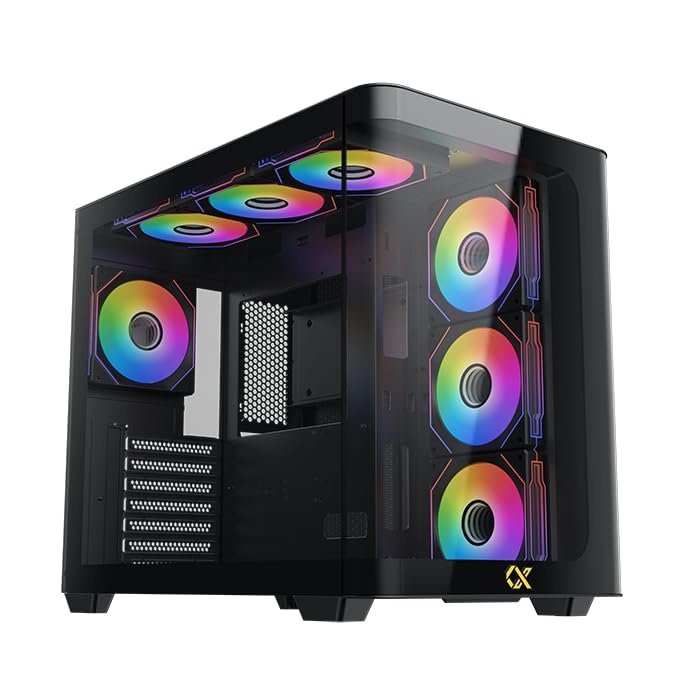
Figure 1: Xigmatek Bano EN44250 Computer Case (Exterior View)
2. Karakteristike
- Materijal: Constructed from high-quality steel alloy for durability and long-term use.
- Podrška za matičnu ploču: Compatible with E-ATX, ATX, Micro ATX, and Mini ITX motherboards.
- Sistem hlađenja: Supports both air and liquid cooling solutions, with multiple fan and radiator mounting options.
- Prostori za pogone: Features five internal drive bays compatible with both 2.5-inch and 3.5-inch hard drives/SSDs.
- I/O Panel: Equipped with one USB 3.0 port, two USB 2.0 ports, and HD audio jacks for seamless connectivity.
- Dizajn: Stylish black finish with a curved tempered glass panel for showcasing internal components and superior airflow.
- Slotovi za proširenje: Includes 7 expansion slots.
- PSU Mounting: Supports rear-mounted power supplies.

Figure 2: Internal Layout of the Case
3. Upute za postavljanje
3.1 Priprema slučaja
- Raspakujte kutiju i uklonite sav materijal za pakovanje.
- Carefully remove the tempered glass side panel by unscrewing the thumb screws. Place it on a soft, flat surface to prevent scratches.
- Identify the accessory box inside the case, which contains screws, standoffs, and cable ties.
3.2 Instalacija matične ploče
- Install the I/O shield (if not pre-installed) into the rear opening of the case.
- Align your motherboard with the pre-installed standoffs. If your motherboard form factor (E-ATX, ATX, Micro ATX, Mini ITX) requires additional standoffs, install them in the appropriate holes.
- Pažljivo postavite matičnu ploču na odstojnike i pričvrstite je priloženim vijcima.
3.3 Instalacija jedinice za napajanje (PSU).
- Mount the PSU into the designated rear compartment of the case.
- Pričvrstite napajanje vijcima sa stražnje strane kućišta.
- Route the necessary power cables through the cable management cutouts to the motherboard and other components.
3.4 Storage Drive Installation (2.5"/3.5" HDDs/SSDs)
- Locate the internal drive bays. The case supports five drive bays compatible with 2.5-inch and 3.5-inch drives.
- For 3.5-inch drives, slide the drive into the tool-less tray (if applicable) or secure it with screws.
- For 2.5-inch drives, secure them to the designated mounting points or adapters.
- Connect SATA data and power cables to each installed drive.
3.5 Ugradnja sistema za hlađenje (ventilatori/radijatori)
The Xigmatek Bano EN44250 supports various fan and radiator configurations for optimal airflow. Refer to the diagrams below for compatible sizes and locations.

Figure 3: Fan and Radiator Mounting Options (Side View)

Figure 4: Fan and Radiator Mounting Options (Top View)
- Install case fans or liquid cooling radiators into the desired mounting positions using the appropriate screws.
- Connect fan power cables to the motherboard fan headers or a fan controller.
3.6 Front I/O Panel Connections
Connect the front I/O panel cables to the corresponding headers on your motherboard. These include:
- USB 3.0 zaglavlje
- USB 2.0 zaglavlja
- HD Audio header
- Power switch, reset switch, HDD LED, and power LED headers

Figure 5: Front I/O Panel
4. Operativne smjernice
Once all components are installed and connected, replace the side panel. Ensure all cables are neatly managed to avoid obstructing airflow. Power on your system using the front panel power button. Monitor temperatures and fan speeds to ensure optimal cooling performance.
5. Održavanje
Regular maintenance helps prolong the life of your computer components and ensures efficient cooling.
- Čišćenje prašine: Povremeno čistite filtere za prašinu (ako postoje) i unutrašnje komponente komprimiranim zrakom. Prije čišćenja provjerite je li sistem isključen iz struje i iskopčan iz struje.
- Upravljanje kablovima: Review cable routing periodically to ensure no cables are obstructing fan blades or airflow paths.
- Eksterijerno čišćenje: Obrišite vanjske površine mekom krpom, damp krpom. Izbjegavajte abrazivna sredstva za čišćenje ili rastvarače.
6. Otkrivanje problema
Ako naiđete na probleme tokom ili nakon montaže, razmotrite sljedeće uobičajene korake za rješavanje problema:
- Sistem se ne uključuje:
- Check all power connections, including the PSU to wall outlet, PSU to motherboard (24-pin and CPU 8-pin), and front panel power switch header.
- Provjerite je li prekidač za napajanje u položaju 'UKLJUČENO'.
- Nema izlaza za prikaz:
- Verify that your monitor is connected to the graphics card (not the motherboard I/O if using a dedicated GPU).
- Ponovo instalirajte grafičku karticu i RAM module.
- Problemi sa pregrijavanjem:
- Ensure all case fans are spinning and correctly oriented for optimal airflow (intake/exhaust).
- Provjerite instalaciju hladnjaka procesora i nanošenje termalne paste.
- Clean any dust buildup from fans and radiators.
- USB/audio na prednjoj ploči ne radi:
- Verify that the front panel USB and audio headers are correctly connected to the motherboard.
7. Specifikacije
| Feature | Detalj |
|---|---|
| Proizvođač | XIGMATEK Co., Ltd. |
| Broj modela | EN44250 |
| Dimenzije proizvoda (D x Š x V) | 45 x 53.3 x 25.8 cm |
| Težina | 9.44 kg |
| Kompatibilnost matične ploče | E-ATX, ATX, Micro ATX, Mini ITX |
| Tip slučaja | Toranj |
| Boja | Crna |
| Materijal | čelična legura |
| Montaža napajanja | Stražnji nosač |
| Metoda hlađenja | Zrak, Voda |
| Zazor CPU hladnjaka | Do 16 cm |
| VGA Card Length Support | Do 41 cm |
| PSU Length Support | Do 22 cm |
| Slotovi za proširenje | 7 |
| Unutrašnja ležišta pogona | 5 (compatible with 2.5" and 3.5" drives) |
| Prednji I / O portovi | 1x USB 3.0, 2x USB 2.0, HD audio |
8. Garancija i podrška
For warranty information and technical support, please refer to the official Xigmatek webweb-mjesto ili kontaktirajte lokalnog prodavača. Sačuvajte dokaz o kupovini za slučaj reklamacije.
Online resursi: www.xigmatek.com


