Uvod
The 1Mii SafeFly Pro is a versatile Bluetooth 5.3 audio adapter designed to transmit and receive audio wirelessly. It features an OLED screen for clear status display and supports advanced audio codecs for high-quality sound. This device allows you to connect your wireless headphones to non-Bluetooth audio sources or stream audio from your Bluetooth-enabled devices to wired audio systems.
Šta je u kutiji

This image displays all items included in the 1Mii SafeFly Pro package. You will find the SafeFly Pro Bluetooth Audio Adapter, a USB-C Charging Cable, a 3.5mm Female to Female Audio Adapter, and a Keychain.
- SafeFly Pro Bluetooth Audio Adapter
- USB-C kabl za punjenje
- 3.5mm Female to Female Audio Adapter
- Privjesak za ključeve
- Korisnički priručnik (ovaj dokument)
Product Overview

Ova slika pruža detaljan view of the 1Mii SafeFly Pro, highlighting its key components. These include the flexible audio cable with a 3.5mm audio connection, an audio plug protector, the OLED display screen, the 'M' key, the 'OK' key, the TX/RX sliding switch, a one-click reset button, and the USB-C charging port.
Komponente i funkcije:
- 3.5 mm audio konekcija: Connects to audio source (TX mode) or audio receiver (RX mode).
- Audio Plug Protector: Protects the 3.5mm audio plug when not in use.
- OLED ekran: Shows battery level, volume, paired device names, and active audio codecs.
- Tipka 'M': In pairing mode, press once to select the connected device. In TX mode, press twice to switch the Bluetooth decoding format.
- 'OK' Key: Power ON/OFF (long press for 1 second). Long press for 2 seconds to enter pairing mode. Also functions as Play/Pause.
- TX/RX Sliding Switch: Selects Transmitter (TX) or Receiver (RX) mode.
- Dugme za resetiranje: Pritisnite i držite 3 sekundi da resetujete uređaj.
- USB-C priključak za punjenje: Za punjenje interne baterije.
Setup
1. Punjenje uređaja
Before first use, fully charge the SafeFly Pro using the provided USB-C charging cable. Connect the cable to the USB-C port on the device and a standard USB power adapter (not included). The OLED screen will indicate charging status.
2. Uključivanje / isključivanje napajanja
- Za uključivanje: Long press the 'OK' button for 1 second.
- Za isključivanje: Long press the 'OK' button for 1 second.
3. Odabir načina rada (TX/RX)
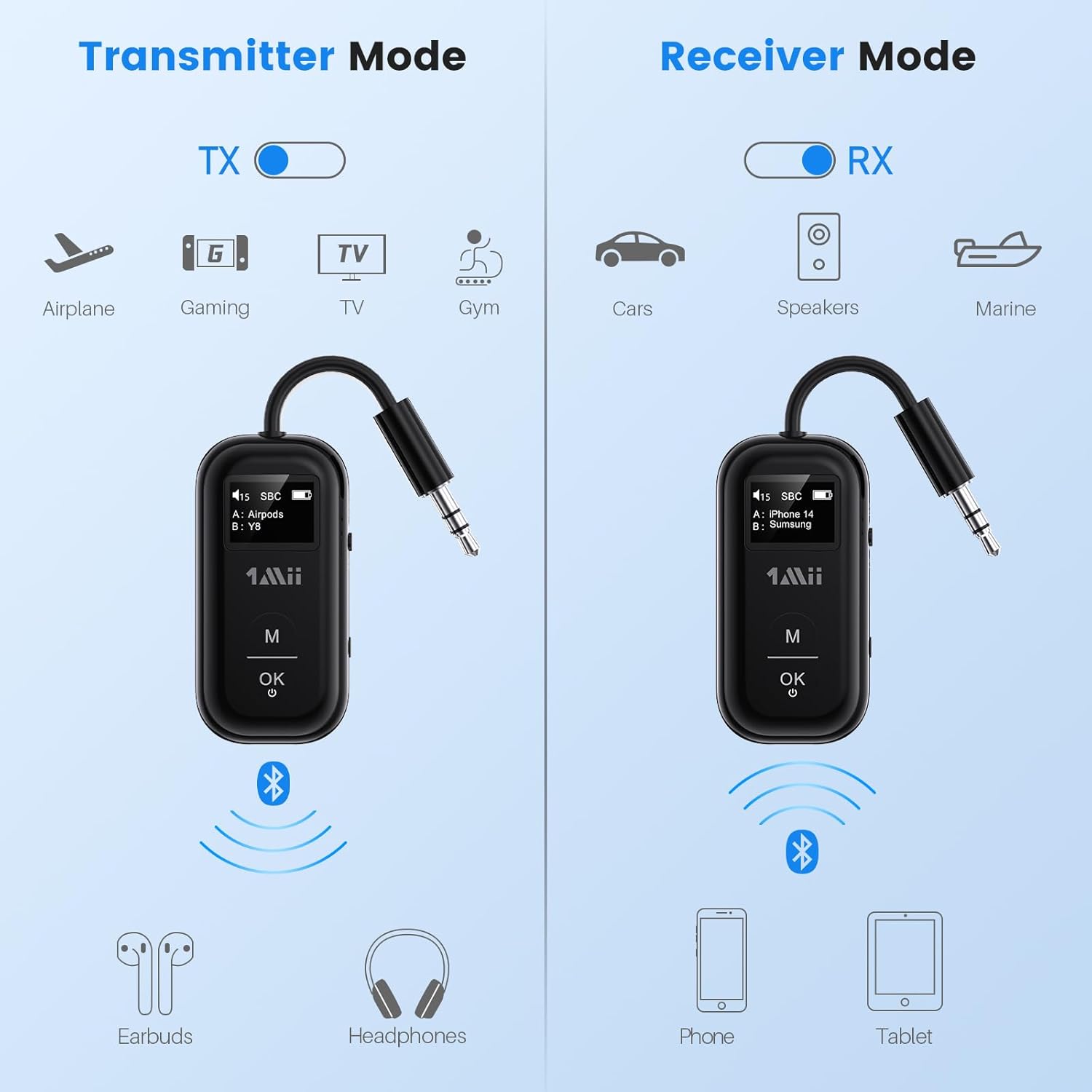
This image illustrates the two operating modes: Transmitter (TX) and Receiver (RX). TX mode is used for devices like airplanes, gaming consoles, TVs, and gym equipment to transmit audio to earbuds or headphones. RX mode is used for cars, speakers, and marine systems to receive audio from phones or tablets.
Use the TX/RX sliding switch on the side of the device to select the desired mode:
- TX (odašiljački) način rada: For sending audio from non-Bluetooth devices (e.g., airplane entertainment, TV, gym equipment) to Bluetooth headphones or speakers.
- RX (prijemnik) način rada: For receiving audio from Bluetooth-enabled devices (e.g., smartphones, tablets) to wired audio systems (e.g., car stereo, home speakers).
4. Pairing in TX Mode (Connecting to Headphones)

- Set the SafeFly Pro to TX mode using the sliding switch.
- Plug the 3.5mm audio connection into your audio source (e.g., airplane entertainment system, TV headphone jack). If needed, use the dual-prong airplane adapter.
- Long press the 'OK' button on the SafeFly Pro for 2 seconds to enter pairing mode. The screen will display "Searching".
- Put your Bluetooth headphones or speakers into pairing mode. Refer to your headphone's manual for specific instructions.
- The SafeFly Pro will automatically search for and connect to nearby Bluetooth devices. Once connected, the device name will appear on the OLED screen.
- To connect a second pair of headphones: After the first device is connected, long press the 'OK' button again for 2 seconds to enter pairing mode for the second device. Put the second pair of headphones into pairing mode. Both devices will then be connected simultaneously.

This image shows the 1Mii SafeFly Pro connected to an airplane's in-flight entertainment system, enabling wireless audio streaming to a user's Bluetooth headphones.
5. Pairing in RX Mode (Connecting to Smartphones/Tablets)
- Set the SafeFly Pro to RX mode using the sliding switch.
- Plug the 3.5mm audio connection into your wired audio system's AUX input (e.g., car stereo, home speaker).
- Long press the 'OK' button on the SafeFly Pro for 2 seconds to enter pairing mode. The screen will display "Searching".
- On your smartphone or tablet, go to Bluetooth settings and select "1Mii SafeFly Pro" from the list of available devices to connect.
- Once connected, the device name will appear on the OLED screen.
- To connect a second smartphone/tablet: After the first device is connected, long press the 'OK' button again for 2 seconds to enter pairing mode for the second device. Connect the second smartphone/tablet via its Bluetooth settings.

This image shows the 1Mii SafeFly Pro in RX mode, connected to a car's audio system, receiving audio wirelessly from a smartphone.
Uputstvo za upotrebu
OLED ekran

Ova slika pruža krupni plan view of the OLED screen, indicating the power status, audio format (e.g., SBC), volume level, battery level, and the names of the two currently paired devices (A and B).
OLED ekran pruža informacije u realnom vremenu:
- Nivo baterije: Označava preostali napunjenost baterije.
- Nivo glasnoće: Displays the current audio output volume.
- Upareni uređaj: Shows the name(s) of the connected Bluetooth headphones or smartphones.
- Audio kodek: Displays the active audio codec (e.g., aptX LL, aptX HD, aptX Adaptive, aptX, AAC, SBC).
Funkcije dugmadi
- 'OK' Button: Short press to Play/Pause audio.
- Dugme 'M': In TX mode, press twice to cycle through available audio codecs (aptX LL, aptX HD, aptX Adaptive, AAC, SBC) if supported by your connected headphones.
Održavanje
To ensure the longevity and optimal performance of your 1Mii SafeFly Pro, follow these maintenance guidelines:
- čišćenje: Obrišite uređaj mekom, suhom krpom. Ne koristite tekuća sredstva za čišćenje ili abrazivne materijale.
- Skladištenje: Uređaj čuvajte na hladnom i suhom mjestu, dalje od direktne sunčeve svjetlosti i ekstremnih temperatura.
- Održavanje baterije: Izbjegavajte često potpuno pražnjenje baterije. Redovno punite uređaj, čak i ako ga ne koristite, kako biste održali ispravnost baterije.
- Rukovanje: Pažljivo rukujte uređajem. Izbjegavajte ispuštanje ili izlaganje jakim udarcima.
Rješavanje problema
If you encounter issues with your SafeFly Pro, try the following steps:
- Uređaj se ne uključuje: Provjerite je li uređaj potpuno napunjen. Povežite ga na izvor napajanja pomoću USB-C kabela.
- Nije moguće upariti:
- Ensure the SafeFly Pro is in the correct TX or RX mode.
- Make sure both the SafeFly Pro and your target Bluetooth device are in pairing mode.
- Približite uređaje jedan drugom.
- Isključite i uključite oba uređaja, a zatim pokušajte ponovo upariti.
- Nema zvuka/Loš kvalitet zvuka:
- Check that the 3.5mm audio cable is securely connected to both the SafeFly Pro and the audio source/receiver.
- Ensure the volume on both the SafeFly Pro and the connected device is turned up.
- Verify that the correct audio codec is selected (in TX mode, press 'M' twice to cycle).
- Test with a different audio cable or source/receiver if possible.
- Device Frozen/Unresponsive: Long press the Reset Button (small hole on the side) for 3 seconds using a thin object (e.g., paperclip) to restart the device.
Specifikacije
| Dimenzije proizvoda | 2.24 x 1.18 x 0.51 inča |
| Težina artikla | 0.64 unce |
| Broj modela stavke | SafeFly Pro |
| Baterije | 1 litijum-polimerska baterija (uključena) |
| Tehnologija povezivanja | AUX, Bluetooth 5.3 |
| Izvor napajanja | Battery Powered |
| Materijal | akrilonitril butadien stiren (ABS) |
| Posebne karakteristike | AptX LL/HD/Adaptive, Bluetooth Transmitter & Receiver, Built-in Battery, Connect 2 Devices, with Screen |
Sigurnosne informacije
Molimo pročitajte i slijedite ove sigurnosne smjernice kako biste spriječili oštećenje uređaja ili tjelesne ozljede:
- Izbjegavajte izlaganje ekstremnim temperaturama (vrućim ili hladnim).
- Handle the battery with care. Do not puncture, disassemble, or expose to fire.
- Budite svjesni potencijalnih smetnji s drugim bežičnim uređajima.
- Držite uređaj dalje od vode i drugih tečnosti.
- Ne pokušavajte sami popravljati ili modificirati uređaj. Za pomoć se obratite korisničkoj podršci.
Garancija i podrška
1Mii products are designed for reliability and performance. For warranty information, technical support, or customer service inquiries, please refer to the official 1Mii webweb-mjesto ili direktno kontaktirajte njihov tim za korisničku podršku. Sačuvajte račun kao dokaz o kupovini za reklamacije u slučaju garancije.