Uvod
The Migipaws Automatic MigiBox Plus Cat Toy offers a versatile 3-in-1 interactive experience designed to engage your cat's natural hunting instincts and curiosity. This innovative system combines the MigiBox Plus, PopSkin, and a Cardboard Cat Toy, providing varied play scenarios to keep indoor cats entertained and active.

Image: The Migipaws MigiBox Plus Cat Toy, showcasing its main unit and various included accessories like feathers, balls, and the PopSkin cover.
Sadržaj paketa
Molimo Vas da provjerite da li se u Vašem paketu nalaze sve dolje navedene stavke:
- MigiBox Plus x1
- PopSkin x1
- Cardboard x1 (packaging box designed for play)
- Plush ball x1 (random color)
- Crinkle Ball x1 (random color)
- Fabric refill x2 (for PopSkin)
- Feathers refill x2 (for MigiBox Plus)
- Uputstvo za upotrebu x1
- USB-C kabl x1

Image: A visual representation of all components included in the Migipaws MigiBox Plus package, including the main unit, PopSkin, cardboard, various balls, refills, manual, and charging cable.
Setup
Početno punjenje
Before first use, fully charge the MigiBox Plus using the provided USB-C cable. The charging port is located on the side of the main unit. A full charge ensures optimal performance and play duration.
Assembling the MigiBox Plus
The MigiBox Plus is designed for immediate use. Ensure the feather attachments are securely placed in the designated slots. The toy features 4 holes on the top face and 8 holes on its sides from which feathers will randomly emerge.

Image: An infographic detailing the smart features of the MigiBox Plus, such as its AI software for random feather movement, 2-3 feet detection range, rechargeable battery, and safe materials.
Switching to PopSkin Mode
To activate the PopSkin mode, you must install the special rod head designed for this function. This rod head ensures the hidden surprise pops up correctly beneath the soft fabric. Carefully follow the instructions in the manual for proper installation to avoid damage.

Image: The yellow PopSkin cover with cartoon mice, highlighting the "Skin Stick" which is essential for the PopSkin's pop-up mechanism.
Setting up the Cardboard Cat Toy
The product packaging itself can be transformed into an interactive toy. Simply poke out the pre-perforated holes along the dashed lines on the box. You can then place the included crinkle ball and plush ball inside, or add your cat's favorite small toys or freeze-dried treats. This encourages your cat to paw and grab through the holes.

Image: A cat interacting with the Cardboard Box Toy, demonstrating how small toys can be placed inside for the cat to retrieve through the holes.
Uputstvo za upotrebu
Automatski rad
The MigiBox Plus features a motion sensor that activates the toy when a cat approaches within 1 meter (approximately 3 feet). It operates day and night, allowing your cat to engage in self-play even when you are busy. After 5 minutes of activity, the toy will enter standby mode until motion is detected again.
MigiBox Plus Play
In MigiBox Plus mode, two feathers will randomly pop in and out from the 4 top holes and 8 side holes. This unpredictable movement stimulates your cat's curiosity, enhances their hunting instincts, and provides mental stimulation, helping to alleviate boredom and anxiety.
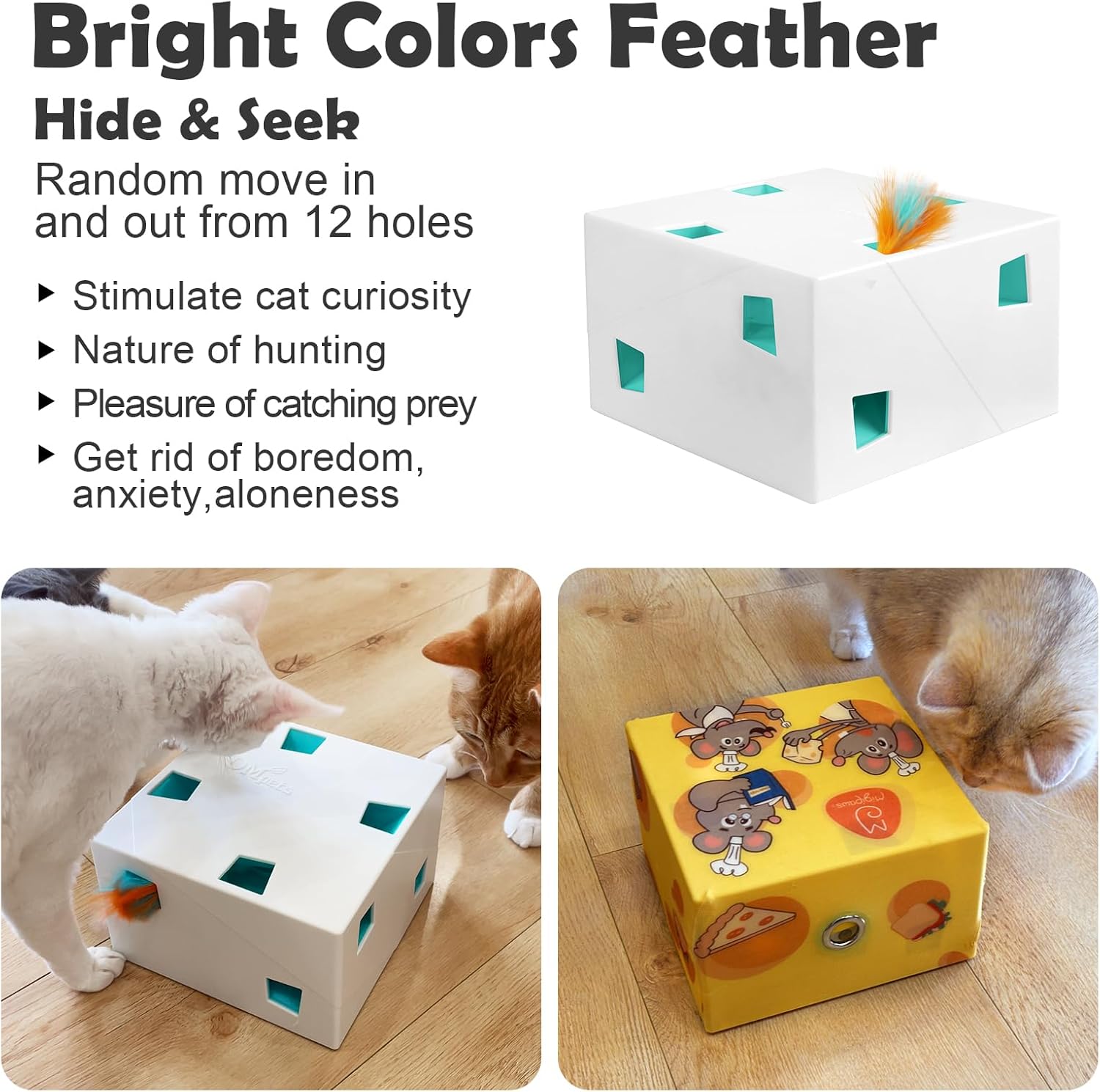
Image: Two cats actively engaging with the MigiBox Plus, with feathers visible emerging from the toy's various openings, demonstrating the interactive play.
Video: An official demonstration of the Migipaws MigiBox Plus in action, showing cats interacting with the randomly emerging feathers from multiple openings. This video highlights the toy's ability to stimulate hunting instincts and provide engaging play.
PopSkin Play
When the PopSkin is installed, the toy creates a "moving secret under a blanket" effect. A hidden element randomly pops up beneath the soft, plush fabric, enticing your cat to watch, pounce, and try to catch the movement. This mimics natural prey behavior and provides a different type of interactive challenge.

Image: A cat intently watching the PopSkin, which is covered in a yellow fabric with mouse illustrations, suggesting the hidden movement underneath.
Cardboard Cat Toy Play
Utilize the specially designed packaging cardboard as a separate interactive toy. By poking out the pre-marked holes, you create an engaging puzzle for your cat. Place the included plush and crinkle balls, or other small toys and treats, inside the box. Your cat will enjoy pawing and grabbing through the holes to retrieve the items, providing a simple yet effective form of enrichment.
Održavanje
Cleaning the PopSkin
The baby-grade plush PopSkin is washable. For best results, hand wash with mild soap and water, then air dry completely before reattaching to the MigiBox Plus. Ensure no moisture enters the electronic components of the main unit.
Replacing Attachments
The MigiBox Plus comes with multiple replaceable attachments, including feathers and fabric refills for the PopSkin. To replace a feather, gently pull the old feather out from its base and insert a new one, ensuring it is securely seated. Additional refill packs are available for purchase to ensure continuous play.
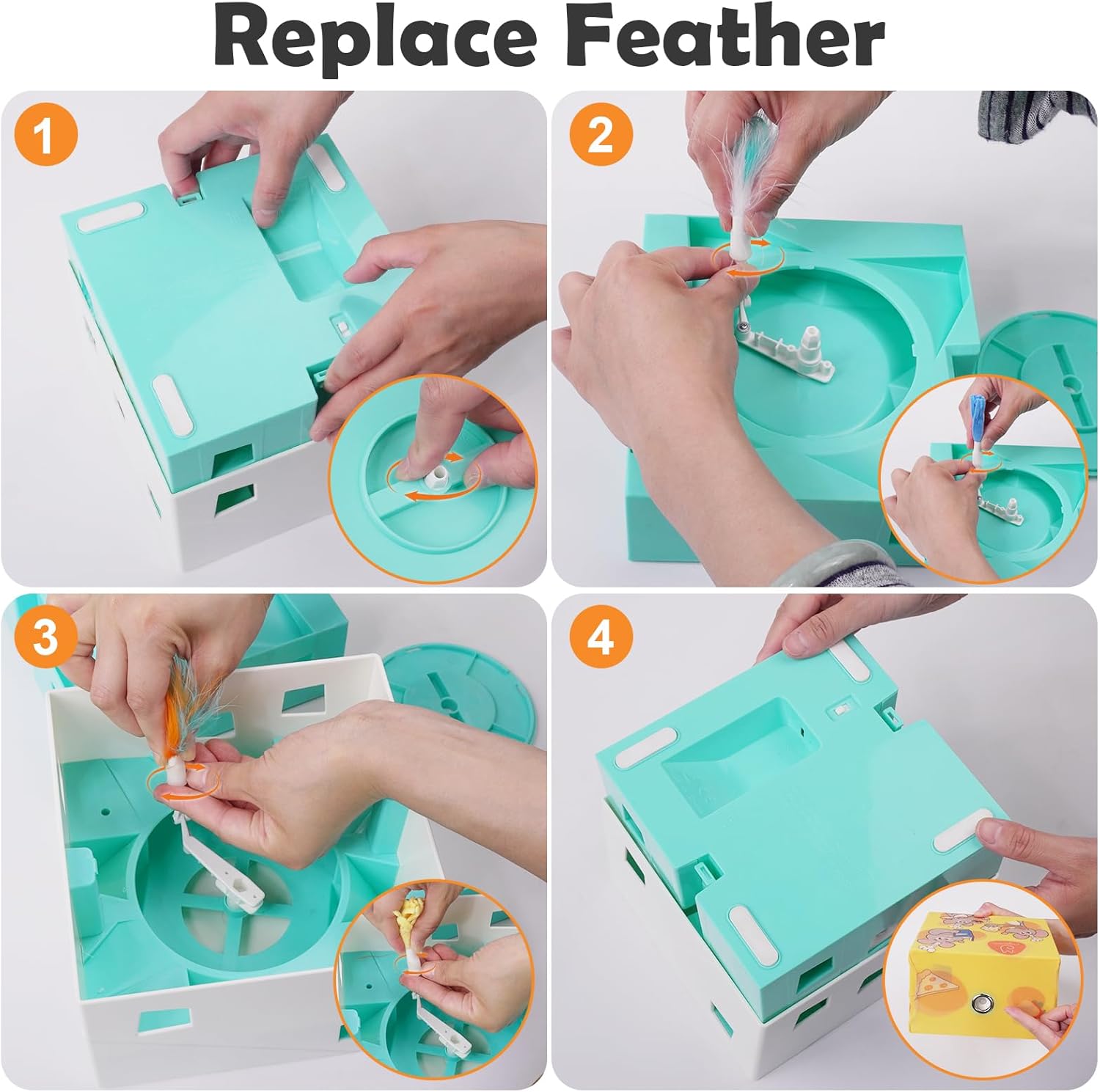
Image: A four-panel instructional image demonstrating the process of replacing the feather attachments on the MigiBox Plus, showing how to open the unit and secure new feathers.
Rješavanje problema
Toy Not Activating
- Provjerite bateriju: Ensure the toy is fully charged. Connect it to the USB-C cable and allow it to charge for at least 2 hours.
- Senzor pokreta: Verify that the cat is within the 1-meter detection range. Ensure no obstructions are blocking the sensor.
- Uključeno: Confirm the toy is switched on.
Feathers Not Moving Smoothly
- Prepreke: Check for any debris or foreign objects inside the toy that might be hindering the feather mechanism.
- Feather Condition: Ensure the feathers are not overly worn or tangled. Replace them if necessary.
PopSkin Not Popping Up
- Correct Rod Head: Confirm that the special "Skin Stick" rod head is correctly installed for PopSkin mode. Refer to the "Switching to PopSkin Mode" section in Setup.
- Pravilan plasman: Ensure the PopSkin cover is correctly aligned and not obstructing the internal mechanism.
Addressing Cat Behavioral Issues (3D Problems)
The Migipaws MigiBox Plus can help mitigate common cat behavioral challenges:
- Depression/Loneliness: The automatic and interactive nature of the toy provides consistent engagement, reducing feelings of loneliness and boredom when owners are away.
- Disturbing Work/Sleep: By providing an independent play outlet, the toy can redirect your cat's energy and attention, minimizing disruptions during your work or sleep hours.
- Anxiety/Boredom: The varied play modes and unpredictable movements offer mental and physical stimulation, which can significantly reduce anxiety and boredom.

Image: A graphic illustrating common cat behavioral issues such as depression, disturbing owners during work, and disturbing sleep, which interactive toys like the MigiBox Plus aim to address.
Specifikacije
| Feature | Detalj |
|---|---|
| Brand | Migišape |
| Naziv modela | White MigiBox Plus |
| Broj modela stavke | MigiBox-03 |
| Boja | White Plus |
| Veličina | X Large |
| Materijal | Plastika |
| Težina artikla | 1.76 funti (800 grama) |
| Dimenzije proizvoda (DxŠxV) | 7.48 x 7.09 x 2.76 inča |
| Baterije | 1 litijum-jonska baterija (uključena) |
| Proizvođač | Nanjing Dimeng Technology Co.,LTD. |
| Ciljna publika | House-cats, All Life Stages, All Breed Sizes |
| Specifične upotrebe | Active, Indoor Play |
Garancija i podrška
Informacije o garanciji
The Migipaws Automatic MigiBox Plus Cat Toy comes with a 2-mjesečna garancija od datuma kupovine. Ova garancija pokriva proizvodne nedostatke i kvarove pri normalnoj upotrebi. Molimo sačuvajte dokaz o kupovini za reklamacije u slučaju garancije.
Korisnička podrška
For any questions, concerns, or technical assistance, please contact Migipaws customer support. You can typically find contact information on the product packaging or through the retailer's website where you purchased the product. Please provide your model number (MigiBox-03) and a detailed description of the issue when contacting support.
Visit the official Migipaws Store for more information and additional products: Migipaws Store


