1. Uvod
The TATTMUSE Portable Wireless Inkless Thermal Printer (Model A285M) offers a compact and efficient solution for your printing needs, whether you're traveling, working from home, or in the office. Utilizing advanced thermal technology, this printer eliminates the need for ink, toner, or ribbons, providing a hassle-free and cost-effective printing experience. Its lightweight design and robust battery make it an ideal companion for professionals, students, and anyone requiring on-the-go document printing.
Ključne karakteristike uključuju:
- Compact & Space-saving: Weighs only 1.5lb with a built-in 2600mAh rechargeable battery, capable of printing 160 sheets of 8.5'' x 11'' thermal paper per charge.
- Jaka kompatibilnost: Connects wirelessly via Bluetooth to iPhone, Android Phone, iPad, and Tablet. Also supports USB-C connection for laptops and computers (driver download required).
- Cost-Effective & Inkless Printing: Advanced thermal technology means no ink, toner, or ribbon. Only thermal paper is required.
- Multi-Size Printing: Supports thermal roll paper, continuous, and single sheet thermal paper in 5 sizes: 8.5'' x 11'' US Letter, A4, 4.33'' (110mm), 3.14'' (80mm), and 2.08'' (53mm) width.
- High Quality Printing: Equipped with 300 DPI clear printing for crisp black and white documents.
2. Šta se nalazi u kutiji
Upon unboxing your TATTMUSE Portable Thermal Printer, you should find the following items:
- 1x Portable Thermal Printer
- 1x US Letter Size Thermal Roll Paper (pre-installed in the printer paper bin)
- 1x USB-C Cable & 1x USB-A Cable
- 1x Flannel Storage Bag
- 1x uputstvo za upotrebu

Image: The TATTMUSE Portable Thermal Printer shown with its accessories, including cables, storage bag, and thermal paper.
3. Podešavanje
3.1. Initial Paper Loading
The printer comes with a thermal paper roll pre-installed. To load or replace paper:
- Press the cover open buttons on the sides of the printer to open the top cover.
- Remove any protective paper or old paper rolls.
- Insert the new thermal paper roll into the paper bin, ensuring the front side of the paper is facing up.
- Pull out approximately 2 cm of paper beyond the paper exit.
- Čvrsto zatvorite gornji poklopac.
Video: Demonstrates how to load paper into the TATTMUSE Portable Printer.
3.2. Uključivanje
Pritisnite i držite dugme za napajanje na štampaču 3 sekunde da biste ga uključili. Indikatorska lampica će se upaliti.
3.3. Povezivanje s uređajima
3.3.1. Bluetooth Connection (for Smartphones, Tablets)
- Download the recommended app (e.g., Labelnize) from your device's app store (Google Play or App Store). A QR code for the app is usually found in the user manual or on the printer itself.
- Provjerite je li Bluetooth omogućen na vašem telefonu ili tabletu.
- Open the downloaded app and follow the on-screen instructions to connect to the printer (usually by clicking an 'Unconnected' or 'Connect' button and selecting 'M835' or similar from the list of available devices).

Image: Step-by-step guide for connecting the printer via Bluetooth to a mobile device using the dedicated app.
3.3.2. USB Connection (for Laptops, Computers)
For laptop and computer connections, you will need to download the appropriate driver first. Refer to the official website mentioned in your user manual for driver downloads compatible with Windows, macOS, Chrome OS, or Linux.
- Go to the official product support page (usually found in the manual).
- Download and install the correct driver for your operating system.
- Connect the printer to your laptop/computer using the provided USB-C cable.
- Set print properties in your computer's print dialogue and initiate printing.

Image: Instructions for connecting the printer to a laptop or computer via USB, including driver download steps.
4. Upravljanje štampačem
4.1. Štampanje dokumenata
Once connected, you can print various document types, including contracts, invoices, web pages, photos, and study notes. The printer supports different file formats such as PDF, JPG, Word, Excel, and TXT.
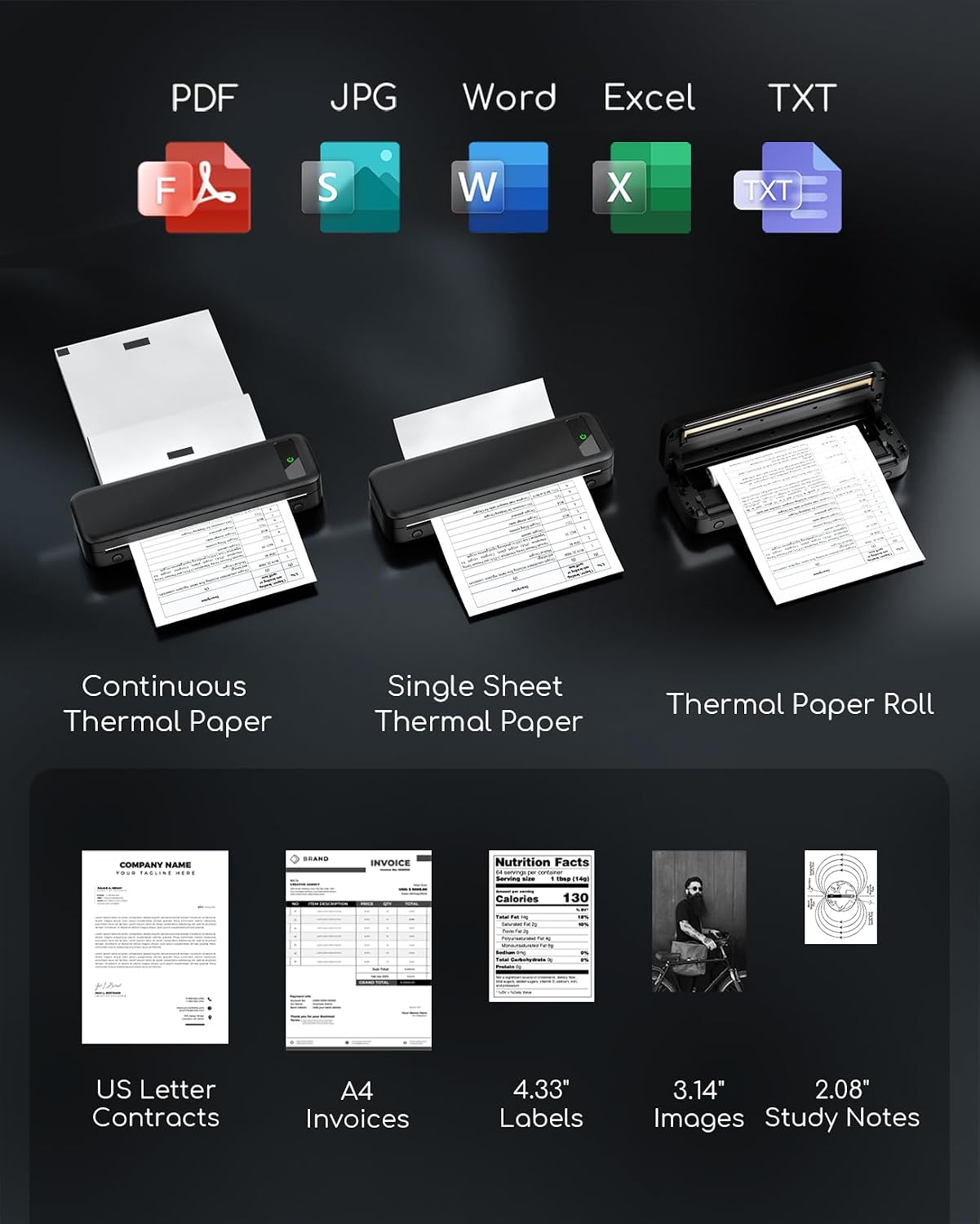
Slika: pramples of documents and paper sizes that can be printed, including US Letter contracts, A4 invoices, and various labels/images.
4.2. Paper Types and Sizes
The printer is designed to work with thermal paper only. It supports both continuous thermal paper and single sheets, as well as thermal paper rolls. Supported widths include 8.5'' x 11'' US Letter, A4, 4.33'' (110mm), 3.14'' (80mm), and 2.08'' (53mm).

Image: Illustrates the use of continuous thermal paper and single sheet thermal paper with the printer.
4.3. Print Quality
The printer offers 300 DPI resolution for clear black and white prints. Note that it does not support color printing.

Image: Visual comparison highlighting the clarity of 300 DPI printing from this portable printer compared to 200 DPI.
4.4. Trajanje baterije
The built-in 2600mAh rechargeable battery allows for printing up to 160 sheets of 8.5'' x 11'' thermal paper on a single charge. Charging time is approximately 3 hours.

Image: Details about the upgraded 2600 mAh battery, showing it supports 160 sheets of continuous printing and offers 30 hours of battery life.
5. Održavanje
Due to its inkless thermal technology, the TATTMUSE printer requires minimal maintenance. There are no ink cartridges to replace or print heads to clean, which prevents common issues like clogging. Simply ensure you use compatible thermal paper for optimal performance.

Image: Highlights the inkless nature of the printer, showing no need for ink cartridges or toner.
6. Otkrivanje problema
While the provided data does not include a specific troubleshooting section, common issues with thermal printers often relate to paper loading or connectivity. Ensure the paper is loaded correctly (front side up) and that your device's Bluetooth is enabled and paired with the printer. For USB connections, verify the correct drivers are installed.
If you encounter persistent issues, please refer to the Warranty & Support section for contact information.
7. Specifikacije
| Feature | Specifikacija |
|---|---|
| Naziv modela | A285M |
| Brand | TATTMUSE |
| Tehnologija štampe | Thermal |
| Tehnologija povezivanja | Bluetooth, USB |
| Izlaz štampača | Monochrome |
| Maksimalna brzina štampanja (monohromatski) | 7.0 ppm |
| Maksimalni kapacitet ulaznog lista | 160 listova |
| Podržane veličine medija | 8.5'' x 11'' US Letter, A4, 4.33'' (110mm), 3.14'' (80mm), 2.08'' (53mm) Inches |
| Dimenzije proizvoda | 10.39 x 3.07 x 1.77 inča |
| Težina artikla | 1.5 funte |
| Baterija | 2600mAh rechargeable battery (included) |
| Kompatibilni uređaji | Pametni telefoni, računari, tableti, laptopi |
8. Jamstvo i podrška
For after-sales service and support, please refer to the contact information provided on the printer itself or in the quick start guide. Common support channels include:
- Email: bestservice2023@outlook.com
- WhatsApp: +1 (971) 476-7804
- Tel: +1 833 879 0323 (besplatno)
- Radno vrijeme: pon-pet 9:5-XNUMX:XNUMX (EST)
Please retain your purchase receipt for warranty purposes. Specific warranty terms and conditions may vary; consult your product documentation for full details.
Video: A short promotional video from the seller showcasing the printer's portability and inkless features, including contact information for support.


