1. Uvod
This manual provides detailed instructions for the setup, operation, and maintenance of your ECHTPower Wireless Switch Controller. Please read this manual thoroughly before using the product to ensure proper functionality and to maximize your gaming experience. This controller is designed for use with Nintendo Switch, PC, iOS, and Android devices.

Image 1.1: ECHTPower Wireless Switch Controller in purple. This image displays the front view of the controller, highlighting its ergonomic design and button layout.
2. Proizvod je gotovview
2.1 Sadržaj paketa
- ECHTPower Wireless Switch Controller
- USB-C kabl za punjenje
- Korisnički priručnik (ovaj dokument)
2.2 Izgled kontrolera
Familiarize yourself with the buttons and features of your controller:

Slika 2.1: Prednja strana view of the ECHTPower Wireless Switch Controller. This image shows the left and right analog sticks, D-pad, A/B/X/Y buttons, Home button, Capture button, Plus/Minus buttons, and shoulder buttons.
- Lijeva analogna palica: For movement and camera control. Features Hall Effect technology for precision.
- Desna analogna palica: For camera control and aiming. Features Hall Effect technology for precision.
- D-Pad: Usmjereni ulaz.
- Dugmad A/B/X/Y: Dugmad za akcije.
- L/R dugmad: Dugmad za ramena.
- ZL/ZR Triggers: Analog triggers.
- Dugme HOME: Vraća se na početni ekran sistema.
- CAPTURE Button: Takes screenshots or records video clips.
- +/- dugmad: Start/Select functions.
- M dugme: Macro/Customization button (refer to advanced settings for programming).
- LED indikatori: Player number and charging status.

Slika 2.2: Krupni plan view of the Hall Effect joystick. This image highlights the advanced sensor technology used in the analog sticks for enhanced durability and drift-free performance.
The controller features Hall Effect joysticks, which utilize electromagnetic induction for precise, drift-free control and extended lifespan compared to traditional potentiometers.
3. Podešavanje i povezivanje
3.1 Punjenje kontrolera
Before first use, fully charge the controller. Connect the supplied USB-C cable to the controller's charging port and the other end to a USB power source (e.g., console, PC, USB wall adapter). The LED indicators will show charging status and turn off when fully charged.
3.2 Povezivanje sa Nintendo Switch konzolom
- Iz menija HOME odaberite "Kontroleri" > "Promijeni hvat/redoslijed".
- On the next screen, press and hold the SYNC button on the top of the ECHTPower controller for a few seconds until the player LEDs begin to flash.
- Jednom upareni, LED indikatori (playeri) koji odgovaraju broju kontrolera i dalje će svijetliti.
Note: The SYNC button is usually a small, recessed button on the top edge of the controller.
3.3 Povezivanje sa računarom (Windows)
The controller supports both wired and wireless connections to PC.
3.3.1 Žičano povezivanje
- Povežite kontroler sa računarom pomoću USB-C kabla.
- Računar bi trebao automatski prepoznati i instalirati potrebne upravljačke programe.
- The controller will be recognized as an XInput device.
3.3.2 Bežična veza (Bluetooth)
- Provjerite da li je na vašem računaru omogućen Bluetooth.
- Go to "Settings" > "Devices" > "Bluetooth & other devices" and select "Add Bluetooth or other device".
- Odaberite "Bluetooth".
- Press and hold the SYNC button on the controller until the LEDs flash rapidly.
- Select the "Pro Controller" or similar device name from the list on your PC.
- Once paired, the controller LEDs will stop flashing and remain lit.
3.4 Povezivanje sa iOS/Android uređajima

Image 3.1: The ECHTPower Wireless Switch Controller shown alongside various devices, including a tablet, smartphone, and laptop, illustrating its multi-device compatibility.
- Omogućite Bluetooth na svom iOS ili Android uređaju.
- Go to Bluetooth settings and search for new devices.
- Press and hold the SYNC button on the controller until the LEDs flash rapidly.
- Select the "Pro Controller" or similar device name from the list on your mobile device.
- Once paired, the controller LEDs will stop flashing and remain lit.
Compatibility may vary with specific games and applications on mobile platforms.
4. Uputstvo za upotrebu
4.1 Osnovne kontrole
The controller functions similarly to standard gaming controllers. Refer to the in-game instructions for specific button mappings.
- Analogne palice: Used for movement, camera control, and menu navigation.
- D-Pad: Used for directional input, often for menu navigation or specific game actions.
- Dugmad A/B/X/Y: Primary action buttons, typically for jumping, attacking, interacting, etc.
- L/R/ZL/ZR Buttons: Used for various in-game actions such as aiming, shooting, or special abilities.
- Dugme HOME: Returns to the console's home screen or main menu.
- CAPTURE Button: Captures screenshots or video clips (Nintendo Switch specific).
- +/- dugmad: Often used for pausing games, opening menus, or selecting options.
4.2 Advanced Features (Hall Effect Joysticks)
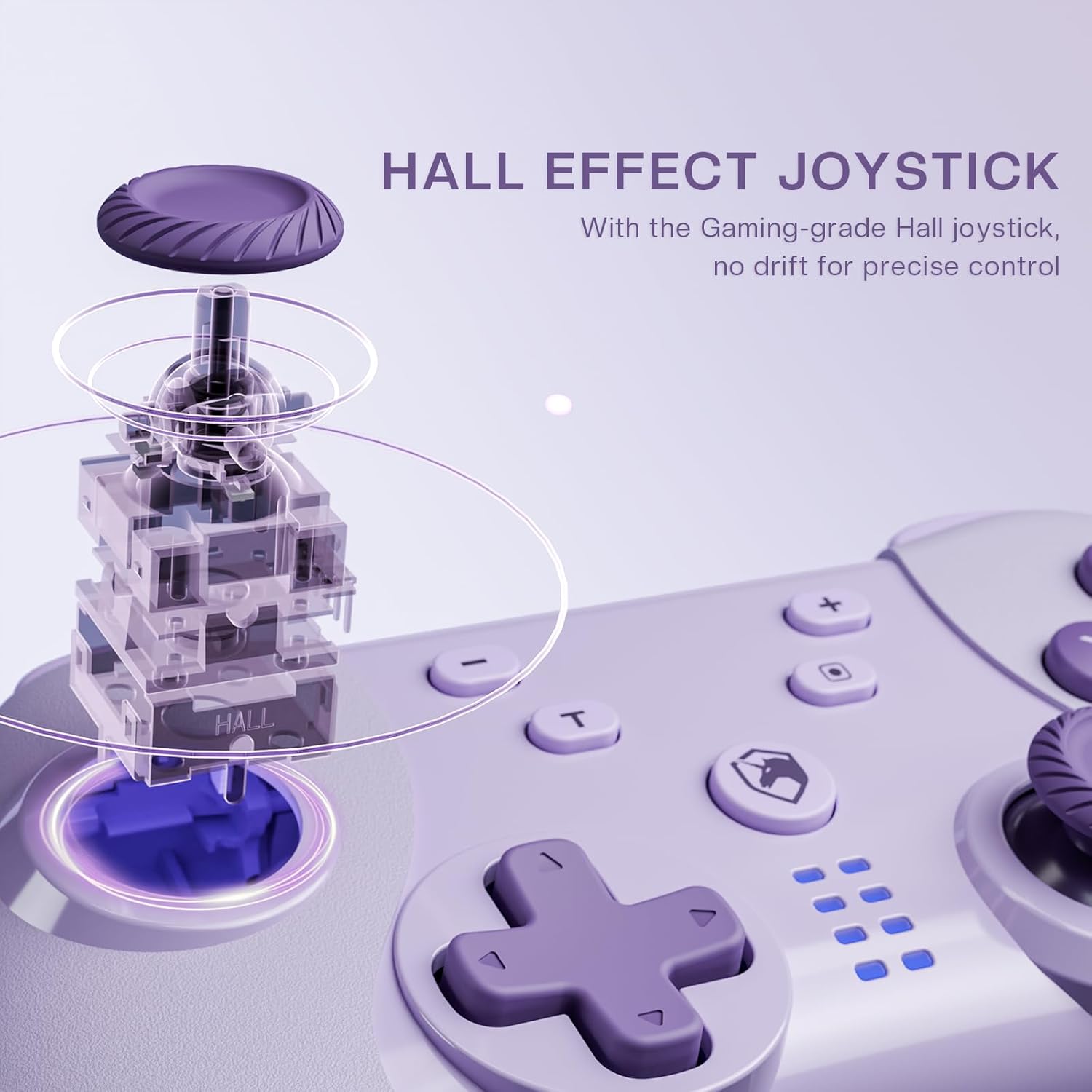
Image 4.1: Diagram illustrating the internal mechanism of a Hall Effect joystick. This image demonstrates how magnetic fields are used for position detection, contributing to drift-free and precise control.
The Hall Effect joysticks provide enhanced precision and durability. This technology uses magnetic fields instead of physical contact, virtually eliminating stick drift and extending the lifespan of the joysticks. No special operation is required; simply enjoy the improved responsiveness and accuracy.
4.3 Macro Function (M Button)
The 'M' button can be programmed for macro functions. Refer to the ECHTPower official website or advanced user guides for detailed instructions on how to program and utilize macro functions for specific gaming scenarios.
5. Održavanje
- čišćenje: Za čišćenje kontrolera koristite meku, suhu krpu. Nemojte koristiti jake hemikalije ili abrazivne materijale.
- Skladištenje: Kontroler čuvajte na hladnom i suhom mjestu, dalje od direktne sunčeve svjetlosti i ekstremnih temperatura.
- Održavanje baterije: Da biste produžili vijek trajanja baterije, izbjegavajte često potpuno pražnjenje kontrolera. Redovno ga punite, čak i ako se ne koristi duži period.
- Izbjegavajte kapi: Zaštitite kontroler od padova i udaraca, koji mogu oštetiti unutrašnje komponente.
6. Otkrivanje problema
| Problem | Mogući uzrok | Rješenje |
|---|---|---|
| Kontroler se ne uključuje. | Niska baterija. | Charge the controller using the USB-C cable. |
| Cannot connect to device. | Not in pairing mode; Bluetooth interference; device's Bluetooth off. | Ensure controller is in pairing mode (flashing LEDs). Check device's Bluetooth settings. Try restarting both controller and device. |
| Input lag or disconnection. | Distance from device; low battery; wireless interference. | Move closer to the device. Charge the controller. Reduce other wireless devices nearby. |
| Joystick drift. | Rare with Hall Effect, but possible calibration issue or extreme wear. | Try recalibrating the joysticks through your device's settings (e.g., Nintendo Switch system settings). If issue persists, contact support. |
7. Specifikacije
- Model: Kontroler bežičnog prekidača
- Povezivanje: Bluetooth Wireless, USB-C Wired
- Kompatibilnost: Nintendo Switch, PC (Windows), iOS, Android
- Joystick Technology: Hall Effect
- Izvor napajanja: Ugrađena punjiva baterija
- Port za punjenje: USB-C
- ASIN: B0DNN1BP4F
8. Garancija i podrška
ECHTPower products come with a standard manufacturer's warranty. For specific warranty terms and conditions, please refer to the warranty card included with your product or visit the official ECHTPower website.
If you encounter any issues or have questions not covered in this manual, please contact ECHTPower customer support:
- Webstranica: ECHTPower Official Store on Amazon
- Email: Pogledajte pakovanje proizvoda ili službene webstranica za kontakt putem e-maila.


