1. Proizvod je gotovview
The AGM M8 is a rugged 4G basic flip phone designed for durability and simplicity. It features a robust build with IP68 and IP69K certifications for water and dust resistance, and meets MIL-STD-810G shock resistance standards. Key features include a powerful 104dB speaker, large keypad and fonts for ease of use, an SOS side key for emergencies, and dual SIM card support. This phone is compatible exclusively with GSM T-Mobile carriers.
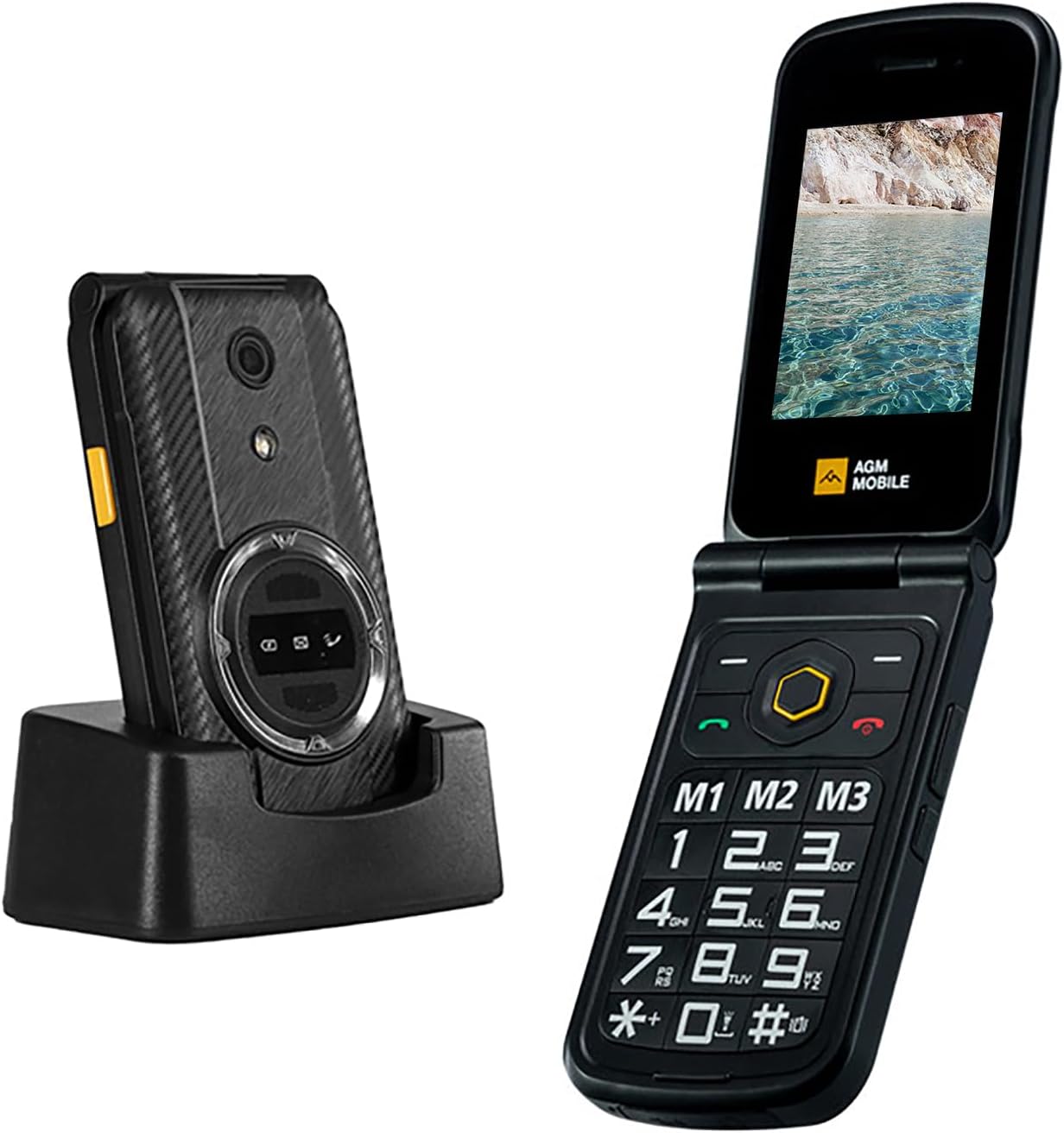
Figure 1: The AGM M8 Flip Phone shown both closed in its charging dock and open, displaying its large keypad and screen.
2. Šta se nalazi u kutiji
- AGM M8 telefon na preklop
- Adapter za napajanje
- USB kabel
- Lithium Ion Battery (1500 mAh)
3. Vodič za postavljanje
3.1 Instalacija SIM kartice
The AGM M8 supports dual SIM cards. Ensure your SIM card is activated in another phone before inserting it into the M8 to prevent recognition issues.
- Gently open the SIM slot cover on the back of the phone.
- Carefully place the SIM card(s) into the designated slot(s). Avoid applying excessive force to prevent damage.
- Close the SIM slot cover securely.
- Umetnite bateriju u njen odjeljak.
- Replace the back cover of the phone.
Video 1: This video demonstrates the proper installation of a SIM card into the AGM M8 FLIP phone, showing how to open the slot, insert the SIM, and secure it before battery installation.
3.2 Početno punjenje
Before first use, fully charge the phone using the provided power adapter and USB cable. Connect the USB cable to the phone's charging port and the power adapter to a wall outlet.

Figure 2: The AGM M8 Flip Phone connected to a USB-C charging cable, illustrating the charging process.
4. Uputstvo za upotrebu
4.1 Uključivanje/isključivanje napajanja
- Za uključivanje: Pritisnite i držite dugme za uključivanje/isključivanje/prekid poziva dok se ekran ne upali.
- Za isključivanje: Pritisnite i držite dugme za uključivanje/isključivanje/prekid poziva, a zatim odaberite "Isključivanje" iz ponuđenih opcija.
4.2 Upućivanje poziva
- Birajte broj pomoću tastature.
- Pritisnite zeleno dugme za poziv da biste započeli poziv.
- Da biste završili poziv, pritisnite crveno dugme za prekid poziva.
4.3 Brzo biranje
The AGM M8 allows you to set up speed dial shortcuts for frequently called contacts.
- Navigate to 'Settings' > 'Phone settings' > 'Speed Dial'.
- Assign contacts to the available speed dial keys (M1, M2, M3, or numeric keys).
- To use speed dial, press and hold the assigned key.

Figure 3: The keypad of the AGM M8 Flip Phone, highlighting the dedicated M1, M2, and M3 speed dial keys for quick access to contacts.
4.4 SOS Side Key
The SOS side key is designed for emergencies. It can be programmed to call emergency services or designated contacts.
- To activate: Press and hold the SOS side button for 3-5 seconds.
- To configure: Go to 'Settings' > 'SOS settings' to set emergency contacts and alarm preferences.

Figure 4: A hand demonstrating the use of the yellow SOS side key located on the side of the AGM M8 Flip Phone.
4.5 Poruke (SMS/MMS)
The phone supports SMS and MMS with T9 input for easier typing.
- Navigate to 'Messages' from the main menu.
- Select 'Write message' to compose a new text or multimedia message.
- Use the keypad to type your message. The phone supports T9 predictive text.
- Unesite broj primaoca ili ga odaberite iz kontakata, a zatim pošaljite.
5. Održavanje i njega
- čišćenje: Use a soft, dry cloth to clean the phone. Avoid harsh chemicals or abrasive materials.
- Otpornost na vodu i prašinu: The AGM M8 is IP68 and IP69K rated. Ensure all port covers are securely closed to maintain water and dust resistance. Do not intentionally submerge the phone in water.
- temperatura: Avoid exposing the phone to extreme temperatures (hot or cold) as this can affect battery life and overall performance.
- Održavanje baterije: The 1500mAh Lithium Ion battery is removable. For optimal battery life, avoid overcharging and allow the battery to fully discharge occasionally before recharging.

Figure 5: A hand rinsing the AGM M8 Flip Phone under running water, illustrating its waterproof capabilities. Ensure all ports are sealed before exposure to water.

Figure 6: The AGM M8 Flip Phone in mid-air during a drop test, showcasing its MIL-STD-810G shock resistance and drop-proof design.
6. Otkrivanje problema
| Issue | Rješenje |
|---|---|
| Phone won't charge. |
|
| Accidental SOS side key activation. |
|
| Button press sounds are active. |
|
| Cannot read SIM card. |
|
7. Specifikacije
- Naziv modela: AGM_M8 FLIP_4G
- Dimenzije proizvoda: 4.54 x 2.45 x 0.9 inča
- Težina artikla: 10.6 unci (300 grama)
- baterija: 1500 mAh litijum-jonska (uključena)
- Operativni sistem: Mocor(RTOS)
- Povezivanje: 4G Cellular Technology, Bluetooth, USB
- Veličina ekrana: 2.8 inča
- RAM: 48 MB
- Memorijska pohrana: 0.12 GB (proširivo)
- Posebne karakteristike: Basic Phone, Dual SIM, Expandable Memory, Rugged Body, Water Resistant, Large Keypad & Fonts, 104dB Powerful Speaker, SOS Side Key, Speed Dial.
- Audio Jack: 3.5 mm
- Boja: BLACK
- Proizvođač: AGM MOBILE
8. Garancija i podrška
For warranty information and technical support, please refer to the documentation included with your purchase or visit the official AGM Mobile website. You can also contact AGM Official seller on Amazon for assistance.
AGM Official Store: Visit the AGM Store on Amazon


