1. Uvod
This manual provides detailed instructions for the proper use, setup, and maintenance of your Pard NV009-850nm Digital Night Vision Monocular. Please read this manual thoroughly before operating the device to ensure optimal performance and longevity. This device is designed for wildlife observation, hunting, and general outdoor viewing in various light conditions.

Image 1.1: The Pard NV009-850nm Digital Night Vision Monocular. This image displays the compact and ergonomic design of the monocular, highlighting its main body, objective lens, and eyepiece.
2. Proizvod je gotovview
2.1 Sadržaj paketa
Nakon raspakivanja, provjerite da li su prisutne sve dolje navedene stavke:
- Pard NV009-850nm Digital Night Vision Monocular
- Zaštitna torbica za nošenje
- USB kabl za punjenje
- Wrist Strap / Neck Strap
- Korisnički priručnik (ovaj dokument)

Image 2.1: Contents of the Pard NV009-850nm package. This image shows the monocular, its carrying case, charging cable, straps, and the user manual, all neatly arranged.
2.2 Ključne karakteristike
- Daytime and Nighttime Operation: Seamless transition between full-color daytime viewing and monochrome night vision mode.
- Slika visoke rezolucije: Features a 1920x1080 FHD CMOS image sensor and a 1024x768 OLED display for clear, detailed visuals.
- Adjustable IR Illuminator: Integrated 850nm IR illuminator with three intensity levels, providing effective illumination up to 200 meters.
- Photo and Video Recording: Capture 2608x1944 resolution photos and 1920x1080 Full HD videos directly to a Micro SD card.
- Optički i digitalni zum: Offers 4.7x optical magnification and 1.5x-3.0x digital zoom for precise target observation.
- Wi-Fi povezivanje: Connects to smart mobile devices via the "PardVision" app for remote viewing and data transfer.
- Način rada slike u slici (PIP): Provides a magnified inset view of the central area for enhanced detail without losing the wider field of view.
- Izdržljiv dizajn: IP67 waterproof rating ensures reliability in various outdoor conditions.

Image 2.2: Comparison of day and night vision modes. This image illustrates the monocular's capability to provide full-color images during the day and clear monochrome images at night, featuring a fox in both scenarios.

Image 2.3: Nighttime viewing range illustration. This graphic demonstrates the monocular's effective viewing distance of up to 200 meters (656 feet) in low-light conditions, showing a wild boar as an example target.

Image 2.4: Enhanced image quality demonstration. This image compares a blurred, lower-quality image with a sharp, enhanced image, illustrating the effectiveness of the PARD Visual Light Enhancement Algorithm (VLEA) and OLED display.
3. Podešavanje
3.1 Instalacija baterije
- Locate the battery compartment cover, typically on the underside or side of the monocular.
- Open the cover by twisting or sliding it according to the indicator.
- Insert a fully charged 18650 type battery (not included) with the correct polarity (+/-) as indicated inside the compartment.
- Sigurno zatvorite poklopac odjeljka za baterije.
3.2 Micro SD Card Insertion
The device supports Micro SD cards for storing photos and videos.
- Locate the Micro SD card slot, usually protected by a rubber cover.
- Pažljivo umetnite Micro SD karticu u utor dok ne klikne na mjesto. Provjerite je li kartica pravilno orijentirana.
- Close the rubber cover to protect the slot from dust and moisture.
3.3 Početno uključivanje i podešavanje fokusa
- Pritisnite i držite dugme za napajanje da uključite uređaj.
- Adjust the diopter ring on the eyepiece until the on-screen display (OSD) text appears sharp and clear to your eye.
- Rotate the objective lens focus ring to bring the observed image into sharp focus.
4. Uputstvo za upotrebu
4.1 Uključivanje/isključivanje napajanja
- Uključeno: Pritisnite i držite dugme za napajanje otprilike 3 sekunde.
- Iskljuciti: Pritisnite i držite dugme za napajanje otprilike 3 sekunde dok se uređaj ne isključi.
4.2 Mode Selection (Day/Night)
The NV009-850nm automatically adjusts to ambient light, but you can manually switch modes:
- U glavnom viewing interface, short press the Mode button to toggle between Day (color) and Night (monochrome) vision modes.
4.3 Podešavanje IR iluminatora
The integrated IR illuminator enhances visibility in complete darkness.
- Activate the IR illuminator by pressing its dedicated button (if available) or through the menu.
- Short press the IR button to cycle through the three intensity levels (Low, Medium, High) or to turn it off.

Image 4.1: IR Illuminator functionality. This graphic illustrates the 200m adjustable beam IR illuminator with its three intensity levels, showing how it illuminates a target in darkness.
4.4 Rad sa zumiranjem
- Use the designated zoom buttons (often '+' and '-') to adjust the digital magnification. The optical magnification is fixed at 4.7x.
4.5 Snimanje fotografija i videa
- foto: In viewing mode, short press the Photo button to capture an image.
- video: Short press the Video button to start recording. Press again to stop recording.

Image 4.2: Video recording and playback function. This image shows the monocular's ability to capture and play back high-definition video, with a simulated screen displaying a recorded scene of a fox.
4.6 Reprodukcija
- Enter the Playback menu via the main menu.
- Navigate through your recorded photos and videos using the directional buttons.
- Odaberite stavku za view it on the OLED display.
4.7 Wi-Fi Connectivity (PardVision App)
- Download the "PardVision" app from your device's app store (Apple App Store or Google Play Store).
- On the monocular, enable Wi-Fi through the system settings. The device will broadcast a Wi-Fi network.
- Connect your smartphone or tablet to the monocular's Wi-Fi network.
- Open the PardVision app to view a live feed, control settings, and transfer files.
4.8 Režim slike u slici (PIP)
- Activate PIP mode through the quick menu or system settings.
- A magnified window will appear on the main display, showing a zoomed-in view of the central area.
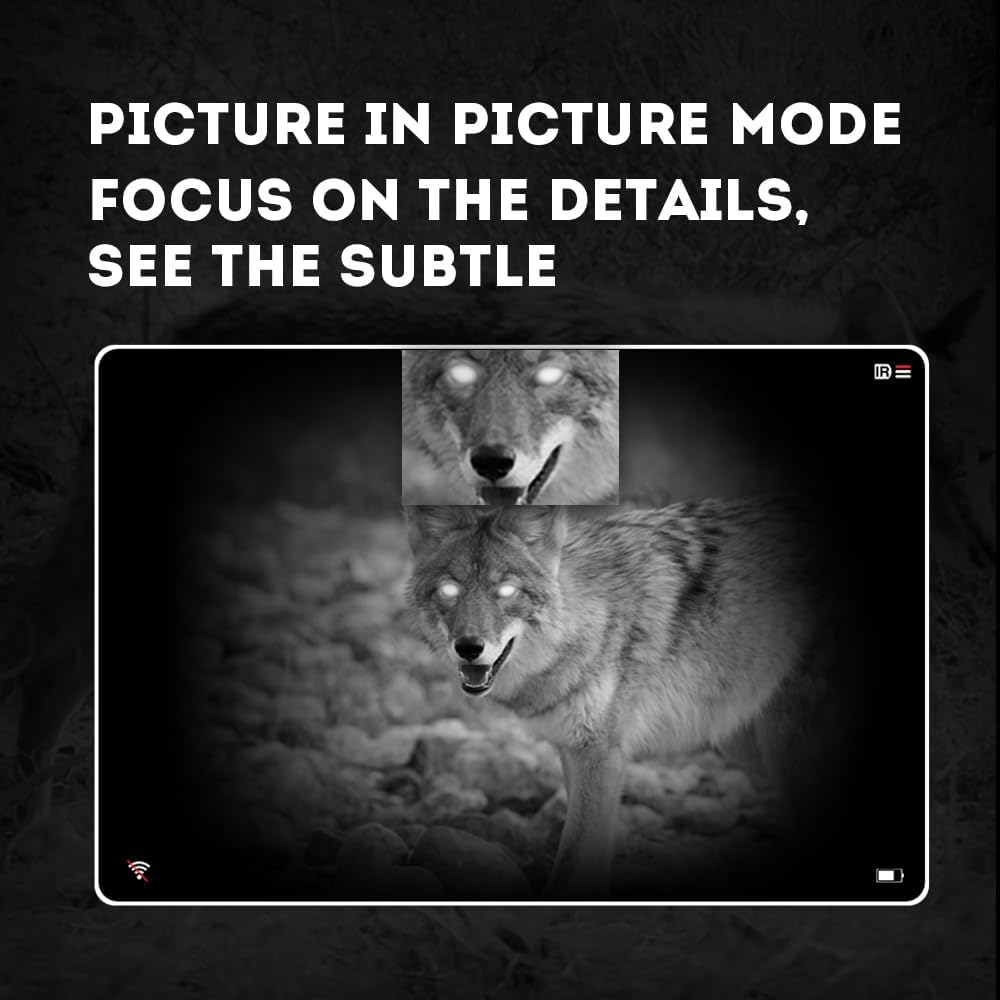
Image 4.3: Picture-in-Picture (PIP) mode. This image demonstrates how PIP mode allows users to focus on specific details within the main view, showing a magnified inset of a coyote's face.
5. Održavanje
5.1 Čišćenje uređaja
- sočiva: Use a soft, lint-free cloth specifically designed for optical lenses. For stubborn smudges, use a small amount of lens cleaning solution. Avoid abrasive materials.
- tijelo: Obrišite tijelo monokulara mekom,amp tkanina. Nemojte koristiti jake hemikalije ili rastvarače.
5.2 Njega baterija
- Always use high-quality, rechargeable 18650 batteries.
- Uklonite bateriju ako se uređaj neće koristiti duži period.
- Čuvajte baterije na hladnom i suvom mestu.
5.3 Skladištenje
- Store the monocular in its protective carrying case when not in use.
- Uređaj držite na suhom mjestu, dalje od direktne sunčeve svjetlosti i ekstremnih temperatura.
6. Otkrivanje problema
If you encounter issues with your Pard NV009-850nm, refer to the following common problems and solutions:
| Problem | Mogući uzrok | Rješenje |
|---|---|---|
| Uređaj se ne uključuje | Low or depleted battery; Incorrect battery installation | Charge or replace the battery; Reinstall battery with correct polarity. |
| Slika je mutna | Improper focus adjustment; Dirty lens | Adjust the diopter and objective lens focus rings; Clean the lenses. |
| No image in night mode | IR illuminator is off or set too low | Turn on the IR illuminator and adjust its intensity. |
| Problemi sa Wi-Fi vezom | Wi-Fi not enabled on device; Incorrect app settings | Ensure Wi-Fi is enabled on the monocular; Check app permissions and settings. |
| Cannot record photos/videos | No Micro SD card; SD card full or corrupted | Insert a Micro SD card; Delete old files or format the card (backup important data first). |
If the problem persists after attempting these solutions, please contact Pard customer support.
7. Specifikacije
| Feature | Detalj |
|---|---|
| Brand | Pard |
| Naziv modela | PARD Night Vision Monocular |
| Broj modela | NV009-850nm |
| Boja | Crna |
| Dimenzije proizvoda (DxŠxV) | 7.16" x 2.24" x 2.79" (18.19 cm x 5.69 cm x 7.09 cm) |
| Težina artikla | 340 grama |
| Materijal | Aluminijum |
| Prečnik objektiva | 25 milimetara |
| Eye Relief | 25 milimetara |
| Mogućnost noćnog vida | Da |
| IR Illuminator Wavelength | 850nm (with 940nm option available in other variants) |
| CMOS Sensor Resolution | 1920x1080 piksela |
| Display Screen | 1024x768 OLED |
| Optičko uvećanje | 4.7x |
| Digitalni zum | 1.5x-3.0x |
| Photo Resolution | 2608x1944 piksela |
| Video Rezolucija | 1920x1080 piksela |
| Waterproof Rating | IP67 |
| Kompatibilni uređaji | Camera (for recording) |
| Vrsta montaže | Rail Mount (if applicable for accessories) |
8. Garancija i podrška
8.1 Informacije o garanciji
The Pard NV009-850nm Digital Night Vision Monocular comes with a 1 godine garancije od datuma kupovine. Ova garancija pokriva proizvodne nedostatke i kvarove pri normalnoj upotrebi. Ne pokriva štetu uzrokovanu zloupotrebom, nezgodama, neovlaštenim modifikacijama ili nepravilnim održavanjem.
Molimo sačuvajte svoj dokaz o kupovini za zahtjeve u vezi s garancijom.
8.2 Korisnička podrška
For technical assistance, warranty claims, or any questions regarding your device, please contact Pard customer support through the official Pard website or your retailer. When contacting support, please have your model number (NV009-850nm) and purchase date available.


