Uvod
This manual provides detailed instructions for the DOOMAY Thermometer Model 5294B and the DOOMAY Digital Kitchen Countdown Timer Model 6226. These devices are designed to assist with temperature and humidity monitoring, and precise time management in various settings.

Image: The DOOMAY Thermometer 5294B (top) displays temperature, humidity, date, and time. The DOOMAY Digital Kitchen Countdown Timer 6226 (bottom) features a large digital display and control buttons.
Setup
Instalacija baterije
Both the Thermometer 5294B and the Digital Kitchen Countdown Timer 6226 require batteries for operation. Locate the battery compartment on the back of each device. Insert the required batteries, ensuring correct polarity (+/-). Close the battery compartment cover securely.
Početno uključivanje
Upon battery installation, both devices should power on automatically. If not, check battery placement or for a power button (if present, though typically automatic for these types of devices).
Placement Recommendations (Thermometer 5294B)
For accurate temperature and humidity readings, place the Thermometer 5294B in a location away from direct sunlight, heat sources, or drafts. Ensure good air circulation around the device.
Thermometer 5294B Operation
The DOOMAY Thermometer 5294B functions as an indoor temperature and humidity monitor with additional features.

Slika: Prekoview of the Thermometer 5294B's functions, including thermometer, hygrometer, comfort level indicator, date & time display, °C/°F switcher, and calibration.
Elementi prikaza
- temperatura: Displays current temperature in Fahrenheit (°F) or Celsius (°C).
- Vlažnost: Displays current relative humidity in percentage (%).
- Datum: Shows the current month and day (M D).
- vrijeme: Displays the current time (HH:MM AM/PM).
Funkcije
- termometar: Measures and displays ambient temperature.
- higrometar: Measures and displays ambient humidity.
- Indikator nivoa udobnosti: Provides a visual indication of the indoor comfort level based on temperature and humidity.
- Date & Time Display: Prikazuje trenutni datum i vrijeme.
- °C/°F Switcher: Allows switching between Celsius and Fahrenheit temperature units. Refer to the device's physical buttons or settings for this function.
- kalibracija: The device supports calibration for enhanced accuracy. Refer to specific instructions on the device or packaging for calibration procedures.
Comfort Level Indicator Details
The comfort level indicator uses a smiley face icon to represent the environmental conditions. This indicator changes based on specific temperature and humidity ranges.

Image: Chart illustrating the comfort level indicator based on temperature and humidity ranges. A happy face indicates optimal conditions (66°F ≤ Temp ≤ 80°F and 30% < Humidity ≤ 70%).
Refer to the chart above for specific temperature and humidity thresholds that determine the comfort level icon displayed.
Typical Usage Scenarios

Slika: pramples of where the thermometer can be used, including baby rooms, offices, greenhouses, and wine cellars.
The Thermometer 5294B is suitable for monitoring environmental conditions in various indoor spaces such as baby rooms, offices, greenhouses, and wine cellars.
Digital Kitchen Countdown Timer 6226 Operation
The DOOMAY Digital Kitchen Countdown Timer 6226 offers precise time management for various tasks.

Image: The Digital Kitchen Countdown Timer 6226 showing its large LED display, Minute, Second, D/II (Play/Pause), Custom, Reset, and volume/light buttons.
Kontrolna dugmad
- Dugme minuta: Press to increase the minute setting.
- Drugo dugme: Press to increase the second setting.
- D/II (Play/Pause) Button: Pokreće ili pauzira tajmer.
- Prilagođeno dugme: Sets or recalls a pre-defined custom countdown time.
- Dugme za resetiranje: Clears the current timer setting to 00:00.
- Speaker Icon Button: Adjusts the alarm volume level.
- Sun Icon Button: Controls the display backlight or brightness.
Podešavanje tajmera
- Pritisnite Minuta dugme da biste podesili željene minute.
- Pritisnite Drugo dugme da biste podesili željene sekunde.
- The timer can be set from 00:00 up to 99:59.
Pokretanje i pauziranje
After setting the desired time, press the D/II button to start the countdown. Press D/II again to pause the timer. Press it once more to resume.
Resetovanje tajmera
To clear the current timer setting and return to 00:00, press the Reset dugme.
Prilagođena funkcija
The Custom button allows you to quickly set and recall a frequently used countdown time. To set a custom time, first set the desired minutes and seconds, then press and hold the Custom button until the display confirms the setting. To recall the custom time, simply press the Custom dugme jednom.
Vremenski režimi

Image: Illustration of the two timing modes: Countdown (from 99:59 to 00:00) and Count Up (from 00:00 to 99:59).
- Način odbrojavanja: Set a specific time, and the timer will count down to 00:00. The range is 00:00 to 99:59.
- Count Up Mode: When the timer is at 00:00, press the D/II button to start counting upwards. The range is 00:00 to 99:59.
Alarm Sounds and Volume
The timer features four alarm sound levels, ranging from mute (0dB) to 85dB. Press the Ikona zvučnika button to cycle through the volume levels (L00 for mute, L01, L02, L03 for increasing volumena).
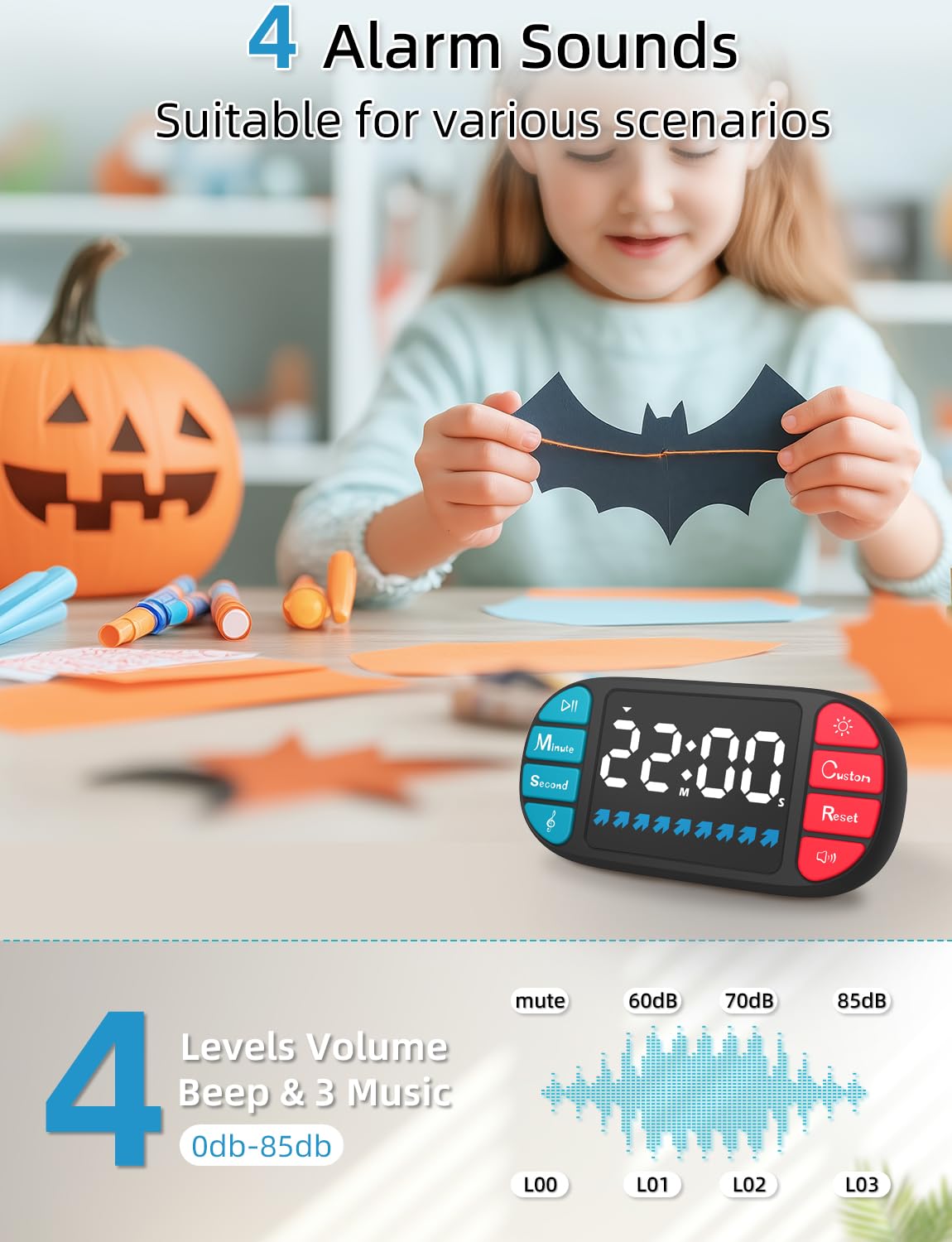
Image: Visual representation of the four alarm sound levels (mute, 60dB, 70dB, 85dB) and their corresponding display indicators (L00, L01, L02, L03).
Typical Usage Scenarios

Slika: pramples of where the timer can be used, including cooking, classroom activities, homework, exercise, naps, skin care routines, and in toy rooms.
The Digital Kitchen Countdown Timer 6226 is versatile and can be used for various activities such as cooking, classroom management, homework sessions, exercise routines, managing nap times, timing skin care applications, and organizing play in toy rooms.
Održavanje
Čišćenje
To clean the devices, use a soft, dry cloth. For stubborn marks, a slightly damp cloth with mild soap can be used, followed by drying thoroughly. Do not use abrasive cleaners or immerse the devices in water.
Zamjena baterije
When the display becomes dim or the device functions erratically, it is time to replace the batteries. Follow the battery installation steps outlined in the Setup section. Dispose of old batteries responsibly according to local regulations.
Rješavanje problema
Uređaj se ne uključuje
- Provjerite da li su baterije pravilno umetnute s odgovarajućim polaritetom.
- Zamijenite novim baterijama.
Inaccurate Thermometer Readings
- Relocate the thermometer away from direct sunlight, heat sources, or drafts.
- Allow the device to stabilize for 15-30 minutes after relocation.
- Consider performing a calibration if supported and necessary.
Timer Alarm Not Sounding
- Check the volume setting using the Ikona zvučnika button. Ensure it is not set to L00 (mute).
- Replace batteries if the device is generally weak.
Display Issues (Dim, Flickering, Incomplete)
- Zamijenite baterije.
- Ensure the display is not exposed to extreme temperatures.
Specifikacije

Image: Dimensions of the Thermometer 5294B (8.7cm x 6.5cm, display 9.2cm x 3.62cm) and a comparison highlighting features like large LCD display, big digits, calibration, and longer battery life.
DOOMAY Thermometer 5294B
- Dimenzije: Approximately 8.7 cm (3.43 in) x 6.5 cm (2.58 in)
- Veličina ekrana: Approximately 9.2 cm (3.62 in) x 3.62 cm (1.42 in)
- Funkcije: Thermometer, Hygrometer, Comfort Level Indicator, Date & Time, °C/°F Switcher, Calibration.
- Prikaz: Large LCD Display with Big Digits.
- Izvor napajanja: Battery (type not specified, typically AAA or button cell).
DOOMAY Digital Kitchen Countdown Timer 6226
- Count Range: 00:00 to 99 Minutes 59 Seconds.
- Režimi mjerenja vremena: Countdown and Count Up.
- Jačina alarma: 4 levels (0dB - 85dB).
- Prikaz: Large LED Display.
- Posebne karakteristike: Blue Status Bar, Custom Function.
- Izvor napajanja: Battery (type not specified, typically AAA or button cell).
Garancija i podrška
For warranty information or technical support, please refer to the documentation included with your purchase or contact DOOMAY customer service. Contact details can typically be found on the product packaging or the official DOOMAY website.


