Uvod
This manual provides comprehensive instructions for the installation, operation, and maintenance of the ENS SN4432/M 32-Channel 12MP+ Network Video Recorder (NVR). The SN4432/M is a high-performance surveillance solution designed for demanding security installations, offering advanced features such as 12MP+ resolution support, RAID capabilities, and Point-of-Sale (PoS) integration. Please read this manual thoroughly before using the device to ensure proper setup and optimal performance.
Sigurnosne informacije
Always follow these safety precautions to prevent injury or damage to the device:
- Osigurajte napajanje voltage is correct before connecting the NVR.
- Ne izlažite NVR vodi ili vlazi.
- Izbjegavajte postavljanje NVR-a na direktnu sunčevu svjetlost ili u blizinu izvora topline.
- Koristite samo dodatnu opremu i adaptere za napajanje koje je odobrio proizvođač.
- Do not open the NVR casing; sve servisne radove prepustite kvalifikovanom osoblju.
- Osigurajte odgovarajuću ventilaciju kako biste spriječili pregrijavanje.
Sadržaj paketa
Provjerite da li su sve stavke prisutne u paketu:
- ENS SN4432/M Video Recorder
- Installation Hardware (screws, cables)
- Korisnički priručnik (ovaj dokument)
- Adapter za napajanje
- USB miš
- Remote Control (optional, depending on region)
Product Overview
The ENS SN4432/M NVR is designed for robust surveillance, supporting up to 32 IP cameras with resolutions exceeding 12MP. Key features include dual HDMI outputs, RAID support for data redundancy, and advanced H.265+ compression.
Prednja ploča
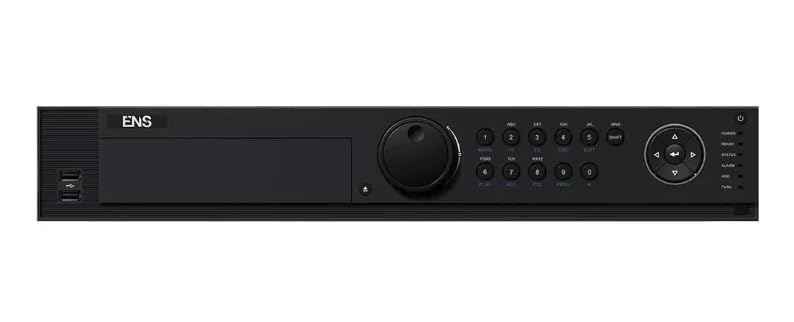
Opis slike: A front view of the ENS SN4432/M NVR, showing the power indicator, status LEDs, and USB ports. This image represents the general appearance of the device. (Note: Specific front panel image not provided, using main product image as a general representation.)
Zadnja ploča
The rear panel contains all essential connection ports. These typically include:
- Power Input
- Ethernet Ports (LAN, IP Camera Network)
- HDMI Outputs (Dual)
- VGA Outputs (Dual)
- USB portovi
- Audio ulaz/izlaz
- Alarmni ulaz/izlaz
- RS-485 port
(Note: A specific image of the rear panel would be included here if available, detailing each port.)
Setup
1. Instalacija hardvera
- Instaliranje tvrdih diskova: Otvorite NVR casing, mount the SATA hard drives into the designated bays, and connect the SATA data and power cables. Secure the drives with screws. The SN4432/M supports up to 4 SATA interfaces.
- Povežite kamere: Connect your IP cameras to the NVR's network ports or to a PoE switch connected to the NVR's LAN port.
- Poveži ekran: Connect a monitor to one of the HDMI or VGA output ports.
- Povezivanje miša: Uključite USB miš u USB priključak na NVR-u.
- Povežite mrežu: Povežite NVR na vašu lokalnu mrežu pomoću Ethernet kabela.
- Uključeno: Connect the power adapter to the NVR and then to a power outlet. Press the power button if available.
2. Početna konfiguracija
- First-Time Wizard: Upon first boot, the NVR will typically launch a setup wizard. Follow the on-screen prompts to set up basic parameters.
- Postavite lozinku: Create a strong administrator password.
- Mrežne postavke: Configure network settings (DHCP or Static IP) to ensure the NVR can communicate with your network and cameras.
- Vrijeme i datum: Podesite tačnu vremensku zonu, datum i vrijeme.
- Inicijalizacija tvrdog diska: Initialize the installed hard drives for recording. This process will format the drives.
- Dodajte kamere: Use the camera management interface to search for and add IP cameras to the NVR. Ensure cameras are on the same network segment or properly routed.
Uputstvo za upotrebu
1. Navigacija korisničkim interfejsom
The NVR's graphical user interface (GUI) can be accessed via a connected monitor and mouse, or remotely via a web browser or client software. The main screen typically displays live camera feeds.
- Uživo View: Displays real-time video from connected cameras.
- Reprodukcija: Accesses recorded footage.
- Konfiguracija: Allows adjustment of system settings, camera parameters, and recording schedules.
- Dnevnik događaja: Reviews system events and alarms.
2. Upravljanje kamerom
From the configuration menu, you can manage all connected cameras:
- Add/Delete Cameras: Traži new cameras or remove existing ones.
- Izmijeni parametre: Adjust camera resolution, frame rate, bit rate, and image settings.
- Detekcija pokreta: Configure motion detection zones and sensitivity.
- Zaštita privatnosti: Definišite područja koja će biti isključena iz nadzora.
3. Snimanje i reprodukcija
- Raspored snimanja: Set continuous, motion-triggered, or alarm-triggered recording schedules for each camera.
- Ručno snimanje: Initiate recording manually from the live view.
- Reprodukcija: Navigate to the playback interface, select the desired camera and time range to review snimljeno footage. Use the timeline and search functions to find specific events.
- Export Footage: Select and export recorded video clips to a USB drive or network location.
4. Napredne funkcije
- RAID konfiguracija: Access the storage management menu to configure RAID 0, 1, 5, 6, or 10 for data redundancy and performance. Refer to the RAID section for detailed setup.
- PoS Integration: Connect Point-of-Sale (PoS) devices to the NVR. Configure the PoS settings to overlay transaction data on video footage and trigger recordings based on transaction events.
- Daljinski pristup: Configure network settings for remote viewing via a web browser or mobile application. Ensure port forwarding or P2P services are correctly set up.
- Upravljanje alarmom: Set up alarm inputs, outputs, and notification methods (e.g., email, push notifications).
Održavanje
- Ažuriranja firmvera: Redovno provjeravajte proizvođačeve website for firmware updates. Download and install updates to ensure optimal performance and security. Follow the provided instructions carefully.
- Upravljanje skladištem: Monitor HDD health through the NVR's system status menu. Replace failing drives promptly. Configure automatic overwriting of old footage or set up archiving as needed.
- čišćenje: Periodically clean the NVR's exterior with a soft, dry cloth. Ensure ventilation openings are free from dust and obstructions.
- Konfiguracija sigurnosne kopije: Regularly back up the NVR's configuration settings to a USB drive or network location.
Rješavanje problema
| Problem | Mogući uzrok | Rješenje |
|---|---|---|
| Nema video izlaza na monitoru | Loose HDMI/VGA cable, incorrect input selected on monitor, NVR not powered on. | Check cable connections. Ensure monitor is set to the correct input source. Verify NVR power. |
| Kamere ne prikazuju | Network issue, camera not powered, incorrect camera IP address, camera not added to NVR. | Check network cables and connections. Verify camera power. Ensure camera IP is correct and added to NVR. Check firewall settings. |
| Nema snimanja | HDD not initialized, no recording schedule, HDD full, HDD failure. | Initialize HDDs. Configure recording schedules. Check HDD status and free space. Replace faulty HDDs. |
| Udaljeni pristup ne radi | Network configuration issues, incorrect port forwarding, firewall blocking. | Verify NVR network settings. Check router port forwarding rules. Disable firewall temporarily for testing. Ensure P2P service is enabled if used. |
Specifikacije
| Feature | Detalj |
|---|---|
| Broj modela | SN4432/M |
| Broj kanala | 32 |
| Podrška za maksimalnu rezoluciju | 12MP+ per channel (up to 32 channels at 1080p or 2 channels at 32MP decoding) |
| Video Compression | H.265+, H.265, H.264+, H.264 |
| Video izlazi | Dual HDMI (up to 8K), Dual VGA |
| Audio ulaz/izlaz | Podržano |
| SATA interfejsi | 4 SATA interfejsa |
| RAID podrška | RAID 0, 1, 5, 6, 10 (with N+M hot spare) |
| Incoming Bandwidth | 320 Mbps |
| Outgoing Bandwidth | 400 Mbps |
| PoS Integration | Podržano |
| Proizvođač | ENS |
Garancija i podrška
For warranty information and technical support, please refer to the official ENS webstranicu ili kontaktirajte ovlaštenog prodavača. Sačuvajte račun kao dokaz o kupovini za reklamacije.