1. Uvod
Ensure the security of your home or business with the HiLook DVR-216G-M1 Recorder. This device allows you to store all images captured by your security cameras, providing greater control and continuous monitoring of your spaces. With advanced features, it is perfect for ensuring maximum protection and peace of mind.
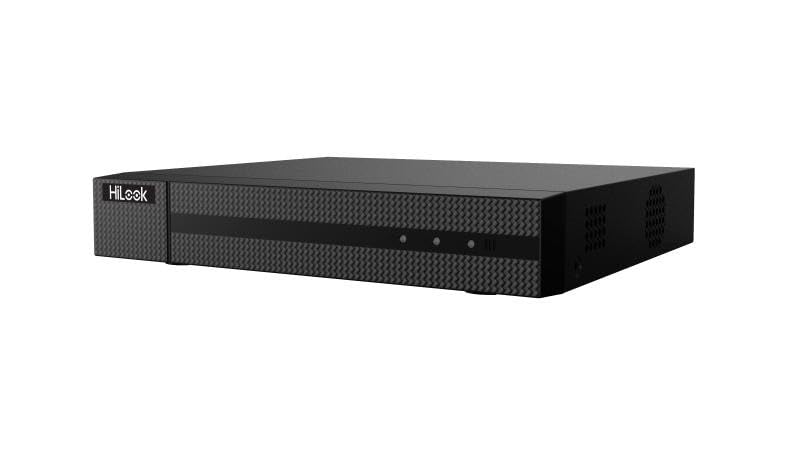
Slika 1: Prednja strana view of the HiLook Hikvision DVR-216G-M1 Digital Video Recorder, a black rectangular device with a textured front panel and the 'HiLook' logo on the left side.
2. Ključne karakteristike
- Inteligentna klasifikacija: Based on deep learning, Motion Detection 2.0 classifies human and vehicle targets, reducing false alarms.
- Napredna video kompresija: Supports H.265 Pro+/H.265 Pro/H.265, saving bandwidth and storage.
- Svestrani video ulazi: Compatible with HDTVI, AHD, CVI, CVBS, and IP camera signals.
- Audio via Coaxial Cable: Clear and efficient audio transmission over coaxial cables.
- IP Camera Support: Up to 18 IP camera input channels, with resolution up to 5 MP.
- Encoding Capability: Supports up to 1080p Lite at 15 frames per second (fps).
- Raspon signala: Maximum of 1200 meters for 720p HDTVI signal.
3. Sadržaj paketa
Molimo Vas da pažljivo provjerite paket za sljedeće stavke:
- 1 x HiLook Hikvision DVR-216G-M1 DVR Unit
- 1 x Korisnički priručnik (ovaj dokument)
- 1 x adapter za napajanje
- 1 x Installation Kit (including screws and necessary tools)
- 1 x Ethernet kabel
4. Vodič za postavljanje
4.1 Početno podešavanje
- Unpack the DVR: Carefully remove the DVR and all accessories from the packaging.
- Priključite napajanje: Connect the provided power adapter to the DVR's power input and then plug it into a suitable power outlet.
- Poveži se s monitorom: Use an HDMI or VGA cable (not included) to connect the DVR to a monitor for initial setup and viewing.
- Povežite se na mrežu: Connect the provided Ethernet cable from the DVR's LAN port to your router or network switch.
- Uključeno: The DVR will typically power on automatically once connected to power. Follow the on-screen prompts for initial configuration, including setting up an administrator password and network settings.
4.2 Povezivanje kamera
The DVR-216G-M1 supports various camera types. Connect your analog (HDTVI, AHD, CVI, CVBS) cameras to the BNC video input ports on the rear panel. For IP cameras, ensure they are on the same network as the DVR and add them through the DVR's network camera management interface.
5. Operacija
5.1 Osnovni rad
Once the DVR is set up and cameras are connected, you can view live feeds, record footage, and play back recorded events. Navigate the DVR's menu using a connected mouse (not included) to access various functions such as live view, recording schedules, playback, and system settings.
5.2 Motion Detection Configuration
The DVR features advanced motion detection. To configure, access the 'Event' or 'Alarm' settings in the DVR menu. You can define motion detection areas, sensitivity levels, and set up actions such as recording, notification, or alarm output when motion is detected. The deep learning-based Motion Detection 2.0 helps in accurately classifying human and vehicle targets, reducing false alarms.
6. Održavanje
- Redovno čišćenje: Keep the DVR free from dust. Use a soft, dry cloth for cleaning. Do not use liquid cleaners.
- Ažuriranja firmvera: Povremeno provjeravajte službene stranice HiLook-a. webstranica za ažuriranja firmvera kako bi se osigurale optimalne performanse i pristup novim funkcijama.
- Sigurnosna kopija podataka: Redovno pravite sigurnosne kopije važnih snimljenih datotekatagna eksterni uređaj za pohranu ili uslugu u oblaku kako biste spriječili gubitak podataka.
- ventilacija: Ensure the DVR is placed in a well-ventilated area to prevent overheating. Do not block ventilation openings.
7. Rješavanje problema i često postavljana pitanja
Često postavljana pitanja
- Q1: How many cameras does the DVR-216G-M1 support?
- A1: The DVR-216G-M1 supports up to 16 analog cameras and 2 IP cameras (expandable up to 18 IP cameras).
- Q2: What is the maximum recording resolution?
- A2: The DVR-216G-M1 supports resolution up to 5 MP, providing high-quality images.
- Q3: Does the DVR-216G-M1 have motion detection?
- A3: Yes, it features deep learning-based Motion Detection 2.0 technology, which classifies humans and vehicles, reducing false alarms.
- Q4: Is installation easy?
- A4: Yes, the DVR-216G-M1 is easy to install and comes with a detailed installation kit, including necessary screws and tools.
- Q5: How does video storage work?
- A5: The DVR-216G-M1 supports local and cloud storage, ensuring you have continuous access to recordings.
- Q6: Which network protocols are compatible with the network interface?
- A6: The network interface supports TCP/IP, PPPoE, DHCP, HiLookVision, DNS, DDNS, NTP, SADP, SMTP, UPnP, and HTTPS.
8. Tehničke specifikacije
| Feature | Specifikacija |
|---|---|
| Model | DVR-216G-M1 |
| Brand | HiLook |
| Proizvođač | Hikvision |
| Broj kanala | 16 (Analog) + 2 (IP, expandable to 18 IP) |
| Video ulazi | HDTVI, AHD, CVI, CVBS, IP |
| Video Compression | H.265 Pro+/H.265 Pro/H.265 |
| Audio ulaz | Via coaxial cable |
| Encoding Capability | Up to 1080p Lite @ 15 fps |
| Rezolucija video snimanja | 2592x1944 (5 MP max for IP cameras) |
| Signal Range (HDTVI) | Max 1200 m for 720p HDTVI signal |
| Posebne karakteristike | Motion Detection 2.0 (Deep Learning-based) |
| Tehnologija povezivanja | Žičani |
| Boja | Crna |
| Vrsta izvora napajanja | AC/DC |
| Dimenzije paketa | 40.5 x 28.1 x 8 cm |
| Težina | 1.46 kilograma |
| ASIN | B0DM6FJCH9 |
9. Garancija i podrška
Specific warranty terms and conditions are not provided in the product details. For detailed warranty information, technical support, or service inquiries, please refer to the official HiLook or Hikvision webweb-mjesto ili direktno kontaktirajte njihovu korisničku podršku. Sačuvajte račun kao dokaz o kupovini za bilo kakve reklamacije u vezi s garancijom.


