1. Uvod
This manual provides detailed instructions for the FREEWOLF M68 60% Wireless Gaming Keyboard. Please read this manual carefully before using the product to ensure proper operation and longevity.

Figure 1: FREEWOLF M68 Wireless Gaming Keyboard (Shimmer color variant)
2. Proizvod je gotovview
Ključne karakteristike:
- Trostruka povezanost: Supports wired (USB-C), 2.4GHz wireless, and Bluetooth 5.0 connections.
- Kompatibilnost sa više uređaja: Connects to Windows, Mac, Linux, PC, Laptop, iPad, iOS, and Android devices.
- Kompaktni 60% raspored: Features 67 keys, optimizing desktop space.
- PBT kapice za tipke: Durable Polybutylene Terephthalate keycaps with clear legends.
- Dugine LED pozadinsko osvjetljenje: Offers constant and breathing modes with adjustable brightness and speed.
- Dugotrajna baterija: Built-in 2000mAH battery provides extended usage.
- Ergonomski dizajn: Double leg braces allow for three adjustable typing angles.
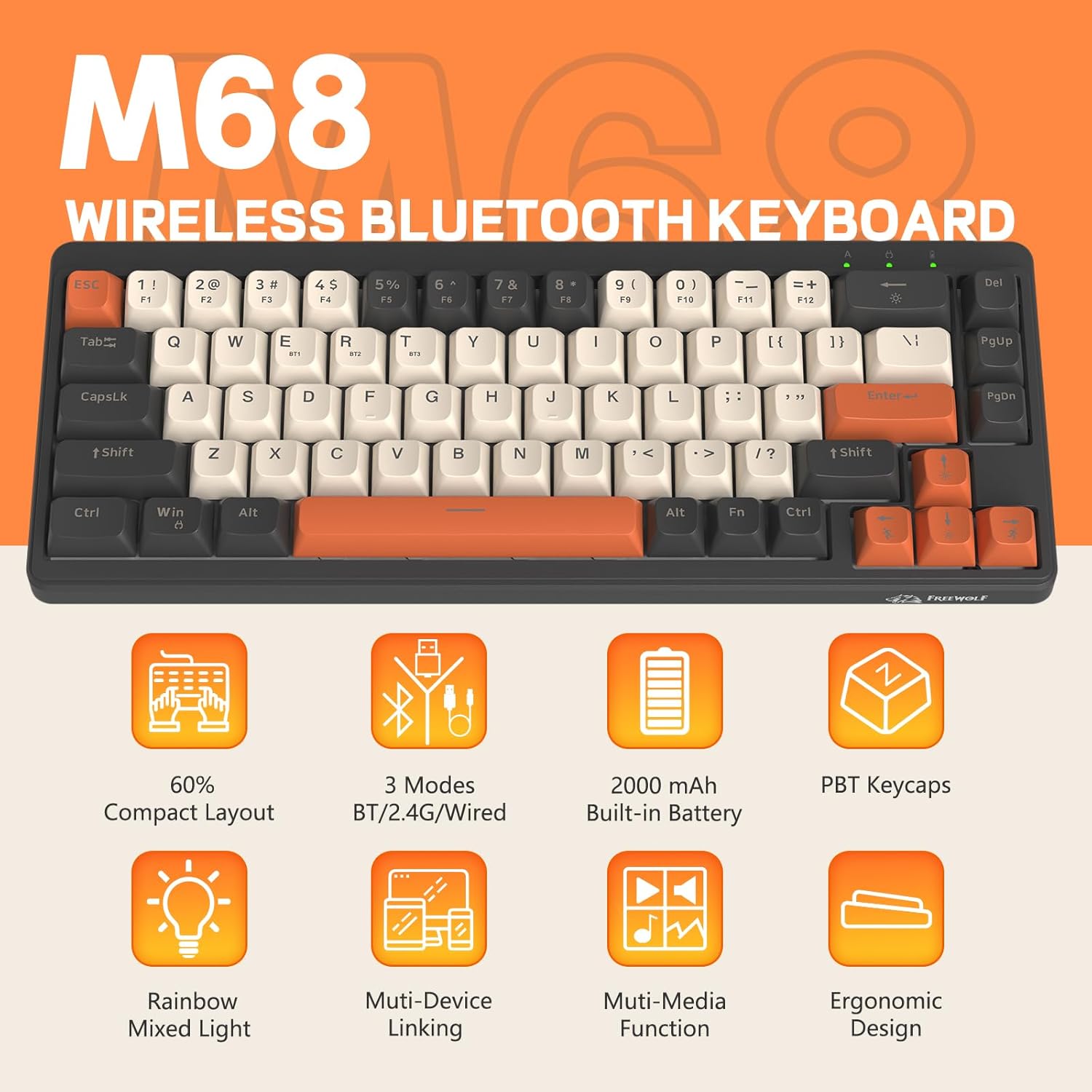
Slika 2: Gotovoview of FREEWOLF M68 key features.
3. Podešavanje i povezivanje
3.1. Tri-Mode Connection Overview
The M68 keyboard supports three connection methods: wired via USB-C, 2.4GHz wireless via a USB receiver, and Bluetooth 5.0. You can switch between these modes using the dedicated switch on the keyboard.

Slika 3: Detaljno view of the 3-mode connection options.
3.2. Žična veza
- Pronađite USB-C priključak na tastaturi.
- Connect the provided USB-C cable to the keyboard and the other end to your computer's USB port.
- Ensure the mode switch on the keyboard is set to the wired (USB) position.
- Vaš sistem će automatski prepoznati tastaturu.
3.3. Bežična veza od 2.4 GHz
- Pronađite USB prijemnik od 2.4 GHz (često se nalazi u odjeljku na tastaturi).
- Uključite USB prijemnik u slobodan USB port na vašem računaru.
- Set the mode switch on the keyboard to the 2.4GHz wireless position.
- Tastatura bi se trebala automatski povezati. Ako ne, pritisnite FN + R da započnete uparivanje.
3.4. Bluetooth veza
The M68 can connect to up to three Bluetooth devices simultaneously.
- Postavite prekidač za način rada na tastaturi u položaj Bluetooth.
- To enter pairing mode for a specific channel (BT1, BT2, or BT3), press and hold FN + Q (za BT1), FN + W (za BT2), ili FN + E (for BT3) until the corresponding indicator light flashes rapidly.
- On your device (PC, laptop, tablet, phone), open Bluetooth settings and search for "FREEWOLF M68".
- Odaberite tastaturu za uparivanje. Indikatorska lampica će početi stalno svijetliti nakon povezivanja.
- Za prebacivanje između uparenih Bluetooth uređaja, pritisnite FN + Q/W/E ukratko.
4. Operacija
4.1. Kontrola pozadinskog osvjetljenja
The M68 features customizable rainbow LED backlighting.
- FN + Backspace: Toggle backlight on/off or switch between constant and breathing modes.
- FN + strelica lijevo: Smanjite brzinu pozadinskog osvjetljenja.
- FN + strelica udesno: Povećajte brzinu pozadinskog osvjetljenja.
- FN + strelica gore: Povećajte svjetlinu pozadinskog osvjetljenja.
- FN + strelica dolje: Smanjite svjetlinu pozadinskog osvjetljenja.

Figure 4: Backlight adjustment key combinations.
4.2. Ergonomic Adjustment
The keyboard includes double leg braces on the back to adjust the typing angle for comfort.
- Flip the keyboard over to access the leg braces.
- Podesite dva-stage leg braces to achieve your preferred typing angle (flat, one stage, or two stages).

Figure 5: Ergonomic angle adjustments.
4.3. Upravljanje baterijom
The keyboard has a built-in 2000mAH rechargeable battery.
- Punjenje: Connect the keyboard via the USB-C cable to a power source (computer USB port or wall adapter). The charging indicator will show status.
- Trajanje baterije: Up to 60 hours with backlight on, and up to 200 hours with backlight off.
- Cuvanje energije: The keyboard will enter sleep mode after a period of inactivity to conserve battery. Press any key to wake it up.

Figure 6: Battery capacity information.
5. Održavanje
- čišćenje: Use a soft, dry cloth to clean the keyboard surface. For keycaps, you may use a slightly damp krpu. Izbjegavajte prekomjernu vlagu.
- Uklanjanje tipkovnice: If necessary, use a keycap puller to carefully remove PBT keycaps for deeper cleaning or replacement.
- Skladištenje: Tastaturu čuvajte na hladnom i suhom mjestu, dalje od direktne sunčeve svjetlosti i ekstremnih temperatura.
- Izbjegavajte tečnosti: Do not expose the keyboard to liquids to prevent damage to internal components.
6. Otkrivanje problema
| Problem | Mogući uzrok | Rješenje |
|---|---|---|
| Tastatura ne reaguje (žična) | Labava kablovska veza, pogrešan način rada. | Ensure USB-C cable is securely connected. Check if the mode switch is set to wired. Try a different USB port. |
| Keyboard not responding (2.4GHz) | USB receiver not connected, incorrect mode, pairing issue. | Ensure USB receiver is plugged in. Set mode switch to 2.4GHz. Re-pair by pressing FN + R. Try a different USB port for the receiver. |
| Tastatura ne reaguje (Bluetooth) | Not paired, incorrect mode, device Bluetooth off. | Ensure device Bluetooth is on. Set mode switch to Bluetooth. Enter pairing mode (FN + Q/W/E) and re-pair. Forget the device on your system and re-pair. |
| Pozadinsko osvjetljenje ne radi ili je zaglavljeno | Pozadinsko osvjetljenje isključeno, slaba baterija, softverski problem. | Pritisnite FN + Backspace to toggle. Charge the keyboard. Try resetting the keyboard (refer to advanced functions if available, or disconnect/reconnect). |
| Tipke se ne registruju ili se tipkaju dvaput | Dust/debris under keycap, switch issue. | Carefully remove keycap and clean. If issue persists, contact support. |
7. Specifikacije
| Model | M68 |
| Brand | SLOBODNI VUK |
| Povezivanje | Žičano (USB-C), bežično 2.4 GHz, Bluetooth 5.0 |
| Key Layout | 60% (67 tipki) |
| Materijal poklopca ključa | PBT (polibutilen tereftalat) |
| Pozadinsko osvetljenje | Rainbow LED (RGB) |
| Kapacitet baterije | 2000mAH |
| Kompatibilni uređaji | Laptop, PC, Tablet (Windows, Mac, Linux, iOS, Android) |
| Dimenzije proizvoda | 32.51 x 12.5 x 3.99 cm |
| Težina | 600 g |
| Posebne karakteristike | Ergonomic (adjustable angles), Backlit |
8. Garancija i podrška
For warranty information, technical support, or customer service inquiries, please refer to the contact information provided with your purchase or visit the official FREEWOLF website.
Molimo sačuvajte dokaz o kupovini za bilo kakve reklamacije u vezi s garancijom.


