1. Uvod
The NEDIS WIFICI12CWT SmartLife Indoor Wi-Fi Camera is designed for home surveillance, offering 3MP 1296p Full HD video quality. It features infrared night vision, intelligent motion detection, and two-way audio communication. This camera is compatible with Onvif standards and integrates seamlessly with the SmartLife application for remote access and control. Video recordings can be stored on a microSD card (up to 128 GB) or via an optional cloud storage service. This manual provides essential information for the proper installation, operation, and maintenance of your camera.
2. Šta se nalazi u kutiji
- 1x NEDIS WIFICI12CWT Camera
- 1x adapter za napajanje
- 1x USB Type-C kabel
- 1x Uputstvo za upotrebu
3. Proizvod je gotovview
Familiarize yourself with the components of your NEDIS WIFICI12CWT camera.

This image displays the front of the NEDIS WIFICI12CWT camera, highlighting its key functionalities such as Wi-Fi connectivity, control via a mobile application, voice control compatibility, infrared night vision, and 3MP Full HD resolution for clear video.
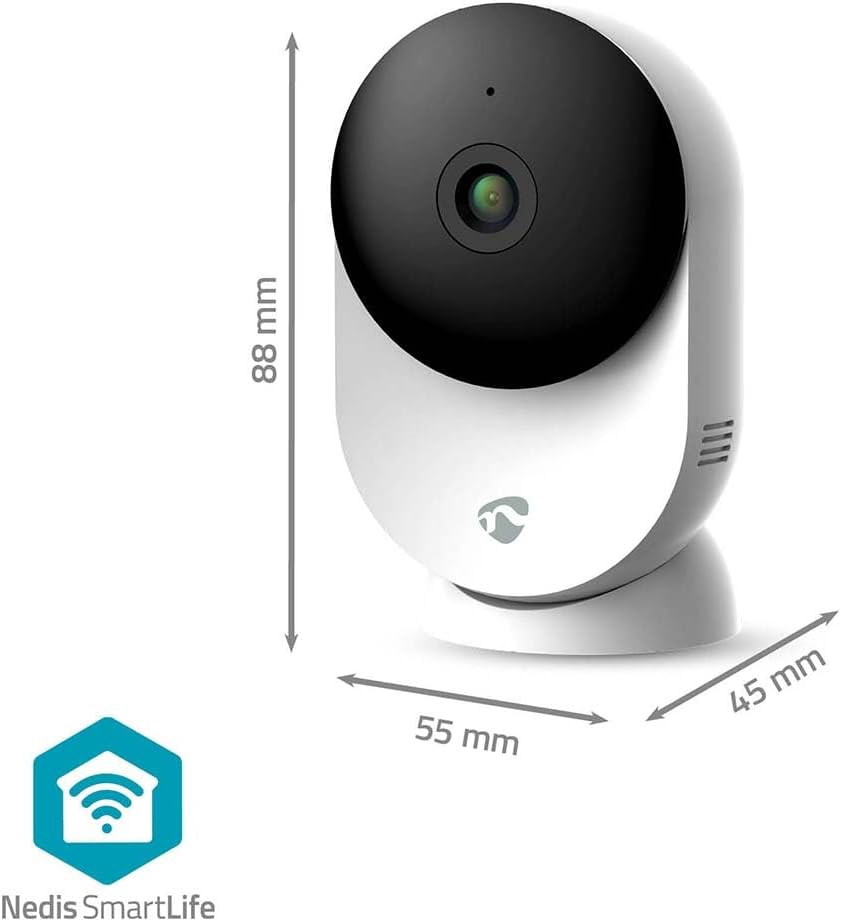
Ova slika pruža jasan view of the NEDIS WIFICI12CWT camera along with its physical dimensions: 88 mm in height, 55 mm in width, and 45 mm in depth, aiding in placement planning.

Pozadi view of the camera is shown, highlighting the speaker grille for two-way audio and the 'PUSH' button, which typically serves as a reset or pairing button.
Ključne komponente:
- Objektiv kamere: Snima video footage.
- LED indikator: Shows camera status (e.g., power, connection).
- mikrofon: Za audio ulaz i dvosmjernu komunikaciju.
- govornik: Za audio izlaz i dvosmjernu komunikaciju.
- Power Port (USB Type-C): Povezuje se na strujni adapter.
- Dugme za resetiranje: Koristi se za fabričko vraćanje na tvorničke postavke ili način uparivanja.
- Utor za microSD karticu: Za lokalno pohranjivanje videa.
4. Podešavanje
Follow these steps to set up your NEDIS WIFICI12CWT camera:
- Preuzmite aplikaciju SmartLife: Traži "SmartLife" in your mobile device's app store (iOS or Android) and install it.
- Kreirajte račun: Open the SmartLife app and register for a new account or log in if you already have one.
- Uključite kameru: Connect the USB Type-C cable to the camera's power port and plug the power adapter into an electrical outlet. The camera will power on, and the LED indicator will typically blink, indicating it's ready for pairing.
- Dodaj uređaj: In the SmartLife app, tap the "+" icon (usually in the top right corner) to add a new device. Select "Security & Video Surveillance" then "Smart Camera (Wi-Fi)" or similar.
- Povežite se na Wi-Fi: Follow the on-screen instructions in the app. Ensure your mobile device is connected to a 2.4 GHz Wi-Fi network. The camera does not support 5 GHz Wi-Fi. You may need to scan a QR code displayed on your phone with the camera lens.
- Kompletno podešavanje: Once the camera connects successfully, you can name it and begin using it.

A user is shown interacting with the NEDIS WIFICI12CWT camera through the SmartLife mobile application on a smartphone, illustrating the remote viewing capability and ease of control.
5. Upravljanje kamerom
Uživo View:
Otvorite aplikaciju SmartLife i odaberite svoju kameru s popisa uređaja da biste pristupili prijenosu videa uživo. Možete view your space in real-time from anywhere.
Detekcija pokreta:
The camera features intelligent motion detection. When motion is detected, the camera can send instant notifications to your smartphone via the SmartLife app. You can adjust sensitivity settings within the app.
noćni vid:
Equipped with infrared LEDs, the camera automatically switches to night vision mode in low-light conditions, providing clear black-and-white video up to 10 meters.
Dvosmjerni zvuk:
Use the built-in microphone and speaker for two-way communication. Tap the microphone icon in the app to speak, and listen through the camera's speaker.

A couple is depicted using a tablet to monitor a baby, showcasing the camera's ability to provide live video feed and two-way audio communication, useful for calming a child or general baby surveillance.
Snimanje i pohrana:
- MicroSD kartica: Insert a microSD card (up to 128 GB, not included) into the designated slot for local storage of recordings. The camera supports continuous recording or event-triggered recording.
- Cloud Storage: Optional cloud storage services may be available through the SmartLife app for secure off-site storage of your video footage.
Funkcionalnost panoramiranja/naginjanja:
The camera features motorized pan and tilt capabilities, allowing for 360° horizontal and vertical tracking. Control the camera's viewing direction directly from the SmartLife app to cover a wider area.

This image shows the camera placed in a room, with graphical overlays emphasizing its 110-degree viewing angle, intelligent movement detection, and dual-band 2.4/5 GHz Wi-Fi connectivity for flexible placement.
6. Održavanje
čišćenje:
To clean the camera, gently wipe the exterior with a soft, dry cloth. Do not use liquid cleaners or aerosols, as they may damage the device.
Ažuriranja firmvera:
Periodically check the SmartLife app for available firmware updates. Keeping your camera's firmware up-to-date ensures optimal performance and security.
7. Otkrivanje problema
- Kamera se ne uključuje: Provjerite je li adapter za napajanje sigurno spojen i na kameru i na ispravnu električnu utičnicu.
- Nije moguće povezivanje na Wi-Fi:
- Verify your Wi-Fi network is 2.4 GHz. The camera does not support 5 GHz networks.
- Provjerite tačnost lozinke za Wi-Fi.
- Provjerite je li kamera unutar dometa vašeg Wi-Fi rutera.
- Try resetting the camera by pressing and holding the reset button for several seconds until the LED indicator changes.
- No recording to microSD card:
- Provjerite je li microSD kartica ispravno umetnuta.
- Check if the microSD card is formatted correctly (usually FAT32). You may need to format it via the app.
- Verify that recording settings are enabled in the SmartLife app.
- Loš kvalitet slike:
- Očistite sočivo fotoaparata mekom, suvom krpom.
- Ensure adequate lighting in the environment, or that night vision is functioning correctly in dark conditions.
- Provjerite brzinu internet veze, jer spora veza može utjecati na kvalitetu streaminga.
8. Specifikacije
| Feature | Specifikacija |
|---|---|
| Naziv modela | WIFICI12CWT |
| Rezolucija snimanja video zapisa | 1296p (3MP) |
| Bežična komunikacijska tehnologija | Wi-Fi (2.4 GHz) |
| Viewing Angle | 110 stepeni |
| Noćni vid | 10 metara |
| Power Input | 5 Volts |
| Potrošnja energije | 4.5 vat-sati |
| Dimenzije (D x Š x V) | 45 x 55 x 88 mm |
| Težina | 161 grama |
| Materijal | akrilonitril butadien stiren (ABS) |
| Posebne karakteristike | Two-way audio, Motion detector, Cry detection, Sound-triggered recording, HD resolution, Night vision |
| Usage Environment | Indoor |
| Kompatibilni uređaji | Pametni telefon, tablet |
| Tip kontrolera | Android, iOS |
9. Sigurnosne informacije
- This product is designed for indoor use only. Do not expose it to rain or moisture.
- Use only the provided power adapter to prevent damage to the device.
- Keep the camera away from direct sunlight, heat sources, and strong magnetic fields.
- Ne pokušavajte sami rastavljati ili popravljati kameru. Za pomoć se obratite kvalifikovanom servisnom osoblju.
- Čuvati van domašaja djece i kućnih ljubimaca.
10. Garancija i podrška
For warranty information and technical support, please refer to the documentation included with your product or visit the official NEDIS website. You can also contact NEDIS customer service for further assistance.


