1. Uvod
This manual provides detailed instructions for the safe and proper installation, operation, and maintenance of your WALI CM3460-2 Dual Screen Ceiling TV Mount. Please read this manual thoroughly before installation and retain it for future reference. This mount is designed to securely hold two flat-screen televisions, ranging from 34 to 60 inches, with a maximum weight capacity of 88 lbs per screen, totaling 176 lbs. It supports VESA mounting patterns from 200x200mm to 600x400mm.
2. Sigurnosne informacije
WARNING: Failure to read and follow these instructions may result in serious personal injury, property damage, or voiding your warranty.
- Ensure the mounting surface can safely support the combined weight of the mount and two televisions.
- Do not install on drywall alone. Always mount into a solid wood joist, concrete, or brick ceiling.
- Use all provided hardware. Do not substitute parts.
- If you have any doubts about installation, consult a qualified professional.
- Držite djecu i kućne ljubimce podalje tokom instalacije.
- Do not exceed the maximum weight capacity of 88 lbs per screen (176 lbs total).
- Regularly check that the mount is secure and all fasteners are tight.
3. Sadržaj paketa
Verify that all components are present and undamaged before beginning installation. If any parts are missing or defective, contact WALI customer support.
- Ceiling Mount Assembly (Main Pole, Crossbar, TV Brackets)
- Mounting Hardware Kit (Bolts, Washers, Spacers, Anchors for various ceiling types)
- Tools (Hex Keys, Wrench)
- Uputstvo za upotrebu
4. Kompatibilnost
This WALI CM3460-2 mount is compatible with:
- Veličina ekrana: Most 34 to 60 inch LCD, LED, OLED flat screen TVs.
- Kapacitet težine: Up to 88 lbs (40 kg) for each screen, with a total maximum capacity of 176 lbs (80 kg).
- VESA šabloni za montažu: 200x200mm, 300x200mm, 300x300mm, 400x200mm, 400x300mm, 400x400mm, and 600x400mm.

Figure 4.1: Display compatibility for screen size and weight.

Figure 4.2: Wide VESA compatibility ranging from 200x200mm to 600x400mm.
5. Instalacija / Podešavanje
Follow these steps carefully to install your WALI CM3460-2 Ceiling TV Mount. It is recommended to have at least two people for installation due to the size and weight of the components and televisions.
5.1 Choose Your Ceiling Type
This mount can be installed on wood joist, concrete, or brick ceilings. NEMOJTE postavljati samo na suhozid.

Figure 5.1: Supported ceiling types for installation.
5.2 Mount the Ceiling Plate
Locate the desired mounting position on your ceiling. Use a stud finder for wood joists or appropriate tools for concrete/brick. Mark the drilling points accurately.
- For wood joist ceilings, drill pilot holes (Ø6.0mm / 1/4") to a depth of 90mm (3.5").
- For concrete ceilings, drill pilot holes (Ø12mm / 1/2") to a depth of 95mm (3.7"). Insert concrete anchors.
- Secure the ceiling plate using the appropriate lag bolts/anchors and washers. Ensure it is firmly attached.
Video 5.1: Instalacija prekoview for WALI Dual Screen Ceiling TV Mount (CM3460-2). This video demonstrates the general installation process, including mounting the ceiling plate and attaching the main pole.
5.3 Assemble the Main Pole and Crossbar
Attach the main pole to the ceiling plate. Then, connect the crossbar to the main pole. Adjust the height of the main pole as needed (41.9" to 65.6" from ceiling to center of mounting plate) and secure it with the provided pins and screws.
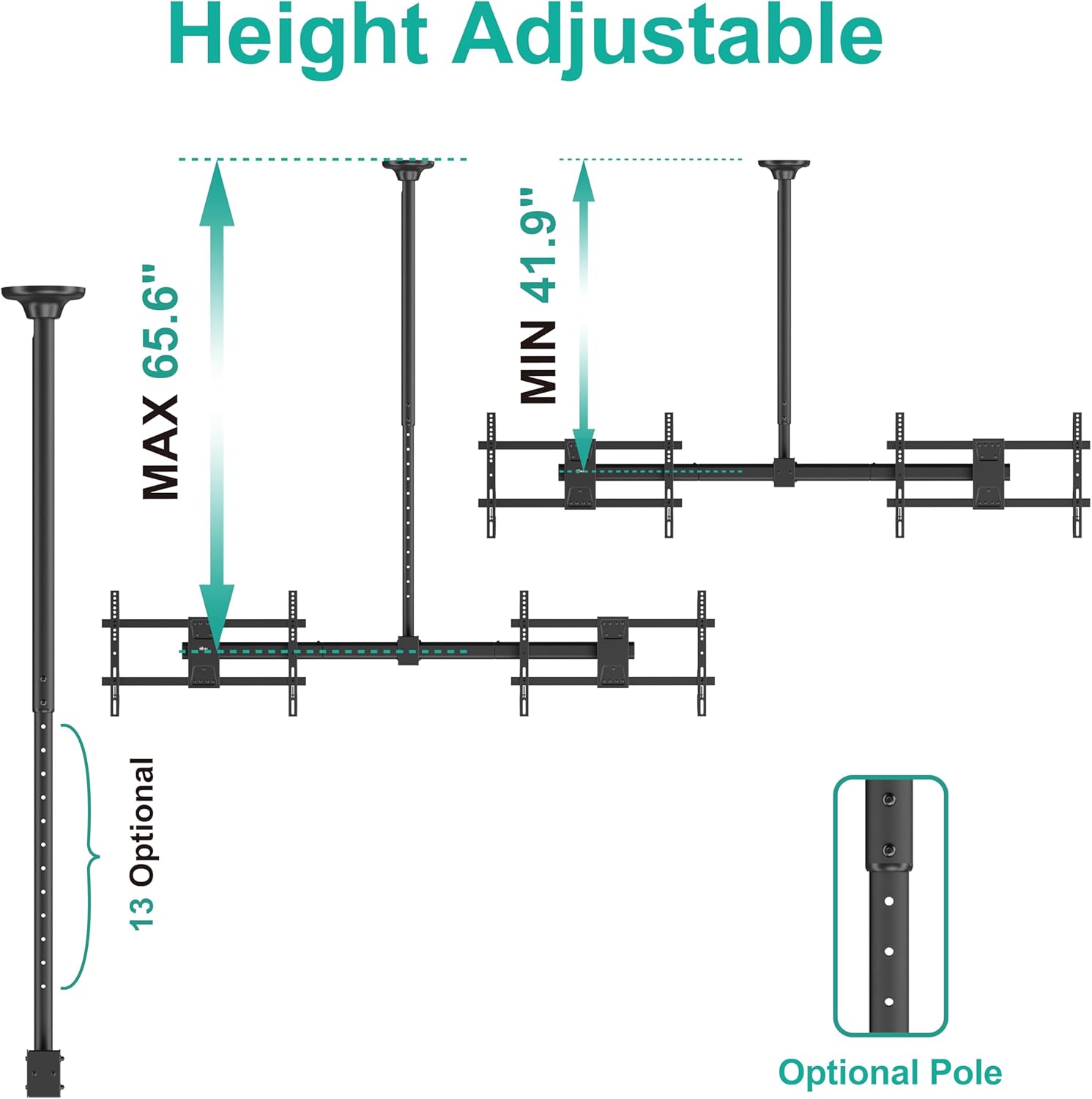
Figure 5.2: Height adjustment range of the main pole.
5.4 Attach TV Brackets to Televisions
Attach the TV brackets to the back of each television using the appropriate screws, washers, and spacers from the hardware kit. Ensure the brackets are centered and securely fastened to the VESA mounting holes on your TV.

Slika 5.3: Gotovoview of the three main installation steps.
5.5 Hang Televisions on the Mount
Carefully lift each television and hook the attached brackets onto the crossbar. Secure the televisions to the mount using the safety screws or locking mechanisms provided. Ensure both TVs are level and stable.
5.6 Upravljanje kablovima
Route TV cables through the main pole and crossbar for a clean and organized appearance. Use cable ties or clips if necessary to keep cables tidy.

Figure 5.4: Integrated cable management for a neat installation.
6. Operating / Adjustments
The WALI CM3460-2 mount offers various adjustments for optimal viewing angles.
- Podešavanje nagiba: Each screen can be individually tilted down by up to 25 degrees. Loosen the tilt knobs, adjust to the desired angle, and re-tighten.
- Podešavanje okretanja: The entire ceiling mount can swivel 360 degrees around the pole. This allows for flexible positioning of both screens.
- Screen Level Adjustment: Each screen can be rotated ±3 degrees to ensure perfect horizontal alignment after installation.
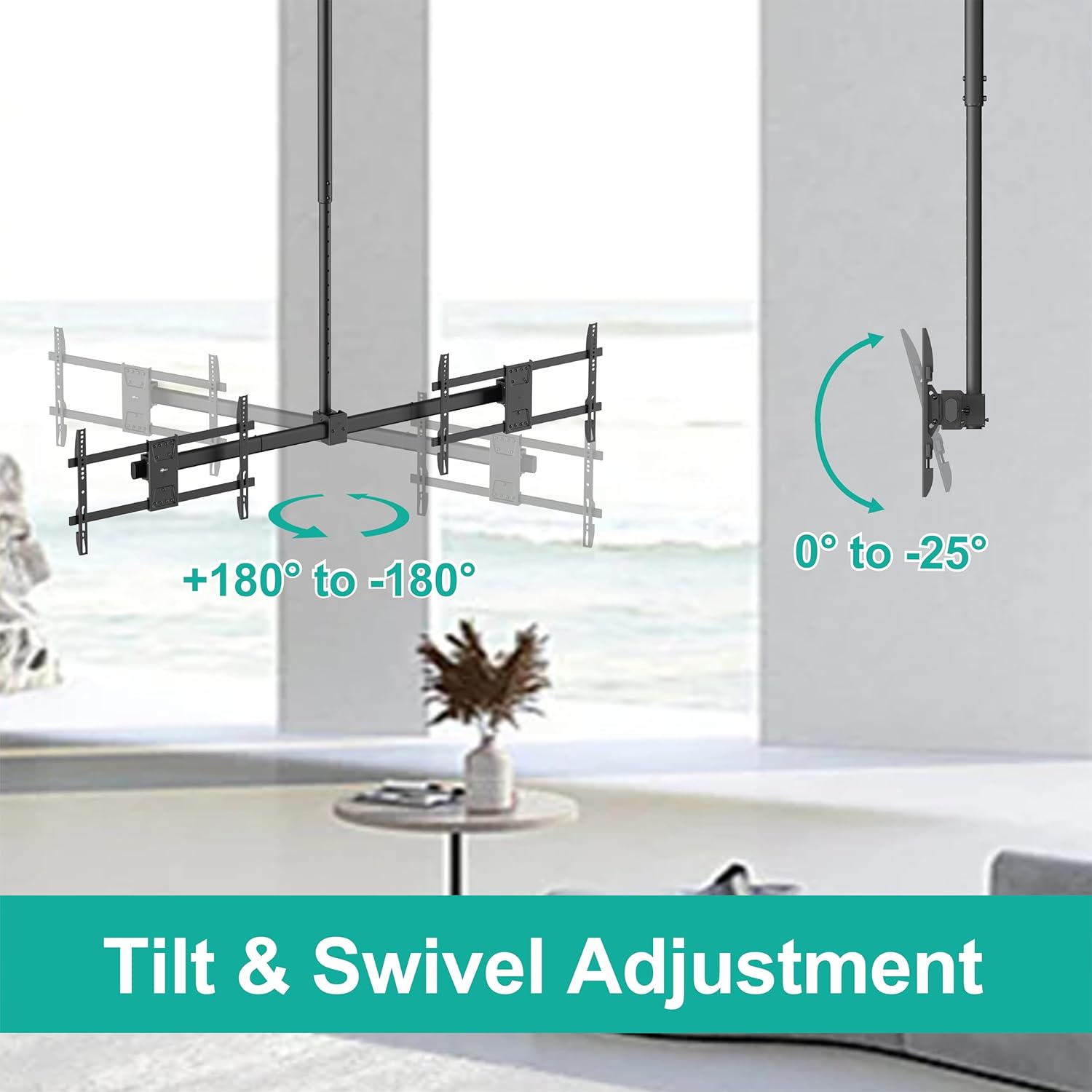
Figure 6.1: Tilt and swivel adjustment capabilities.

Figure 6.2: Screen level adjustment for fine-tuning alignment.
7. Održavanje
Redovno održavanje osigurava dugotrajnost i sigurnost vašeg nosača za TV.
- Periodične kontrole: Every few months, inspect all mounting hardware and connections to ensure they are secure. Tighten any loose screws or bolts.
- čišćenje: Obrišite nosač mekom, suhom krpom. Izbjegavajte abrazivna sredstva za čišćenje ili rastvarače koji bi mogli oštetiti završnu obradu.
- podmazivanje: Moving parts generally do not require lubrication. If any movement becomes stiff, contact customer support for advice.
8. Otkrivanje problema
| Problem | Mogući uzrok | Rješenje |
|---|---|---|
| Nosač se čini nestabilnim ili klimavim. | Loose mounting bolts or incorrect installation. | Re-check all ceiling and TV attachment bolts. Ensure they are tightened according to instructions. Verify installation on a suitable ceiling type. |
| Televizori nisu nivelisani. | Improper screen level adjustment. | Use the screen level adjustment feature (±3 degrees rotation) to fine-tune the horizontal alignment of each TV. |
| Difficulty adjusting tilt or swivel. | Adjustment knobs/screws are too tight. | Loosen the relevant adjustment knobs or screws slightly before attempting to move the screens. Re-tighten once the desired position is achieved. |
| Nedostaju dijelovi. | Greška u pakovanju. | Contact WALI customer support immediately for replacement parts. |
9. Specifikacije
- Model: CM3460-2
- Brand: WALI
- Materijal: Metal
- Boja: Crna
- Kompatibilne veličine TV-a: 34 do 60 inča
- Kapacitet težine: 88 lbs (40 kg) per screen, 176 lbs (80 kg) total
- VESA kompatibilnost: 200x200mm do 600x400mm
- Podešavanje visine: 41.9" to 65.6" (from ceiling to center of mounting plate)
- Raspon nagiba: 0° to -25° (individual screen)
- Opseg okretanja: 360° (entire mount around pole)
- Screen Level Adjustment: ±3°
- Vrsta montaže: Ceiling Mount
- Težina artikla: 28.4 funte
- UPC: 811278026827
10. Garancija i podrška
WALI provides a limited warranty for this product. For specific warranty terms and conditions, please refer to the warranty card included in your package or visit the official WALI website. For technical assistance, missing parts, or any questions regarding your WALI CM3460-2 mount, please contact WALI customer support. Experienced and friendly US-based customer support is available to assist 7 days a week.
Kontakt informacije:
- Webstranica: Posjetite WALI trgovinu na Amazonu
- Email: (Refer to product packaging or WALI websajt)
- Telefon: (Refer to product packaging or WALI websajt)
11. Videozapisi proizvoda
Watch these official product videos for visual guidance on installation and features.
Video 11.1: WALI Dual Screen Ceiling TV Mount for 34-60" TVs (CM3460-2). This video provides a comprehensive overview and installation guide for the dual screen ceiling TV mount.
Video 11.2: WALI Heavy-Duty Ceiling TV Mount holds up to 176lbs (CM3460-2). This video highlights the heavy-duty construction and weight capacity of the CM3460-2 mount.