1. Uvod
The Focal Lensys Professional Closed-Back Headphones are engineered for detailed audio monitoring and playback. Featuring advanced Aluminum/Magnesium (Al/Mg) drivers and a sound-isolating design, these headphones provide an immersive listening experience for studio work, monitoring sessions, and general audio enjoyment. This manual provides essential information for the proper setup, operation, and maintenance of your Lensys Professional headphones.

Image 1.1: Focal Lensys Professional Closed-Back Headphones, showcasing cjelokupni dizajn.
2. Podešavanje
2.1 Raspakivanje i sadržaj
Carefully unpack your headphones and verify that all components are present:
- Focal Lensys Professional Closed-Back Headphones
- Zaštitna torbica
- Audio Cables (various lengths/types may be included)

Image 2.1: The various audio cables supplied with the headphones for different connection needs.
2.2 Povezivanje slušalica
- Identify the 3.5mm audio jack on your audio source (e.g., laptop, desktop, cellphone, tablet, gaming console, smart speaker).
- Select the appropriate audio cable from the included accessories.
- Insert one end of the audio cable into the designated port on the Focal Lensys Professional headphones.
- Insert the other end of the audio cable into the 3.5mm audio jack of your audio source.
Provjerite je li veza sigurna kako biste spriječili prekide zvuka.
2.3 Podešavanje za udobnost
The Lensys Professional headphones are designed with memory foam earpads and a flexible headband for extended comfort. To achieve the best fit:
- Adjust the headband slides on both sides until the earpads sit comfortably over your ears, ensuring a snug but not overly tight fit.
- The memory foam earpads will conform to the shape of your ears, providing optimal sound isolation and comfort.
3. Uputstvo za upotrebu
3.1 Osnovna reprodukcija zvuka
Once connected to your audio source, begin playing audio. Adjust the volume directly from your connected device. The headphones are designed for a neutral sound profile, making them suitable for critical listening and mixing.
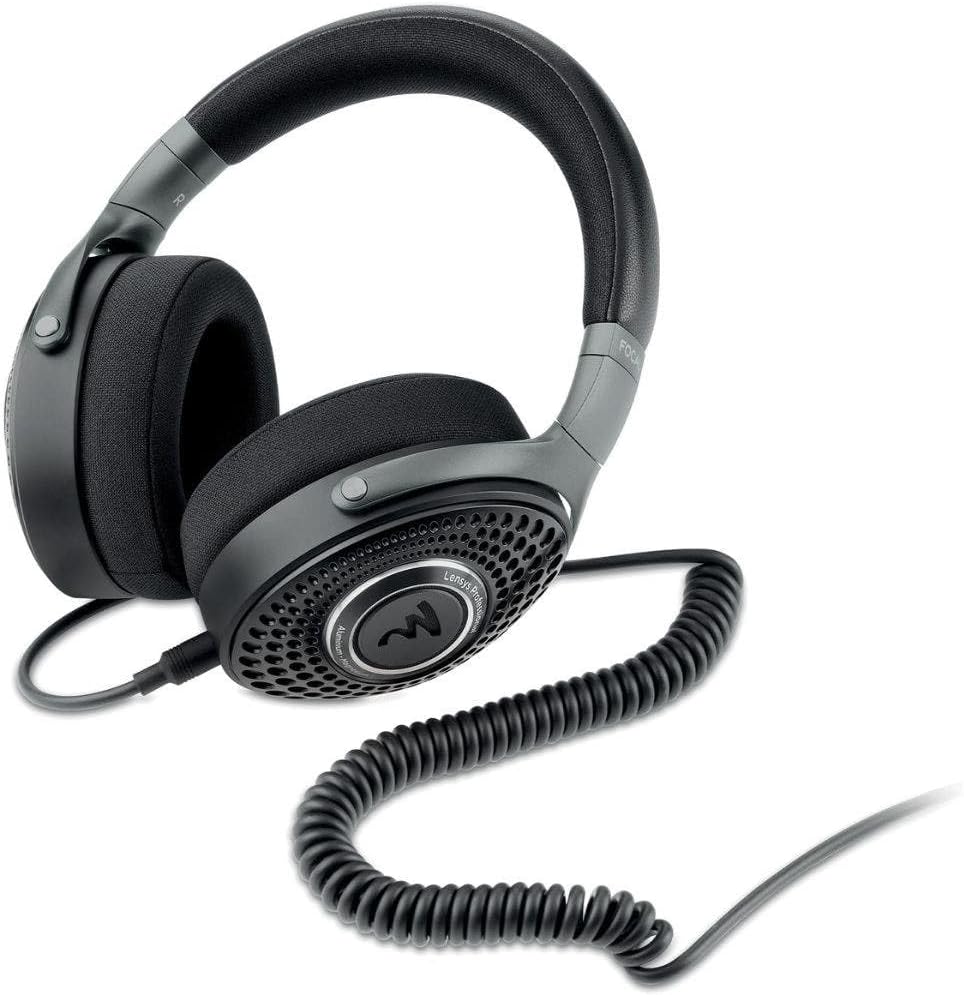
Image 3.1: The Focal Lensys Professional Headphones shown with a coiled audio cable connected, ready for use.
3.2 Remote Control (if applicable)
Some audio cables may include an inline remote control. If your cable features a remote, refer to your audio source device's manual for specific functions such as play/pause, track skipping, or volume control, as functionality can vary.
3.3 Namenska upotreba
These headphones are specifically designed for:
- Snimanje: Providing accurate monitoring during recording sessions.
- miješanje: Offering a neutral sound signature for precise audio mixing.
- Općenito slušanje: Delivering high-fidelity audio for everyday enjoyment.
4. Održavanje
4.1 Čišćenje
To maintain the condition and performance of your headphones:
- Use a soft, dry, lint-free cloth to wipe the exterior surfaces of the earcups and headband.
- For the memory foam earpads, gently wipe with a slightly damp cloth if necessary, and allow them to air dry completely before use. Avoid excessive moisture.
- Do not use harsh chemicals, solvents, or abrasive cleaners, as these can damage the materials (Aluminum/Magnesium, Memory Foam, Plastic/Fabric).
4.2 Skladištenje
When not in use, store your Focal Lensys Professional headphones in the provided protective case. This helps to prevent dust accumulation, scratches, and physical damage, extending the lifespan of the product.

Image 4.1: The protective carrying case, designed to safely store your Focal Lensys Professional Headphones.
5. Otkrivanje problema
If you encounter issues with your Focal Lensys Professional headphones, consider the following:
- Nema zvuka:
- Provjerite je li audio kabel sigurno spojen i na slušalice i na audio izvor.
- Provjerite nivo jačine zvuka na vašem audio izvornom uređaju.
- Test the headphones with a different audio source or cable to rule out device or cable issues.
- Loš kvalitet zvuka:
- Verify that the audio cable is fully inserted and not damaged.
- Provjerite da li audio izvor reprodukuje zvuk visoke kvalitete files.
- Check for any debris in the headphone jack or port.
- Nelagodnost tokom upotrebe:
- Ponovo podesite traku za glavu za udobnije pristajanje.
- Pravite kratke pauze tokom dužih sesija slušanja.
If problems persist, refer to the Warranty & Support section for further assistance.
6. Specifikacije
Detailed technical specifications for the Focal Lensys Professional Closed-Back Headphones:
| Feature | Specifikacija |
|---|---|
| Naziv modela | Lensys Professional |
| Broj modela stavke | RM |
| Tehnologija povezivanja | Žičani |
| Priključak za slušalice | 3.5 mm Jack |
| Vrsta audio drajvera | Dynamic Driver (Al/Mg) |
| Oblik slušalice | Čašice preko ušiju |
| Form Factor | Preko uha |
| Postavljanje uha | Preko uha |
| Impedansa | 26 Ohma |
| Kontrola buke | Zvučna izolacija |
| Materijal | Aluminum/Magnesium, Memory Foam, Plastic/Fabric |
| Uključene komponente | Zaštitna torbica |
| Dimenzije proizvoda | 9.55 x 8.6 x 3.25 inča |
| Težina artikla | 2.53 funte |
| Proizvođač | Focal |

Slika 6.1: Ugaoni view highlighting the design and materials of the Focal Lensys Professional Headphones.
7. Garancija i podrška
7.1 Informacije o garanciji
For detailed information regarding the warranty coverage for your Focal Lensys Professional Headphones, please refer to the warranty card included with your purchase or visit the official Focal webstranica. Uslovi i odredbe garancije mogu se razlikovati u zavisnosti od regije i prodavca.
7.2 Korisnička podrška
Should you require technical assistance, have questions about your product, or need to report a defect, please contact Focal customer support through their official website or the contact information provided in your product documentation. Ensure you have your product model number (RM) and proof of purchase available when contacting support.


